I recently needed to get .env variable in Laravel while moving some settings into my project’s .env file. I added a couple of custom keys and then got stuck on the “where do I read these from?” part—Blade, controller, both?
- Example .env variables
- Option 1: Use env() (quick, but not ideal for production)
- Option 2: Recommended — map env values into config, then use config()
- Step 1: Create a config file
- Step 2: Read values in a controller with config()
- Step 3: Read values in Blade with config()
- Step-by-step checklist
- Troubleshooting
- 1) My value is always null
- 2) It works locally but not on production
- 3) Should I display secrets in Blade?
- Official docs (worth bookmarking)
- Related guides
The short answer is: yes, you can read them using env(). But the “works now, breaks later” issue shows up when config caching is enabled. So in this post, I’ll show the quick method and the production-safe method I actually use.
Example .env variables
Here’s a simple example of custom values in .env:
APP_KEY="pufimebradr481u3it9l"
APP_SECRET="tr1wu7lyujupr8truperojuhlxedu81a"
Now let’s access them from a controller and a Blade view—cleanly.
Option 1: Use env() (quick, but not ideal for production)
Laravel includes the env() helper, and it works in both controllers and Blade templates.
Controller example (using env())
public function index()
{
    if (env('APP_SECRET')) {
        // do something with the APP_SECRET
    }

    $secret = env('APP_SECRET', 'default-secret');

    return view('welcome', compact('secret'));
}
Blade example (using env())
@if (env('APP_KEY'))
    Key is set
@endif

Value: {{ env('APP_SECRET') }}
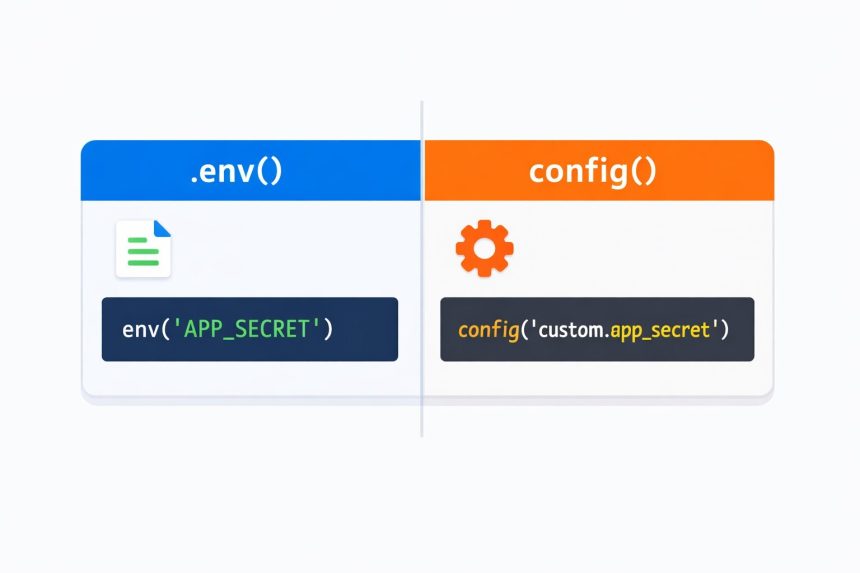
Important: This is where many projects get tripped up. When you run php artisan config:cache (common in production), Laravel’s own guidance is to avoid calling env() directly throughout your app. The safer pattern is to read env values in config files and use config() everywhere else.
Option 2: Recommended — map env values into config, then use config()
This is the method I switched to because it stays reliable across environments and deployments.
- Put
env()calls in a config file (this is the intended place) - Use
config()in controllers, services, jobs, and Blade views
Step 1: Create a config file
Create config/custom.php:
<?php
return [
    'app_key' => env('APP_KEY'),
    'app_secret' => env('APP_SECRET'),
];
You can name the file anything, but a dedicated custom.php keeps it tidy for project-specific settings.
Step 2: Read values in a controller with config()
Now access them like this:
public function index()
{
    $key = config('custom.app_key');
    $secret = config('custom.app_secret');
    // Example usage
    if (!empty($secret)) {
        // do something secure here
    }
    return view('welcome', compact('key', 'secret'));
}
Step 3: Read values in Blade with config()
And in your Blade file:
@if (config('custom.app_key'))
    Key is set
@endif
Value: {{ config('custom.app_secret') }}
That’s it. This approach is the most consistent way to get .env variable in Laravel without surprises later.
Step-by-step checklist
- Add your keys to
.env(example:APP_SECRET=...). - Create
config/custom.phpand map env values usingenv(). - Use
config('custom.app_secret')in controllers and Blade. - If you cache config in production, rebuild the cache after changes.
Troubleshooting
1) My value is always null
- Double-check the key name matches exactly (case-sensitive):
APP_SECRETvsAPP_Secret. - Avoid extra spaces around
=. UseAPP_SECRET=value(notAPP_SECRET = value). - If you moved to
config(), make sure your config key path is correct:config('custom.app_secret').
2) It works locally but not on production
This is usually config caching. After updating .env on the server, run:
php artisan config:clear
php artisan cache:clear
php artisan config:cache
Then prefer reading values via config() throughout your app.
3) Should I display secrets in Blade?
Usually, no. If it’s a real secret (API keys, private tokens), keep it server-side. Only pass non-sensitive values to views, and never print secrets into HTML output.
Official docs (worth bookmarking)
Related guides
Add your internal links here when available: