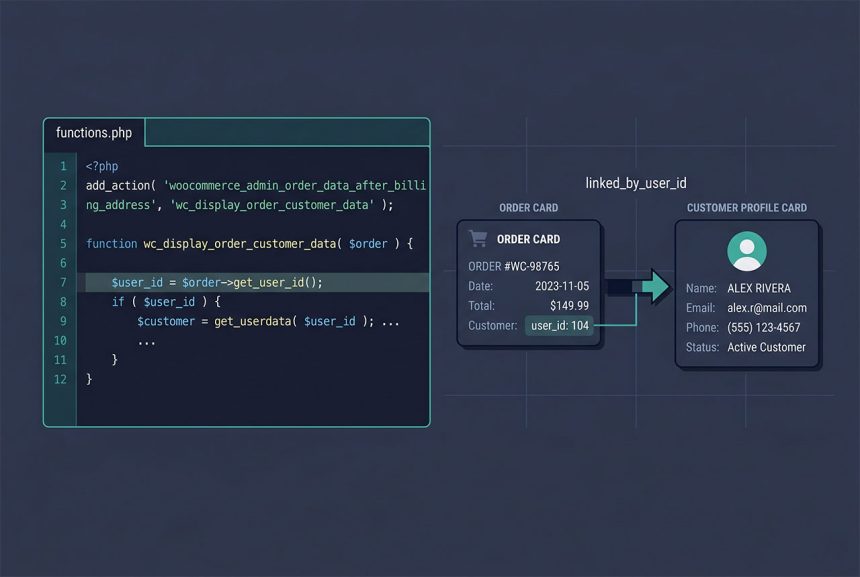
For woocommerce get customer id from order, call $order->get_user_id() (or its alias get_customer_id()) on any WC_Order object. Returns the customer’s WP_User ID, or 0 for guest checkouts. On older installs without HPOS, the legacy meta read (_customer_user) still works but has been superseded — this guide shows the modern method and why the older pattern breaks on current WooCommerce.
Last verified: 2026-04-23 on WooCommerce 9.x (HPOS enabled) with WordPress 6.5. Originally published 2022-11-08, rewritten and updated 2026-04-23.
TL;DR
// From a $order object already in scope
$user_id = $order->get_user_id();   // int, 0 for guests

// If you only have the order ID
$order   = wc_get_order( $order_id );
$user_id = $order ? $order->get_user_id() : 0;
In a $order-aware hook
add_action( 'woocommerce_admin_order_data_after_billing_address', 'how7o_customer_details', 10, 1 );

function how7o_customer_details( $order ) {
    $user_id = $order->get_user_id();

    if ( ! $user_id ) {
        echo '<p><em>Guest checkout</em></p>';
        return;
    }

    $custom_details = get_user_meta( $user_id, '_custom_details', true );
    if ( $custom_details ) {
        printf(
            '<p><strong>Custom Details:</strong> %s</p>',
            esc_html( $custom_details )
        );
    }
}
The woocommerce_admin_order_data_after_billing_address hook passes the $order object so you can grab get_user_id() directly. Guard against 0 (guest checkout) before handing the value to get_user_meta — meta lookups against user ID 0 would return a WordPress-wide record, which is not what you want.
Why not get_post_meta($order_id, '_customer_user')?
// Legacy — only works on pre-HPOS installs
$user_id = get_post_meta( $order_id, '_customer_user', true );
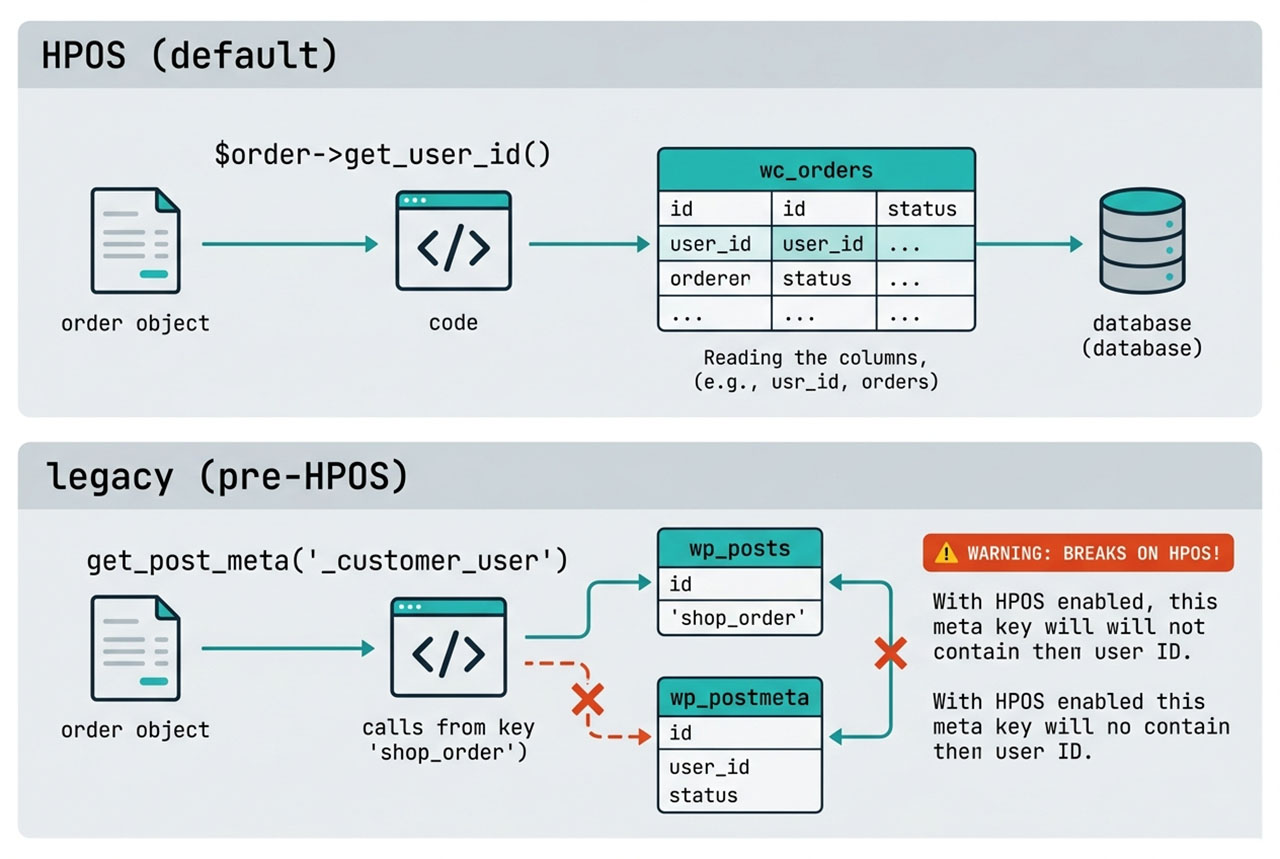
This pattern reads the _customer_user post meta that WooCommerce used to write to wp_postmeta when orders were stored as custom posts. WooCommerce 8.2 made HPOS (High-Performance Order Storage) the default: orders move to a dedicated wc_orders table and wp_postmeta no longer holds the link. get_post_meta returns an empty string on HPOS installs — silently, no error.
Always use the WC_Order method (get_user_id() / get_customer_id()). It abstracts the storage mode — works the same whether the order lives in posts (legacy) or the custom table (HPOS).
Loading an order by ID
$order = wc_get_order( $order_id );

if ( ! $order ) {
    // Order doesn't exist or the ID is bogus
    return;
}

$user_id       = $order->get_user_id();
$billing_email = $order->get_billing_email();
$status        = $order->get_status();
wc_get_order() is the factory that handles every order type (standard, subscription, refund). It accepts an ID, a post object, or an existing order object, and returns false when the input doesn’t resolve. The return-value check catches deleted orders and typos without fatal errors.
Order snapshot vs live user data
// From the order — the values as they were when the order was placed
$order->get_billing_first_name();
$order->get_billing_email();
$order->get_shipping_city();

// From the current user record — may have been updated since
$user         = $order->get_user();     // WP_User or false
$current_name = $user ? $user->first_name : '';
WooCommerce snapshots the billing and shipping addresses on the order at checkout time. The $order->get_billing_*() methods give you that frozen copy. $order->get_user() gives you the live WP_User, which may have been updated since the order.
For analytics and invoicing, use the order snapshot (the customer’s name at the time of purchase). For sending a post-purchase email or running a loyalty check, use the live user data.
Frequently asked questions
$order->get_user_id() (or the alias get_customer_id()) — both return the WP_User ID of the customer who placed the order, or 0 if it was a guest checkout. Works anywhere you have a WC_Order object.
Load it: $order = wc_get_order($order_id);. wc_get_order is the proper factory — works with HPOS (High-Performance Order Storage, now the default on new WooCommerce installs), handles subscription order types, and returns false if the ID doesn’t exist. Don’t reach for new WC_Order($id) directly; the factory is what handles storage differences.
get_post_meta($order_id, '_customer_user', true) still valid? Only on legacy installs that haven’t migrated to HPOS. With HPOS enabled (default since WooCommerce 8.2), orders live in a custom table wc_orders instead of wp_posts, and get_post_meta returns empty. Always prefer the $order->get_user_id() method — it works in both storage modes.
get_user_id() returns 0 for guest checkouts. Use $order->get_billing_email() to identify the guest, or match against user_email in wp_users to see if they later created an account with the same address. Don’t assume every order has a logged-in customer — guest checkout is common.
$user_id = $order->get_user_id(); $meta = get_user_meta($user_id, 'some_key', true); — two calls. Or the shortcut: WooCommerce stores the snapshot of customer info on the order itself (billing address, shipping address), accessible via $order->get_billing_first_name(), $order->get_shipping_city(), etc. Reach for the user_meta lookup when you need data that isn’t in the order snapshot; reach for the order getters when you want the address as it was when the order was placed.
Related guides
- How to Display Orders Instead of Dashboard on the WooCommerce My Account Page — another order-surface customization.
- How to Search Users by Multiple Fields in WordPress — finding customers when you don’t have an order ID.
- How to Login a User Programmatically in WordPress — post-purchase account linking.
- How to Add a Custom Fee in WooCommerce — order-context hook patterns.
References
WooCommerce WC_Order reference: woocommerce.github.io/code-reference/classes/WC-Order.