The laravel validate in rule (in:foo,bar) restricts an input to a fixed allow-list — perfect for select fields, status columns, and any enum-like value where only a handful of strings are acceptable. This guide covers the string form, the Rule::in() array form, and when to graduate to a PHP 8.1 backed enum with Laravel’s Enum rule.
Last verified: 2026-04-23 on Laravel 11 with PHP 8.3. Originally published 2024-03-28, rewritten and updated 2026-04-23.
TL;DR
For a <select> with two options, validate with 'status' => 'required|in:open,close'. If the allow-list comes from a variable or an enum, use the array form: ['required', Rule::in(['open', 'close'])]. Both reject any value outside the list with “The selected status is invalid.”
Option 1 — String form: in:value1,value2
The shortest path: declare the allowed values as a comma-separated list on the rule string.
public function store(Request $request)
{
    $request->validate([
        'status' => 'required|in:open,close',
    ]);
}
Pair it with an HTML form like this:
<select name="status">
  <option value="open">Open</option>
  <option value="close">Close</option>
</select>
The validator compares the incoming value against each item in the list with strict string comparison. "open" passes, "Open", "OPEN", " open", 1, and true all fail.
Watch the separators: the string form uses , to split values and | to separate rules. If any of your allowed values contain a comma or pipe, you must use the Rule::in() form below — the string form will misparse.
Option 2 — Array form: Rule::in([...])
When the allow-list is dynamic, comes from a config file or an enum, or includes values that would break the string parser, import Illuminate\Validation\Rule and use the array form:
use Illuminate\Validation\Rule;

public function store(Request $request)
{
    $request->validate([
        'role' => ['required', Rule::in(['courier', 'rider'])],
    ]);
}
Two real-world reasons to reach for this form over the string version:
- Dynamic lists.
Rule::in(config('app.supported_currencies'))orRule::in(Status::cases())— impossible to express as a static string. - Special characters. Values containing commas, pipes, or spaces work as array elements; the string form would split them.
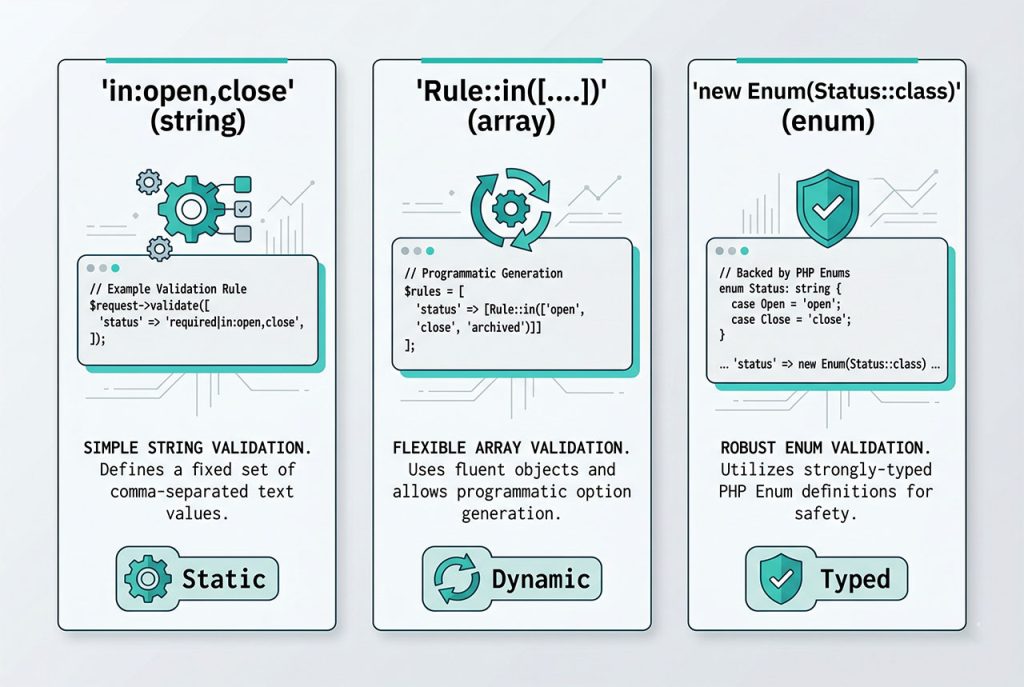
Option 3 — Graduate to a PHP 8.1 enum
Once the same allow-list appears in more than one place — the validator, a controller check, an Eloquent cast, a Blade @if — it’s worth promoting it to a PHP 8.1 backed enum and using Laravel’s Enum rule against it:
// app/Enums/Status.php
namespace App\Enums;

enum Status: string
{
    case Open  = 'open';
    case Close = 'close';
}

// Controller
use Illuminate\Validation\Rules\Enum;
use App\Enums\Status;

$request->validate([
    'status' => ['required', new Enum(Status::class)],
]);
The Enum rule passes only if the input maps to one of the enum’s backing values. Because the enum is imported anywhere else you need the list (model casts, query scopes, Blade conditions), the allow-list can’t drift — there’s one definition, not three.
Custom error messages
The default “The selected status is invalid.” rarely reads well in a user-facing form. Override it per-field by passing a messages array as the second argument to validate():
$request->validate(
    ['status' => 'required|in:open,close'],
    ['status.in' => 'Status must be either open or close.']
);
For app-wide overrides of every in message, edit resources/lang/en/validation.php and change the 'in' line. That’s the right home for consistent language across a large app.
Frequently asked questions
'status' => 'required|in:open,close'. The in rule takes a comma-separated list of allowed values and fails any input that isn’t on the list. It’s the right fit for enum-like fields — status, role, type, direction — where the acceptable set is fixed and short.
Rule::in() instead of the string form? Use Rule::in([...]) when the list comes from a variable, an enum class, or includes values with commas, pipes, or spaces (the string form uses , and | as separators and will break). Example: ['status' => ['required', Rule::in(['open', 'close'])]]. The array form is also easier to diff when the list grows.
in: case-sensitive? Yes. in:open,close rejects "Open" and "CLOSE". For case-insensitive matches either normalize the input first (strtolower in a form-request prepareForValidation hook) or list the variants you want to accept explicitly. Avoid listing every capitalization — normalization is cleaner.
in compare to a PHP 8.1 enum or the Enum rule? If you have a PHP 8.1 backed enum (enum Status: string { case Open = 'open'; case Close = 'close'; }), Laravel’s Enum rule validates against it directly: new Enum(Status::class). This is stricter than in because the enum is the single source of truth — you can’t drift. Use in for ad-hoc lists; reach for Enum once the values are used elsewhere in the app.
in emit? “The selected status is invalid.” by default. Customize per-rule in resources/lang/en/validation.php under 'in' => 'The :attribute must be one of: ...', or per-field by adding the $messages array as the second argument to validate(): ['status.in' => 'Status must be open or close.'].
Related guides
- How to Check if Exists in the Database with the Laravel Validator — validate against a live table instead of a static list.
- Laravel Nullable Exists Validation — the nullable/sometimes/present rule combinations for optional fields.
- How to Change Password in Laravel — form validation in a real auth flow.
- How to Install Laravel on Ubuntu — set up Laravel 11 before wiring up validation.
References
Official Laravel validation docs (in, Rule::in, Enum): laravel.com/docs/validation.