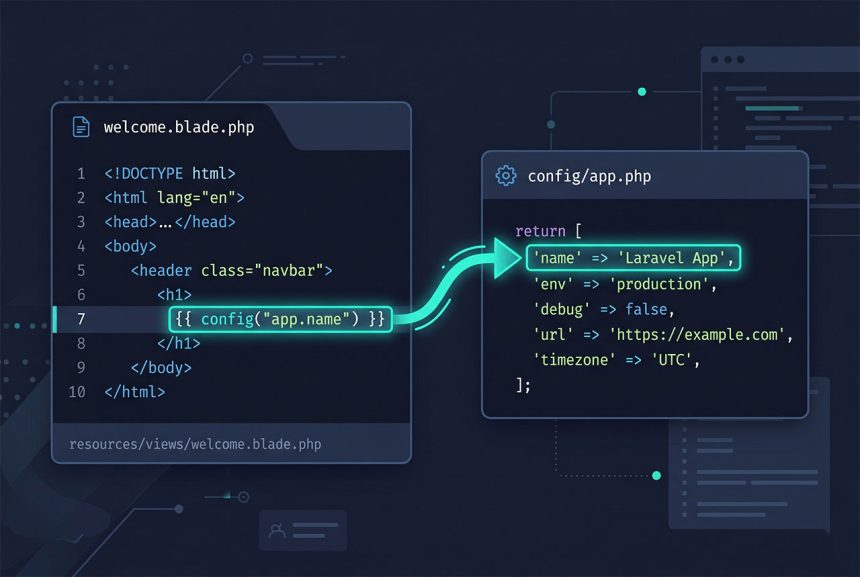
To laravel get config variable in a controller, model, service, or Blade view, use the config() helper or the Config facade with a dotted key path. The first segment names the file in config/, and the rest drills into the array it returns. This guide covers both forms, why you reach for them instead of env(), and the production-only footgun that config:cache introduces.
Last verified: 2026-04-23 on Laravel 11 with PHP 8.3. Originally published 2022-11-28, rewritten and updated 2026-04-23.
TL;DR
Use config('app.name') anywhere in Laravel code. In Blade: <title>Accounts - {{ config('app.name') }}</title>. For a nested key inside config/database.php: config('database.default'). Never call env('APP_NAME') outside a config/*.php file — it returns null in production once the config is cached.
How Laravel config files work
Every file under config/ returns a PHP array. config/app.php might start like:
// config/app.php
return [
    'name' => env('APP_NAME', 'BMS'),
    'env'  => env('APP_ENV', 'production'),
    // ...
];
Laravel loads every file in config/ at boot time and merges them into a single repository keyed by file name. config('app.name') is literally “open config/app.php‘s returned array, then read ['name'] from it.” The dot-notation syntax works for nested arrays too — config('app.providers.0') returns the first provider string.
Both helper forms work the same way
// In a Blade view
<title>Accounts - {{ Config::get('app.name') }}</title>

// Same thing, shorter
<title>Accounts - {{ config('app.name') }}</title>
The Config facade and the config() helper resolve to the same config repository and return identical values. The helper is more idiomatic in Blade views and controllers; the facade is fine when you prefer a “class-like” style or when your IDE autocompletion prefers classes over helpers.
Reading keys from other config files
Swap the first segment for the file name. For config/database.php:
config('database.default');                 // e.g. "mysql"
config('database.connections.mysql.host');  // e.g. "127.0.0.1"
For your own config file config/features.php:
// config/features.php
return [
    'billing_v2' => env('FEATURE_BILLING_V2', false),
];

// Anywhere in the app
if (config('features.billing_v2')) {
    // new billing path
}
config() vs env() — always prefer config()
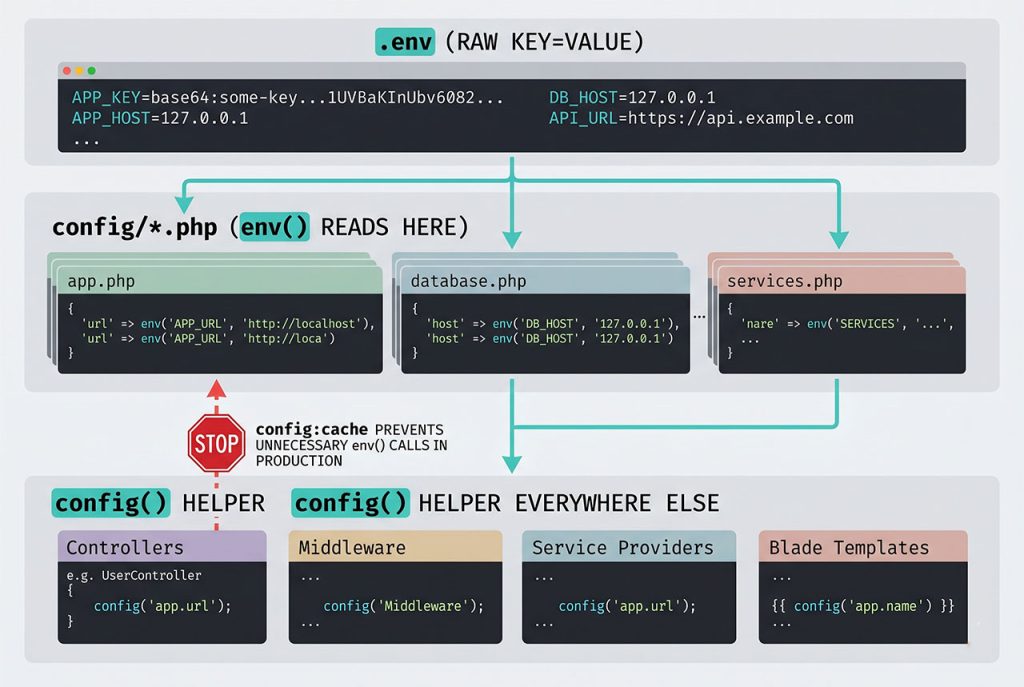
env('APP_NAME') only works when the config cache isn’t built. In production the first thing a sensible deploy script does is php artisan config:cache, which pre-resolves every config/*.php file into a single cached PHP array at bootstrap/cache/config.php. Once that cache exists, Laravel skips .env entirely — env() returns null everywhere except inside the config files themselves.
The rule is simple: env() belongs only in config/*.php. Controllers, models, services, middleware, Blade views, and commands always call config(). If you find an env() call outside config, refactor it: add the value to a config file, reference it via config('file.key'), and the production config:cache step will stop silently breaking it.
Runtime overrides
Passing an array to config() sets a value for the current request only:
config(['app.name' => 'Accounts']);

// Later in the request
config('app.name');  // "Accounts"
The override never touches the config file or the cache; it lives in memory for this request and resets on the next one. Useful for tests and one-off overrides — risky as a production pattern because the coupling between the override site and the read site is invisible to any future reader.
After changing a config file
If the environment is running with a built config cache, you need to rebuild it after editing any config/*.php file or touching .env:
php artisan config:clear   # remove the cache
php artisan config:cache   # rebuild it
Locally you can skip this — without a built cache, Laravel reads the files on every request and changes show up immediately. In CI/CD, always config:cache after deploying new code.
Frequently asked questions
config('app.name'). The first segment is the config file name (config/app.php → app), the rest is the dotted key path into its returned array. The equivalent facade form is Config::get('app.name'); both hit the same cached repository and return the same value.
config() and env()? env() reads directly from .env and only works when the config cache is not built. config() reads from the resolved config/*.php arrays, which do go through env() at build time. In any controller, service, or Blade view, always call config() — calling env() there silently returns null in production once php artisan config:cache has run.
Pass a second argument: config('app.name', 'BMS'). If app.name isn’t defined in the config file (or resolves to null), Laravel returns the default instead. Useful for optional custom keys you add to config/app.php that older environments might not have.
Yes: config(['app.name' => 'Accounts']). The change is in-memory only — it lasts for the current request and never touches the config file. Avoid writing to config in middleware or services that run on every request; it couples unrelated code to the value’s key name. Prefer service classes that own their own state.
config() work in production but env() doesn’t? After php artisan config:cache, Laravel bypasses .env entirely and reads from bootstrap/cache/config.php. The config cache is a pre-resolved PHP array, built once at deploy time. env() outside a config file returns null in that mode by design — it forces you to route all configuration through the cached config layer, which is fast and deterministic.
Related guides
- How to Set a Global Variable for Laravel Views — pushing config values into every Blade template with a view composer.
- How to Install Laravel on Ubuntu — where
.envandconfig/show up in a fresh install. - How to Run a Laravel Project Without a .env File — config resolution when the env file is missing.
- How to Call a Controller Method from Another Controller in Laravel — another pattern that uses the service container.
References
Official Laravel configuration docs (config helper, Config facade, config caching): laravel.com/docs/configuration.