How7o
  • Home
  • Tools
  • Prank Screens
  • Learn
  • Blog
  • Contact
Reading: How to Switch from LiteSpeed to Apache in WHM/cPanel
Share
How7oHow7o
Font ResizerAa
  • OS
Search
  • Home
  • Tools
  • Prank Screens
  • Learn
  • Blog
  • Contact
Follow US
© 2024–2026 How7o. All rights reserved.
How7o > Free Laravel, PHP, WordPress & Server Tutorials > Server Management > How to Switch from LiteSpeed to Apache in WHM/cPanel
Server Management

How to Switch from LiteSpeed to Apache in WHM/cPanel

how7o
By how7o
Last updated: May 23, 2026
4 Min Read
Switch from LiteSpeed to Apache in WHM/cPanel
SHARE

To switch from LiteSpeed to Apache in WHM/cPanel, run LiteSpeed’s bundled switching script as root: /usr/local/lsws/admin/misc/cp_switch_ws.sh apache. The script flips cPanel’s web-server preference and stops the LiteSpeed service. If LiteSpeed is still running afterwards, stop it explicitly with lswsctrl stop.

Contents
  • Run the switch script
  • If LiteSpeed is still running
  • Switch back to LiteSpeed
  • Verify after switching
  • Frequently asked questions
  • Related guides
  • References

Last verified: 2026-05-17 on cPanel/WHM 118 with LiteSpeed Web Server Enterprise. Originally published 2023-12-30, rewritten and updated 2026-05-17.

Run the switch script

sudo /usr/local/lsws/admin/misc/cp_switch_ws.sh apache

cp_switch_ws.sh is LiteSpeed’s official helper for cPanel servers. It updates the cPanel “Web server” setting, stops LiteSpeed, and starts Apache. The argument is either apache or lsws.
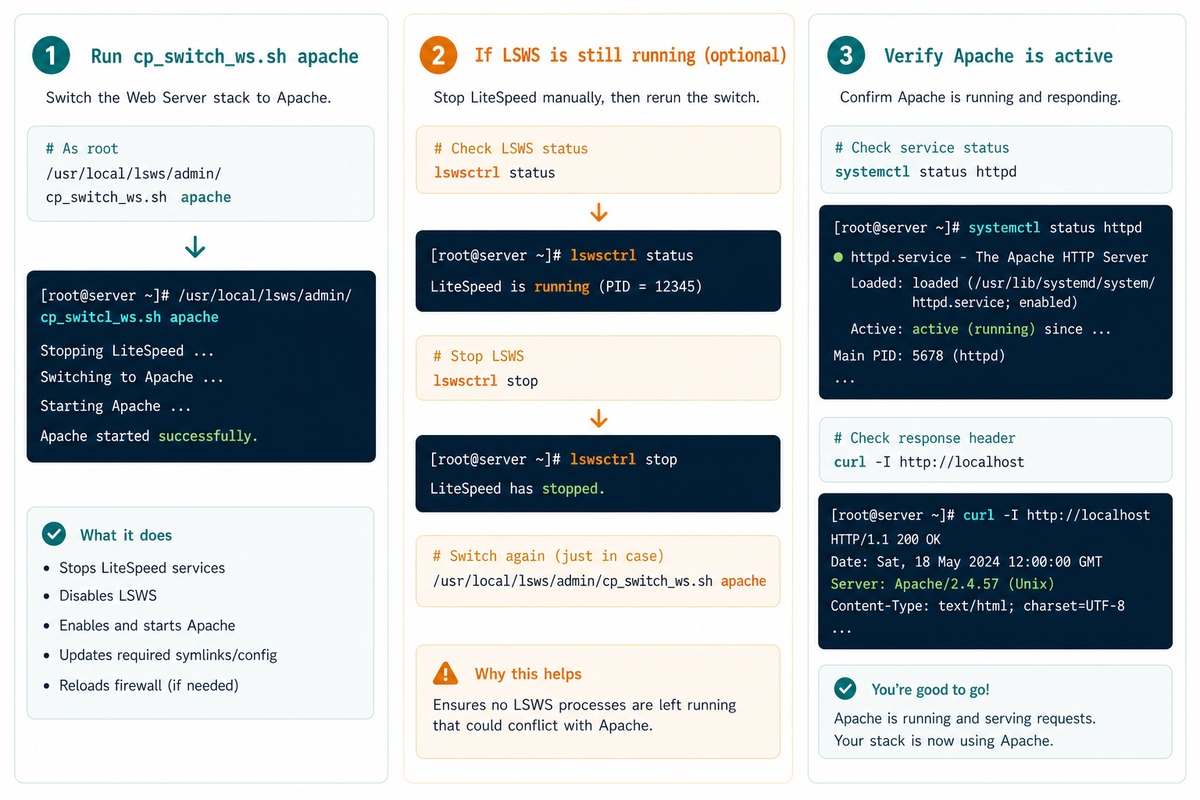
Switch LiteSpeed to Apache in WHM — cp_switch_ws.sh apache, verify, optional lswsctrl stop

If LiteSpeed is still running

sudo /usr/local/lsws/bin/lswsctrl stop

The script normally stops LiteSpeed, but if the service is still up (you can check with systemctl status lsws or ps aux | grep lshttpd), force-stop it with lswsctrl. After that, only Apache should be listening on ports 80/443.

Switch back to LiteSpeed

sudo /usr/local/lsws/admin/misc/cp_switch_ws.sh lsws

Same script, different argument. cPanel’s per-account configuration is preserved across switches, so sites come back online with the same virtual-host configuration as before.

Verify after switching

# Apache should be running
sudo systemctl status httpd

# LiteSpeed should not be
sudo systemctl status lsws

# Or check what's bound to ports 80 / 443
sudo ss -tlnp | grep -E ':(80|443)\s'

# Hit a real site and check the Server header
curl -sI https://your-domain.example.com/ | grep -i server

The Server response header confirms which web server is actually answering. Apache means the switch worked; LiteSpeed means something is still routing through LSWS.

Frequently asked questions

Why does WHM warn that “both LiteSpeed and Apache are running”?

The WHM UI flips the cPanel-level web-server preference, but LiteSpeed’s own service can stay up on its own port. With both services listening you get the warning. The cp_switch_ws.sh script handles both sides — switches the cPanel preference and stops LiteSpeed — which is why it’s the cleaner way to switch.

Will my sites have downtime during the switch?

A short outage (a few seconds to a minute) — the old service stops while the new one binds to the ports. For a busy production server, schedule the switch outside peak hours. The order in cp_switch_ws.sh minimises the gap, but it’s not zero.

What’s the difference between LiteSpeed Enterprise and OpenLiteSpeed?

LiteSpeed Enterprise (the licensed product) drops in as a 100% Apache httpd.conf replacement — same config files, same modules concept. OpenLiteSpeed (free) has its own native config format. This post and the cp_switch_ws.sh script apply to LSWS Enterprise on cPanel. OpenLiteSpeed doesn’t ship the script.

Can I switch back to LiteSpeed later?

Yes — same script, different argument: /usr/local/lsws/admin/misc/cp_switch_ws.sh lsws. cPanel-level config is preserved through the switch (your virtual hosts, account settings, etc. are stored in cPanel’s own files and survive intact).

Related guides

  • How to Reset the LiteSpeed WebAdmin Console Password
  • How to Install the Apache Web Server on Ubuntu
  • How to Fix Quotas in cPanel

References

LiteSpeed cPanel switching: docs.litespeedtech.com/lsws/cp/cpanel. cPanel web-server configuration: docs.cpanel.net/whm.
TAGGED:ApacheconfigurationcPanelLiteSpeed

Sign Up For Daily Newsletter

Be keep up! Get the latest breaking news delivered straight to your inbox.
[mc4wp_form]
By signing up, you agree to our Terms of Use and acknowledge the data practices in our Privacy Policy. You may unsubscribe at any time.
Share This Article
Facebook Copy Link Print
Previous Article Replace jQuery .each with vanilla JavaScript loops How to Replace jQuery’s .each() with Vanilla JavaScript
Next Article Disable binary logging in MySQL or MariaDB How to Disable Binary Logging in MySQL or MariaDB
Leave a Comment

Leave a Reply Cancel reply

You must be logged in to post a comment.

FacebookLike
XFollow
PinterestPin
InstagramFollow
Most Popular
Run Laravel queue workers with Supervisor
How to Run Laravel Queue Workers in Production with Supervisor
May 23, 2026
Nginx as a reverse proxy for a Node.js app on Ubuntu
How to Set Up Nginx as a Reverse Proxy for Node.js on Ubuntu
May 23, 2026
Install and configure Redis on Ubuntu for Laravel and WordPress
How to Install and Configure Redis on Ubuntu (for Laravel & WordPress)
May 23, 2026
Harden a fresh Ubuntu VPS with UFW, Fail2Ban, and SSH key auth
How to Harden a Fresh Ubuntu VPS: UFW + Fail2Ban + SSH Key Auth
May 23, 2026
Set up Let's Encrypt SSL with Certbot on Ubuntu
How to Set Up Let’s Encrypt SSL with Certbot on Ubuntu (Apache & Nginx)
May 23, 2026

You Might Also Like

Install the Apache web server on Ubuntu
Server Management

How to Install the Apache Web Server on Ubuntu

7 Min Read
MariaDB not starting — six-step triage from logs to stale PID
Server Management

How to Troubleshoot MariaDB Not Starting

8 Min Read
Check Pure-FTPd installed on Linux — rpm and dpkg package queries
Server Management

How to Check if Pure-FTPd Is Installed on Linux

5 Min Read
Check if Laravel scheduler is running (cron + php artisan schedule:run)
Web Development

How to Check if Laravel Scheduler Is Running (Cron + Logs)

6 Min Read
How7o

We provide tips, tricks, and advice for improving websites and doing better search.

Tools

  • Age Calculator
  • Word Counter
  • Image Upscaler
  • Password Generator
  • QR Code Generator
  • See all tools→

Pranks

  • Fake Blue Screen Prank
  • Hacker Typer
  • Fake iMessage Generator
  • Windows XP Crash Prank
  • Windows 11 Update Prank
  • See all prank screens →

Company

  • About Us
  • Blog
  • Contact
  • Privacy Policy
  • Terms of Service
  • Sitemap
© 2024–2026 How7o. All rights reserved.
Welcome Back!

Sign in to your account

Username or Email Address
Password

Lost your password?