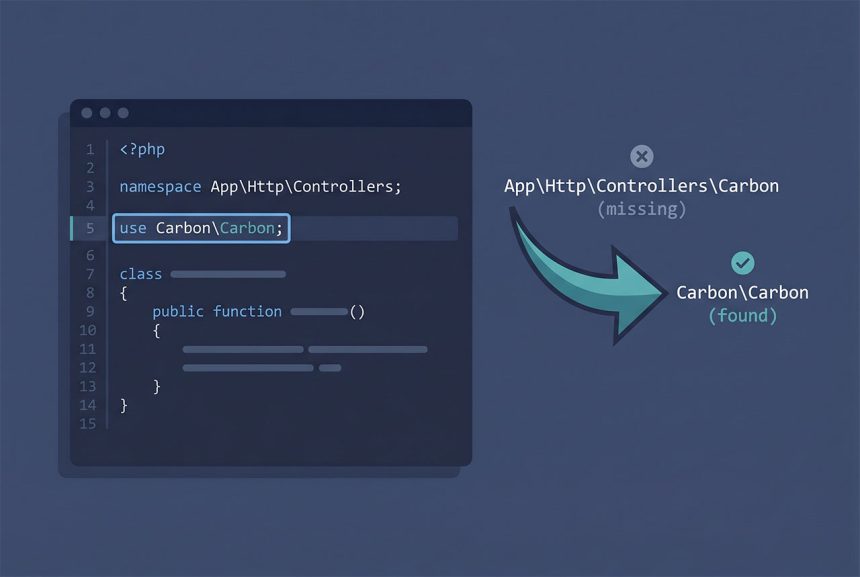
The laravel carbon not found error — Class 'App\Http\Controllers\Carbon' not found — is a namespace problem, not a missing package. Carbon ships with every Laravel install; the error just means PHP tried to resolve Carbon against the current controller’s namespace and didn’t find it. The fix is a single use line, and this guide also covers when to pick Carbon\Carbon versus Laravel’s own Illuminate\Support\Carbon.
Last verified: 2026-04-23 on Laravel 11 with PHP 8.3 and Carbon 3.x.
TL;DR
Add use Carbon\Carbon; under the namespace App\Http\Controllers; line at the top of the controller. Then $date = Carbon::now(); works. Prefer use Illuminate\Support\Carbon; in Laravel-specific code — it’s a Laravel-aware subclass of the upstream Carbon and is what Eloquent’s date casts return.
Why the error happens
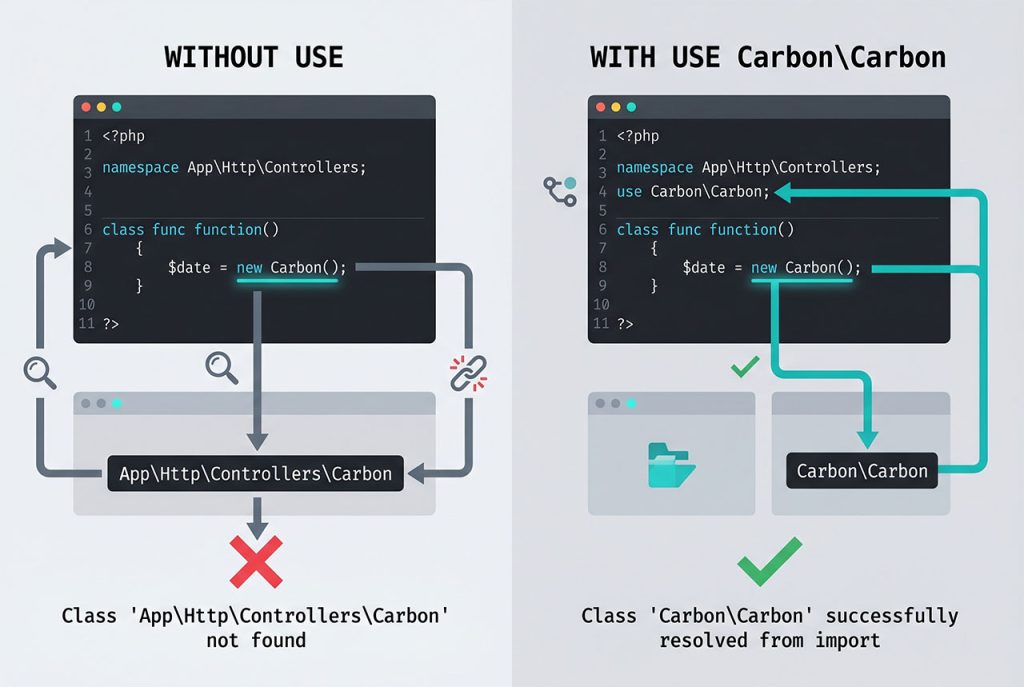
PHP resolves unqualified class names against the current namespace. Inside app/Http/Controllers/PostController.php, the file’s namespace is App\Http\Controllers, so writing Carbon::now() without an import makes PHP look for App\Http\Controllers\Carbon. That class doesn’t exist, and the autoloader gives up with:
Class 'App\Http\Controllers\Carbon' not foundThe same thing happens for any third-party class you forget to import — Str, Arr, Log, DB. The error is always the current namespace plus the class you typed.
Fix — import Carbon
Add a use statement between the namespace line and the class declaration:
<?php

namespace App\Http\Controllers;

use Carbon\Carbon;

class PostController extends Controller
{
    public function show()
    {
        $date = Carbon::now();
        // ...
    }
}
Now the autoloader resolves Carbon to Carbon\Carbon — the package shipped with Laravel via nesbot/carbon, which Laravel declares as a direct Composer dependency.
Carbon\Carbon vs Illuminate\Support\Carbon
There are two valid import lines:
use Carbon\Carbon;            // upstream package

use Illuminate\Support\Carbon;  // Laravel-aware subclass
Illuminate\Support\Carbon extends Carbon\Carbon and is what Eloquent’s datetime casts return for $model->created_at. For greenfield Laravel code, prefer the Laravel subclass: it gives you access to Laravel’s test-time freezing (Carbon::setTestNow(...) works on both, but the Laravel one integrates cleanly with travelTo() in tests), macros, and the serializeDate hook for customizing how dates are emitted in JSON responses. For everyday now(), addDays(), diffForHumans() usage, the two classes are interchangeable — instances of one are also instances of the other.
When to use now() instead
Laravel provides a global helper now() that returns a Carbon instance without needing any import:
$inSevenDays = now()->addDays(7);
$startOfMonth = now()->startOfMonth();
It’s the ergonomic choice for one-liners. Reach for the imported Carbon class when you need static factory methods — Carbon::parse('2026-01-01'), Carbon::createFromFormat('d/m/Y', $input), Carbon::today(), Carbon::tomorrow(). Those only exist on the class itself.
Still not resolving?
If you’ve added the use line and still see the error, regenerate the Composer autoload map and clear Laravel’s caches:
composer dump-autoload
php artisan optimize:clear
One of those almost always fixes a lingering class-not-found after the import looks correct. If it persists, check that vendor/nesbot/carbon/ exists — if not, composer install was never run or it failed partway through.
Frequently asked questions
Add use Carbon\Carbon; at the top of the file (under the namespace line), then use Carbon::now() as normal. The error happens because PHP resolves unqualified class names against the current namespace (App\Http\Controllers) first — without the use line, Carbon looks for a class that doesn’t exist there.
Carbon\Carbon or Illuminate\Support\Carbon? Prefer Illuminate\Support\Carbon in Laravel code. It extends the upstream Carbon\Carbon class and adds a handful of Laravel-aware features (macros, the serializeDate customization hook, integration with Laravel’s test-time freezing). Both classes produce identical instances for everyday use — the Laravel subclass just gives you escape hatches if you ever need them.
Carbon::now() throw a class-not-found error but now() works? now() is a Laravel global helper function, not a class — it lives in Illuminate\Foundation\helpers.php and is always available. It internally returns a Carbon instance, so now()->addDays(7) works without any use statement. Reach for now() in one-liners; use the Carbon class import when you need Carbon::parse(...), Carbon::createFromFormat(...), or other static factories.
No. Carbon ships as a dependency of laravel/framework via Composer, so every Laravel app has it available out of the box. If use Carbon\Carbon still doesn’t resolve, the problem is a missing composer install or a stale autoload — run composer dump-autoload to regenerate.
Yes, via Laravel’s config/app.php — the timezone key is read by both PHP’s internal date functions and Carbon (through Laravel’s bootstrapping). Change it to your preferred zone (for example 'timezone' => 'Asia/Dhaka') and every new Carbon instance picks it up. For one-off conversions, call ->setTimezone('UTC') on a specific instance.
Related guides
- How to Install Laravel on Ubuntu — fresh install gets Carbon for free via Composer.
- How to Get Current Month Records in Eloquent Laravel — Carbon-based date ranges in Eloquent.
- How to Get Records That Are Created Today in Laravel —
whereDatewithnow(). - How to Install Composer on Ubuntu — the package manager that brings Carbon in.
References
Carbon official docs: carbon.nesbot.com/docs. Laravel helpers (now, today): laravel.com/docs/helpers.