When you need laravel eloquent current month records — posts, orders, or any timestamped row created in the ongoing calendar month — Laravel gives you three idiomatic options: whereMonth + whereYear, a whereBetween range using Carbon’s startOfMonth() / endOfMonth(), or a Carbon-driven pair using Carbon::now()->month. This guide shows each approach, explains which one actually uses your database index, and covers the timezone gotcha that trips up most developers near midnight.
Last verified: 2026-04-21 on Laravel 11 with PHP 8.3 and MySQL 8.0. Originally published 2022-10-08, rewritten and updated 2026-04-21.
TL;DR
For a quick fix use Post::whereMonth('created_at', date('m'))->whereYear('created_at', date('Y'))->get(). For production and large tables, prefer the index-friendly range form: Post::whereBetween('created_at', [now()->startOfMonth(), now()->endOfMonth()])->get(). Always match your app timezone to the timezone of the stored created_at values.
Option 1 — whereMonth + whereYear with PHP date()
The shortest way to filter rows created this month is to combine Eloquent’s whereMonth and whereYear scopes with PHP’s built-in date() function. No Carbon import required:
$posts = Post::whereMonth('created_at', date('m'))
    ->whereYear('created_at', date('Y'))->get();
date('m') returns the current month as a two-digit number (01–12) and date('Y') returns the four-digit year. Eloquent translates the scopes into MONTH(created_at) = ? AND YEAR(created_at) = ? in SQL.
This works on every Laravel version back to 5.x, but there’s a performance catch we’ll return to in a moment.
Option 2 — Carbon-based month filtering
If you already import Carbon (use Carbon\Carbon; or via Laravel’s now() helper), you can drop date() in favor of Carbon’s property accessors:
use Carbon\Carbon;

$posts = Post::whereMonth('created_at', Carbon::now()->month)
    ->whereYear('created_at', Carbon::now()->year)
    ->get();
Functionally identical to Option 1 — Carbon’s ->month and ->year just wrap PHP’s date() internally. The advantage is that Carbon makes timezone handling explicit: Carbon::now('UTC')->month evaluates “month” in UTC regardless of your app timezone.
Option 3 — whereBetween with startOfMonth / endOfMonth (recommended)
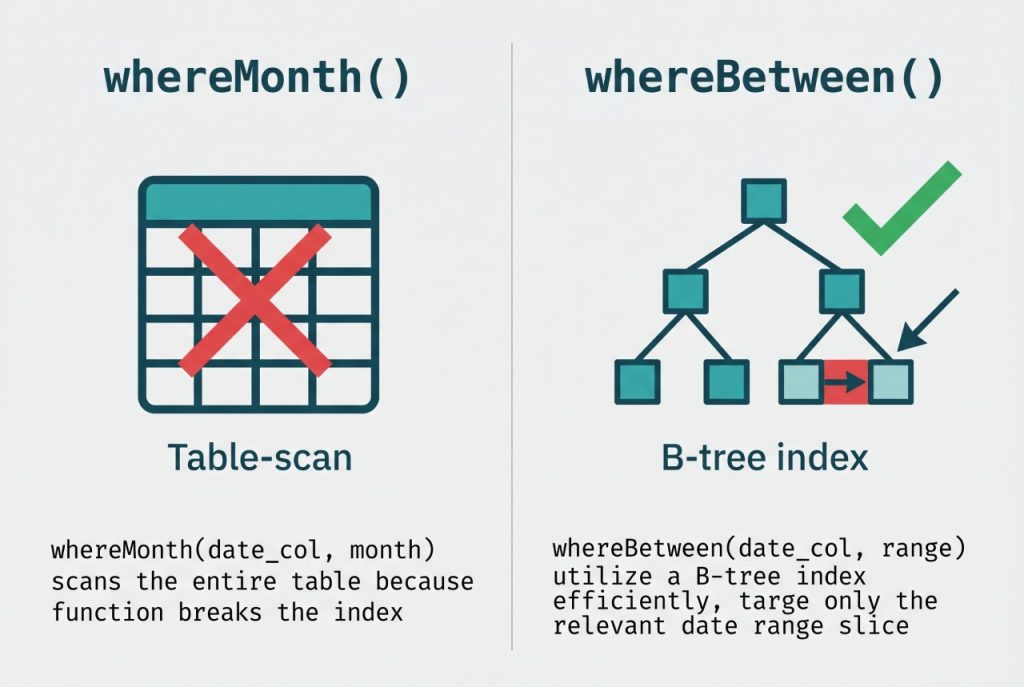
This is the form I reach for in production. It uses a timestamp range instead of month-year arithmetic, which means the database can answer the query with a B-tree index range scan on created_at:
use Carbon\Carbon;

$start = Carbon::now()->startOfMonth();
$end   = Carbon::now()->endOfMonth();

$posts = Post::whereBetween('created_at', [$start, $end])->get();
Or, with the now() helper for a one-liner:
$posts = Post::whereBetween('created_at', [
    now()->startOfMonth(),
    now()->endOfMonth(),
])->get();
startOfMonth() returns YYYY-MM-01 00:00:00 and endOfMonth() returns the last day at 23:59:59, so the between is inclusive at both edges. This form also sidesteps the “year rollover” issue where whereMonth(1) in January would return January rows from every previous year as well — whereYear is required with Options 1 and 2, but is redundant here because the range itself is anchored to a specific year.
Performance: why the range form wins on big tables
Run EXPLAIN on each query and you’ll see the difference. whereMonth('created_at', ?) compiles to MONTH(created_at) = ?. MySQL can’t use a normal index on created_at once the column is wrapped in a function — it falls back to a full table scan or forces you to maintain a functional index.
whereBetween('created_at', [$start, $end]) compiles to created_at BETWEEN ? AND ?, which the optimizer resolves as a range scan on any B-tree index covering created_at. On tables over ~100k rows the difference between these two plans is typically one or two orders of magnitude in query time.
If created_at doesn’t already have an index, add one in a migration — see adding columns to an existing table for the pattern and use $table->index('created_at').
The timezone gotcha
All three options rely on “the current month” being the same month on both sides of the wire: in PHP (your app timezone, set in config/app.php) and in the database (where created_at is stored, usually UTC). When those disagree, you get ghosts near midnight.
Concrete example: your app’s timezone config is 'Asia/Dhaka' (UTC+6), but MySQL stores timestamps in UTC. A row inserted at 2026-05-01 02:00 Dhaka time is stored as 2026-04-30 20:00 UTC. On the first of the month in Dhaka, that row already “belongs to May” from the app’s perspective, but whereMonth('created_at', 5) against the UTC timestamp won’t match it.
Two clean fixes: either set config/app.php 'timezone' => 'UTC' and convert for display only, or pass a timezone-aware Carbon into the range — Carbon::now('Asia/Dhaka')->startOfMonth()->setTimezone('UTC') — so the window boundaries match the stored column’s zone.
Frequently asked questions
Use PHP’s built-in date() function with whereMonth and whereYear: Post::whereMonth('created_at', date('m'))->whereYear('created_at', date('Y'))->get(). This works on any Laravel version and avoids pulling in Carbon if you haven’t imported it in that file.
Use whereBetween with Carbon’s startOfMonth() and endOfMonth() helpers: Post::whereBetween('created_at', [Carbon::now()->startOfMonth(), Carbon::now()->endOfMonth()])->get(). It generates a single range query that the database can resolve with an index scan, unlike whereMonth/whereYear which apply functions to the column.
Timezone mismatch. date('m') uses PHP’s configured timezone (config/app.php or the server default), while created_at in MySQL is typically stored as UTC. If your app timezone is Asia/Dhaka but the DB is UTC, rows inserted between 18:00 and 23:59 UTC will appear to be “next month” from PHP’s perspective. Either align both timezones or convert explicitly with Carbon::now('UTC').
whereMonth use an index on created_at? No. whereMonth compiles to MONTH(created_at) = ?, which wraps the column in a function and prevents MySQL from using a B-tree index on created_at. For large tables, prefer the whereBetween range approach — it produces created_at BETWEEN ? AND ?, which the optimizer can answer with an index range scan.
Yes — chain selectRaw with a DATE() expression and groupBy: Post::whereBetween('created_at', [now()->startOfMonth(), now()->endOfMonth()])->selectRaw('DATE(created_at) as day, COUNT(*) as total')->groupBy('day')->get(). Useful for building a daily-activity chart for the current month.
Related guides
- How to Install Laravel on Ubuntu — get your Laravel 11 environment ready first.
- How to Get Records Created Today in Laravel — the single-day variant of this query.
- How to Count Rows in Laravel Eloquent — pair month filtering with a count for dashboard widgets.
- Laravel Eloquent group by + count — group current-month rows by day or category.
References
Official Laravel query builder docs (where/whereBetween/whereMonth): laravel.com/docs/queries.