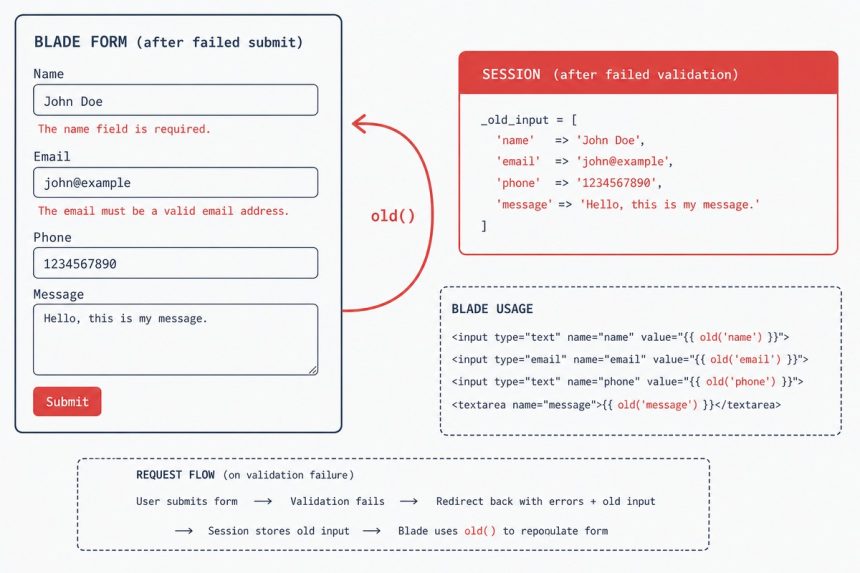
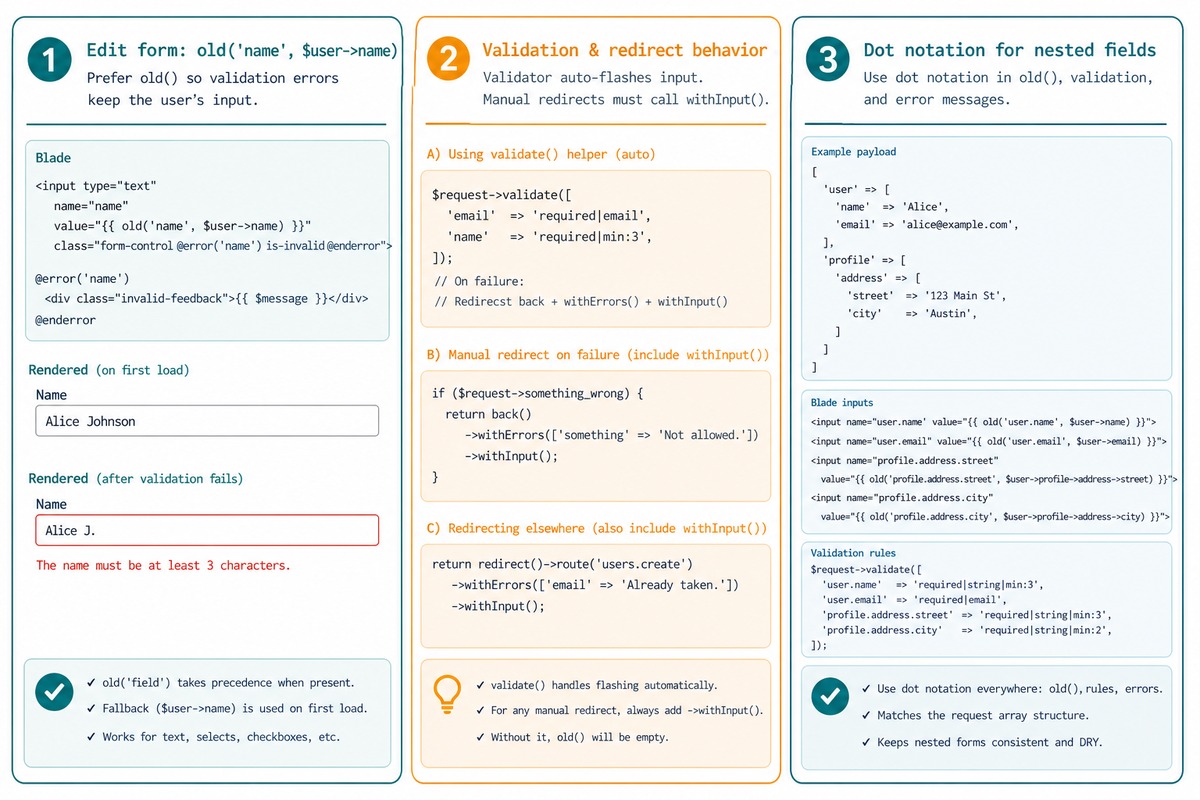
Laravel’s old() helper repopulates form inputs with the user’s previously submitted values after a validation failure. For edit forms, pass the model’s current value as the second argument so the field shows the database value on first render and the user’s submitted value after validation: {{ old('name', $user->name) }}. If old() returns empty after a manual redirect, the cause is almost always a missing ->withInput().
Last verified: 2026-05-17 on Laravel 11. Originally published 2023-03-15, rewritten and updated 2026-05-17. (Merges old posts 195 and 194 — both about the old() helper.)
The pattern for edit forms
<input type="text" name="name" value="{{ old('name', $user->name) }}">
<input type="email" name="email" value="{{ old('email', $user->email) }}">- Initial render of the edit form — no old input in the session;
old()returns the second argument ($user->name). - After a failed submit — Laravel flashed the user’s input back into the session;
old()returns that value, preserving whatever they typed (including the typo that failed validation).
old() vs old() ?? $value
{{-- Recommended --}}
value="{{ old('name', $user->name) }}"

{{-- Works but slightly less robust --}}
value="{{ old('name') ?? $user->name }}"
The second-argument form is the documented pattern. The ?? variant works in most cases but has edge cases where old() returns empty string instead of null and the fallback doesn’t fire.
Why old() sometimes returns nothing
When you use $request->validate() or a Form Request, Laravel automatically:
- Detects validation failure.
- Flashes the submitted input into the session.
- Redirects back to the previous URL.
If you do this manually, you have to call ->withInput() yourself — otherwise the session is empty and old() finds nothing.
// WRONG — old() returns nothing because no input was flashed
return back()->withErrors(['name' => 'Already taken']);

// RIGHT — input is flashed for old() to read
return back()
    ->withErrors(['name' => 'Already taken'])
    ->withInput();

// Or selectively
return back()
    ->withErrors(['name' => 'Already taken'])
    ->withInput($request->except(['password', 'password_confirmation']));
$request->except([...]) on the manual flash lets you exclude sensitive fields from being flashed back — important for password fields where flashing them back to the form would echo the user’s password in the rendered HTML.
Array and nested-input fields
{{-- For a single field --}}
<input name="user[name]" value="{{ old('user.name', $user->name) }}">

{{-- For multi-row table forms --}}
@foreach ($items as $i => $item)
    <input
        name="items[{{ $i }}][quantity]"
        value="{{ old("items.{$i}.quantity", $item->quantity) }}"
    >
@endforeach
Dot notation reaches into nested arrays in the flashed input. The fallback (second argument) works the same way for nested paths.
For <select> and checkboxes
{{-- Select --}}
<select name="role">
    @foreach (['admin', 'editor', 'viewer'] as $role)
        <option value="{{ $role }}" @selected(old('role', $user->role) === $role)>
            {{ ucfirst($role) }}
        </option>
    @endforeach
</select>

{{-- Checkbox --}}
<input type="checkbox" name="active" value="1"
    @checked(old('active', $user->active))>
@selected and @checked are Blade shortcuts (Laravel 9+) that render the attribute only when the condition is true. They pair cleanly with old().
Frequently asked questions
old() read its values from? The previous-request’s flashed input — stored in the session under the _old_input key. Laravel automatically flashes input when you call $request->validate() and validation fails, or when you explicitly call ->withInput() on a redirect. If neither happened, the session has nothing flashed and old() returns the default.
old() work on the edit form but not after a manual redirect? $request->validate() handles the redirect-with-input automatically when validation fails. Custom validation paths don’t — you have to call ->withInput() yourself: return back()->withErrors($errors)->withInput(). Without it, the session is empty on the next render and old() falls back to nothing.
old() work with array fields? Yes — old('users.0.name', $user->name) reads from the flashed input’s nested path, falling back to $user->name. Dot-notation works for both reads. For multi-row forms, this is the cleanest way to repopulate after a validation failure without ternary chains.
{{ old('x') ?? $value }} the same as {{ old('x', $value) }}? Almost — but the second argument is the recommended form. old('x', $value) uses Laravel’s built-in default. old('x') ?? $value works too, but old('x') returns an empty string in some flash-not-set edge cases, and ?? only triggers on null — so the fallback doesn’t fire. The two-arg form is consistent.
Related guides
- How to Validate a Unique Column on Update in Laravel
- How to Check if Exist in the Database with the Laravel Validator
- How to Create a Login and Registration System in Laravel
References
Laravel helper old(): laravel.com/docs/helpers#method-old. Validation redirect-with-input: laravel.com/docs/validation#repopulating-forms. @selected / @checked directives: laravel.com/docs/blade#selected.