How7o
  • Home
  • Tools
  • Prank Screens
  • Learn
  • Blog
  • Contact
Reading: How to Validate a Unique Column on Update in Laravel
Share
How7oHow7o
Font ResizerAa
  • OS
Search
  • Home
  • Tools
  • Prank Screens
  • Learn
  • Blog
  • Contact
Follow US
© 2024–2026 How7o. All rights reserved.
How7o > Free Laravel, PHP, WordPress & Server Tutorials > Web Development > How to Validate a Unique Column on Update in Laravel
Web Development

How to Validate a Unique Column on Update in Laravel

how7o
By how7o
Last updated: May 23, 2026
4 Min Read
Laravel unique validation that ignores the current record on update
SHARE

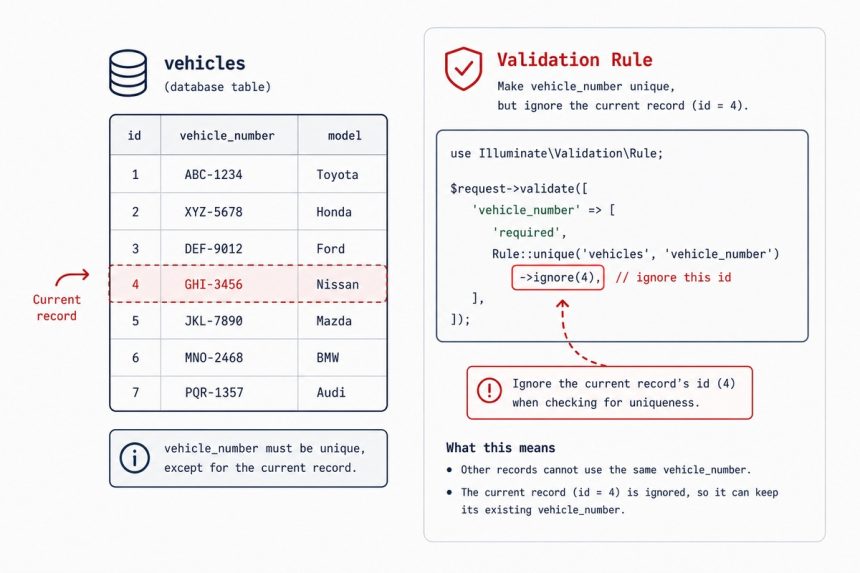
To validate a unique column on update in Laravel without rejecting the record’s own current value, add the record’s id as the third argument to the unique rule: unique:vehicles,vehicle_number,$id. The cleaner equivalent is Rule::unique('vehicles')->ignore($vehicle->id), which is the form Laravel’s docs now recommend.

Contents
  • The string-rule form (from the source)
  • The cleaner Rule::unique() form (recommended)
  • Ignore by a non-id column
  • Combine with extra where clauses
  • In a Form Request
  • Frequently asked questions
  • Related guides
  • References

Last verified: 2026-05-17 on Laravel 11. Originally published 2023-10-11, rewritten and updated 2026-05-17.

The string-rule form (from the source)

// In a controller's update method
$request->validate([
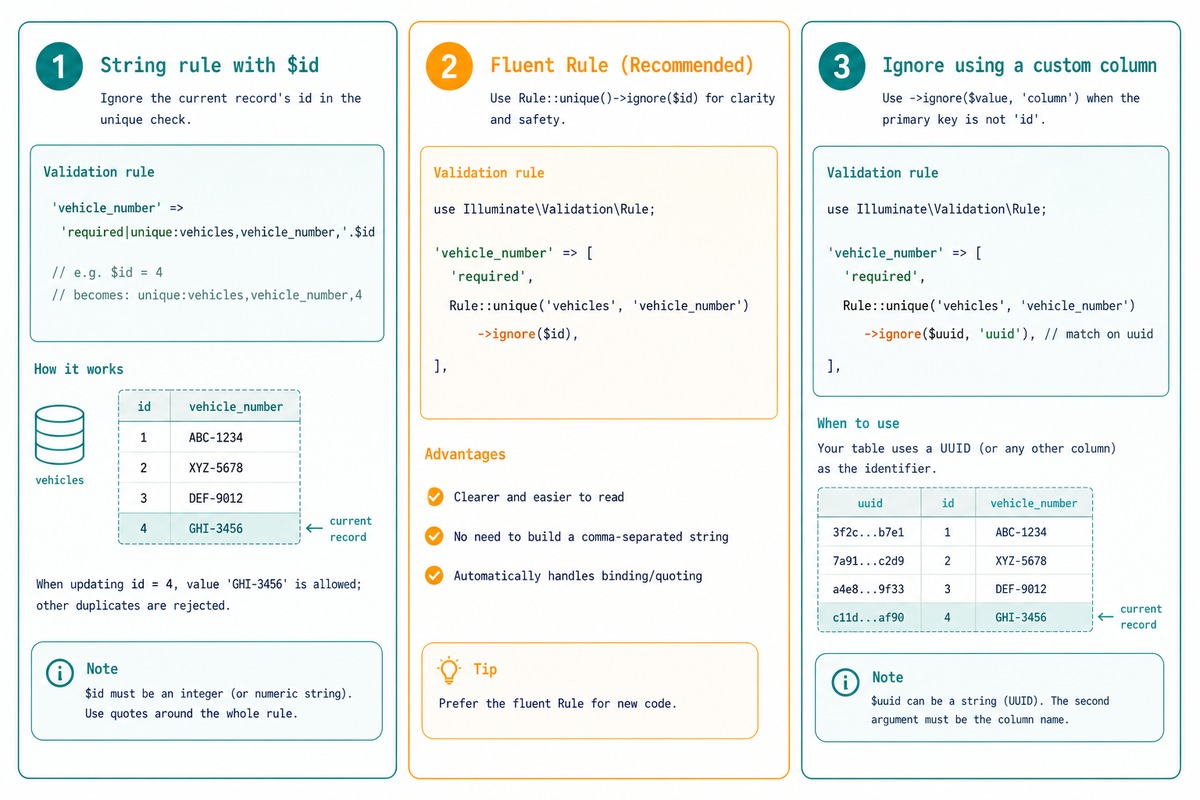
    'vehicle_number' => 'required|max:255|unique:vehicles,vehicle_number,' . $vehicle->id,
]);

The third argument is the id to ignore. The validator runs SELECT … WHERE vehicle_number = ? AND id <> $vehicle->id, so the record’s own current value doesn’t trigger the “already exists” error.
Laravel unique-on-update — string rule with id, Rule::unique()->ignore(), non-id column” class=”wp-image-5771″/></figure>


<h2 id=The cleaner Rule::unique() form (recommended)
use Illuminate\Validation\Rule;

$request->validate([
    'vehicle_number' => [
        'required',
        'max:255',
        Rule::unique('vehicles')->ignore($vehicle->id),
    ],
]);

The Rule facade returns a builder object. ignore($id) is the same idea as the string-rule’s third argument but reads cleanly and handles edge cases (commas in values, special chars) that break string concatenation.

Ignore by a non-id column

Rule::unique('users')->ignore($user->uuid, 'uuid')

For tables that use a UUID or other non-id primary key, pass the column name as the second argument to ignore.

Combine with extra where clauses

// Unique within a single tenant, ignore current record
Rule::unique('vehicles')
    ->where('tenant_id', $tenantId)
    ->ignore($vehicle->id);

// Skip soft-deleted records
Rule::unique('vehicles')
    ->whereNull('deleted_at')
    ->ignore($vehicle->id);

Chain any number of where / whereNull / whereNotNull calls. They become additional WHERE clauses in the uniqueness check.

In a Form Request

// app/Http/Requests/UpdateVehicleRequest.php
public function rules(): array
{
    return [
        'vehicle_number' => [
            'required', 'max:255',
            Rule::unique('vehicles')->ignore($this->route('vehicle')),
        ],
    ];
}

Form Request classes keep validation off the controller. $this->route('vehicle') resolves to the model bound to the route’s {vehicle} parameter (Laravel’s route-model binding), so the id is always the right one for the record being updated.

Frequently asked questions

Why does the unique rule fail on update?

unique:table,column rejects values that already exist in column. On update, the record being edited still has its own value in that column — so the rule sees a match and rejects. The fourth argument $id tells the rule “ignore the row with this primary key” so the record’s own value doesn’t trigger the check.

What’s the difference between the string syntax and Rule::unique()?

Both produce the same SQL. The string form ('unique:vehicles,vehicle_number,'.$id) is concise but breaks subtly when the ignore value contains a comma or pipe. Rule::unique('vehicles')->ignore($id) is explicit, type-safe, and the recommended form in the Laravel docs. Prefer it for new code.

How do I ignore by a non-id column?

Pass both arguments to ignore: Rule::unique('users')->ignore($uuid, 'uuid'). The second argument is the column name to match against. Default is id.

How do I include a soft-deleted record’s value in the uniqueness check?

By default, unique checks every row including soft-deleted ones. To skip soft-deletes: Rule::unique('vehicles')->whereNull('deleted_at')->ignore($id). To skip them only for the current record: ->ignore($id)->whereNull('deleted_at') — order of where* and ignore doesn’t matter for the resulting query.

Related guides

  • How to Check if Exist in the Database with the Laravel Validator
  • How to Validate Input Field to Contain Only Specific Values in Laravel
  • How to Use exists Validation in Laravel Only If the Value Is Not Empty

References

Laravel validation rules — unique: laravel.com/docs/validation#rule-unique. Rule facade: laravel.com/api/master/Illuminate/Validation/Rule.html.

TAGGED:LaravelphpValidation

Sign Up For Daily Newsletter

Be keep up! Get the latest breaking news delivered straight to your inbox.
[mc4wp_form]
By signing up, you agree to our Terms of Use and acknowledge the data practices in our Privacy Policy. You may unsubscribe at any time.
Share This Article
Facebook Copy Link Print
Previous Article Validate an email address in PHP with filter_var How to Validate an Email Address in PHP
Next Article Fix Laravel CSRF token mismatch in DataTables Ajax How to Fix Laravel CSRF Token Mismatch in DataTables Ajax
Leave a Comment

Leave a Reply Cancel reply

You must be logged in to post a comment.

FacebookLike
XFollow
PinterestPin
InstagramFollow
Most Popular
Set vi as the default editor in Ubuntu — a terminal opening the vim editor
How to Set vi (Vim) as the Default Editor in Ubuntu
June 8, 2026
rsync says ALL DONE but files are missing — a terminal showing ALL DONE next to an empty folder
rsync Says “ALL DONE” but Files Are Missing: How to Verify
June 8, 2026
Migrate a website to a new server with rsync — files copying from an old server to a new one over SSH
How to Migrate a Website to a New Server With rsync
June 8, 2026
Bun runtime — faster JS toolkit replacing npm in Laravel projects
How to Install Bun Runtime on Ubuntu (And Use It in a Laravel Project)
May 24, 2026
Tailscale mesh — peer-to-peer connections between devices, coordination server
How to Install Tailscale on Ubuntu (Zero-Config Mesh VPN for Self-Hosters)
May 24, 2026

You Might Also Like

Debug PHP like console.log using error_log and server logs
Web Development

How to Debug in PHP Like console.log (echo, error_log, WordPress debug.log)

6 Min Read
WooCommerce dynamic currency switcher — cookie-stored currency applied via woocommerce_currency filter
Web Development

How to Dynamically Change Currency in WooCommerce

7 Min Read
MySQL 8 create user and grant privileges on Ubuntu
Web Development

How to Create Users and Grant Privileges in MySQL 8 on Ubuntu

8 Min Read
Install Laravel on Ubuntu — terminal with composer create-project command and Laravel red-pillar icon
Web Development

How to Install Laravel on Ubuntu: Step-by-Step Guide

9 Min Read
How7o

We provide tips, tricks, and advice for improving websites and doing better search.

Tools

  • Age Calculator
  • Word Counter
  • Image Upscaler
  • Password Generator
  • QR Code Generator
  • See all tools→

Pranks

  • Fake Blue Screen Prank
  • Hacker Typer
  • Fake iMessage Generator
  • Windows XP Crash Prank
  • Windows 11 Update Prank
  • See all prank screens →

Company

  • About Us
  • Blog
  • Contact
  • Privacy Policy
  • Terms of Service
  • Sitemap
© 2024–2026 How7o. All rights reserved.
Welcome Back!

Sign in to your account

Username or Email Address
Password

Lost your password?