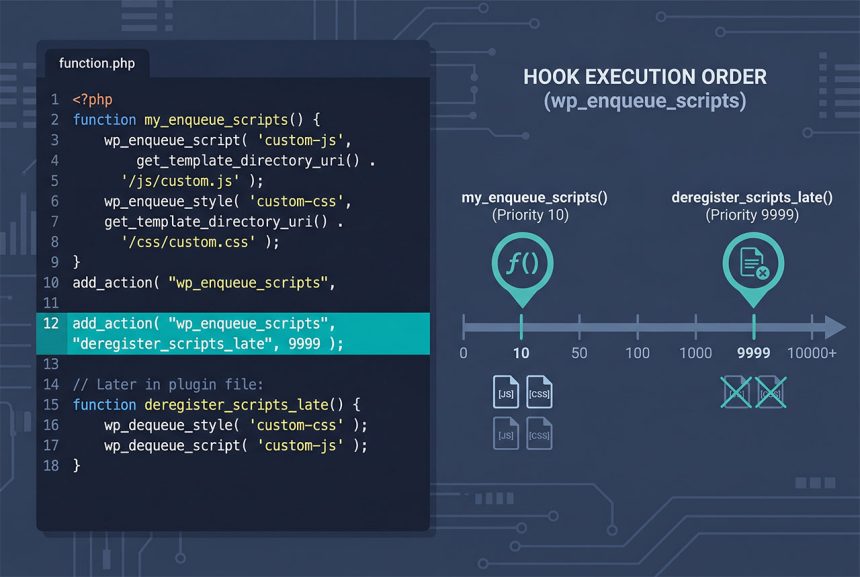
When wp_dequeue_style not working turns up with a plugin-added stylesheet (typically an outdated Font Awesome you want to replace), the real culprit is hook priority. Your dequeue fires at the default priority 10, at the same time the plugin is registering its enqueue, and the race can go either way. Bumping your hook to priority 9999 runs your removal after every plugin has finished — and the style stays out.
Last verified: 2026-04-23 on WordPress 6.5 and PHP 8.3. Originally published 2023-12-16, rewritten and updated 2026-04-23.
TL;DR
add_action( 'wp_enqueue_scripts', function () {
    wp_dequeue_style( 'font-awesome' );
    wp_deregister_style( 'font-awesome' );
}, 9999 );
Why the default-priority version fails
// Fails silently — priority 10 runs alongside the plugin's enqueue
add_action( 'wp_enqueue_scripts', function () {
    wp_dequeue_style( 'font-awesome' );
    wp_deregister_style( 'font-awesome' );
} );
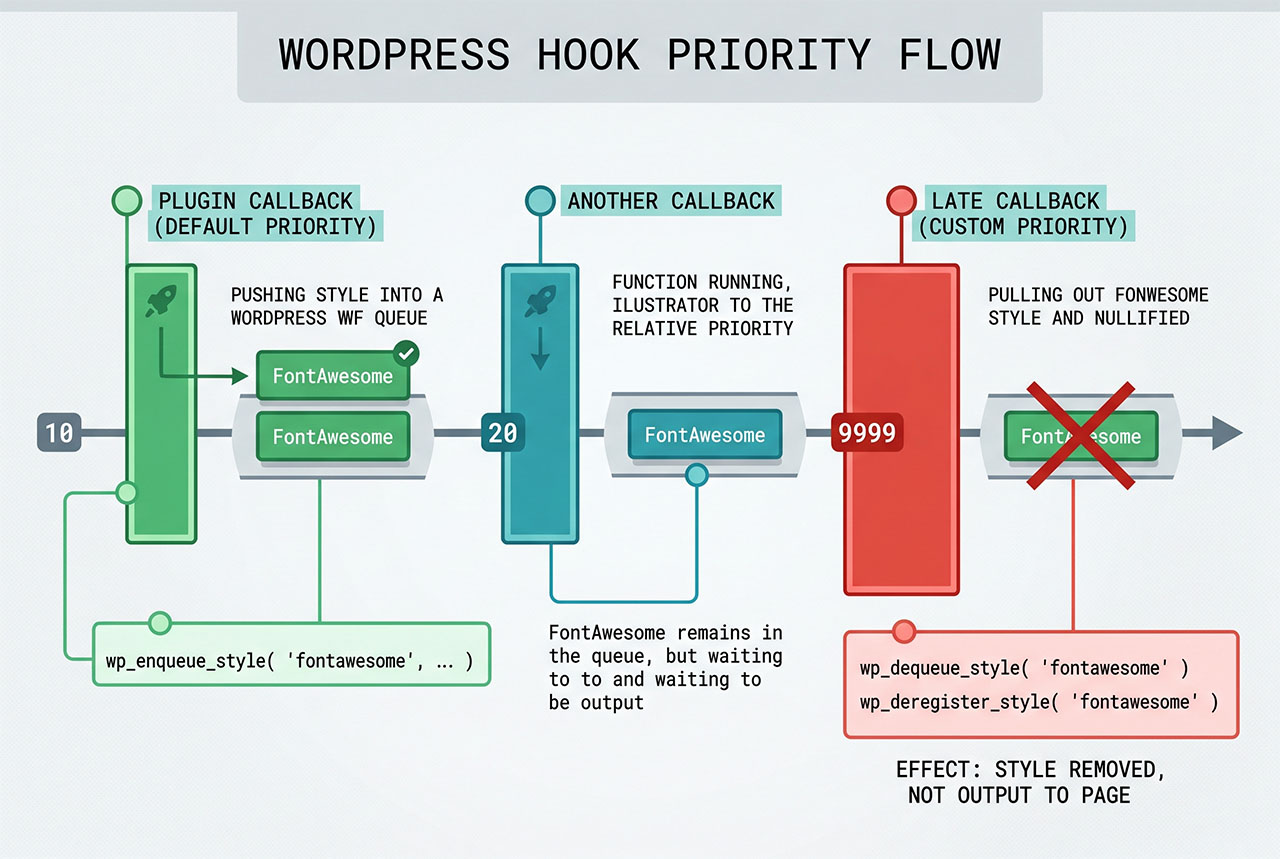
WordPress calls every wp_enqueue_scripts callback in ascending priority order. If the offending plugin hooks at priority 10 and so do you, PHP runs whichever registered first — which varies with load order. Even if your dequeue runs later, the plugin may register its style again later in the hook chain, putting it back into the queue. The priority 9999 form sidesteps both problems: your callback runs last, after every plugin has already enqueued.
Finding the handle
View the page source and search for the stylesheet. WordPress marks every enqueued style with an id attribute of {handle}-css:
<link rel='stylesheet' id='font-awesome-css' href='...'>
                             ^^^^^^^^^^^^^ handle is 'font-awesome'
Some plugins use less predictable names (fa-css, my-plugin-fontawesome, swfa-style) — the id attribute is authoritative. Strip the trailing -css and you have the handle.
Replacing the removed style with a newer version
add_action( 'wp_enqueue_scripts', function () {
    wp_dequeue_style( 'font-awesome' );
    wp_deregister_style( 'font-awesome' );

    wp_enqueue_style(
        'how7o-font-awesome',
        get_stylesheet_directory_uri() . '/assets/fontawesome/css/all.min.css',
        array(),
        '6.5.2'
    );
}, 9999 );
Ship your own copy and re-enqueue under a different handle. Using a different handle (how7o-font-awesome instead of font-awesome) avoids conflict with any plugin that later checks wp_style_is('font-awesome') and tries to re-enqueue.
Admin and editor contexts
wp_enqueue_scripts— frontend.admin_enqueue_scripts— admin pages.login_enqueue_scripts—/wp-login.php.enqueue_block_editor_assets— block editor iframe.
Hook into whichever context the offending style is loading in. If the plugin enqueues globally, you’ll need to hook multiple contexts to suppress it everywhere.
Same pattern for scripts
add_action( 'wp_enqueue_scripts', function () {
    wp_dequeue_script( 'slick' );
    wp_deregister_script( 'slick' );
}, 9999 );
Identical shape. The JS equivalent of the -css id suffix is -js — look for id="slick-js" on the <script> tag.
Frequently asked questions
wp_dequeue_style not working? Your hook is firing before the plugin registers its own enqueue. WordPress runs wp_enqueue_scripts callbacks in priority order — default 10 — so a dequeue at priority 10 runs side-by-side with the plugin’s enqueue and one of them wins unpredictably. Raise your hook’s priority (add_action( 'wp_enqueue_scripts', ..., 9999 )) so your dequeue always runs after every plugin has finished registering.
wp_dequeue_style and wp_deregister_style? wp_dequeue_style removes the style from the output queue for the current request — it doesn’t print a <link> tag. wp_deregister_style removes the handle from WordPress’s registry entirely, so nothing else can re-enqueue it (via a dependency chain or a plugin’s later hook). Call both to be safe: dequeue for this request, deregister so no re-enqueue can bring it back.
Inspect your page’s source and look for id="{handle}-css" on the <link> tag — WordPress appends -css to every handle. If the offending style is <link id="font-awesome-css" ...>, the handle is font-awesome. For scripts the suffix is -js. Some plugins use less obvious handles (fa-css, my-plugin-fontawesome) — the page source is authoritative.
Yes — swap wp_dequeue_style/wp_deregister_style for wp_dequeue_script/wp_deregister_script. The priority rule is the same (fire after all plugin enqueues, typically 9999). Hook into wp_enqueue_scripts for frontend scripts, admin_enqueue_scripts for admin.
No — any number higher than every plugin’s priority works. 9999 is the pragmatic convention because it’s almost certainly higher than any plugin would reach. If you specifically need to run after another plugin that’s also using PHP_INT_MAX or a similar extreme, use a still-later hook like wp_print_styles (which fires after wp_enqueue_scripts has finished).
Related guides
- How to Compile Multiple CSS into One CSS with Laravel + Vite — bundle pipeline thinking, different ecosystem.
- How to Disable Revisions and Autosave in WordPress — related “turn off this WP feature” pattern.
- How to Apply pre_get_posts on Custom Post Types in WordPress — another priority-matters hook pattern.
- How to Display Different Menus to Logged-In Users in WordPress — another functions.php customization.
References
WordPress developer reference for wp_dequeue_style and wp_deregister_style: developer.wordpress.org/reference/functions/wp_dequeue_style.