

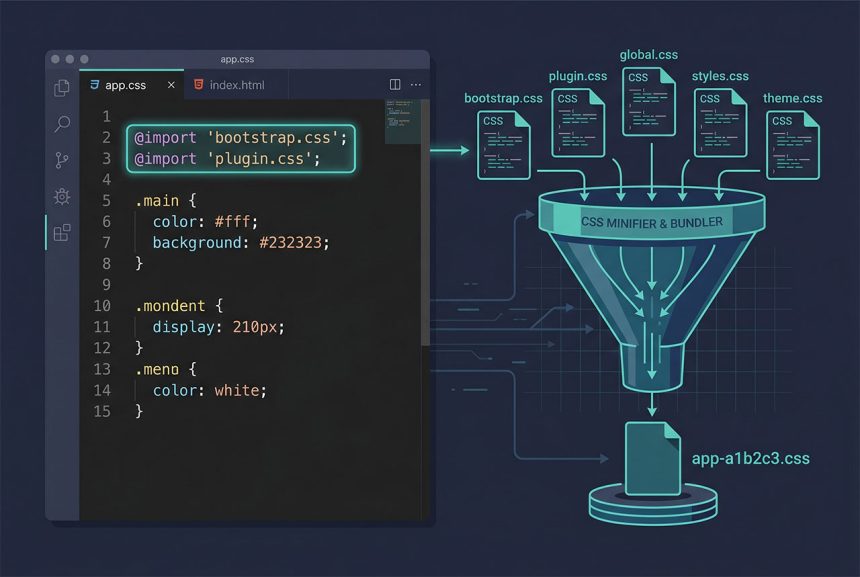
To laravel vite combine css files into a single stylesheet, skip the vite.config.js gymnastics and use CSS @import from one entry file. Vite resolves those imports at build time and bundles everything into a single hashed output in public/build/. This is the Vite equivalent of Laravel Mix’s mix.styles([...], 'public/css/app.css') — different shape, same end result. This guide shows the CSS-entry pattern, the JS-entry variant, and how the bundled output hooks into Blade via @vite.
Last verified: 2026-04-23 on Laravel 11, Vite 5, and laravel-vite-plugin 1.0. Originally published 2022-11-14, rewritten and updated 2026-04-23.
TL;DR
In resources/css/app.css, import your vendor and app stylesheets:
@import 'bootstrap.css';
@import 'plugin.css';

/* your own styles below */
Run npm run build. Vite emits one hashed CSS file in public/build/assets/, and @vite(['resources/css/app.css']) in the Blade layout renders the right URL in both dev and prod.
Why Mix’s mix.styles([...]) is gone
Laravel Mix had a one-liner:
// webpack.mix.js (pre-Vite)
mix.styles([
    'resources/css/bootstrap.css',
    'resources/css/main.css',
], 'public/css/app.css');
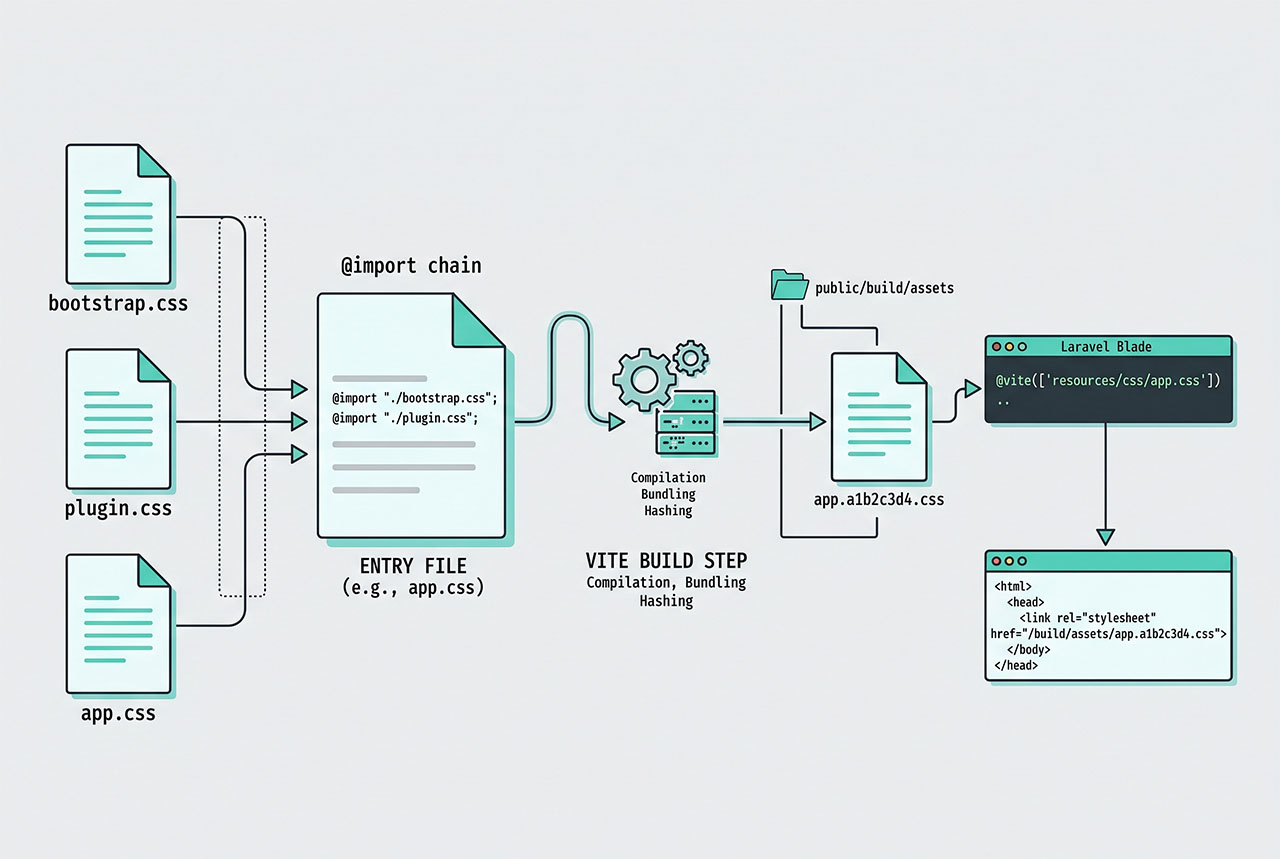
Mix concatenated the listed files in order and wrote the result to the destination path. Vite doesn’t do that — its model is “declare entry points, let the bundler follow imports from there.” The nearest equivalent is to make a single CSS entry file and @import the pieces you want combined. Vite’s CSS pre-processor (using PostCSS by default) inlines the imports at build time, so the final output is effectively a concatenation.
Pattern 1 — CSS-only entry with @import
The smallest change from a Mix project. Make sure resources/css/app.css is declared as an input in vite.config.js:
// vite.config.js
import { defineConfig } from 'vite';
import laravel from 'laravel-vite-plugin';

export default defineConfig({
    plugins: [
        laravel({
            input: [
                'resources/css/app.css',
                'resources/js/app.js',
            ],
            refresh: true,
        }),
    ],
});
Then in resources/css/app.css:
@import 'bootstrap.css';
@import 'plugin.css';

/* your own styles below */
body { font-family: system-ui, sans-serif; }
The paths are relative to app.css, so bootstrap.css and plugin.css live in the same resources/css/ directory. For a file in a subdirectory: @import 'vendor/bootstrap.css';. For an npm package: @import 'bootstrap/dist/css/bootstrap.css'; — Vite resolves it through node_modules/.
Pattern 2 — Import CSS from JS
The shape the stock Laravel + Vite scaffold uses. Declare only a JS entry, and let that JS pull in the CSS:
// vite.config.js
laravel({
    input: ['resources/js/app.js'],
    refresh: true,
})
// resources/js/app.js
import '../css/bootstrap.css';
import '../css/plugin.css';
import '../css/app.css';
// ...your JSVite follows the imports from app.js, collects every reachable CSS file, concatenates them, and emits a single CSS bundle in public/build/assets/. The name ends up embedded in the manifest, so @vite('resources/js/app.js') in Blade emits both the CSS <link> and the JS <script> automatically.
Wiring into Blade
Put @vite([...]) in the layout’s <head>:
<!-- resources/views/layouts/app.blade.php -->
<!DOCTYPE html>
<html>
<head>
    <meta charset="utf-8">
    <title>{{ config('app.name') }}</title>
    @vite(['resources/css/app.css', 'resources/js/app.js'])
</head>
<body>
    @yield('content')
</body>
</html>
In development (npm run dev) the directive points at Vite’s dev server with hot module replacement. In production (after npm run build) it reads public/build/manifest.json and emits the hashed asset URLs — <link rel="stylesheet" href="/build/assets/app-a1b2c3d4.css"> — so browser caching works correctly.
Build commands
npm ci              # install deps (use ci in deploy scripts)
npm run dev         # dev server with HMR
npm run build       # emit production assets to public/build/
Deploy pipeline: npm ci && npm run build before the app boots. Without the build step, @vite can’t find the manifest and production pages break.
Frequently asked questions
Import them from a single entry CSS file with @import. Vite’s pre-processor follows those imports at build time and bundles every referenced stylesheet into one app.css output. No custom vite.config.js changes — just @import 'bootstrap.css';, @import 'main.css';, etc. at the top of resources/css/app.css.
mix.styles([...])? Yes, functionally. The mix.styles(['bootstrap.css', 'main.css'], 'public/css/app.css') pattern is gone in Vite — there’s no styles() equivalent. The Vite way is to chain the files through CSS @imports (or through a single JS entrypoint that imports them) and let the bundler concatenate. Output goes to public/build/assets/ by default, not public/css/.
Yes. In resources/js/app.js, add import '../css/app.css'; (or any other CSS paths directly). Vite picks them up and emits them into the manifest. This is the shape the stock Laravel + Vite scaffold uses — the laravel-vite-plugin expects CSS to reach it through JS entrypoints, though a CSS-only entrypoint also works if you declare it in vite.config.js.
Use the @vite directive: @vite(['resources/css/app.css', 'resources/js/app.js']) in the layout’s <head>. In development it serves hot-reloaded files from the Vite dev server; in production it reads the manifest and emits the hashed asset URLs under public/build/. You never hardcode public/css/app.css — that path doesn’t exist with Vite.
npm run build? Yes — Vite needs a build step for production just like Mix did. npm run dev (or npm run hot) runs the Vite dev server with hot module replacement; npm run build emits hashed production assets into public/build/ and writes the manifest. Your deploy pipeline runs npm ci && npm run build before shipping code.
Related guides
- How to Install Laravel on Ubuntu — fresh Laravel 11 ships with Vite-ready scaffolding.
- How to Install the Latest Version of Node.js on Ubuntu — the runtime Vite needs.
- Fix 403 Forbidden on Laravel Shared Hosting — the
public/layout Vite expects. - How to Get Config Variables in Laravel — reading
config/app.phpvalues in a Vite-built layout.
References
Official Laravel Vite docs: laravel.com/docs/vite. Vite CSS imports: vitejs.dev/guide/features.html#css.

![DataTables default sort order — order: [[1, 'desc']] config](https://www.how7o.com/wp-content/uploads/2026/05/datatables-default-sort-order-featured-330x220.jpg)