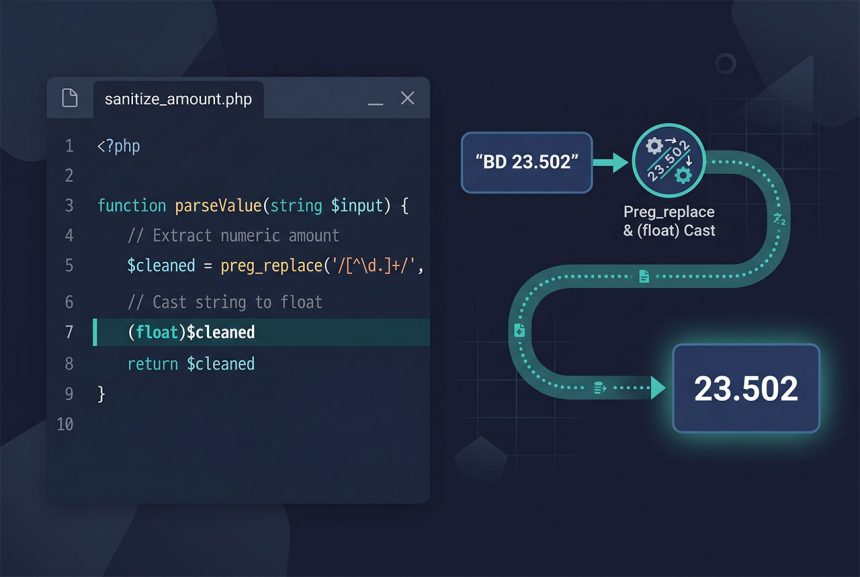
For a clean php string to float conversion, (float) $value is the answer. For strings that include currency codes or thousand separators — "BD 23.502", "USD 1,234.56" — strip everything that isn’t a digit, decimal point, or minus sign first with preg_replace. This guide covers both patterns plus the NumberFormatter-based approach for locale-aware parsing.
Last verified: 2026-04-23 on PHP 8.3. Originally published 2023-10-09, rewritten and updated 2026-04-23.
TL;DR
// Clean numeric string
$value = (float) "23.502";            // 23.502

// Fixed prefix
$value = (float) str_replace('BD ', '', 'BD 23.502');   // 23.502

// Mixed prefix or junk — strip non-numeric characters
$value = (float) preg_replace('/[^-0-9.]/', '', $input);

// Locale-aware (European commas, etc.)
$fmt   = new NumberFormatter('fr_FR', NumberFormatter::DECIMAL);
$value = $fmt->parse('42,50');        // 42.5
Simple case — cast operator
$amount    = "23.502";
$asFloat   = (float) $amount;
echo $asFloat;                        // 23.502
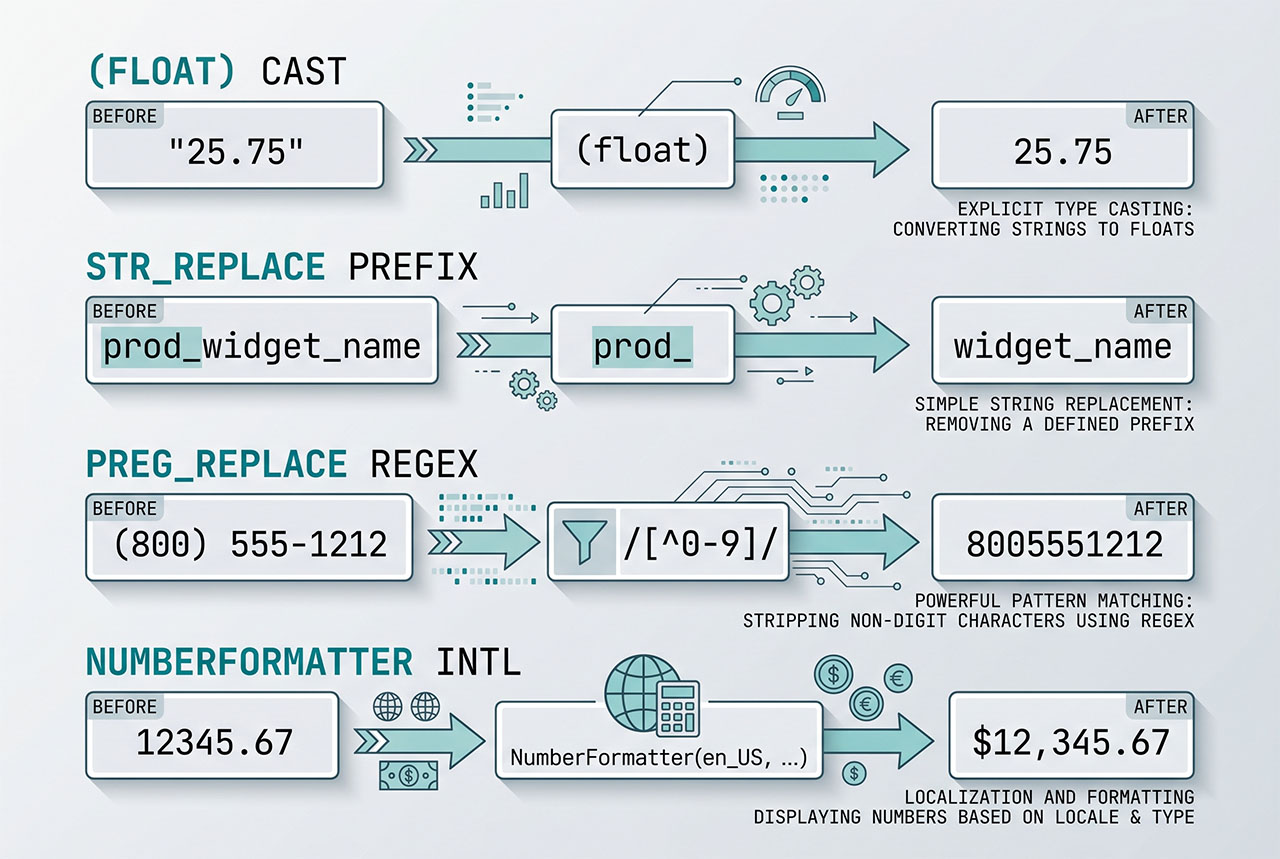
(float) reads the leading numeric characters and returns them as a float, stopping at the first non-numeric. Fast, no function call overhead, works for any clean numeric string.
Inputs it handles correctly:
"23.502"→23.502"-12.5"→-12.5"1.5e2"→150(scientific notation)"12abc"→12(stops at first non-numeric)"abc12"→0(non-numeric start)
The last one is why the cast alone doesn’t work for “BD 23.502” — the leading “BD” makes it a non-numeric start, and the whole thing returns 0.
Fixed prefix — str_replace first
$amount   = "BD 23.502";
$asFloat  = (float) str_replace('BD ', '', $amount);
echo $asFloat;                        // 23.502
When the prefix is a known literal, strip it before casting. Works for any single known prefix; brittle when the prefix varies (USD, EUR, GBP, $, €). For that, go regex.
Mixed prefix / junk — regex cleanup
$amount    = "USD 1,234.56";
$asFloat   = (float) preg_replace('/[^-0-9.]/', '', $amount);
echo $asFloat;                        // 1234.56
The regex /[^-0-9.]/ matches every character that is not a minus sign, digit, or dot. preg_replace deletes them all, leaving just the numeric components. (float) then parses the result.
Trap: this strips the comma from "USD 1,234.56" correctly (the comma is a thousand separator there) but also strips it from European-style "42,50" where the comma is the decimal separator. That’s why locale matters for currency input — if your app accepts both formats, you need to know which locale each input uses.
Locale-aware — NumberFormatter
// Requires the ext-intl PHP extension

// French: "42,50" -> 42.5
$fmt   = new NumberFormatter('fr_FR', NumberFormatter::DECIMAL);
$value = $fmt->parse('42,50');

// US: "1,234.56" -> 1234.56
$fmt   = new NumberFormatter('en_US', NumberFormatter::DECIMAL);
$value = $fmt->parse('1,234.56');

// Parse currency strings too
$fmt   = new NumberFormatter('en_US', NumberFormatter::CURRENCY);
$value = $fmt->parseCurrency('$1,234.56', $currencyCode);
// $value = 1234.56, $currencyCode = 'USD'
For applications that need correct parsing across locales, NumberFormatter is the right tool. It understands thousand separators, decimal separators, currency symbols, and spacing conventions per locale. The intl extension is standard on most PHP installs; if not available, the regex-and-cast fallback handles the English cases.
Validate before casting
if (! is_numeric($input)) {
    // Treat as invalid — return an error, not 0
    throw new InvalidArgumentException('Amount must be numeric');
}

$value = (float) $input;
For form input or API payloads, is_numeric() rejects garbage before the silent “return 0” bite you get from casting. Fails loud instead of silently coercing.
Frequently asked questions
(float) $value — the cast operator parses leading numeric characters and returns the float. "23.502" → 23.502, "abc" → 0, "12abc" → 12. Works for the happy-path case where the string is already clean. For mixed strings like "BD 23.502" you need to strip the prefix first — (float) alone returns 0 because it bails on the first non-numeric character.
floatval() different from (float)? Functionally identical — floatval($x) is just the function form of (float) $x. Both invoke the same internal conversion, both stop at the first non-numeric character. Prefer the cast operator for inline use ($total = (float) $input); reach for floatval() when you need a function reference (array_map('floatval', $values)).
USD 1,234.56? Two passes: strip the currency code and thousand separators, then cast. For a generic approach that handles any prefix/suffix: (float) preg_replace('/[^-0-9.]/', '', $value). The regex keeps digits, the decimal point, and the minus sign; drops everything else. Works for "$1,234.56" → 1234.56, "€ 42,50" → 4250 (careful: European-style commas-as-decimal get stripped as thousand separators).
The regex above strips commas, which breaks European formatting ("42,50" → 4250). For locale-aware parsing, use NumberFormatter: $fmt = new NumberFormatter('fr_FR', NumberFormatter::DECIMAL); $value = $fmt->parse("42,50");. Returns 42.5 correctly. Requires the intl PHP extension. For mixed-locale input (a dropdown of currencies), let users pick the locale alongside the value.
(float) produce unexpected results? Yes — values that look numeric but have trailing garbage return the numeric prefix. (float) "1.5e2" returns 150 (scientific notation). (float) "0x1A" returns 0 (hex is not parsed). (float) "inf" returns INF. (float) "NaN" returns NAN. When input validation matters (currency, amounts), use is_numeric($value) first to reject garbage before casting.
Related guides
- How to Extract Only the Digits from a String in MySQL — the sibling pattern on the database side.
- How to Convert a String to Uppercase in PHP — other PHP string transforms.
- How to Combine Two Arrays Without Duplicates in PHP — array operations after parsing values.
- How to Dynamically Change Currency in WooCommerce — the real-world use case for currency strings.
References
PHP type casting: php.net/manual/en/language.types.type-juggling. NumberFormatter: php.net/manual/en/class.numberformatter.