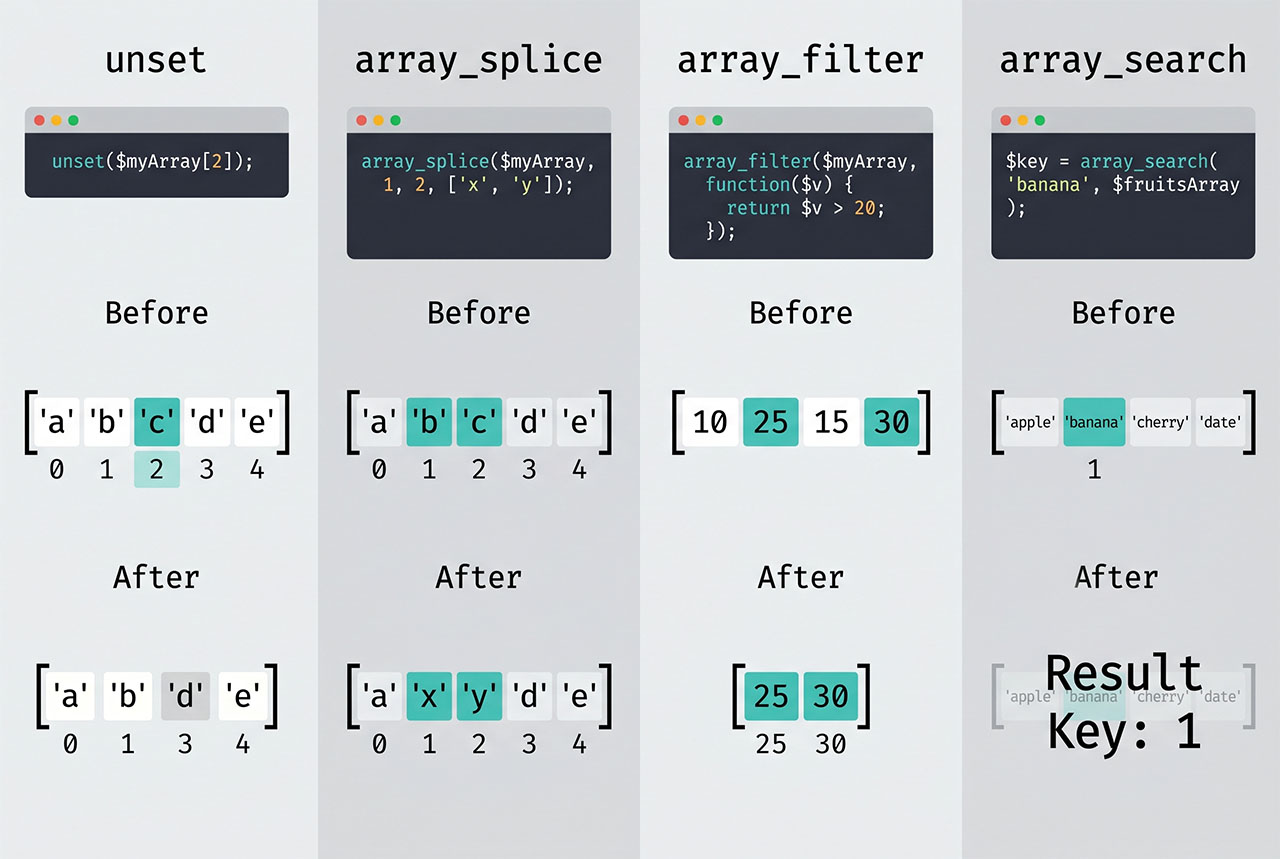
Four functions handle php delete array element, each with a different shape: unset() for a specific key, array_splice() for a specific index (with re-indexing), array_filter() for callback-based removal, and array_search() + unset() when you only know the value. Picking the right one keeps intent clear and sidesteps the gap-in-keys gotcha that bites beginners.
Last verified: 2026-04-23 on PHP 8.3. Originally published 2022-12-30, rewritten and updated 2026-04-23.
TL;DR
$array = [1, 2, 3, 4, 5];

// By known key — leaves a gap in the indexes
unset($array[2]);                       // [0=>1, 1=>2, 3=>4, 4=>5]

// By offset — reindexes the array
array_splice($array, 2, 1);              // [0=>1, 1=>2, 2=>4, 3=>5]

// By callback — keep only elements matching the predicate
$kept = array_filter($array, fn ($v) => $v !== 3);

// By value — find the key, then unset
$key = array_search(3, $array, true);
if ($key !== false) unset($array[$key]);
unset() — remove by known key
$array = [1, 2, 3, 4, 5];

unset($array[2]);
// [0 => 1, 1 => 2, 3 => 4, 4 => 5]

// Multiple keys at once
unset($array[0], $array[4]);
// [1 => 2, 3 => 4]
Simplest form, fastest execution. The catch: subsequent keys keep their original indexes, leaving gaps. If the array represents a list where order matters but key numbers don’t, follow with $array = array_values($array) to re-key from 0.
array_splice() — remove by offset, auto-reindex
$array = [1, 2, 3, 4, 5];

array_splice($array, 2, 1);
// [0 => 1, 1 => 2, 2 => 4, 3 => 5]

// Remove a range
$array = [1, 2, 3, 4, 5];
array_splice($array, 1, 3);
// [0 => 1, 1 => 5]
array_splice($array, $offset, $length) removes $length elements starting at $offset and reindexes the rest. Offset is position (0-based), not key — on an array with arbitrary integer keys, it’s still the 0th, 1st, 2nd element. For associative arrays, array_splice preserves string keys but reindexes numeric ones.
array_filter() — callback-based removal
$array = [1, 2, 3, 4, 5];

// Keep everything except 3
$new = array_filter($array, fn ($v) => $v !== 3);
// [0 => 1, 1 => 2, 3 => 4, 4 => 5]  — keys preserved

// Default callback — remove falsy values
$data = [0, 1, '', 'keep', null, false, 'me'];
$clean = array_filter($data);
// [1 => 1, 3 => 'keep', 6 => 'me']

// Access both key and value
$people = ['alice' => 28, 'bob' => 17, 'carol' => 35];
$adults = array_filter($people, fn ($age, $name) => $age >= 18, ARRAY_FILTER_USE_BOTH);
Callback semantics are the opposite of “remove this one” — you define what stays, and the function removes everything else. Perfect for “remove every draft post” or “keep only logged-in users.” Like unset, it doesn’t reindex — follow with array_values if you need contiguous keys.
Remove by value
$array = ['apple', 'banana', 'cherry', 'banana'];

// Remove the first match
$key = array_search('banana', $array, true);
if ($key !== false) {
    unset($array[$key]);
}
// ['apple', 'cherry', 'banana'] — kept the second 'banana'

// Remove every match
$array = array_values(
    array_filter($array, fn ($v) => $v !== 'banana')
);
// ['apple', 'cherry']
array_search returns the first key whose value matches — always combine with a !== false check because a real key of 0 would be falsy. The true strict-comparison flag prevents "1" from matching 1.
Which one to pick
- Know the key →
unset. - Want clean 0-based indexes →
array_splice(orunset+array_values). - Condition-based removal →
array_filter. - Only know the value →
array_search+unset.
Frequently asked questions
unset($array[2]) — removes the element at key 2. Simple, one-liner, works for any array. The only gotcha: it leaves the remaining keys where they were (so after removing index 2 from [1,2,3,4,5] you get [0=>1, 1=>2, 3=>4, 4=>5] with a gap at 2). If you need contiguous keys, reindex with array_values() or use array_splice().
array_splice instead? When you need the array to stay zero-indexed and contiguous. array_splice($array, 2, 1) removes one element starting at index 2 and shifts subsequent elements down — no gaps. It’s also the right choice when you want to remove by offset rather than key, or when you’re removing a range.
array_filter add? Callback-based removal. array_filter($array, fn($v) => $v !== 3) removes every element where the callback returns false — useful when the thing you want to remove is “every row where status is draft” rather than “the element at a known index.” Default callback (no second argument) removes falsy values — null, '', 0, false.
Find the key first: $key = array_search($value, $array, true); if ($key !== false) unset($array[$key]);. The true third argument forces strict comparison (===) so "1" and 1 don’t collide. To remove every occurrence, combine with array_keys($array, $value) and loop.
unset free memory immediately? For simple values, yes — PHP removes the reference and garbage-collects. For values shared between variables ($a = $b = [big_array]), only the removed variable’s reference goes; the data stays until the last reference is gone. In a tight loop where memory matters, unset is still the right call — PHP decrements the refcount and frees as soon as possible.
Related guides
- How to Combine Two Arrays Without Duplicates in PHP — sibling array-manipulation pattern.
- How to Convert a String to Uppercase in PHP — another PHP basics pattern.
- How to Display PHP Errors — debugging what your array operations actually do.
- How to Retrieve Inputs with a Specific Prefix in Laravel — real-world array filtering.
References
PHP unset: php.net/manual/en/function.unset. array_splice: php.net/manual/en/function.array-splice. array_filter: php.net/manual/en/function.array-filter.