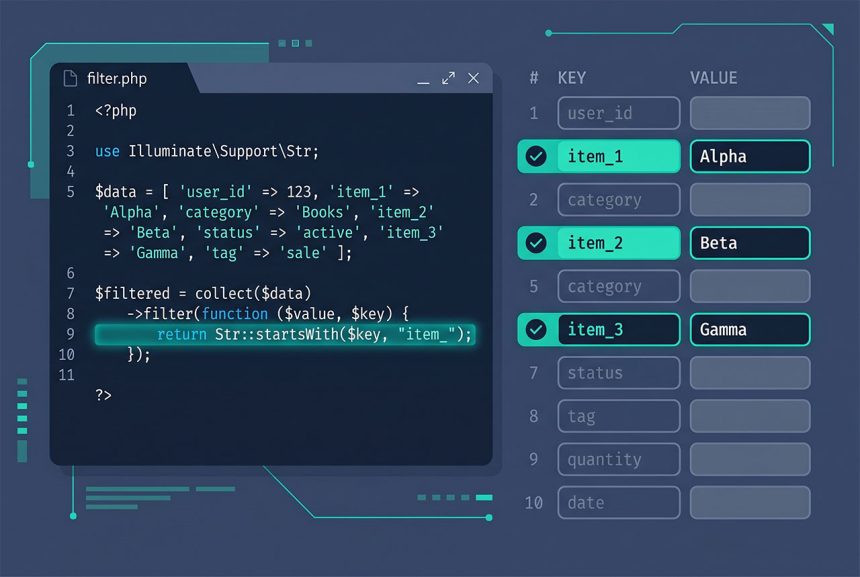
Laravel request inputs with prefix comes up whenever a form sends several fields sharing a common key prefix — item_1, item_2, item_3 — and you want to loop over them without listing every key by hand. Laravel doesn’t ship a dedicated helper for prefix matching, but a one-line collect or array_filter on request()->all() does the job. This guide covers the idiomatic patterns, why array-style names (items[]) are usually better when you control the form, and how to validate the filtered keys.
Last verified: 2026-04-23 on Laravel 11 with PHP 8.3. Originally published 2023-02-08, rewritten and updated 2026-04-23.
TL;DR
Filter request()->all() by key prefix with a collect:
use Illuminate\Support\Str;

$items = collect(request()->all())
    ->filter(fn ($value, $key) => Str::startsWith($key, 'item_'))
    ->all();

foreach ($items as $key => $value) {
    // $key = 'item_1', 'item_2', ...
    // $value = the submitted value
}
When this pattern fits
The typical case is a dynamically-added form where JavaScript appends inputs with incrementing suffixes:
<input type="text" name="item_1">
<input type="text" name="item_2">
<input type="text" name="item_3">
PHP parses those into flat top-level keys — item_1, item_2, item_3 — not a nested array. On the server you need a way to find them without hard-coding the count, which is what the filter above does.
Alternative syntax — request()->only with filtered keys
A slightly more explicit form that uses only() for the final picking:
$prefix = 'item_';

$itemKeys = array_filter(
    array_keys(request()->all()),
    fn ($key) => Str::startsWith($key, $prefix)
);

$items = request()->only($itemKeys);
Two passes: first find the keys that start with your prefix, then ask the request for exactly those. Reads well when someone grep-s the codebase for request()->only — they’ll find the call directly — but the collect version is more compact and does the same work in one expression.
![laravel request inputs with prefix — collect filter versus array-style items[] form names](https://www.how7o.com/wp-content/uploads/2026/05/laravel-request-input-prefix-infographic.jpg)
Better shape: array-style names
When you control the form, switch to PHP’s native array syntax instead of a suffix-number convention:
<input type="text" name="items[]">
<input type="text" name="items[]">
<input type="text" name="items[]">
PHP parses items[] as a numeric-indexed array, so $request->items returns ['first value', 'second value', 'third value'] natively — no filtering or prefix matching needed. For complex rows, use nested keys:
<input type="text" name="items[0][name]">
<input type="number" name="items[0][quantity]">
<input type="text" name="items[1][name]">
<input type="number" name="items[1][quantity]">

// On the server
foreach ($request->items as $row) {
    // $row['name'], $row['quantity']
}
Reach for the prefix pattern in this guide only when the form isn’t yours to change — an external integration, a third-party script emitting its own names, a legacy page in the app you haven’t refactored yet.
Validating prefixed inputs
For array-style names, wildcards make validation one line:
$request->validate([
    'items.*'          => 'required|string|max:255',
    'items.*.quantity' => 'required|integer|min:1',
]);
For flat prefixed keys (item_1, item_2), Laravel’s validator treats the underscore as a literal character, not a wildcard — so you need to build the rules list dynamically from the filtered keys:
$rules = collect(request()->all())
    ->keys()
    ->filter(fn ($key) => Str::startsWith($key, 'item_'))
    ->mapWithKeys(fn ($key) => [$key => 'required|string|max:255'])
    ->all();

$request->validate($rules);
Another reason to prefer array-style names when you can: the wildcard validation form is much cleaner.
Writing the rows to the database
Once the filtered array is in hand, map it into model rows. Don’t pass the raw $items array into Item::create() — you’d be feeding it keys like item_1 that don’t correspond to any column:
foreach ($items as $key => $value) {
    Item::create([
        'post_id' => $post->id,
        'name'    => $value,
        'sort'    => (int) Str::after($key, 'item_'),
    ]);
}
Str::after($key, 'item_') gives you the numeric suffix ('1', '2', '3') if you need the original position — useful for a stable sort order when the form order matters.
Frequently asked questions
Build a filtered array with collect and Str::startsWith: collect(request()->all())->filter(fn ($v, $k) => Str::startsWith($k, 'item_'))->all();. You get back only the keys that start with your prefix. Use this in a controller method to split multi-item forms into per-item buckets.
request()->only([...]) enough if I don’t know the keys in advance? No. only() takes a concrete array of keys and returns exactly those. It doesn’t support wildcards or prefixes, so if you don’t know the exact item_1, item_2, item_3 ahead of time, you need to build the key list yourself — typically by filtering request()->all()‘s keys first and then passing the resulting array to only(), or just filtering the values directly.
items[]) instead of prefixed keys? Yes, when you control the form. PHP parses items[0], items[1], and items[name][] into a native nested array on the server, so $request->items returns the whole collection with no filtering needed. The prefix pattern in this guide is the right answer when you’re integrating with a legacy form, an external POST, or a third-party script you can’t change.
Match them with a dot-wildcard in the rule array: ['item_*' => 'required|string|max:255']. Laravel’s validator treats * as a wildcard in array keys and applies the rule to every key matching the pattern. Combine it with sometimes if the field may be absent from some submissions.
item_*? The usual one — mass-assignment. If you pass the filtered array straight into Model::create(), the request can include arbitrary item_X keys that match your model’s $fillable. Scope writes to the columns you intend: Item::create(['name' => $value, 'post_id' => $postId]). And if the prefix keys become row values, trust them the same way you’d trust any user input — validate and cast before storing.
Related guides
- Laravel Nullable Exists Validation — validating filtered inputs against the database.
- Laravel Validate Input to Specific Values (in Rule) — allow-list validation on individual fields.
- Best Way to Insert or Update Records in Laravel Eloquent — persisting the rows you built from the filtered array.
- How to Call a Controller Method from Another Controller in Laravel — delegating the row-write step to a reusable service.
References
Official Laravel request docs (request()->all, request()->only, validation wildcards): laravel.com/docs/requests. Illuminate\\Support\\Str helpers: laravel.com/docs/strings.