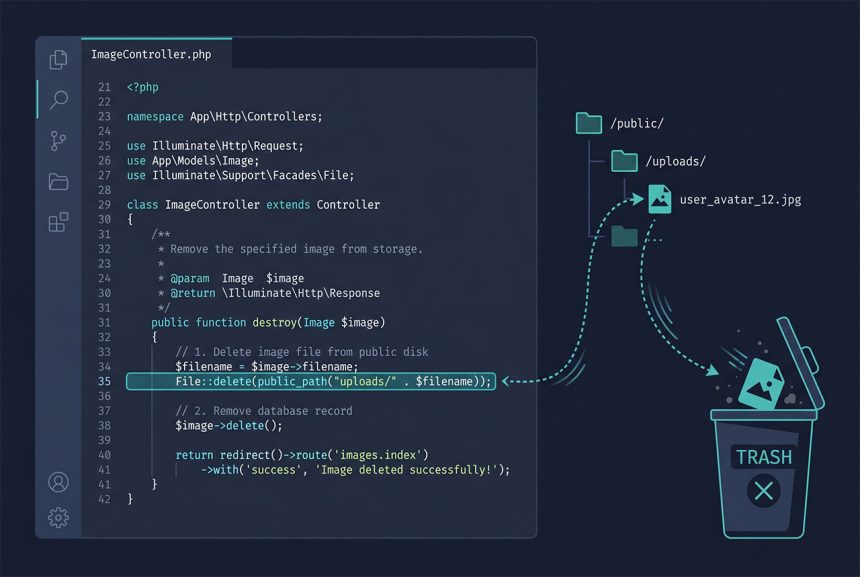
To laravel delete file public folder — typically a thumbnail or upload tied to a model you’re removing — use Laravel’s File facade with public_path(). The model’s delete() clears the database row but leaves the on-disk file behind unless you explicitly unlink it. This guide covers the single-file case, multi-file deletes, the Storage-vs-File decision, and how to clean up whole directories safely.
Last verified: 2026-04-23 on Laravel 11 with PHP 8.3. Originally published 2022-08-17, rewritten and updated 2026-04-23.
TL;DR
Inside a controller’s destroy method, after you’ve loaded the model but before (or after) calling $post->delete():
use Illuminate\Support\Facades\File;

$thumbnail = public_path("uploads/{$post->thumbnail}");
if (File::exists($thumbnail)) {
    File::delete($thumbnail);
}
The full destroy method
A typical blog-post deletion where the thumbnail lives at public/uploads/:
use Illuminate\Support\Facades\File;

public function destroy($id)
{
    $post = Post::findOrFail($id);

    $thumbnail = public_path("uploads/{$post->thumbnail}");
    if (File::exists($thumbnail)) {
        File::delete($thumbnail);
    }

    $post->delete();

    return redirect('admin/posts')
        ->with('message', 'Post deleted successfully!');
}
Three things to notice:
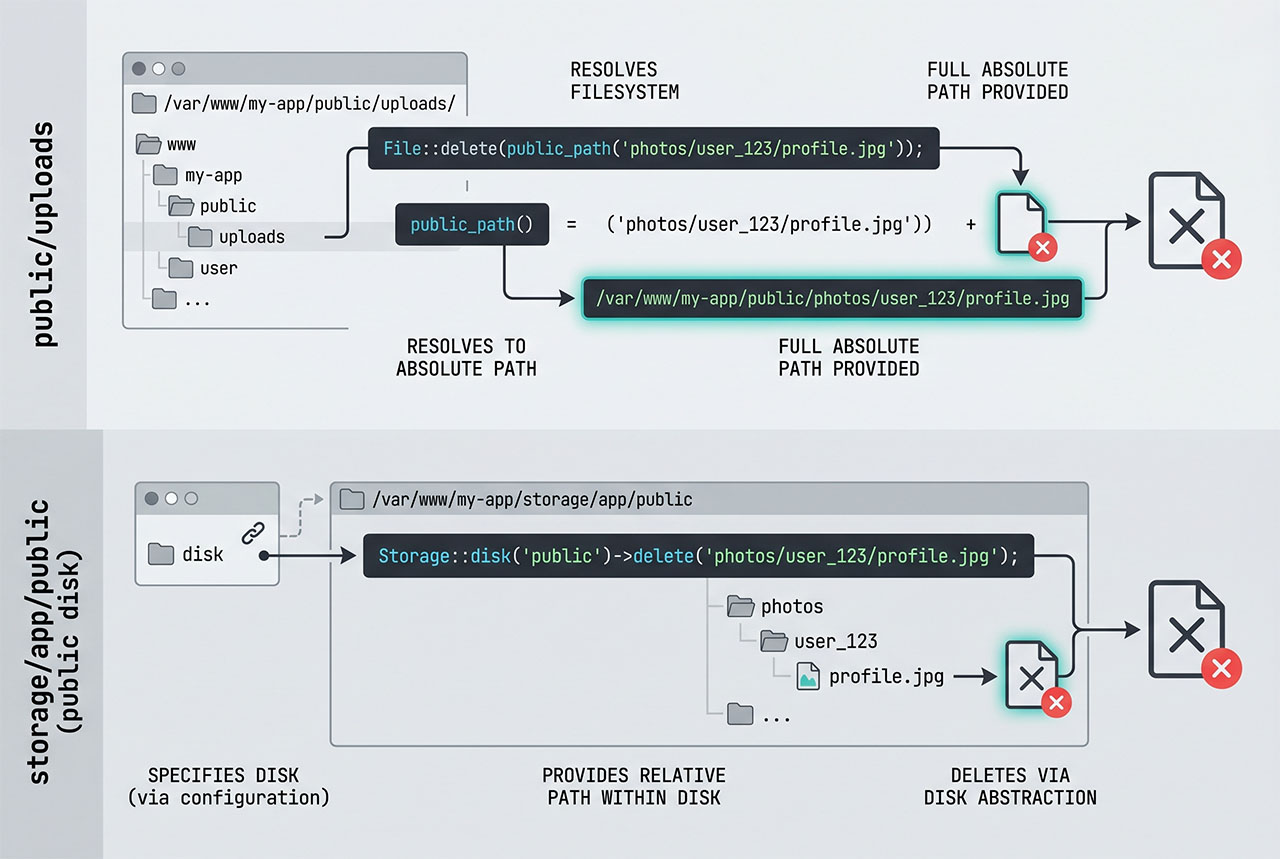
public_path('uploads/...')builds an absolute filesystem path —/var/www/blog/public/uploads/abc123.jpg— which is whatFile::delete()needs. Building the path yourself with string concatenation ('/public/uploads/' . $name) breaks the moment the app runs in a different environment.- The
File::exists()guard is optional.File::delete()returnsfalsefor a missing file and doesn’t throw — so skip the check unless you want to log the orphan case. - Delete the file before the model row is removed. If the
delete()call somehow fails, you’d rather have a zombie row in the database (recoverable) than a zombie file with no row pointing at it (harder to garbage-collect).
Deleting multiple files at once
File::delete() accepts a variadic list or an array:
File::delete($thumbnail1, $thumbnail2, $thumbnail3);

// or, when you've built a list programmatically
$thumbnails = [$thumbnail1, $thumbnail2, $thumbnail3];
File::delete($thumbnails);
Useful when you have multiple image sizes saved alongside a model (a full-size, a card thumbnail, an OG preview). The return value is true only if every file deleted successfully — false if any one was missing or couldn’t be removed.
File::delete vs Storage::delete
Laravel has two file APIs that do very similar things. Pick based on where the file lives:
File::delete()— works with absolute filesystem paths (whatpublic_path(),base_path(),storage_path()return). Use this when you’re managing files directly underpublic/.Storage::delete()— works with disk-relative paths on a configured filesystem (config/filesystems.php). Use this when files were saved throughStorage::disk('public')->put()or a modelstore()call — it dispatches to the local filesystem, S3, or any other driver based on the disk.
For a file saved via $request->file('thumbnail')->store('thumbnails', 'public'), the matching delete is:
use Illuminate\Support\Facades\Storage;

Storage::disk('public')->delete($post->thumbnail);
// $post->thumbnail is what store() returned, e.g. "thumbnails/abc123.jpg"
The public disk’s root is storage/app/public/, symlinked into public/storage/ via php artisan storage:link. This is Laravel’s recommended layout for user uploads — keeps them out of version control and makes S3 migration trivial.
Cleaning up whole directories
For periodic cleanup (temp exports, expired caches), reach for directory-level helpers:
// Remove the directory and everything under it
File::deleteDirectory(public_path('uploads/temp'));

// Keep the directory but empty it
File::cleanDirectory(public_path('uploads/temp'));
Both are destructive. Treat them the same way you’d treat rm -rf: never pass a path that contains user-supplied segments without first validating that the resolved path stays inside the intended base directory. A typical guard:
$base   = realpath(public_path('uploads'));
$target = realpath(public_path("uploads/{$userInput}"));

if ($target === false || !str_starts_with($target, $base . DIRECTORY_SEPARATOR)) {
    abort(403);  // path traversal attempt
}

File::deleteDirectory($target);
The realpath resolution expands any ../ segments; the str_starts_with check makes sure the result is still inside the intended base.
Frequently asked questions
File::delete(public_path('uploads/filename.jpg')), with use Illuminate\Support\Facades\File; at the top of the file. It wraps PHP’s unlink and returns true on success, false if the file didn’t exist. For multiple files, pass them as separate arguments or as an array — File::delete($a, $b, $c) or File::delete([$a, $b, $c]).
File::exists() first? Only if you need to know whether the file was there. File::delete() quietly returns false for a missing file and doesn’t throw, so for a best-effort cleanup (“delete the thumbnail if it’s there”) you can call it directly. Add the exists() check when you want to log or alert on the unexpected case — for example, a model that claims to have a thumbnail but the file is gone.
File::delete vs unlink vs Storage::delete — which one? Use File::delete for files you built a path to with public_path() or base_path() — it’s a thin wrapper around unlink that accepts arrays. Use Storage::delete when you’ve stored the file on a configured filesystem disk (storage/app/public, S3, etc.) and you only have a relative path on that disk. unlink is the plain PHP call and works fine too, but File::delete is more idiomatic and handles arrays for free.
Use Storage::disk('public')->delete($relativePath) where $relativePath is what store() or storeAs() returned — typically something like thumbnails/abc123.jpg. Don’t pass the full public_path() value; Storage deals in disk-relative paths. If your model saved the store() return value, that’s already the right shape.
File::deleteDirectory(public_path('uploads/old')) removes a directory and everything under it. File::cleanDirectory(public_path('uploads/old')) empties the directory but leaves it in place. Both are destructive — guard them behind the same checks you’d give rm -rf: validate the path doesn’t escape your uploads root before calling, especially if any part of the path is user-supplied.
Related guides
- How to Delete a Record from the Database in Laravel with Eloquent — the model-side of a cleanup flow.
- How to Automatically Delete All Related Rows in Laravel Eloquent — cascading deletes so related rows (and their files) go together.
- Fix 403 Forbidden on Laravel Shared Hosting — fix the upload path before worrying about the delete path.
- How to Install Laravel on Ubuntu — set up
storage:linkand the public disk on a fresh install.
References
Official Laravel filesystem docs (File, Storage, disks): laravel.com/docs/filesystem.