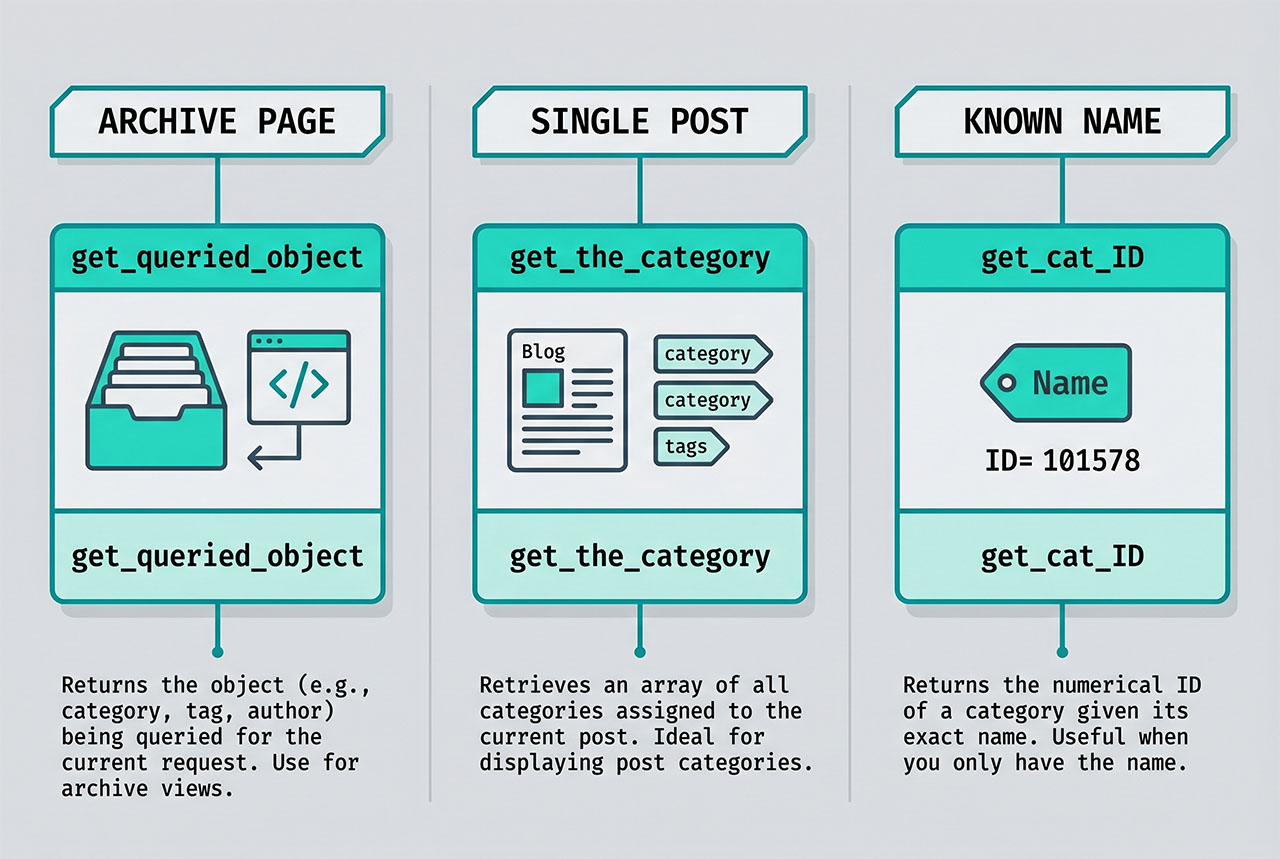
Three idiomatic ways to get the wordpress current category id: get_queried_object()->term_id on an archive page, get_the_category()[0]->term_id on a single post, and get_cat_ID('Name') when you only have the category name. Each has a clear “right context” — pick the one that matches where the template is running, and guard against the non-archive case so you don’t hit null.
Last verified: 2026-04-23 on WordPress 6.5 and PHP 8.3. Originally published 2023-01-03, rewritten and updated 2026-04-23.
TL;DR
// On a category archive (category.php, archive.php)
$cat_id = get_queried_object()->term_id;

// On a single post (single.php)
$cat_id = get_the_category()[0]->term_id;

// From a name you already have
$cat_id = get_cat_ID( 'News' );
On a category archive page
$queried_object = get_queried_object();
$category_id    = $queried_object->term_id;
get_queried_object() returns whichever object the current page is about: a WP_Term for taxonomy archives, a WP_Post for singular pages, a WP_User for author archives. On a category archive (/category/news/), you get the category’s WP_Term and term_id is the ID you want.
Because the object type varies by page, always guard before drilling in:
$obj = get_queried_object();

if ( $obj instanceof WP_Term ) {
    $category_id = $obj->term_id;
}
The instanceof WP_Term check also catches tag and custom-taxonomy archives, which is usually what you want — the rest of the template can branch on the taxonomy if needed ($obj->taxonomy === 'category').
Alternative — get_query_var('cat')
$category_id = get_query_var( 'cat' );

// Or, if you want the full object
$category = get_category( get_query_var( 'cat' ) );
$cat_id   = $category->cat_ID;
get_query_var('cat') reads the parsed cat from WordPress’s query vars. It only works on the standard category archive and the main query — not on tag archives, custom taxonomies, or secondary WP_Query loops. Reach for it only when you specifically want the category-archive ID and you know the template runs there; otherwise get_queried_object is more robust.
On a single post
$categories = get_the_category();

if ( ! empty( $categories ) ) {
    $cat_id   = $categories[0]->term_id;
    $cat_name = $categories[0]->name;
}
get_the_category() returns an array of WP_Terms — every category the current post is assigned to. Posts can have multiple categories, so the array index matters. [0] is typically the primary or the first one in the admin’s assigned order.
If your site uses Yoast’s Primary Category feature, respect that selection instead:
$primary_id = get_post_meta( get_the_ID(), '_yoast_wpseo_primary_category', true );
$cat_id     = $primary_id ?: get_the_category()[0]->term_id;
From a name you already have
$cat_id = get_cat_ID( 'News' );          // exact name match
$term   = get_category_by_slug( 'news' ); // slug match
$cat_id = $term ? $term->term_id : 0;
Useful when you’re displaying a hardcoded category archive widget or filtering by a category you know exists. Both calls are cached after the first hit, so calling them a few times per request is cheap.
Using the ID once you have it
// Fetch posts in the current category
$posts = get_posts( array(
    'cat'            => $cat_id,
    'posts_per_page' => 10,
) );

// Get the category's metadata
$name        = get_cat_name( $cat_id );
$description = category_description( $cat_id );
$link        = get_category_link( $cat_id );

// Edit link (admin)
echo esc_url( get_edit_term_link( $cat_id, 'category' ) );
With the ID in hand, everything downstream — querying, rendering, linking — is a one-liner against WordPress’s taxonomy API.
Frequently asked questions
get_queried_object()->term_id. On a category archive, get_queried_object() returns the WP_Term for the requested category, and its term_id is what you want. It works for any taxonomy archive (categories, tags, custom taxonomies) — the same call on a tag archive returns the tag term.
get_query_var('cat') always work? Only on the default category archive and the main query. It reads cat from the parsed query vars, which WordPress only sets for standard category archives — not for tag or custom-taxonomy pages. get_queried_object() is safer because it returns whichever term the page is for, regardless of taxonomy.
get_the_category() returns an array of WP_Terms for the current post, and the first one’s term_id is typically the primary category: get_the_category()[0]->term_id. If the theme uses Yoast’s Primary Category feature, use get_post_meta($post_id, '_yoast_wpseo_primary_category', true) to respect that selection.
Yes: get_cat_ID('News'). Pass the human-readable name and it returns the integer ID. For slug lookups, get_category_by_slug('news')->term_id. Both hit the database the first time and cache on subsequent calls, so they’re fine for infrequent use in templates.
get_queried_object() safe on a non-archive page? It returns null or the wrong object type on pages that aren’t taxonomy archives (home page, search results, 404). Always guard: $obj = get_queried_object(); if ($obj instanceof WP_Term) { $cat_id = $obj->term_id; }. The instanceof check is more reliable than a truthy check because it also filters out WP_Post objects (on singular pages) and WP_User (on author archives).
Related guides
- How to Order Posts by Meta Value in WordPress — the typical thing you do once you’ve grabbed the current category’s posts.
- How to Apply pre_get_posts on Custom Post Types in WordPress — scoping queries to the current archive.
- How to Get Posts by Date Range in WordPress — combining date and category filters.
- How to Check If a User Is Logged In in WordPress — another everyday WP template conditional.
References
WordPress developer reference for get_queried_object, get_the_category, and get_cat_ID: developer.wordpress.org/reference/functions/get_queried_object.