For wordpress search users across username, email, and display name in one call, pass search and search_columns to WP_User_Query (or the get_users() helper). First and last name live in user meta, so if you need those too, layer a meta_query on top. This guide covers the basic multi-column search, the meta-query extension, and the pagination pattern that keeps the query fast on sites with thousands of users.
Last verified: 2026-04-23 on WordPress 6.5 and PHP 8.3. Originally published 2022-12-29, rewritten and updated 2026-04-23.
TL;DR
$search_query = 'john';

$user_query = new WP_User_Query( array(
    'search'         => '*' . $search_query . '*',
    'search_columns' => array( 'user_login', 'user_email', 'display_name' ),
) );

$users = $user_query->get_results();
Columns that live on wp_users
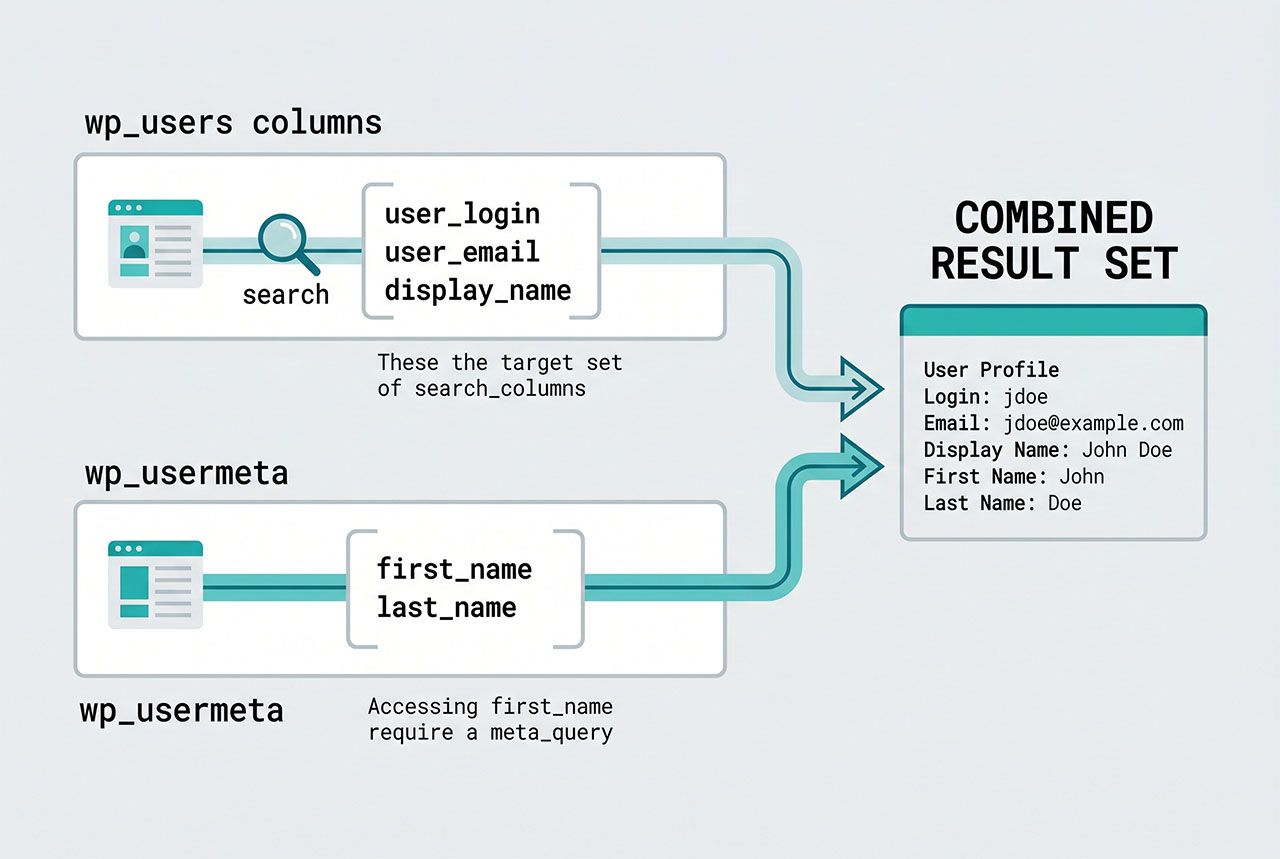
search_columns accepts any column from the wp_users table:
IDuser_loginuser_emailuser_urluser_nicenamedisplay_name
The wildcard characters (*) bracket the search term:
'*john*'— matches “john” anywhere in the column.'john*'— matches columns starting with “john”.'*john'— matches columns ending with “john”.'john'— exact-match only.
WordPress converts the asterisks into SQL % and passes the value through esc_like + prepare, so user-supplied search strings are safe to interpolate directly.
Using the get_users() wrapper
$users = get_users( array(
    'search'         => '*' . $search_query . '*',
    'search_columns' => array(
        'user_login',
        'user_email',
        'display_name',
    ),
) );
get_users() returns the results array directly — what you usually want. Use WP_User_Query when you also need ->get_total() for pagination or plan to call ->query() multiple times with different page indexes.
Searching first_name and last_name (user meta)
first_name and last_name aren’t columns on wp_users — they’re rows in wp_usermeta. To search across meta, pair the search block with a meta_query:
$q = 'john';

$user_query = new WP_User_Query( array(
    'search'         => '*' . $q . '*',
    'search_columns' => array( 'user_login', 'user_email', 'display_name' ),
    'meta_query'     => array(
        'relation' => 'OR',
        array(
            'key'     => 'first_name',
            'value'   => $q,
            'compare' => 'LIKE',
        ),
        array(
            'key'     => 'last_name',
            'value'   => $q,
            'compare' => 'LIKE',
        ),
    ),
) );
The caveat: the top-level relation between search and meta_query is AND, not OR — so this query returns users where both the search columns and one of the meta rows match. For a true OR across all fields, perform two queries and merge results, or store first/last name into display_name and rely only on search_columns.
Pagination
$per_page = 20;
$paged    = max( 1, (int) get_query_var( 'paged' ) );

$user_query = new WP_User_Query( array(
    'search'         => '*' . $q . '*',
    'search_columns' => array( 'user_login', 'user_email', 'display_name' ),
    'number'         => $per_page,
    'paged'          => $paged,
) );

$users  = $user_query->get_results();
$total  = $user_query->get_total();
$pages  = (int) ceil( $total / $per_page );
number sets the per-page limit; paged is the 1-indexed page. Without number, WordPress returns every matching user, which is fine for 100-user sites and very slow for 100,000-user sites.
Restricting by role
$users = get_users( array(
    'role__in'       => array( 'editor', 'author' ),
    'search'         => '*' . $q . '*',
    'search_columns' => array( 'user_login', 'user_email', 'display_name' ),
) );
role filters by a single role; role__in takes an array; role__not_in excludes roles. Combine with the search pattern to scope a user picker to just the right audience.
Frequently asked questions
Pass search and search_columns to WP_User_Query (or the get_users() helper): new WP_User_Query(['search' => '*john*', 'search_columns' => ['user_login', 'user_email', 'display_name']]). The asterisks are wildcards — *term* matches anywhere, term* matches prefix. WordPress runs a LIKE across each listed column.
first_name and last_name natively? Not directly — first name and last name live in wp_usermeta, not in wp_users, and search_columns only supports columns on the wp_users table. To search across meta fields, use meta_query alongside search: ['meta_query' => [['key' => 'first_name', 'value' => $q, 'compare' => 'LIKE'], 'relation' => 'OR', ['key' => 'last_name', 'value' => $q, 'compare' => 'LIKE']]]. Combining both search kinds gets verbose fast — consider promoting the names into wp_users.display_name if this is a frequent query.
WP_User_Query vs get_users() — which one? get_users() is a thin wrapper around WP_User_Query that returns the results array directly. Use it when you only need the user list. Reach for WP_User_Query when you also need the total count (->get_total()) for pagination, or when you want to iterate the result pages via query_vars reuse. Both support the exact same arguments.
search with wildcards SQL-injection safe? Yes. WordPress escapes the value through $wpdb->esc_like() plus $wpdb->prepare() before assembling the query, so user-supplied search strings are safe to pass through directly. Don’t try to “help” by adding backslashes or calling addslashes yourself — WordPress will double-escape and your query will miss real matches. Pass the raw input.
Use number for per-page and paged for the page index: ['number' => 20, 'paged' => max(1, get_query_var('paged'))]. Then $query->get_total() (on WP_User_Query) gives the total matching users for rendering paginate_links() or a custom counter. Without number, WordPress returns every match — fine for small sites, painful once you have thousands of users.
Related guides
- How to Login a User Programmatically in WordPress — the typical follow-up after you’ve found the right user.
- How to Check If a User Is Logged In in WordPress — guarding a user search UI to admins only.
- How to Prepare a %LIKE% SQL Statement in WordPress — the raw-
$wpdbpattern behindsearch. - How to Retrieve the Last Inserted Row ID in WordPress — other
$wpdbeveryday patterns.
References
WordPress developer reference for WP_User_Query and get_users: developer.wordpress.org/reference/classes/wp_user_query.