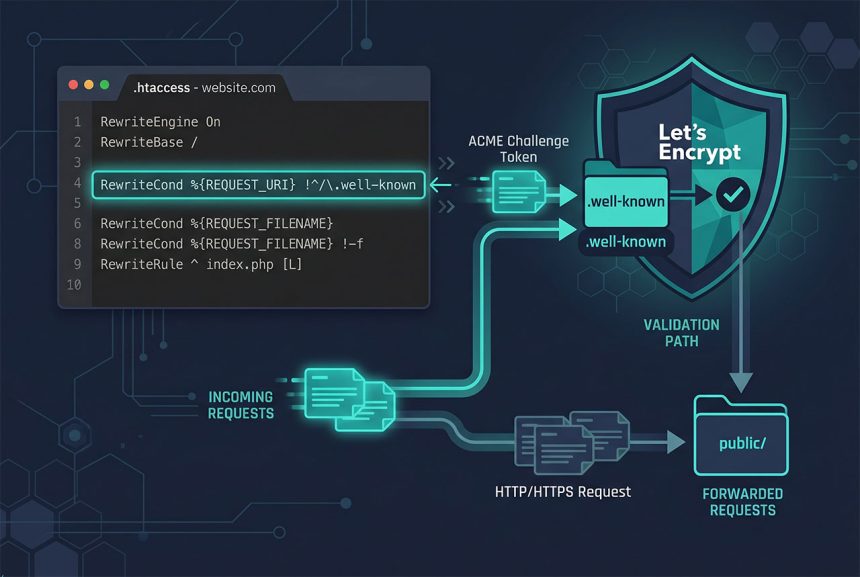
Your laravel htaccess well-known rewrite is eating Let’s Encrypt’s ACME challenge — the request for /.well-known/acme-challenge/<token> gets forwarded into public/, Laravel’s router can’t match it, and certbot fails with Invalid response from http://example.com/.well-known/acme-challenge/.... The fix is a single RewriteCond that excludes /.well-known/ from the rewrite. This guide shows the exact rule, where to put it, and the nginx equivalent for non-Apache setups.
Last verified: 2026-04-23 on Apache 2.4 with Laravel 11 on shared cPanel hosting. Originally published 2022-08-05, rewritten and updated 2026-04-23.
TL;DR
In the project-root .htaccess, add a RewriteCond that excludes /.well-known/ before the forwarding rule:
<IfModule mod_rewrite.c>
    RewriteEngine On
    RewriteCond %{REQUEST_URI} !^/\.well-known
    RewriteCond %{REQUEST_URI} !^public
    RewriteRule ^(.*)$ public/$1 [L]
</IfModule>
Why the error happens
If you’ve dropped a Laravel app onto shared hosting with the standard “forward everything into public/” .htaccess (see Fix 403 Forbidden on Laravel Shared Hosting), the rule looks like:
<IfModule mod_rewrite.c>
    RewriteEngine On
    RewriteCond %{REQUEST_URI} !^public
    RewriteRule ^(.*)$ public/$1 [L]
</IfModule>
When certbot issues a certificate via the HTTP-01 challenge, it does two things:
- Writes a token file into
/.well-known/acme-challenge/<long-random-string>on your server. - Asks Let’s Encrypt to fetch
http://yourdomain.com/.well-known/acme-challenge/<long-random-string>and confirm the token matches.
Apache receives the second request, your .htaccess rewrites it to public/.well-known/acme-challenge/..., Laravel’s router sees an unknown route, and the response is a 404 from Laravel or whatever error page the app is set up to emit. Certbot logs:
Detail: Invalid response from
http://example.com/.well-known/acme-challenge/EXAMPLE_TOKEN
Fix — one more RewriteCond
The existing rule already uses a RewriteCond to prevent an infinite loop on ^public. Add another for /.well-known/:
<IfModule mod_rewrite.c>
    RewriteEngine On
    RewriteCond %{REQUEST_URI} !^/\.well-known
    RewriteCond %{REQUEST_URI} !^public
    RewriteRule ^(.*)$ public/$1 [L]
</IfModule>
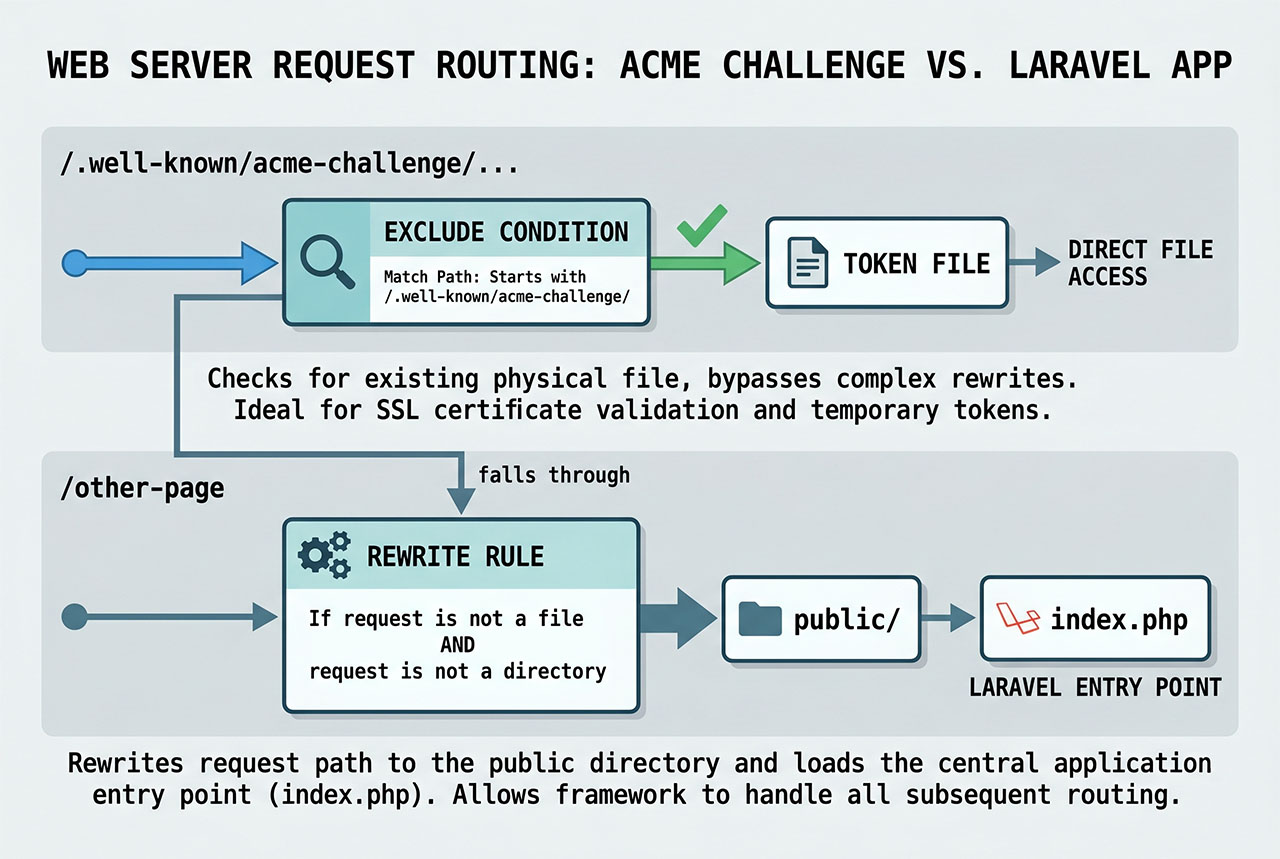
Both RewriteCond lines must pass before the RewriteRule fires. The first says “URL must not start with /.well-known,” the second says “URL must not already be under public.” If either condition is true (requested path IS /.well-known/... or already starts with public), the rewrite is skipped and Apache serves the file directly from the project root.
The backslash in \.well-known is an escape — regex treats the dot as “any character” without it. Escaping makes sure the rule matches only the literal /.well-known/ path, not something like /1well-known.
Verify the fix
Before re-running certbot, put a test file in place and fetch it over plain HTTP:
mkdir -p .well-known/acme-challenge
echo "hello-acme" > .well-known/acme-challenge/test

curl -sS http://example.com/.well-known/acme-challenge/test
# expected output: hello-acme
If curl returns hello-acme, the rewrite is bypassed correctly. If it returns a Laravel error page or the site’s index, the condition hasn’t taken effect — double-check the file is at the project root (same folder as artisan and composer.json), and that there’s no per-directory .htaccess in .well-known/ overriding things.
Delete the test file once it’s confirmed and run certbot:
rm .well-known/acme-challenge/test
sudo certbot --apache -d example.com -d www.example.com
Nginx equivalent
Nginx doesn’t read .htaccess. The equivalent lives in the server block:
server {
    listen 80;
    server_name example.com;
    root /var/www/example.com/public;

    location ^~ /.well-known/acme-challenge/ {
        root /var/www/example.com;
        try_files $uri =404;
    }

    location / {
        try_files $uri $uri/ /index.php?$query_string;
    }

    location ~ \.php$ {
        fastcgi_pass unix:/run/php/php8.3-fpm.sock;
        include fastcgi.conf;
    }
}
The ^~ modifier makes this location block win over any regex location, which matters if you also have a regex block that would otherwise catch the request. root inside the block points at the project root (not public/), so try_files looks for the challenge file in .well-known/acme-challenge/ at the project level.
Renewal works automatically
Once the .well-known exclude is in place, the rule is permanent — the certbot renew cron job uses the same HTTP-01 challenge every ~60 days and succeeds without manual intervention. Test it with:
sudo certbot renew --dry-runA successful dry-run is a strong signal the scheduled renewal will also work.
Frequently asked questions
Because Let’s Encrypt’s HTTP-01 challenge writes a token into /.well-known/acme-challenge/ and expects to fetch it back over HTTP. Your Laravel .htaccess rewrite into public/ forwards that request to Laravel’s router, which doesn’t know the route and returns a 404. Certbot sees the 404 (or a Laravel error page) and reports Invalid response from http://example.com/.well-known/acme-challenge/.... The fix is one more RewriteCond that excludes /.well-known/ from the forwarding.
It exposes the entire /.well-known/ path tree directly — meaning the web server serves files out of it without Laravel’s router seeing them. /.well-known/ is a reserved IANA namespace for exactly this kind of use (ACME challenges, security.txt, apple-app-site-association), so this is the correct behavior. Files you don’t put in that directory are never served from it.
.well-known folder actually live? In your Laravel project root, alongside the public/ folder and the .htaccess file. Certbot writes the challenge token there, and with the RewriteCond excluding /.well-known/, Apache serves the file directly from that path. If the folder doesn’t exist when certbot runs, certbot creates it. After issuance the folder can be left in place — it’s only populated during a challenge.
Nginx doesn’t use .htaccess. The equivalent is a location block in the server config: location ^~ /.well-known/acme-challenge/ { root /var/www/example.com; try_files $uri =404; }. Place it above your existing location / that forwards to index.php. The ^~ modifier ensures this location wins over regex location matches.
Yes — the certbot renew cron job uses the same HTTP-01 challenge, and as long as the .well-known exclude stays in .htaccess, renewal keeps working with no further changes. Test it with certbot renew --dry-run; if that passes, the scheduled renewal will too.
Related guides
- Fix 403 Forbidden on Laravel Shared Hosting — the base
.htaccessrewrite this post extends. - How to Fix cURL Error 60 SSL Certificate Problem in Laravel — the outbound side of TLS.
- How to Install Laravel on Ubuntu — a fresh Laravel 11 install where
.htaccessshows up. - Step-by-Step Guide to Upgrading the Linux Kernel in CentOS 7 — sibling server-management reference.
References
Let’s Encrypt HTTP-01 challenge spec: letsencrypt.org/docs/challenge-types. Apache mod_rewrite reference: httpd.apache.org/docs/current/mod/mod_rewrite.