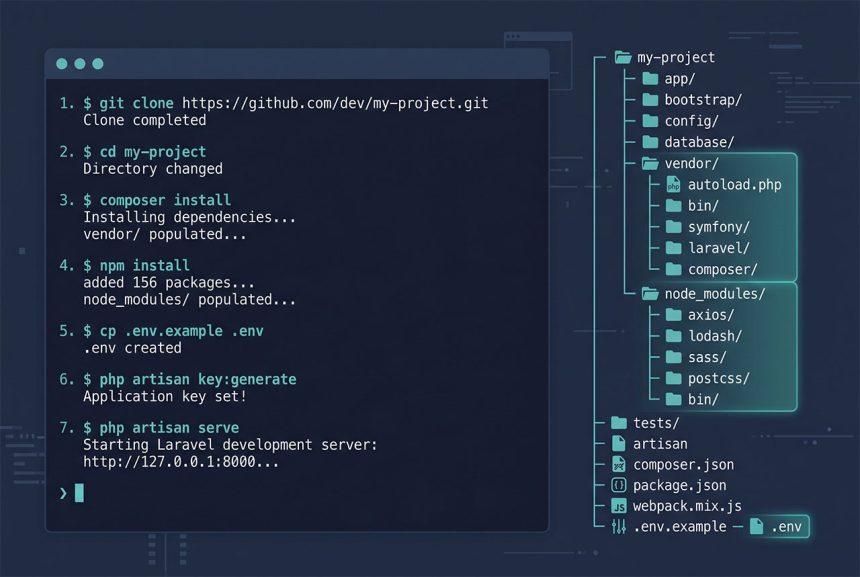
Laravel run project GitHub is a nine-command sequence that ends with php artisan serve and a working app at 127.0.0.1:8000. The repo you cloned is deliberately incomplete — vendor/, node_modules/, and .env are gitignored — and the commands below rebuild each of those in the right order. This guide walks through each step, explains what it actually does, and points out the two that most first-time cloners miss (key:generate and seeding).
- TL;DR
- 1. Clone the repo
- 2. Install PHP dependencies
- 3. Install JS dependencies (if package.json exists)
- 4. Create .env from the example
- 5. Generate the application key
- 6. Fill in database credentials
- 7. Run migrations
- 8. Seed starter data (optional)
- 9. Start the dev server
- Common failures
- Frequently asked questions
- Related guides
- References
Last verified: 2026-04-23 on Laravel 11 with PHP 8.3, Composer 2.7, and Node 20.
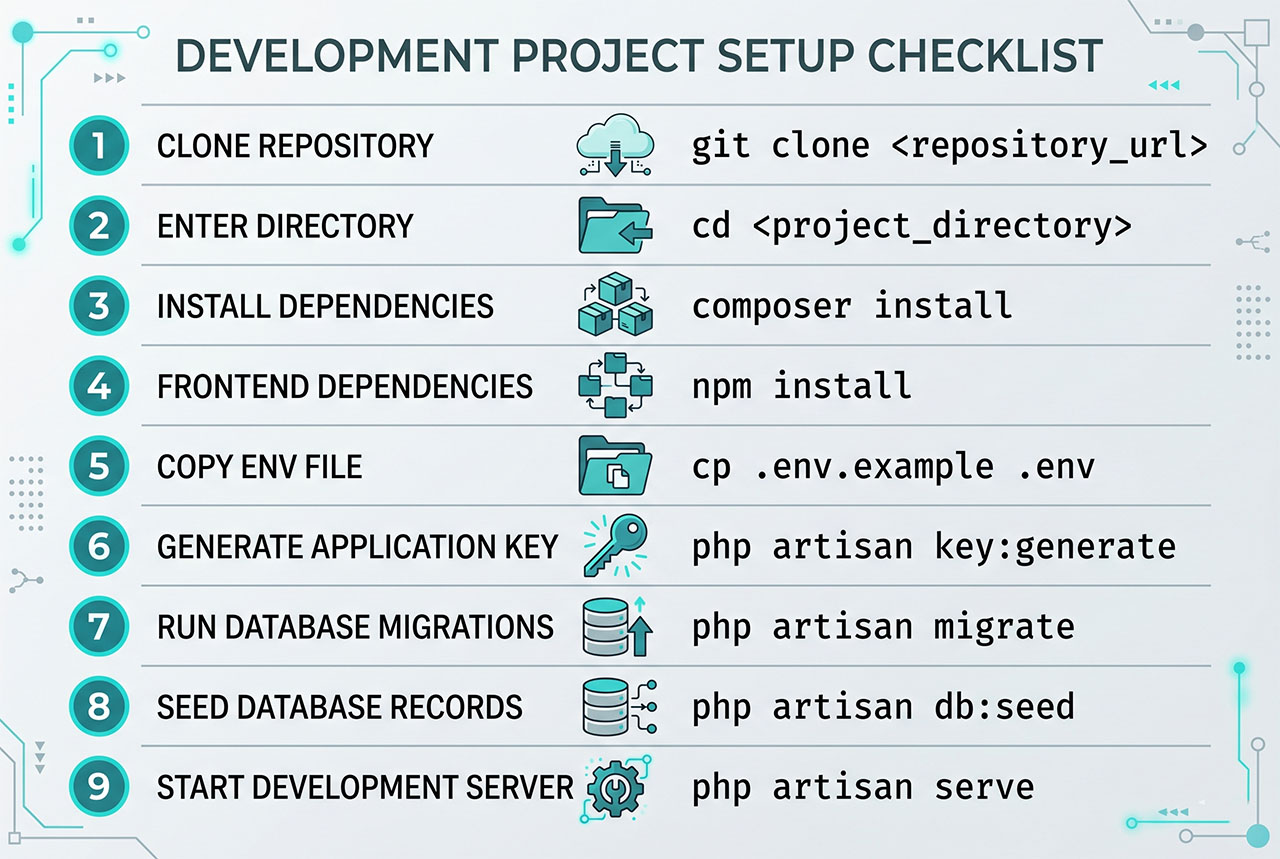
TL;DR
git clone <repo-url> && cd <project-folder>
composer install
npm install && npm run build
cp .env.example .env
php artisan key:generate
# edit .env with DB credentials, then:
php artisan migrate --seed
php artisan serve
1. Clone the repo
git clone <project>
cd <project-folder>
Make sure git is installed (git --version). If you only have a ZIP download, extract it and cd into the extracted folder. Every command below runs from the project root — the folder that contains artisan, composer.json, and package.json.
2. Install PHP dependencies
composer installComposer reads composer.lock and downloads the exact package versions the author used, into vendor/. Use composer install — not composer update — so you get the tested dependency tree. If composer isn’t available, install it via the official setup script or see How to Install Composer on Ubuntu.
3. Install JS dependencies (if package.json exists)
npm install
npm run build
Skip this if the project doesn’t ship a package.json. Modern Laravel apps use Vite, so npm run build compiles CSS and JS into public/build/ — without it, @vite(...) in Blade can’t find the manifest and pages render unstyled. For live dev with hot reload, run npm run dev in a separate terminal instead of build.
4. Create .env from the example
cp .env.example .env.env is gitignored because it holds secrets — the app key, database passwords, API tokens. .env.example is the template the author ships: every key the app expects, with blank or placeholder values. cp makes your local copy, which you’ll fill in next.
5. Generate the application key
php artisan key:generateLaravel uses APP_KEY to encrypt cookies and session payloads. The command writes a new random 32-byte key into your .env‘s APP_KEY= line. Without it you get No application encryption key has been specified the moment the app boots.
6. Fill in database credentials
Open .env and update the DB_* block to match your local database:
DB_CONNECTION=mysql
DB_HOST=127.0.0.1
DB_PORT=3306
DB_DATABASE=myproject
DB_USERNAME=root
DB_PASSWORD=secret
Create the empty database first (CREATE DATABASE myproject; via your MySQL client), then let Laravel fill in the schema. For fresh MySQL setup see How to Install MySQL on Ubuntu.
7. Run migrations
php artisan migrateEach file under database/migrations/ is a schema change. Migrate runs them in order and records what was applied in the migrations table so re-runs are idempotent. If you get a connection error here, the credentials in step 6 are wrong or the database doesn’t exist yet.
8. Seed starter data (optional)
php artisan db:seedIf the project has files under database/seeders/, db:seed inserts dev/test data — admin user, sample records, lookup tables. Safe to skip if there’s no seeder; the app just starts with an empty database. To run migrate + seed in one command: php artisan migrate --seed.
9. Start the dev server
php artisan serveThe built-in server starts on http://127.0.0.1:8000. If port 8000 is taken, pass --port=8080. For a more production-like local setup, reach for Laravel Sail (Docker) or Valet (macOS).
Common failures
Permission deniedonstorage/orbootstrap/cache/—chmod -R 775 storage bootstrap/cache.- 500 error in the browser, nothing in the terminal — check
storage/logs/laravel.log; usually a missing config or cache. Runphp artisan config:clearandphp artisan cache:clear. - Assets load without styles —
npm run buildwasn’t run (or@vitedirective points at paths that don’t exist). See Compile Multiple CSS with Laravel Vite. - Class not found right after
composer install—composer dump-autoload.
Frequently asked questions
Three things are intentionally missing from a GitHub-cloned Laravel repo: the vendor/ folder (Composer dependencies), the node_modules/ folder (npm dependencies), and the .env file (secrets + database config). .gitignore excludes all three by convention. You rebuild them with composer install, npm install, and cp .env.example .env — in that order.
composer install and composer update? composer install reads composer.lock and installs the exact versions the project was developed with — deterministic, fast, what you want when running someone else’s project. composer update ignores the lock file, re-resolves every dependency to the latest version allowed by composer.json, and writes a new lock. Never run update to “make it work” — you’ll get a different dependency tree than the author tested.
php artisan key:generate matter? Laravel uses APP_KEY to encrypt cookies, session data, and anything wrapped by Crypt. A fresh clone has no key (the author’s key is gitignored with .env), and the app throws No application encryption key has been specified on boot. php artisan key:generate writes a random 32-byte key into your .env‘s APP_KEY= line — one command, done.
Run php artisan migrate once, after you’ve filled in the database credentials in .env and created an empty database. It creates the schema from the migration files under database/migrations/. If the project has seeders (database/seeders/), run php artisan db:seed after migrate to populate starter data. On subsequent runs, only re-run migrate if new migration files appear — it’s idempotent and skips already-applied migrations.
Yes. ./vendor/bin/sail up boots a Docker Compose stack with PHP, MySQL, Redis, and MailHog preconfigured — no local PHP install needed. The caveat: Sail depends on vendor/ already existing, so you still need to run composer install once (usually with a one-off docker run composer install container if PHP isn’t on the host). For a more portable dev environment across a team, Sail is the cleanest option.
Related guides
- How to Install Laravel on Ubuntu — start a new Laravel project instead of cloning one.
- How to Install Composer on Ubuntu — the dependency manager step 2 needs.
- How to Install the Latest Version of Node.js on Ubuntu — required for
npm install. - How to Run a Laravel Project Without a .env File — when
.envis genuinely unavailable.
References
Official Laravel installation docs: laravel.com/docs/installation. Composer docs: getcomposer.org/doc.