If you laravel run without .env, Laravel throws No application encryption key has been specified and refuses to boot. The error is real — the framework needs an APP_KEY to encrypt cookies and session data — but the .env file isn’t the only way to supply it. This guide covers the legitimate use cases (bootstrapped installers, container deploys) and the two patterns that keep the app running: a hardcoded default in config/app.php or real environment variables.
Last verified: 2026-04-23 on Laravel 11 with PHP 8.3. Originally published 2022-07-06, rewritten and updated 2026-04-23.
TL;DR
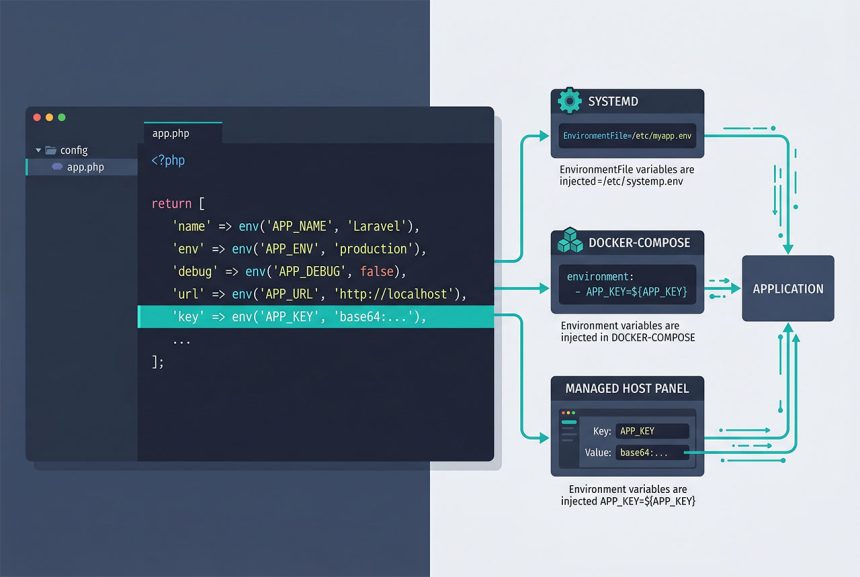
Give config/app.php‘s key entry a fallback — the second argument to env():
'key' => env('APP_KEY', 'base64:siwosp6b3izlfr7thexibrOb2f0Docr6'),Generate a real key with php artisan key:generate before committing anywhere near production.
Why Laravel refuses to boot without a key
On every request, Laravel bootstraps its encrypter to handle cookie signing, session serialization, and anything you’ve wrapped with the Crypt facade. The encrypter reads config('app.key'), which is defined as:
// config/app.php (stock)
'key' => env('APP_KEY'),
No .env, no APP_KEY environment variable, and no second argument to env() → the call returns null. The encrypter bails out rather than generating a runtime-random key (which would invalidate every existing session/cookie on restart) and throws:
RuntimeException: No application encryption key has been specified.Option 1 — Hardcoded fallback (installer use case)
When you’re shipping a Laravel app that needs to boot briefly before the user has a .env — a one-page installer that collects database credentials — give APP_KEY a safe default in config/app.php:
// config/app.php
'key' => env('APP_KEY', 'base64:siwosp6b3izlfr7thexibrOb2f0Docr6'),
Generate the default key once locally:
php -r 'echo "base64:" . base64_encode(random_bytes(32)) . PHP_EOL;'The base64: prefix is what Laravel’s encrypter expects. The installer can run its form, collect the real credentials, write a proper .env, and kick off php artisan key:generate — after which the fallback is never read again because env('APP_KEY') finally returns a value.
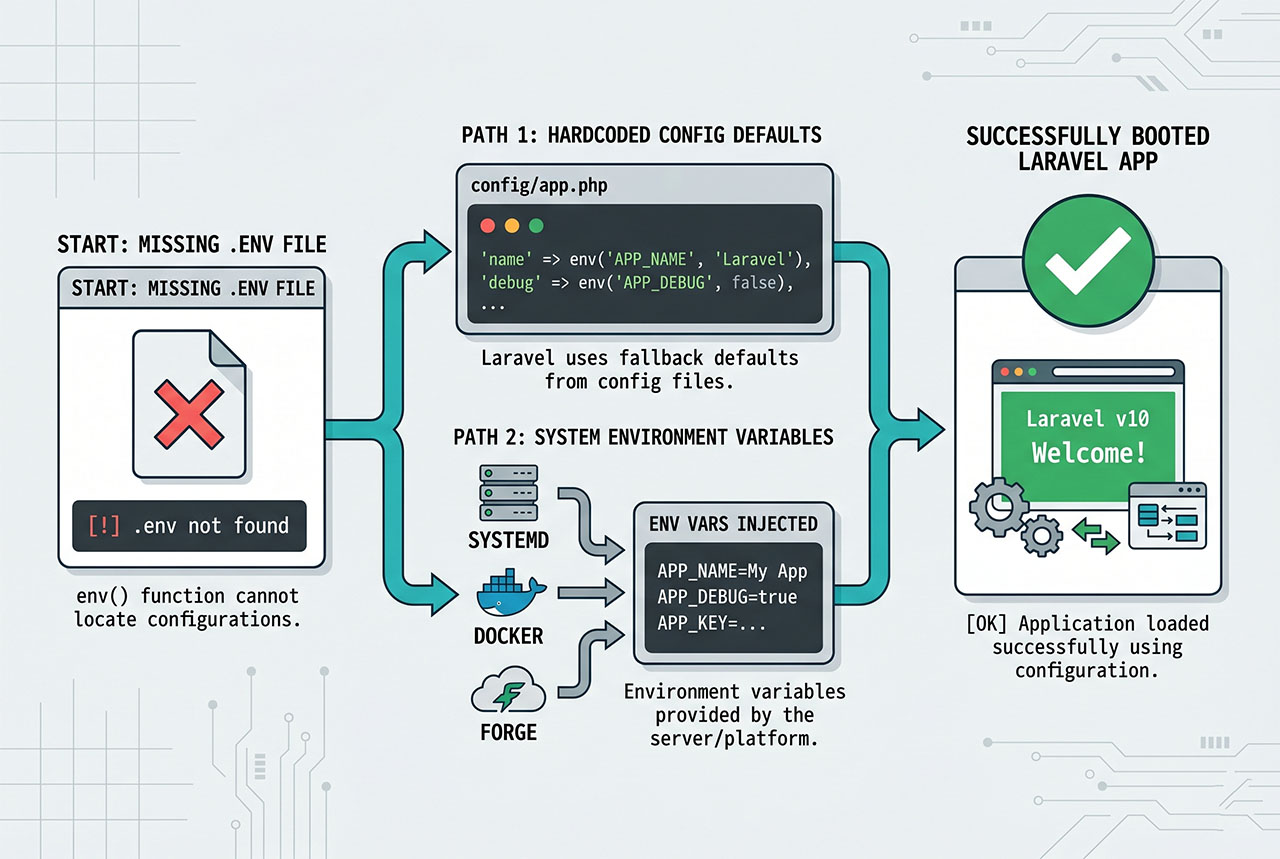
Option 2 — Real environment variables (production)
Laravel’s env() reads $_ENV and $_SERVER, so anything that sets those variables works — no .env file needed. Standard places to set them:
- systemd —
Environment="APP_KEY=base64:..."in the unit file, or viaEnvironmentFile=pointing at a file outside the repo. - Docker Compose —
environment:orenv_file:block per service. - Kubernetes — a
Secretmounted as env vars (envFrom.secretRef). - Managed hosts — Forge, Ploi, Envoyer, Vapor all expose an env panel that writes the vars into the runtime without shipping a
.envfile.
This is the standard production pattern. .env is a developer convenience for local work; production environments deliver the same vars through the hosting layer.
What else breaks without .env
APP_KEY is the loudest failure, but every env() call in every config/*.php file falls back to its second argument — or null if no default. Scan for env(...) calls without defaults and decide for each:
grep -rn "env('" config/Common offenders: DB_PASSWORD, DB_USERNAME, MAIL_PASSWORD, REDIS_PASSWORD, PUSHER_APP_SECRET. For each, either supply the env var or write a sensible default (usually empty string for optional passwords, a real value for required ones). Leave cache and queue drivers alone — their defaults (file, sync) work without any external service.
Always key:generate before shipping
The hardcoded fallback in Option 1 is for bootstrapped installers, not for real deploys. For any environment users actually hit:
php artisan key:generate --forceThis writes a fresh random key into .env (or into the env source, depending on how your deploy is wired). Committing the key to the repo or leaving the installer’s fallback in place in production is a real secret-exposure risk — anyone with source access can decrypt old session cookies.
Frequently asked questions
The boot fails with No application encryption key has been specified. Laravel’s encrypter reads APP_KEY from config/app.php‘s key entry, which in turn calls env('APP_KEY') — and with no .env file, env() returns null. The framework refuses to start rather than silently running with no encryption key.
APP_KEY in config/app.php? Only as a fallback for a tightly-scoped use case — an installer that boots the app briefly to collect database credentials from the user and then writes a real .env. Committing the key to version control is the same risk as committing any secret: anyone with repo access can decrypt old session cookies and Crypt-encoded values. For real deploys, always keep APP_KEY in environment variables (.env, server env, container secret manager) and never in the codebase.
.env? Yes. Laravel’s env() helper reads from $_ENV and $_SERVER, which any normal environment variable populates. Setting APP_KEY=base64:... in the systemd unit file, Docker Compose environment:, Kubernetes Secret, or Forge env panel has the same effect as putting it in .env. This is the standard production approach — .env is a developer convenience, not the only supply path.
.env? Every env() call in every config/*.php file returns its default argument when the key isn’t set. config/database.php has env('DB_CONNECTION', 'mysql') — that’s fine. But env('DB_PASSWORD') with no default returns null, and MySQL refuses the connection. Audit every env() call that doesn’t have a sensible second-argument default and decide whether to hardcode the default or require the env var.
php artisan config:cache freeze the defaults? Yes — config:cache resolves every env() call once and writes the output to bootstrap/cache/config.php. After that, env() outside config files returns null even if the env var is set. This is why production deploys always re-run config:cache after changing env vars, and why env() should never be called from controllers or services — always config('key') instead.
Related guides
- How to Run a Laravel Project from GitHub — the normal path that starts from
.env.example. - How to Get Config Variables in Laravel —
config()vsenv()and whyenv()belongs only in config files. - How to Install Laravel on Ubuntu — fresh install, fresh
.env. - How to Install Composer on Ubuntu — the tool behind
composer install.
References
Official Laravel configuration docs: laravel.com/docs/configuration.