To get multiple rows from the WordPress database, use $wpdb->get_results() — not get_row(). The get_row() method is designed to return a single row; for an array of records use get_results(), which returns an array of objects (or arrays, with the right output type).
Last verified: 2026-05-17 on WordPress 6.5. Originally published 2023-05-22, rewritten and updated 2026-05-17.
Use get_results() for multiple rows
global $wpdb;

$start_date = '2026-01-01';
$end_date   = '2026-01-31';

$posts = $wpdb->get_results( $wpdb->prepare(
    "SELECT * FROM {$wpdb->posts}
     WHERE post_date >= %s AND post_date <= %s
     ORDER BY post_date DESC",
    $start_date,
    $end_date
) );

foreach ( $posts as $post ) {
    echo esc_html( $post->post_title ) . '<br>';
}
Two important touches that the source didn’t include: $wpdb->prepare() with %s placeholders for user input (mandatory, prevents SQL injection), and $wpdb->posts instead of a hardcoded wp_posts (works on installs with a custom table prefix).
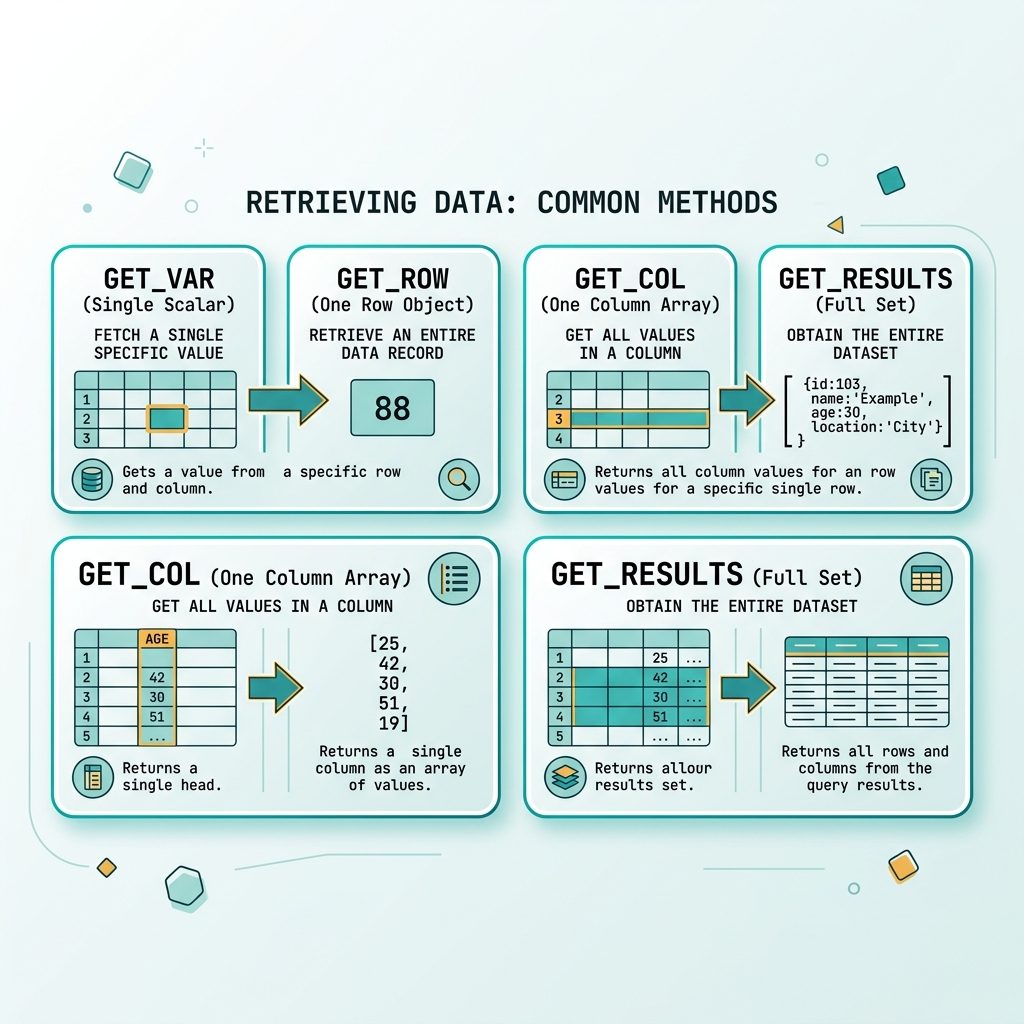
All four $wpdb result helpers
get_var()— single scalar (first column of first row). One post’s title.get_row()— one row as an object. The first matching post.get_col()— one column from every row, flat array. An array of post IDs.get_results()— full row-set as an array of objects. An array of post records.
// One value
$count   = $wpdb->get_var( "SELECT COUNT(*) FROM {$wpdb->posts}" );

// One row
$post    = $wpdb->get_row( "SELECT * FROM {$wpdb->posts} WHERE ID = 1" );

// One column
$titles  = $wpdb->get_col( "SELECT post_title FROM {$wpdb->posts} LIMIT 10" );

// Full result set
$posts   = $wpdb->get_results( "SELECT * FROM {$wpdb->posts} LIMIT 10" );
Pick the output format
// Default — array of stdClass objects
$posts = $wpdb->get_results( $sql );
echo $posts[0]->post_title;

// Associative arrays
$posts = $wpdb->get_results( $sql, ARRAY_A );
echo $posts[0]['post_title'];

// Numeric arrays
$posts = $wpdb->get_results( $sql, ARRAY_N );
echo $posts[0][3];

// Keyed by the first column (e.g. ID -> row)
$posts = $wpdb->get_results( $sql, OBJECT_K );
echo $posts[42]->post_title;   // row with ID=42
Don’t forget prepare()
// WRONG — direct interpolation, vulnerable to SQL injection
$posts = $wpdb->get_results(
    "SELECT * FROM {$wpdb->posts} WHERE post_status = '$status'"
);

// RIGHT — placeholders with prepare()
$posts = $wpdb->get_results( $wpdb->prepare(
    "SELECT * FROM {$wpdb->posts} WHERE post_status = %s",
    $status
) );
Use %s for strings, %d for integers, %f for floats. The %i placeholder (introduced in WP 6.2) escapes identifiers (table or column names) when you need to interpolate one of those.
Frequently asked questions
get_row(), get_results(), get_col(), and get_var()? get_var() returns a single scalar (first column of first row). get_row() returns one row (first matching row). get_col() returns one column from every row as a flat array. get_results() returns the full row-set as an array of objects (or arrays, depending on the output type). Pick the narrowest one — they all share the same query but trim what they return.
$wpdb->prepare()? Yes, anytime the query interpolates user input or any variable that didn’t come from a trusted whitelist. $wpdb->prepare() escapes placeholders for you (%s, %d, %f). Concatenating $_GET or $_POST into a query string is the WordPress version of SQL injection — same vulnerability, same fix.
Pass the output-type constant as the second argument: $wpdb->get_results($sql, ARRAY_A). Options are OBJECT (default — array of stdClass), OBJECT_K (array keyed by the first column), ARRAY_A (array of associative arrays), and ARRAY_N (array of numerically-indexed arrays).
wp_ hardcoded in many examples but not always correct? WordPress installs can use a custom prefix (set in wp-config.php via $table_prefix). Hardcoding wp_posts breaks on sites that picked a different prefix. Use $wpdb->posts, $wpdb->users, $wpdb->options for core tables — they resolve to the correct prefix. For custom tables, build the name with $wpdb->prefix . 'mytable'.
Related guides
- How to Prepare a LIKE SQL Statement in WordPress
- How to Get the Last Inserted Row ID from $wpdb
- How to Get WordPress Posts by Date Range
References
wpdb class reference: developer.wordpress.org/reference/classes/wpdb. $wpdb->get_results(): developer.wordpress.org/reference/classes/wpdb/get_results. $wpdb->prepare(): developer.wordpress.org/reference/classes/wpdb/prepare.