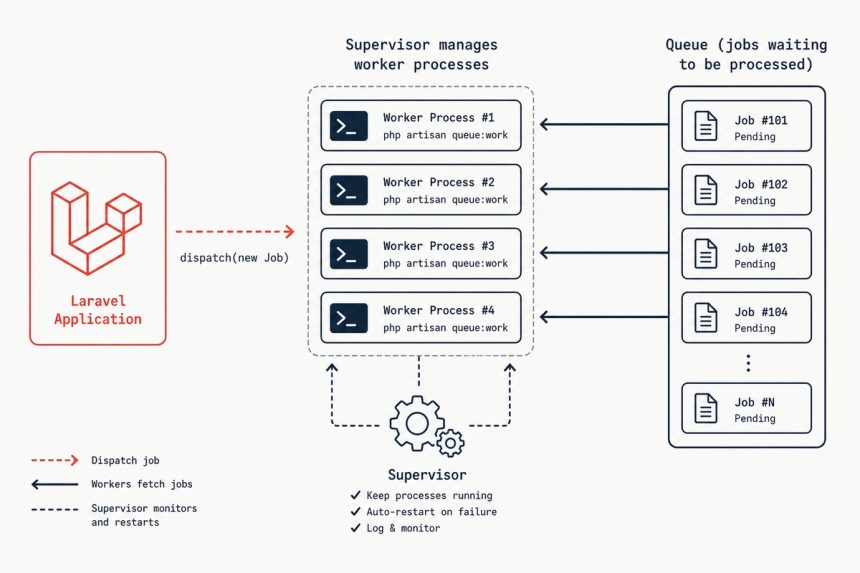
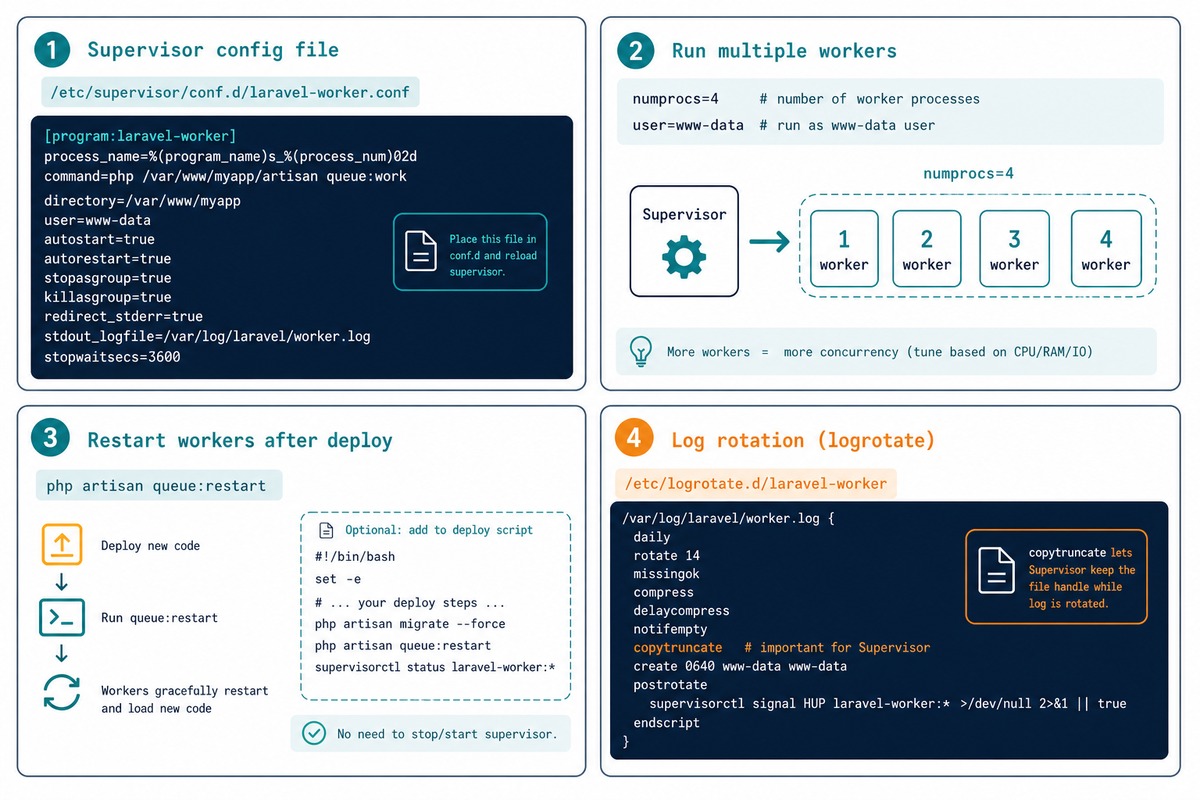
To run Laravel queue workers in production, put Supervisor in charge of php artisan queue:work. Supervisor restarts crashed workers, runs multiple workers in parallel, captures their output to a log, and brings them all back on reboot. A 15-line config file in /etc/supervisor/conf.d/ is the entire setup.
- Why queue:work alone isn’t enough
- Prerequisites
- Step 1 — install Supervisor
- Step 2 — create the worker config
- Step 3 — load the config and start workers
- Step 4 — graceful restart after deploys
- Step 5 — multiple queues with different priorities
- Step 6 — log rotation
- Step 7 — handle failed jobs
- Step 8 — Horizon (optional, Redis-only)
- Useful supervisorctl commands
- Frequently asked questions
- Related guides
- References
Last verified: 2026-05-17 on Ubuntu 24.04 with Laravel 11, Supervisor 4.x, and PHP 8.3.
Why queue:work alone isn’t enough
In development, you run php artisan queue:work in a terminal and it dequeues jobs forever. In production this falls apart fast:
- Closing the SSH session kills the worker.
- A crashing job (out-of-memory, uncaught exception) takes the worker down with it — no auto-restart.
- Server reboots leave no workers running until you SSH back in.
- One worker can’t keep up with even modest traffic — you need several in parallel.
Supervisor solves all four. It’s a tiny process manager originally designed for exactly this kind of “keep N copies of this command running forever” task.
Prerequisites
- A working Laravel app deployed to the server (see How to Install Laravel).
- A queue driver configured — Redis (recommended), database, or SQS. For Redis setup see How to Install and Configure Redis on Ubuntu.
- Root or
sudoaccess.
Step 1 — install Supervisor
sudo apt update
sudo apt install -y supervisor

sudo systemctl enable --now supervisor

# Confirm
sudo supervisorctl status
# (empty — no programs defined yet)
Supervisor’s main config file is /etc/supervisor/supervisord.conf — don’t edit it. Per-program configs live in /etc/supervisor/conf.d/*.conf and are auto-loaded.
Step 2 — create the worker config
sudo tee /etc/supervisor/conf.d/laravel-worker.conf >/dev/null << 'EOF'
[program:laravel-worker]
process_name=%(program_name)s_%(process_num)02d
command=php /var/www/myapp/artisan queue:work redis --sleep=3 --tries=3 --max-time=3600 --timeout=120
autostart=true
autorestart=true
user=www-data
numprocs=4
redirect_stderr=true
stdout_logfile=/var/log/laravel-worker.log
stdout_logfile_maxbytes=50MB
stdout_logfile_backups=10
stopwaitsecs=130
EOF
Walking through each directive:
process_name— gives each of thenumprocsworkers a distinct name likelaravel-worker_00,_01, etc.command— what Supervisor runs. Adjust/var/www/myapp/to your app path;redisto your queue driver.--sleep=3— when the queue is empty, sleep 3 seconds before polling again. Lower = faster pickup of new jobs, higher = less Redis traffic.--tries=3— failed jobs retry up to 3 times before being marked failed (recorded in thefailed_jobstable).--max-time=3600— worker exits after 1 hour and Supervisor restarts it. Bounds memory growth from leaks in third-party packages.--timeout=120— kill any single job that runs longer than 120 seconds. Match this to the longest legitimate job duration; pair withstopwaitsecsbelow.numprocs=4— four worker processes in parallel. Tune based on load.user=www-data— run as the same user as PHP-FPM and the web server. Required so the worker can read app files and write tostorage/.stopwaitsecs=130— when Supervisor stops the program, wait up to 130 seconds for workers to finish their current job (slightly longer than--timeout). Without this, in-flight jobs get killed mid-execution.
Step 3 — load the config and start workers
sudo supervisorctl reread       # detect new config files
sudo supervisorctl update       # start any newly-defined programs
sudo supervisorctl status       # see what's running
Expected output:
laravel-worker:laravel-worker_00   RUNNING   pid 12345, uptime 0:00:05
laravel-worker:laravel-worker_01   RUNNING   pid 12346, uptime 0:00:05
laravel-worker:laravel-worker_02   RUNNING   pid 12347, uptime 0:00:05
laravel-worker:laravel-worker_03   RUNNING   pid 12348, uptime 0:00:05
Four workers running. Drop a job into the queue (from Tinker or a controller) and tail the log to see one of them pick it up:
tail -f /var/log/laravel-worker.logStep 4 — graceful restart after deploys
# After deploying new code
php artisan queue:restart

# That's it — Supervisor takes care of the rest
queue:restart sets a Redis flag that workers check between jobs. Each worker finishes its current job, sees the flag, and exits cleanly. Supervisor restarts each one with the updated code. No in-flight jobs are lost.
Include php artisan queue:restart in your deploy script (after composer install and migrations). Forgetting it means workers keep running the previous version of your code until the next --max-time expiry or server restart — a subtle bug that’s painful to debug.
Step 5 — multiple queues with different priorities
Apps often have a fast “interactive” queue (emails, notifications) and a slow “batch” queue (reports, exports). Run dedicated workers per queue:
sudo tee /etc/supervisor/conf.d/laravel-worker.conf >/dev/null << 'EOF'
[program:laravel-worker-default]
process_name=%(program_name)s_%(process_num)02d
command=php /var/www/myapp/artisan queue:work redis --queue=high,default --sleep=1 --tries=3 --max-time=3600 --timeout=60
autostart=true
autorestart=true
user=www-data
numprocs=6
redirect_stderr=true
stdout_logfile=/var/log/laravel-worker-default.log
stopwaitsecs=70

[program:laravel-worker-long]
process_name=%(program_name)s_%(process_num)02d
command=php /var/www/myapp/artisan queue:work redis --queue=long --sleep=5 --tries=2 --max-time=3600 --timeout=600
autostart=true
autorestart=true
user=www-data
numprocs=2
redirect_stderr=true
stdout_logfile=/var/log/laravel-worker-long.log
stopwaitsecs=610
EOF

sudo supervisorctl reread
sudo supervisorctl update
The --queue=high,default argument tells the worker to process the high queue first, falling back to default when high is empty. Six fast workers handle interactive jobs; two long workers (with a 10-minute --timeout) handle slow batch work without blocking the fast ones.
From your app, dispatch jobs to specific queues: SendInvoiceEmail::dispatch($order)->onQueue('high');.
Step 6 — log rotation
Supervisor’s built-in stdout_logfile_maxbytes rotates at 50 MB by default but only keeps the last 10 files. For longer retention, hand log rotation off to logrotate:
sudo tee /etc/logrotate.d/laravel-worker >/dev/null << 'EOF'
/var/log/laravel-worker*.log {
    daily
    rotate 14
    compress
    delaycompress
    missingok
    notifempty
    copytruncate
}
EOF
copytruncate is important here — Supervisor keeps the log file open, so a regular log rotation that renames the file would orphan Supervisor’s handle. copytruncate copies the contents to the rotated name and truncates in place, keeping Supervisor happy.
Step 7 — handle failed jobs
# Create the failed_jobs table (if you haven't already)
php artisan queue:failed-table
php artisan migrate

# List failed jobs
php artisan queue:failed

# Retry a specific failed job
php artisan queue:retry 5e3ab7c2-...

# Retry all failed jobs
php artisan queue:retry all

# Forget a failed job (permanently)
php artisan queue:forget 5e3ab7c2-...

# Clear all failed jobs
php artisan queue:flush
After a job exceeds --tries, it’s moved to the failed_jobs table. Review failures regularly — most are bugs you can fix and retry, but some are permanent (e.g., a deleted user, a network call to a now-deprecated API) and should be investigated, fixed at the source, then flushed.
Step 8 — Horizon (optional, Redis-only)
If you’re on Redis, install Horizon for the dashboard:
composer require laravel/horizon
php artisan horizon:install
php artisan migrate
Then replace your Supervisor config to run horizon instead of queue:work:
[program:laravel-horizon]
process_name=%(program_name)s
command=php /var/www/myapp/artisan horizon
autostart=true
autorestart=true
user=www-data
numprocs=1
redirect_stderr=true
stdout_logfile=/var/log/laravel-horizon.log
stopwaitsecs=3600
Horizon itself manages worker processes based on the configuration in config/horizon.php — you set processes, tries, and timeout there instead of as CLI arguments to queue:work. Visit /horizon in your browser for the dashboard (protected by Laravel’s auth gate).
Useful supervisorctl commands
sudo supervisorctl status                  # all programs
sudo supervisorctl start  laravel-worker:*  # start every worker in the group
sudo supervisorctl stop   laravel-worker:*  # stop every worker
sudo supervisorctl restart laravel-worker:* # full restart (use queue:restart for graceful)
sudo supervisorctl tail   laravel-worker_00 # last stdout chunk for one worker
sudo supervisorctl tail   laravel-worker_00 -f stdout  # follow live
Frequently asked questions
Horizon is the dashboard layer on top of queue workers — beautiful UI, real-time metrics, failed-job inspection, throughput graphs. It still needs a process manager underneath (Supervisor or systemd) to keep horizon running. For Redis-backed queues, Horizon is worth the extra dependency. For database or SQS queues, Horizon isn’t supported and Supervisor + queue:work is the standard. The skills overlap completely; this guide’s Supervisor config is what Horizon docs themselves recommend.
php artisan queue:restart not always kill workers immediately? By design. queue:restart flags every worker to exit after finishing their current job. This prevents losing work mid-execution. If a worker is processing a 5-minute job when you call queue:restart, it finishes that job and then exits. Supervisor starts a fresh worker (now running your updated code) in its place. Workers stuck on a job longer than --timeout are killed forcefully — which is why setting --timeout matters.
Depends on job type. I/O-bound jobs (sending emails, calling external APIs): match worker count to expected concurrent jobs — 4–8 is typical for a small app. CPU-bound jobs (image processing, PDF generation): worker count = CPU cores; more than that wastes context-switches. Start with 4, watch queue depth via php artisan queue:monitor or Horizon, scale up if backlog grows. Each worker uses 30–80 MB of PHP memory, so a small VPS can easily run a dozen.
If your queue driver is database or Redis, in-flight jobs are reserved — marked as being processed by a specific worker. When the worker process dies (or the server reboots) without completing the job, the reservation has a TTL (default 60s, set via --timeout) after which the job becomes available again and another worker picks it up. The job runs again from the start. Design jobs to be idempotent: running twice should leave the same state as running once.
Related guides
- How to Install Laravel
- How to Install and Configure Redis on Ubuntu
- How to Create a Login and Registration System in Laravel
- How to Run a Cron Job as a Non-Root User
- How to Stop Cron Output
References
Laravel queues documentation: laravel.com/docs/queues. Laravel Horizon: laravel.com/docs/horizon. Supervisor documentation: supervisord.org. logrotate manual: man logrotate.