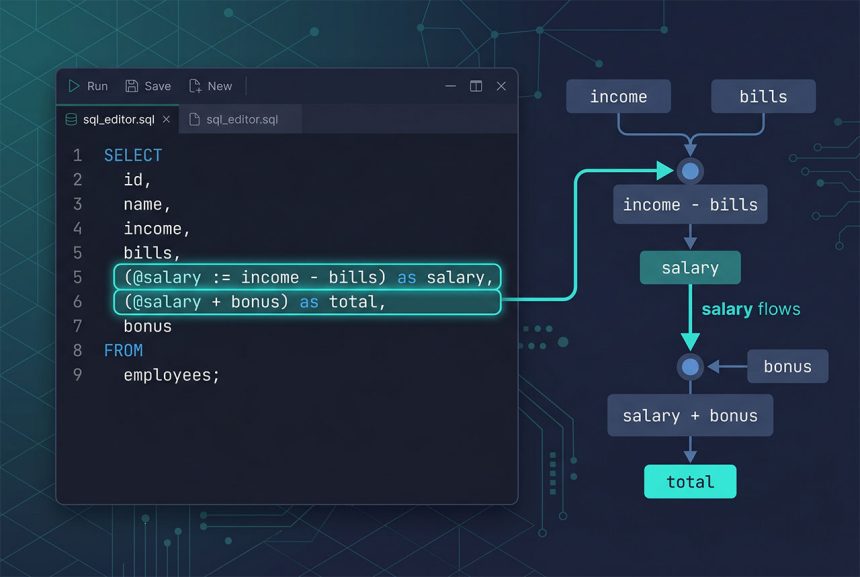
A laravel mysql variable select lets you compute an intermediate value in one select item and reuse it in the next — something SQL aliases can’t do, because every item in a SELECT list is evaluated against the same row snapshot. MySQL’s user variables (@name) store the value for the duration of the statement, which is what you need for patterns like “salary = income − bills, then total = salary + bonus.” This guide shows the raw SQL form, the Laravel Query Builder wrapper, and when to reach for a CTE instead on MySQL 8.
Last verified: 2026-04-23 on Laravel 11 with PHP 8.3 and MySQL 8.0. Originally published 2023-03-29, rewritten and updated 2026-04-23.
TL;DR
use Illuminate\Support\Facades\DB;

$rows = DB::select(DB::raw(
    'SELECT (@salary := income - bills) as salary,
            (@salary + bonus) as total
     FROM table_name'
));
Why SELECT ... as salary, (salary + bonus) as total doesn’t work
SQL doesn’t evaluate SELECT items left-to-right. Every alias is metadata for the output columns, not a variable bound during expression evaluation — so when MySQL evaluates (salary + bonus), the salary alias doesn’t exist yet as a column. You get:
-- This fails with "Unknown column 'salary' in 'field list'"
SELECT (income - bills) as salary,
       (salary + bonus) as total
FROM table_name;
There are three ways around it: repeat the full expression, use a MySQL user variable, or use a CTE. The expression-repeat works but bloats the SQL; the other two are covered below.
Option 1 — MySQL user variables (works on MySQL 5.7 & 8.0)
A MySQL user variable (@name) is session-scoped and can be assigned inline with :=:
-- Assign once, reuse immediately
SELECT (@salary := income - bills) as salary,
       (@salary + bonus) as total
FROM table_name;
The := operator is the assignment form. = alone is a comparison operator inside a SELECT, so it evaluates without assigning — always use := here. Inside SET statements both work:
SET @salary = income - bills;  -- fine in SET
SET @salary := income - bills; -- also fine in SET
Running it through Laravel
Wrap the raw SQL in DB::raw(...) and run it via DB::select:
use Illuminate\Support\Facades\DB;

$rows = DB::select(DB::raw(
    'SELECT (@salary := income - bills) as salary,
            (@salary + bonus) as total
     FROM table_name'
));
Or, staying closer to the query builder and letting Eloquent add WHERE/ORDER BY normally:
$rows = DB::table('table_name')
    ->selectRaw('(@salary := income - bills) as salary,
                 (@salary + bonus) as total')
    ->where('user_id', $userId)
    ->get();
selectRaw is the query-builder-native way to inject raw SQL into the select list — see the DB::raw vs selectRaw breakdown for when to pick which.
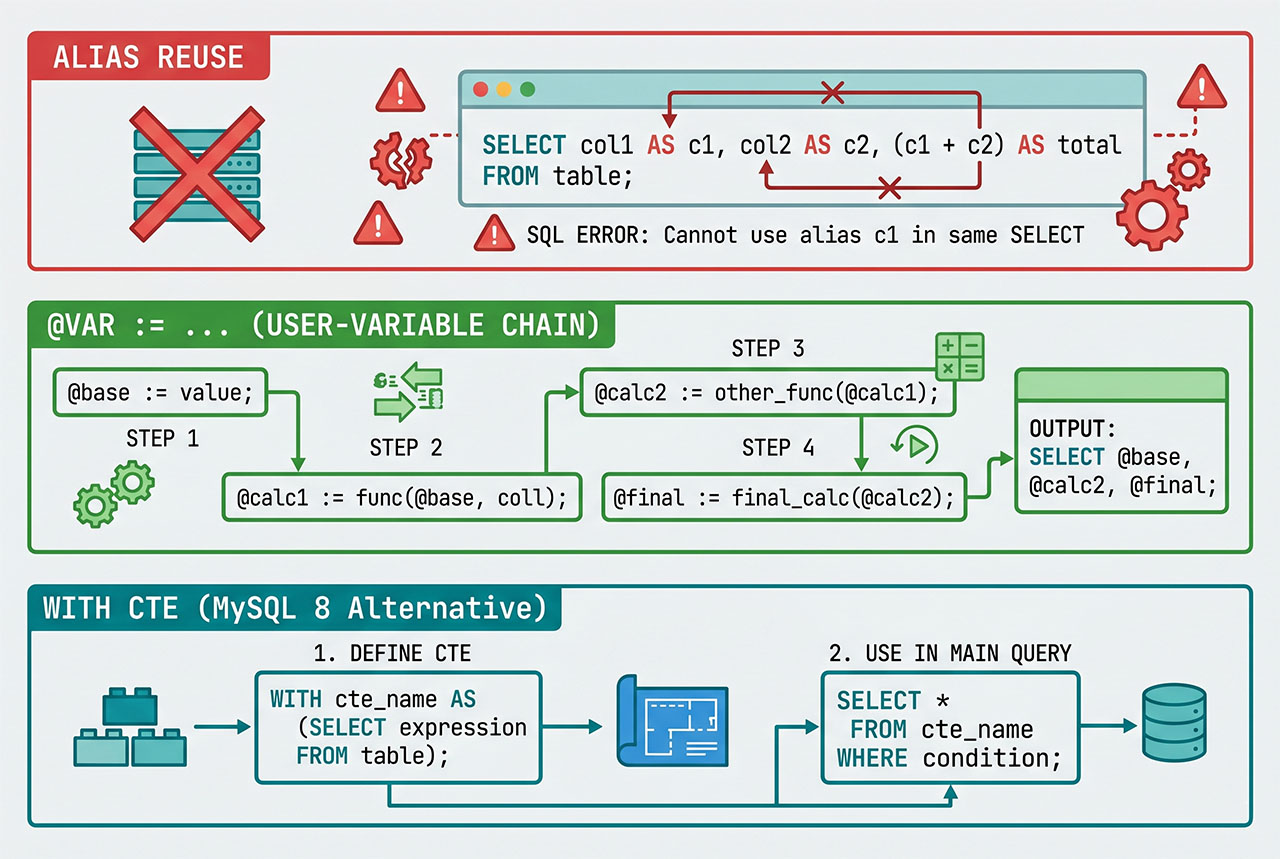
Option 2 — Common Table Expression (MySQL 8+)
MySQL 8.0 deprecated assigning to user variables inside non-SET statements and recommends CTEs as the modern replacement:
WITH base AS (
    SELECT id, income - bills AS salary, bonus
    FROM table_name
)
SELECT id, salary, salary + bonus AS total
FROM base;
Through Laravel:
$rows = DB::select('
    WITH base AS (
        SELECT id, income - bills AS salary, bonus
        FROM table_name
    )
    SELECT id, salary, salary + bonus AS total
    FROM base
');
The CTE names base become a virtual table the outer SELECT can reference by alias — which is exactly what MySQL couldn’t do with inline aliases. CTEs are the cleanest answer for green-field code on MySQL 8+ and MariaDB 10.2+. For existing code already using user variables, those still work on current MySQL 8.x; plan the migration before the feature is removed.
SQL-injection note
Both patterns use DB::raw / selectRaw, which skip parameter binding. Never interpolate user input into the raw SQL string. Dynamic values go through bindings:
DB::table('table_name')
    ->selectRaw('(@salary := income - bills) as salary,
                 (@salary + ?) as total', [$bonusMultiplier])
    ->get();
Column names and literal SQL keywords that you control stay inline; anything from $request goes through a binding.
Frequently asked questions
Use DB::select(DB::raw('SELECT (@salary := income - bills) as salary, (@salary + bonus) as total FROM table_name')). MySQL’s session-scoped user variables (@name) let you assign a value in one select item and reuse it in a later one — something the standard AS alias cannot do because aliases aren’t resolvable in the same select list.
= and := in MySQL? Inside SET, both work (SET @x = 5 and SET @x := 5 are equivalent). Inside a SELECT, you must use := because plain = is parsed as a comparison operator. In practice, always write := for variable assignment — it works in both contexts and avoids the surprise.
DB::select? Yes, chain selectRaw onto your query builder or Eloquent call: Salary::selectRaw('(@salary := income - bills) as salary, (@salary + bonus) as total')->get(). Same SQL under the hood, same session-variable semantics — just integrates cleanly with Eloquent relationships, scopes, and model casts.
SELECT? The behavior of assigning to a user variable inside a non-SET statement is officially deprecated since MySQL 8.0 and documented as subject to removal in a future release. The docs recommend using common table expressions (WITH salary AS (SELECT income - bills AS v FROM ...) SELECT ...) or window functions instead. For green-field code on MySQL 8.0+, prefer CTEs; for short-term production fixes the variable pattern still works.
SQL evaluates every item in a SELECT list against the same source row snapshot — aliases are metadata for the output, not variables that get computed left-to-right. So (income - bills) as salary, (salary + bonus) as total fails because salary isn’t a column yet when the second expression is evaluated. User variables (@salary :=) work around this by storing the value in the MySQL session for the duration of the statement.
Related guides
- How to Fix “Unknown column ‘CONCAT'” in Laravel — the sibling raw-expression pattern for CONCAT and friends.
- How to Use Multiple where and orWhere in Laravel Eloquent — combining raw selects with bound filters.
- How to Use Order By in Eloquent Laravel — ordering on computed columns.
- How to Install MySQL on Ubuntu — a fresh MySQL 8.0 environment to run these queries against.
References
MySQL user-defined variables docs: dev.mysql.com/doc/refman/8.0/en/user-variables. MySQL CTE docs: dev.mysql.com/doc/refman/8.0/en/with.