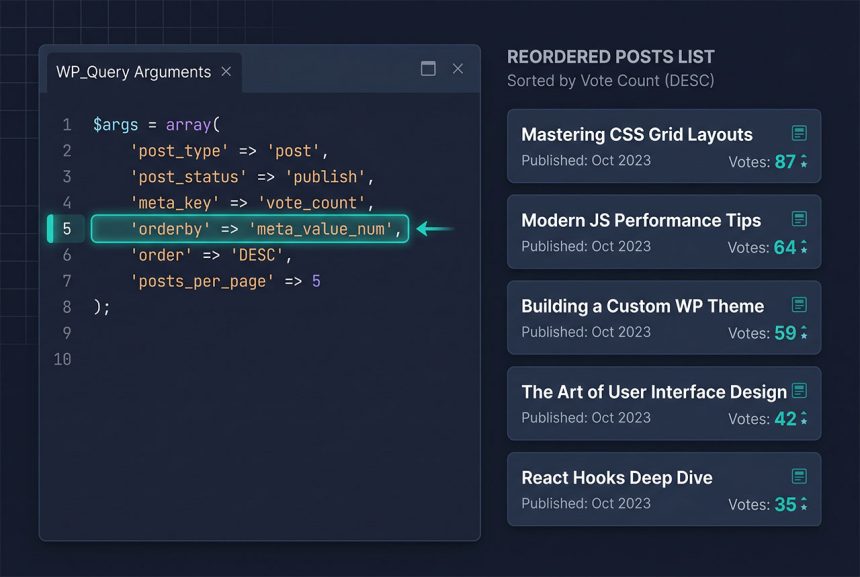
To wordpress order posts by meta value — votes, event date, price, a custom sort_order field — set meta_key to the field name and orderby to meta_value_num (numbers) or meta_value (strings). This works in both WP_Query and pre_get_posts: the first for secondary loops, the second when you want the archive page itself to honor the ordering without an extra query.
Last verified: 2026-04-23 on WordPress 6.5 and PHP 8.3. Originally published 2022-07-17, rewritten and updated 2026-04-23.
TL;DR
$args = array(
    'post_type' => 'post',
    'meta_key'  => 'custom_meta_key',
    'orderby'   => 'meta_value_num',   // 'meta_value' for strings
    'order'     => 'DESC',
);

$query = new WP_Query( $args );
Secondary loop — new WP_Query
For a custom list on a widget, template part, or shortcode — anywhere you’re building a fresh loop alongside the page’s main query:
$args = array(
    'post_type'      => 'post',
    'posts_per_page' => 10,
    'meta_key'       => 'votes',
    'orderby'        => 'meta_value_num',
    'order'          => 'DESC',
);

$top_voted = new WP_Query( $args );

if ( $top_voted->have_posts() ) {
    while ( $top_voted->have_posts() ) {
        $top_voted->the_post();
        the_title( '<h3>', '</h3>' );
    }
    wp_reset_postdata();
}
wp_reset_postdata() after the loop is what restores the main query’s globals so the rest of the page keeps rendering correctly. Skip it and the next the_title() elsewhere on the page shows the last-iterated custom-query post.
Main query — pre_get_posts
When the goal is to reorder the actual archive (homepage, post-type archive, category page), hook pre_get_posts and mutate the main query in place — avoids a second database trip and keeps the built-in pagination, sticky posts, and pretty permalinks working:
add_action( 'pre_get_posts', 'how7o_order_posts_by_votes' );

function how7o_order_posts_by_votes( $query ) {
    if ( is_admin() || ! $query->is_main_query() ) {
        return;
    }

    if ( $query->is_post_type_archive( 'post' ) ) {
        $query->set( 'meta_key', 'votes' );
        $query->set( 'orderby', 'meta_value_num' );
        $query->set( 'order', 'DESC' );
    }
}
Three guards to notice:
is_admin()skips the hook in the WP admin, where you almost never want to change post order.$query->is_main_query()skips every secondaryWP_Queryon the page — widgets, related posts, block queries. Without it you’ll reorder things you didn’t mean to.$query->is_post_type_archive('post')scopes the change to the posts archive. Swap foris_category(),is_home(), oris_post_type_archive('event')depending on which page should honor the ordering. See also scoping pre_get_posts to a custom post type.
Numeric vs string sorting
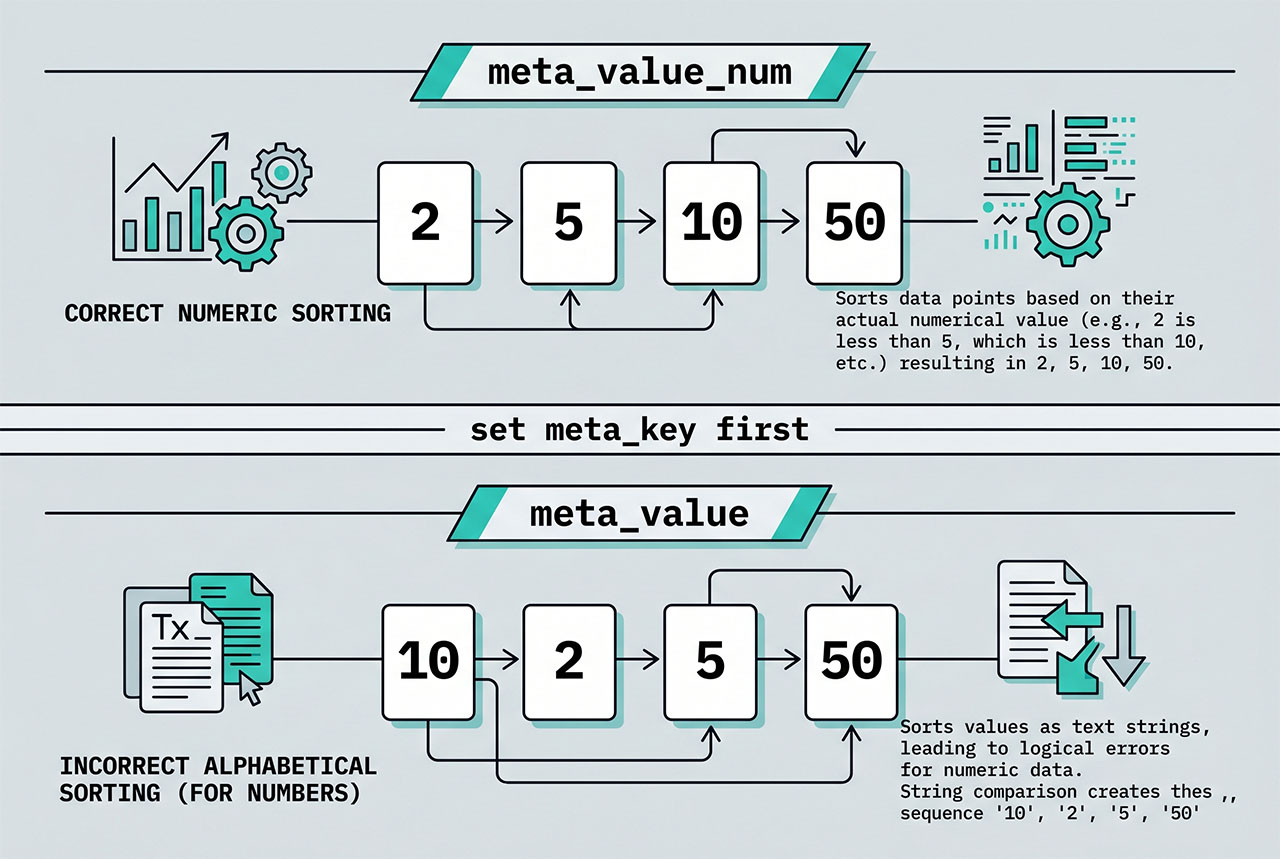
// Numeric — '2' < '10'
'orderby' => 'meta_value_num',

// String — '10' < '2' (alphabetical)
'orderby' => 'meta_value',
WordPress stores every meta value as a string in wp_postmeta.meta_value (LONGTEXT). meta_value_num tells MySQL to cast before comparing, which is what you want for any numeric meta — ratings, vote counts, event dates stored as unix timestamps, prices stored without formatting. meta_value is correct for text meta (author initials, status codes like active/paused).
Including posts without the meta key
Default behavior: posts without the meta_key are silently excluded from the result (the wp_postmeta join has no matching row). To include them with a secondary sort:
$args = array(
    'post_type'  => 'post',
    'meta_query' => array(
        'relation' => 'OR',
        array(
            'key'     => 'votes',
            'compare' => 'EXISTS',
        ),
        array(
            'key'     => 'votes',
            'compare' => 'NOT EXISTS',
        ),
    ),
    'orderby'    => array(
        'meta_value_num' => 'DESC',
        'date'           => 'DESC',
    ),
    'meta_key'   => 'votes',
);
The meta_query with EXISTS/NOT EXISTS makes posts without the key eligible; the two-element orderby puts voted posts first (by vote count) and falls back to post date for the rest.
Frequently asked questions
meta_value_num? meta_value sorts alphabetically — '10' comes before '2' because character-by-character comparison puts '1' before '2'. meta_value_num casts the meta value to a number before sorting, so '2' comes before '10'. Use the numeric form for vote counts, prices, ratings — any integer or decimal stored as string. Use the string form for text meta (author initials, status labels).
meta_key alongside orderby? WordPress joins the wp_postmeta table on the posts query when meta_key is present, and the sort column becomes that meta row’s value. Without a meta_key, there’s nothing to sort by — the orderby => meta_value_num argument silently falls back to post date. Always pair the two.
pre_get_posts better than making a new WP_Query? When you want the archive page itself (the post-type archive, a category archive, the homepage) to show posts in a custom order, pre_get_posts is the right tool — it hooks the existing main query and avoids a second database hit plus pagination mismatch. For a secondary loop (a sidebar widget, a related-posts block, an AJAX endpoint), use a fresh WP_Query. Rule of thumb: modify the main query; build a new one for everything else.
By default, posts without the meta_key are excluded from the result entirely — the inner join filters them out. To include them, switch to a meta_query with a NOT EXISTS OR clause: ['relation' => 'OR', ['key' => 'votes', 'compare' => 'EXISTS'], ['key' => 'votes', 'compare' => 'NOT EXISTS']]. Then set orderby => ['meta_value_num' => 'DESC', 'date' => 'DESC'] so missing-meta posts fall back to date ordering.
Yes — on WordPress 4.2+, use the meta_query + named orderby pattern. Give each meta_query clause a key, then reference those keys from orderby: ['meta_query' => ['votes_clause' => ['key' => 'votes', 'type' => 'NUMERIC'], 'date_clause' => ['key' => 'event_date']], 'orderby' => ['votes_clause' => 'DESC', 'date_clause' => 'ASC']]. The ordering is stable and applies in the listed order.
Related guides
- How to Apply pre_get_posts on Custom Post Types in WordPress — scoping the
pre_get_postshook. - How to Get the Current Category ID in WordPress — branching the ordering per category.
- How to Get Posts by Date Range in WordPress — another filter you often combine with custom ordering.
- How to Prepare a %LIKE% SQL Statement in WordPress — when you need raw
$wpdbqueries instead.
References
WordPress developer reference for WP_Query and pre_get_posts: developer.wordpress.org/reference/classes/wp_query.