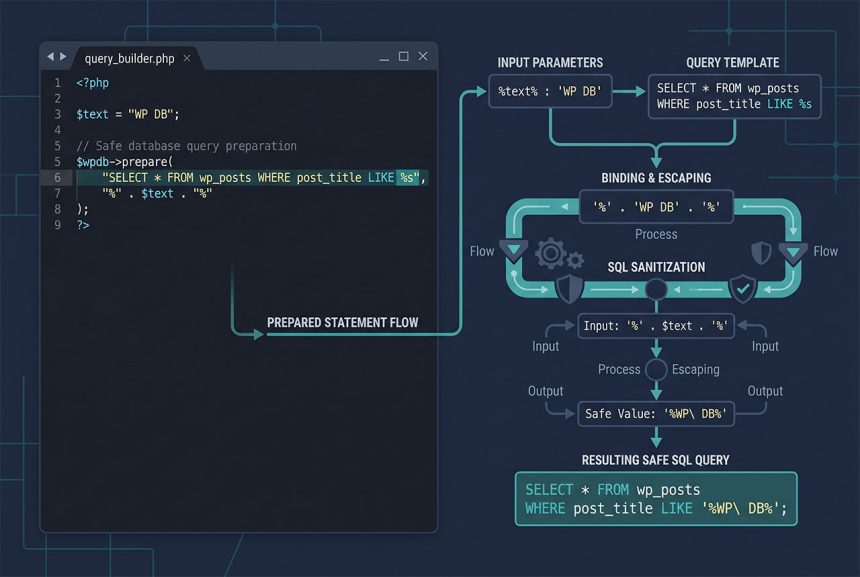
The wordpress prepare like pattern is always the same: put the placeholder %s in the SQL string, put the literal % wildcards around the value when you pass it in. The common wrong attempt — writing LIKE '%%s%' inside the query and passing just $text — confuses prepare()‘s printf-style formatter and breaks. This guide shows the correct shape, the esc_like() step that keeps user-supplied metacharacters from leaking semantics, and when to skip $wpdb entirely for WordPress’s built-in query classes.
Last verified: 2026-04-23 on WordPress 6.5 and PHP 8.3. Originally published 2022-10-07, rewritten and updated 2026-04-23.
TL;DR
$sql = $wpdb->prepare(
    "SELECT * FROM {$wpdb->prefix}my_table WHERE column LIKE %s",
    '%' . $wpdb->esc_like( $text ) . '%'
);

$rows = $wpdb->get_results( $sql );
Why the common attempt breaks
First instinct is to keep the wildcards in the query string:
// Broken
$wpdb->prepare(
    "SELECT * FROM {$wpdb->prefix}my_table WHERE column LIKE '%%s%'",
    $text
);
prepare() formats the query through a printf-style routine, where %% means a literal % and %s is the string placeholder. So %%s% parses as “literal percent, placeholder, orphan percent” — the orphan confuses the formatter and the output is malformed SQL.
The correct shape
$wpdb->prepare(
    "SELECT * FROM {$wpdb->prefix}my_table WHERE column LIKE %s",
    '%' . $text . '%'
);
Two changes:
- The SQL string has only a clean
%splaceholder — no literal%around it. - The value being passed in is already wrapped with
'%'‘s — PHP concatenation, beforeprepare()sees it.
prepare() then wraps the whole bound value in quotes and produces valid SQL: WHERE column LIKE '%my search%'.
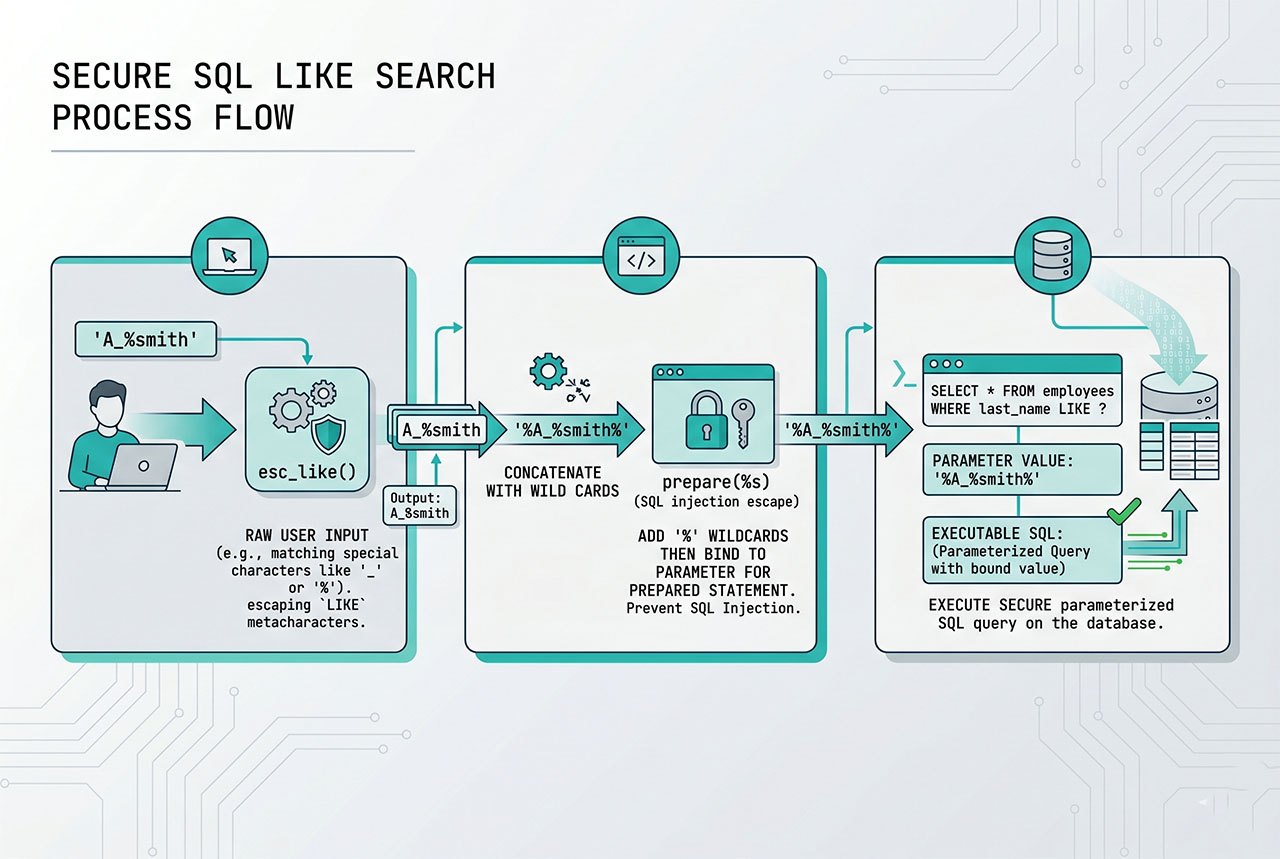
Add esc_like() for user input
$like = '%' . $wpdb->esc_like( $text ) . '%';

$sql = $wpdb->prepare(
    "SELECT * FROM {$wpdb->prefix}my_table WHERE column LIKE %s",
    $like
);
$wpdb->esc_like() escapes MySQL’s LIKE metacharacters — the literal % and _ a user might type. Without it, a search for “50% off” behaves as “starts with 50” (the % becomes a wildcard); with it, the search matches only the literal string.
Two escape stages at play:
esc_like()— escapes LIKE-specific metacharacters so user input matches as written.$wpdb->prepare()— escapes SQL-injection risks (quotes, null bytes, backslashes).
Both are needed for user-supplied search strings.
Common patterns
// 1. Match anywhere: %text%
$like = '%' . $wpdb->esc_like( $text ) . '%';

// 2. Starts-with: text%
$like = $wpdb->esc_like( $text ) . '%';

// 3. Ends-with: %text
$like = '%' . $wpdb->esc_like( $text );

// 4. Multi-column LIKE with OR
$sql = $wpdb->prepare(
    "SELECT * FROM {$wpdb->prefix}my_table
     WHERE column_a LIKE %s OR column_b LIKE %s",
    $like,
    $like
);
The multi-column form passes the same $like value twice — one for each %s. prepare() substitutes positional arguments in order, so you can bind the same variable multiple times without repeating the concatenation.
When to skip $wpdb
WordPress’s built-in query classes already handle LIKE correctly — you just pass the search term and WordPress wraps the wildcards internally:
// Posts
$query = new WP_Query( array( 's' => $text ) );

// Users — see the dedicated guide for search_columns
$users = new WP_User_Query( array(
    'search'         => '*' . $text . '*',
    'search_columns' => array( 'user_login', 'user_email', 'display_name' ),
) );
Drop to raw $wpdb for custom tables (your plugin’s own schema) or for joins WordPress’s classes don’t expose. For anything WordPress provides a class for, the class version is shorter, cached correctly, and less error-prone.
Frequently asked questions
Use %s as the placeholder in the query and wrap the value with literal % characters: $wpdb->prepare("SELECT * FROM ... WHERE column LIKE %s", '%' . $text . '%'). prepare() handles the escaping of the value (including MySQL LIKE metacharacters if you pass through $wpdb->esc_like()) and returns a ready-to-execute SQL string. Never put the % inside the placeholder itself — that’s what breaks.
LIKE %%s% not work? prepare() uses printf-style formatting, so %% is a literal percent sign and %s is the string placeholder. The sequence %%s% reads as: literal %, placeholder, orphan literal % — which confuses the formatter and typically produces malformed SQL. The safe pattern always puts the wildcards in the value, not the query string.
esc_like()? Yes, if the value comes from user input. esc_like() escapes MySQL’s LIKE metacharacters (% and _), so a search for "50%" literally matches fifty-percent instead of “starts with 50.” Typical shape: '%' . $wpdb->esc_like( $text ) . '%'. prepare() then handles SQL-level escaping on top.
%d or %f with LIKE? No — LIKE is a string operator. %d (integer) and %f (float) are for exact-match comparisons (WHERE id = %d). For wildcard searches always use %s, even when the column you’re searching holds numeric-looking content, because MySQL converts the column to a string before the LIKE comparison runs.
$wpdb way to run LIKE queries? For posts and users, WordPress’s query classes handle LIKE natively — WP_Query‘s s parameter, WP_User_Query‘s search + search_columns. See How to Search Users by Multiple Fields. Drop to $wpdb only for custom tables (your plugin’s own schema) or joins WordPress doesn’t expose.
Related guides
- How to Retrieve the Last Inserted Row ID in WordPress — the companion
$wpdbpattern for INSERTs. - How to Search Users by Multiple Fields in WordPress — built-in class equivalent for user search.
- How to Order Posts by Meta Value in WordPress — another
WP_Querypattern instead of raw SQL. - How to Get Posts by Date Range in WordPress — date_query vs raw
$wpdb.
References
WordPress developer reference for $wpdb->prepare and $wpdb->esc_like: developer.wordpress.org/reference/classes/wpdb/prepare.