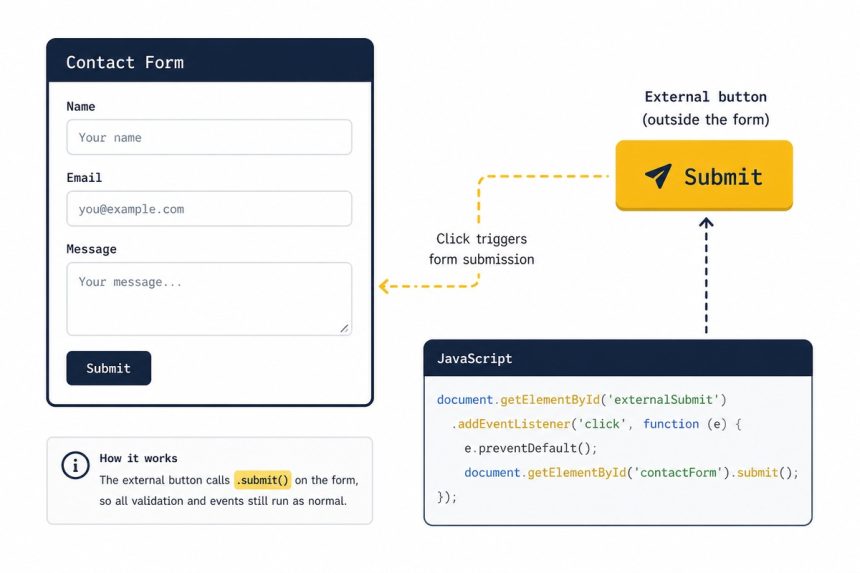
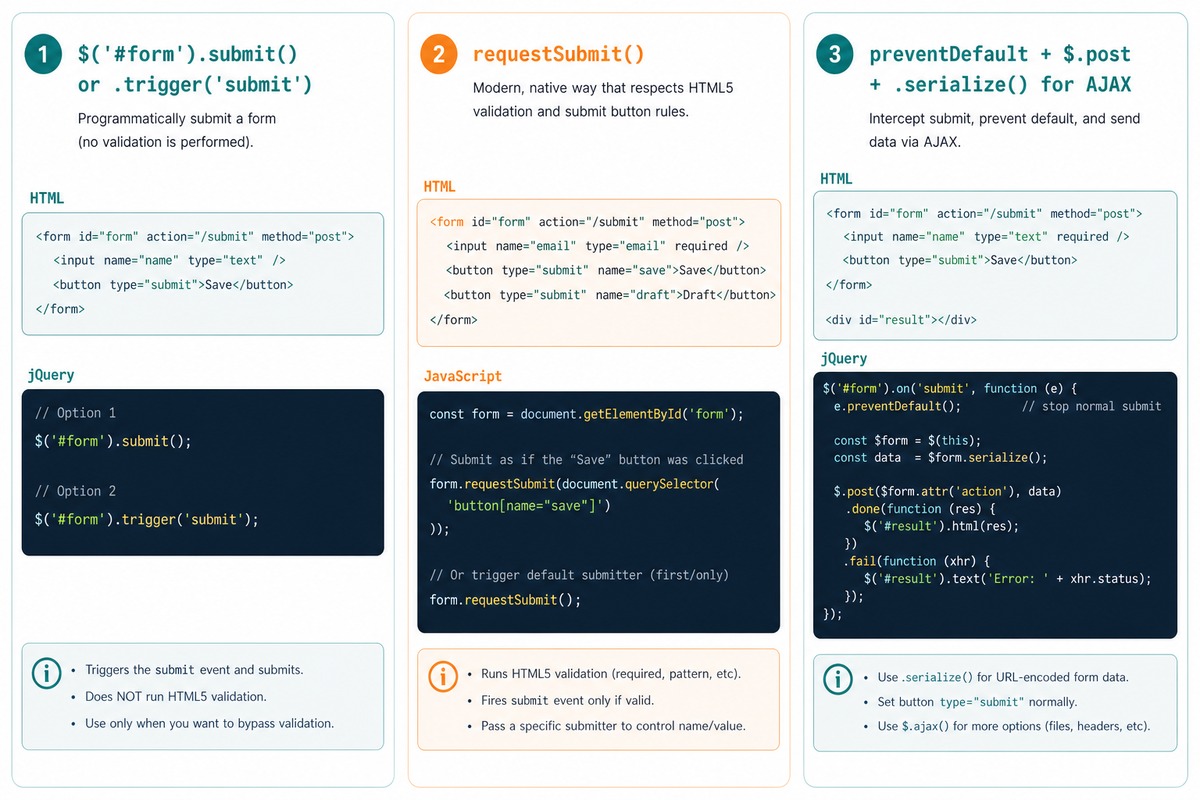
To submit a form with jQuery, call $('#myForm').submit() from your button handler. That fires the form’s normal submit event. .trigger('submit') is the equivalent longer form. For HTML5-validated submits (respecting required, type="email", etc.), call the native form.requestSubmit() instead.
Last verified: 2026-05-17 with jQuery 3.7. Originally published 2022-07-13, rewritten and updated 2026-05-17.
Submit from a button click
$('#some-button').on('click', function () {
    $('#some-form').submit();
});

// Equivalent
$('#some-button').on('click', function () {
    $('#some-form').trigger('submit');
});
Useful when the submit trigger isn’t a type="submit" button inside the form — like a button in a Bootstrap modal confirming a destructive action.
Bootstrap modal “are you sure?” pattern
<form id="delete-form" method="POST" action="/items/42">
    <button type="button" data-bs-toggle="modal" data-bs-target="#confirmModal">
        Delete
    </button>
</form>

<div class="modal fade" id="confirmModal">
    <div class="modal-dialog">
        <div class="modal-content">
            <div class="modal-body">Are you sure?</div>
            <div class="modal-footer">
                <button type="button" class="btn" data-bs-dismiss="modal">Close</button>
                <button type="button" class="btn btn-danger" id="confirm-delete">
                    Save Changes
                </button>
            </div>
        </div>
    </div>
</div>

<script>
$('#confirm-delete').on('click', function () {
    $('#delete-form').submit();
});
</script>
The “Save Changes” button in the modal lives outside the form. Clicking it programmatically submits the form. The opening Delete button uses Bootstrap’s data attributes to show the modal — no JavaScript for that step.
Submit with HTML5 validation
document.getElementById('some-form').requestSubmit();requestSubmit() (native, supported in every modern browser) runs HTML5 form validation first — required, pattern, type="email", etc. — and only submits if everything passes. jQuery’s .submit() bypasses validation, which is almost never what you want for user-driven submits.
Submit via AJAX instead
$('#myForm').on('submit', function (e) {
    e.preventDefault();

    $.post('/api/save', $(this).serialize())
        .done(function (data) {
            // success path
        })
        .fail(function () {
            // error path
        });
});
e.preventDefault() stops the browser’s normal submit. .serialize() URL-encodes the form’s fields into a query string ready for the request body. The page stays put while the server processes the data.
Frequently asked questions
$('form').submit() trigger an infinite loop? If you bound a submit handler that itself calls .submit(), the second call fires the same handler, which fires the second call again. Solutions: (1) bind the handler to a button click, not to the form’s submit event; (2) inside the submit handler, set a flag (form.dataset.submitting = '1') and skip the recursion; (3) use the native form.requestSubmit() which respects HTML validation and runs the normal submit flow once.
.submit() or .trigger('submit')? Functionally identical — both fire the form’s submit event. .trigger('submit') is the more explicit name (it’s the same general API as .trigger('click'), .trigger('change')). .submit() with no arguments is the jQuery shorthand. Either is fine; pick by codebase consistency.
Use the native form.requestSubmit() (no jQuery, no library). It runs HTML5 form validation first (required, pattern, type="email") and only submits if everything passes. Plain .submit() (jQuery or native) skips validation, which is rarely what you want for user-driven submits.
Bind to the submit event on the form, call e.preventDefault(), then send the form data via fetch/jQuery AJAX: $('#myForm').on('submit', function (e) { e.preventDefault(); $.post('/api', $(this).serialize()); }). .serialize() turns the form into a URL-encoded query string ready for the request body.
Related guides
- How to Check if a Bootstrap Modal Is Open with jQuery
- How to Add a Required Attribute to Input Fields in jQuery
- How to Disable or Enable an Input with JavaScript or jQuery
References
jQuery .submit(): api.jquery.com/submit. MDN HTMLFormElement.requestSubmit(): developer.mozilla.org/en-US/docs/Web/API/HTMLFormElement/requestSubmit. jQuery .serialize(): api.jquery.com/serialize.