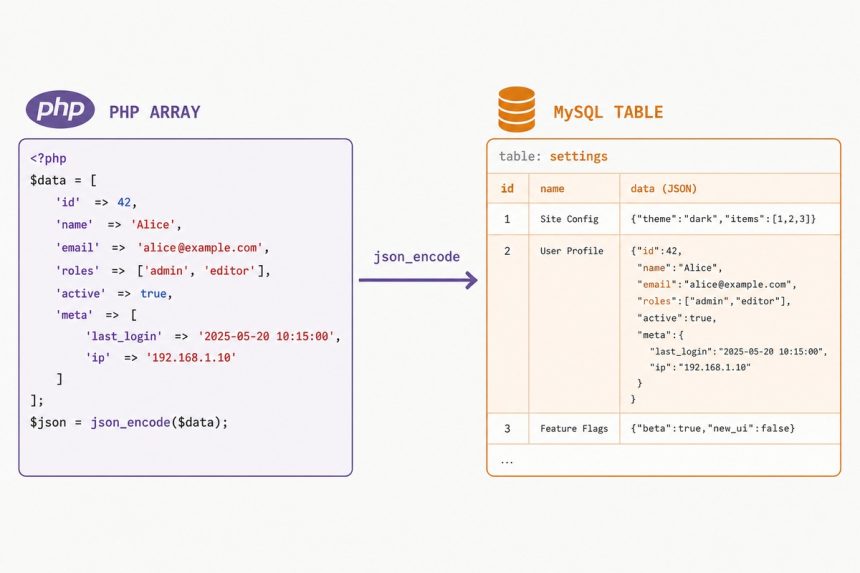
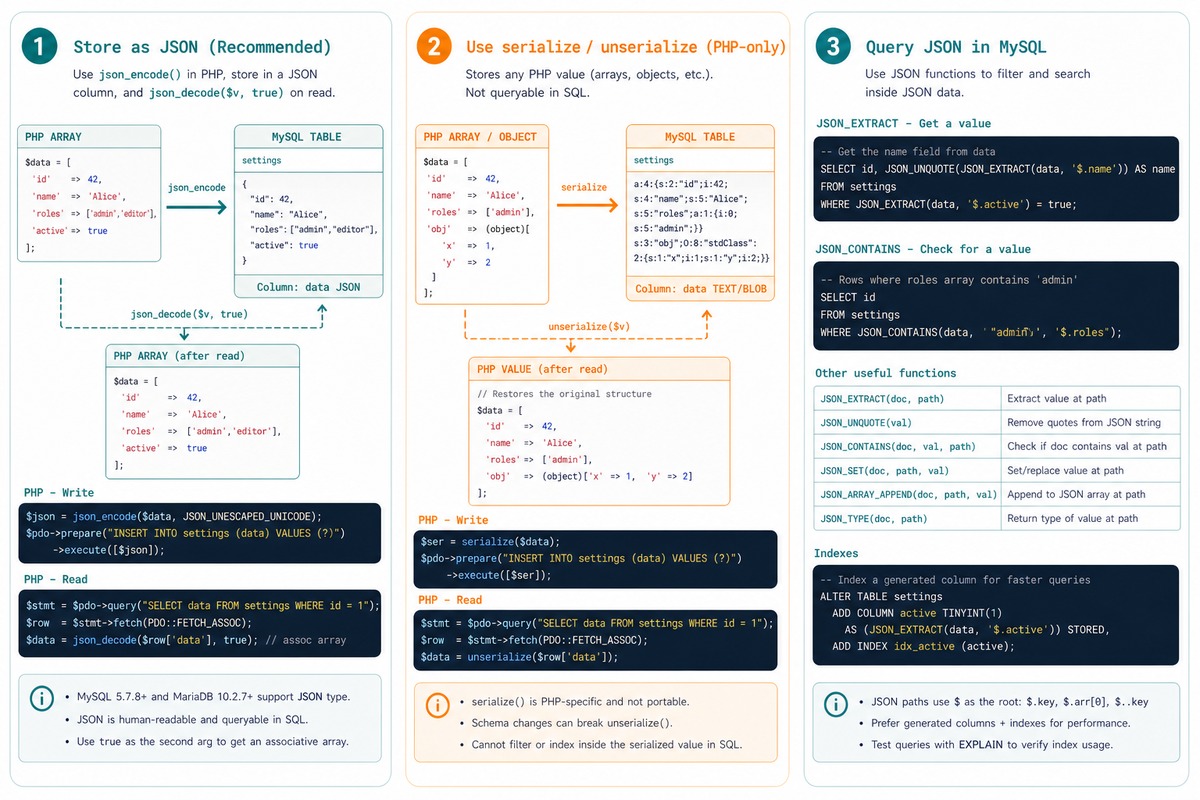
To store a PHP array in a MySQL database, serialize it to a string with json_encode() and write it into a JSON column (MySQL 5.7+, MariaDB 10.2+) or a TEXT/LONGTEXT column on older versions. Read it back with json_decode($value, true). PHP’s own serialize() works too but produces PHP-only data — JSON is the portable choice.
Last verified: 2026-05-17 on PHP 8.3 with MySQL 8.0 and MariaDB 10.11. Originally published 2023-02-08, rewritten and updated 2026-05-17.
Schema
-- Modern: native JSON column (MySQL 5.7+, MariaDB 10.2+)
CREATE TABLE items (
    id    INT AUTO_INCREMENT PRIMARY KEY,
    name  VARCHAR(255) NOT NULL,
    tags  JSON
);

-- Legacy: TEXT / LONGTEXT
CREATE TABLE items (
    id    INT AUTO_INCREMENT PRIMARY KEY,
    name  VARCHAR(255) NOT NULL,
    tags  LONGTEXT
);
The native JSON type validates the value on insert (reject malformed JSON) and unlocks MySQL’s JSON functions. For new tables, use it.
Insert with json_encode
$pdo  = new PDO('mysql:host=localhost;dbname=mydb;charset=utf8mb4', $user, $pass);
$array = ['apple', 'banana', 'cherry'];

$stmt = $pdo->prepare('INSERT INTO items (name, tags) VALUES (?, ?)');
$stmt->execute(['Fruit Box', json_encode($array)]);
Read with json_decode
$stmt = $pdo->prepare('SELECT name, tags FROM items WHERE id = ?');
$stmt->execute([42]);
$row = $stmt->fetch(PDO::FETCH_ASSOC);

// The second arg `true` returns associative arrays instead of stdClass objects
$tags = json_decode($row['tags'], true);
// ['apple', 'banana', 'cherry']
PHP serialize() alternative
$serialized = serialize(['apple', 'banana', 'cherry']);
// Store $serialized as a TEXT column...

$array = unserialize($serialized);
// Back to ['apple', 'banana', 'cherry']
Works, but the format is PHP-only — Node.js, Python, Go can’t read it without a port of PHP’s serializer. Avoid for any data that might be read outside PHP. JSON is the universal format.
Query inside the JSON
-- Find rows where the tags array contains 'banana'
SELECT * FROM items
WHERE JSON_CONTAINS(tags, '"banana"');

-- Extract a single value from inside the JSON
SELECT name, JSON_EXTRACT(tags, '$[0]') AS first_tag
FROM items;
The native JSON functions let you reach inside stored JSON without parsing it in PHP. Useful for filtering — but if you find yourself doing this often, the data probably wants its own normalized table.
When to normalize instead
- Storing JSON is right for opaque blobs treated as a single unit — user preferences JSON, third-party API responses, audit-log payloads.
- Normalize into a separate table when you’ll query, filter, sort, or join on individual values inside the array.
tagas its own table with atag_idforeign key in a join table gives you indexed lookups and proper aggregation.
Frequently asked questions
serialize() — which should I pick? JSON. It’s a universal format any language can read; PHP’s serialize() output is PHP-specific and breaks for other languages reading the same database. JSON also gives you MySQL’s native JSON functions (JSON_EXTRACT, JSON_TABLE, generated columns, JSON path indexes) for querying inside the array. Use serialize() only when you must preserve PHP-specific types like objects with private properties.
MySQL 5.7+ and MariaDB 10.2+ have a native JSON type that validates the value on insert and lets you index and query inside the document. For new tables, prefer JSON. For legacy schemas where you can’t migrate, TEXT or LONGTEXT still works — JSON_EXTRACT works on a TEXT column too as long as the content is valid JSON.
Whenever you need to query by individual array values. A relational table with one row per item lets you index, join, and aggregate. JSON storage is right for opaque blobs you treat as a single unit — user preferences, JSON-formatted metadata from a third-party API, audit-log payloads. If you find yourself parsing JSON in PHP to filter results, normalize.
TEXT holds 64 KB, MEDIUMTEXT 16 MB, LONGTEXT 4 GB. The JSON column type follows similar limits internally. For practical purposes, keep individual JSON values under 64 KB — anything bigger probably belongs in a different table (or a blob storage outside the database).
Related guides
- How to Combine Two Arrays Without Duplicates in PHP
- How to Get the Last Item from an Array in PHP
- How to Combine Multiple Columns as One String in MySQL
References
PHP json_encode(): php.net/manual/en/function.json-encode.php. MySQL JSON type: dev.mysql.com/doc/refman/8.0/en/json.html. MariaDB JSON functions: mariadb.com/kb/en/json-functions.