
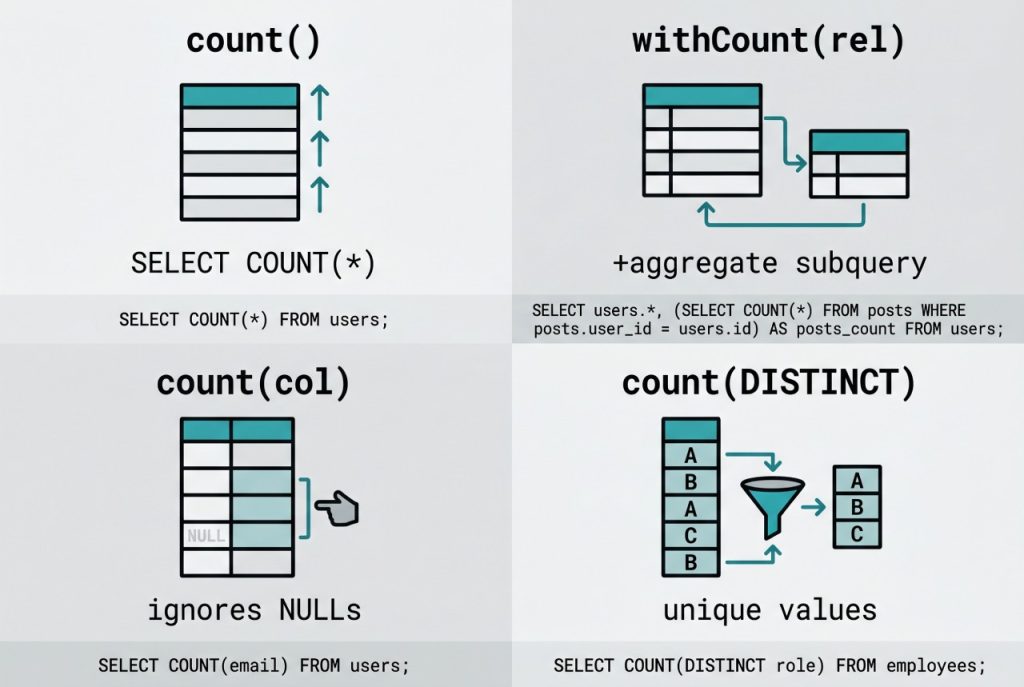
Getting a row count in Laravel should be a one-liner that hits the database with SELECT COUNT(*) and returns an integer. But it’s easy to accidentally pull every row into PHP first and count in memory — which works on tiny tables and falls over on real data. This guide covers the right way to laravel eloquent count rows, how withCount() avoids N+1 queries when counting relationships, and when NULL-aware count('column') or distinct counts are what you actually want.
Last verified: 2026-04-21 on Laravel 11 with PHP 8.3. Originally published 2022-10-07, rewritten and updated 2026-04-21.
TL;DR
Call ->count() at the end of any query builder or Eloquent chain — it emits SELECT COUNT(*) and returns an integer without hydrating rows. For counting relationships, use withCount('relation') to avoid N+1. Avoid Model::all()->count() — that loads the entire table into memory first.
Counting rows with a where clause
Both the query builder and an Eloquent model expose count(). They produce identical SQL — pick whichever fits the surrounding code:
$postCount = DB::table('posts')->where('user_id', '=', $user_id)->count();
$postCount = Post::where('user_id', '=', $user_id)->count();
Both emit:
SELECT COUNT(*) AS aggregate FROM posts WHERE user_id = ?The database returns a single scalar, PHP casts it to int, and nothing gets hydrated into a model instance. Use the Eloquent form when you want global scopes (soft-delete filtering, tenant scoping) applied automatically; use DB::table() when you explicitly want to bypass them.
The anti-pattern to avoid
This looks innocent but runs a full table scan into PHP memory:
// WRONG — hydrates every matching row before counting
$postCount = Post::where('user_id', $user_id)->get()->count();
// even worse:
$allCount = Post::all()->count();
get() returns a collection of model instances; all() is even broader. Counting the collection works but does O(n) work on the PHP side for a value the database can return in O(1). Always end a chain with count() when a number is all you need.
Counting relationships with withCount
When you’re listing users and want to show each user’s post count, the obvious approach is the slow one:
// N+1: one extra COUNT query per user
foreach (User::all() as $user) {
    echo $user->name . ': ' . $user->posts->count();
}
Eloquent’s withCount() folds the count into a single aggregate subquery and attaches it as a {relation}_count attribute:
$users = User::withCount('posts')->get();
foreach ($users as $user) {
    echo $user->name . ': ' . $user->posts_count;
}
You can pass constraints inside withCount to count only matching related rows — for example, “count only published posts”:
User::withCount(['posts' => function ($q) {
    $q->where('status', 'published');
}])->get();
Counting non-NULL values with count(‘column’)
Pass a column name and count() ignores NULLs, which is occasionally useful:
// how many users have filled in a phone number?
$withPhone = User::count('phone');
// total users, NULLs included:
$total = User::count(); // same as count('*')
For a distinct count, wrap the column in a raw expression or use the fluent distinct():
$distinctCountries = User::count(DB::raw('DISTINCT country'));
// or:
$distinctCountries = User::select('country')->distinct()->count();
Both generate SELECT COUNT(DISTINCT country) FROM users.
Frequently asked questions
Model::count() faster than Model::all()->count()? Yes — dramatically so on anything bigger than a few hundred rows. Model::count() emits SELECT COUNT(*) and returns an integer. Model::all()->count() loads every row into memory as a hydrated collection and then counts PHP objects. On a million-row table the first runs in milliseconds and the second will run out of memory.
Use withCount('relation') on the parent query: User::withCount('posts')->get(). Each user row comes back with a posts_count attribute, loaded in a single additional aggregate query. Without it, calling $user->posts->count() in a loop issues one query per user.
count('column') return a different number than count('*')? count('column') counts only non-NULL values in that column. count('*') counts every row regardless. If the column is nullable, the two will diverge — which is sometimes what you want (“how many users have set a phone number?”) but usually not.
Pass a raw expression: User::count(DB::raw('DISTINCT country')). Or use the fluent distinct(): User::select('country')->distinct()->count(). Both emit SELECT COUNT(DISTINCT country) under the hood.
DB::table() instead of the Eloquent model for counts? If you only need a number and you don’t care about scopes, accessors, or casts, DB::table('posts')->where(...)->count() skips the model boot step and is marginally faster. In practice the gap is negligible for a single count() — use whichever reads better in context. Eloquent’s model is worth it when global scopes (like soft-delete filtering) should apply.
Related guides
- How to Install Laravel on Ubuntu — get Laravel running before writing count queries.
- How to Check If a Record Exists in Laravel — use
exists()instead ofcount() > 0. - Best Way to Insert or Update Records in Laravel Eloquent — related single-query aggregate pattern.
References
Query-builder aggregates (count, sum, avg): laravel.com/docs/queries. Eloquent relationship counting and withCount: laravel.com/docs/eloquent.