Checking whether a record exists in Laravel seems like a one-liner, but the method you pick matters: exists(), count(), and first() behave differently under the hood, and picking the wrong one means loading an entire row into memory when you only needed a boolean. In this guide, I’ll show you four idiomatic ways to check for a record’s existence in Laravel, and when each one is the right choice.
Originally published January 31, 2023, rewritten and updated April 17, 2026.
TL;DR
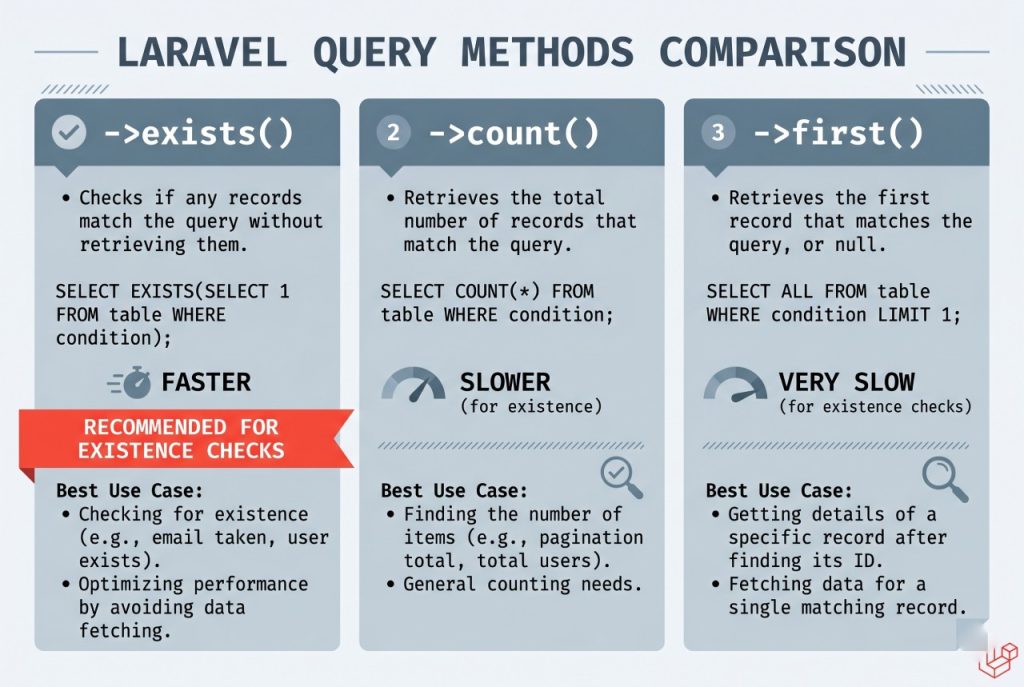
Use Model::where(...)->exists() when you only need a boolean — it runs a lightweight SELECT EXISTS(...) query that returns without pulling any columns. Use first() when you actually need the row. Only reach for count() when the count itself matters.
Option 1: exists() — The Right Default
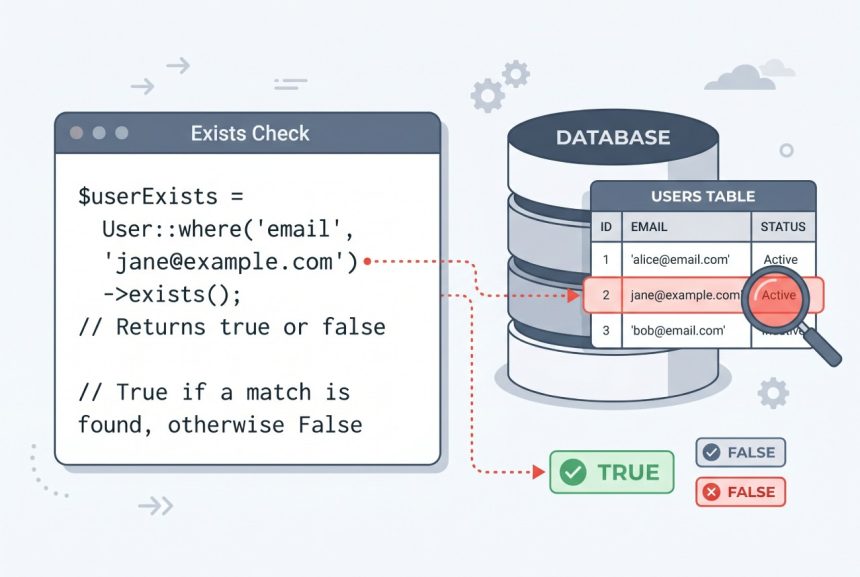
Eloquent’s exists() method is the direct answer. It runs a SQL SELECT EXISTS(...) query that returns a boolean without fetching any columns — so it stays cheap even on very wide rows.
if (User::where('email', '=', $email)->exists()) {
    // user found
}
There’s also a convenience inverse, doesntExist(), which reads more naturally when you want the negative branch:
if (User::where('email', '=', $email)->doesntExist()) {
    // handle the "no user" case
}
Option 2: count() — When You Need the Actual Number
If you need the count itself (e.g. to show “3 results”), use count(). Don’t use it purely as an existence check — count() scans all matching rows, while exists() stops at the first hit.
$count = User::where('email', '=', $email)->count();

if ($count > 0) {
    // user found
}
On a unique column like email, the performance difference is negligible. On a non-unique column with many matches, the gap widens — exists() is faster because the database can short-circuit the query after finding the first match.
Option 3: first() — When You Need the Row Anyway
If the next thing you’re going to do is use the record, skip the separate existence check and go straight to first(). It returns either the model or null:
$user = User::where('email', '=', $email)->first();

if ($user !== null) {
    // use $user directly
}
Running exists() followed by first() is wasteful — that’s two round-trips to the database for information one query could have given you.
Option 4: firstOrFail() — When Absence Is an Error
In controller actions where a missing record should trigger a 404, use firstOrFail(). It throws Illuminate\Database\Eloquent\ModelNotFoundException if no row matches, which Laravel’s exception handler converts to a 404 response automatically:
$user = User::where('email', '=', $email)->firstOrFail();
// if we reach here, $user is guaranteed to be a model instance
This lets you skip the null check entirely and removes the “phantom if” that would otherwise wrap the rest of the action.
Which One Should You Use?
- Just need a boolean? Use
exists()(ordoesntExist()). It’s the cheapest. - Need the row next? Use
first()and check fornull, orfirstOrFail()if missing is a 404. - Need the count itself? Use
count(). - About to insert-or-update? Skip the check entirely — use
updateOrCreateorfirstOrCreate.
Troubleshooting
Call to Undefined Method exists()
If you get Call to undefined method exists(), you’re probably calling it on a model instance instead of a query builder. Make sure there’s a where() clause (or another query method) between the model and exists() — it’s a query-builder method, not an Eloquent instance method.
Race Condition Between Exists Check and Insert
If you’re doing if (!exists) insert(), there’s a window where two requests can both pass the check and both try to insert — causing a duplicate key error on the second. Use updateOrCreate or firstOrCreate instead. These rely on the database’s unique index to resolve the race atomically.
Frequently Asked Questions
<code>exists()</code> runs <code>SELECT EXISTS(…)</code> and stops at the first matching row, returning a boolean. <code>count()</code> scans all matching rows to return the total. Use <code>exists()</code> when you only need a yes/no answer; use <code>count()</code> only when the number itself matters.
Yes — <code>doesntExist()</code>. It returns <code>true</code> when no matching record is found, which reads more naturally than <code>!$query->exists()</code> in negative branches.
Use <code>exists()</code> if you only need the boolean — it’s cheaper because it doesn’t hydrate a model. Use <code>first()</code> if you’re going to use the row anyway. Don’t call both: running <code>exists()</code> then <code>first()</code> is two queries for information one call could have given you.
Use <code>firstOrFail()</code> in controllers where a missing record should return a 404. It throws <code>ModelNotFoundException</code>, which Laravel’s exception handler converts to a 404 response automatically — so you can skip the null check and write cleaner code.
Related Guides
- Laravel updateOrCreate: Insert or Update Records in Eloquent
- How to Install Laravel
- How to Install Composer on Ubuntu
For the full query-builder API, see the official Laravel query builder documentation.