Calling one controller method from another in a Laravel app comes up most often when you’re extending a third-party codebase — a point-of-sale, a CMS, a marketplace plugin — and you want to hook additional logic onto an existing endpoint without editing its controller directly. This guide covers two container-aware patterns (the app() helper and constructor injection), explains why new SaleController() breaks, and points out when a redirect or a shared service class is the better answer.
Last verified: 2026-04-23 on Laravel 11 with PHP 8.3. Originally published 2024-03-17, rewritten and updated 2026-04-23.
TL;DR
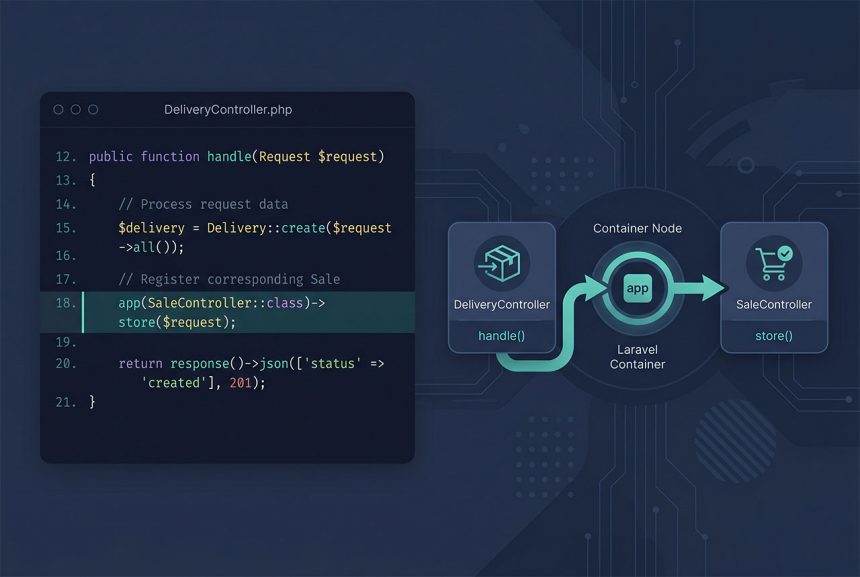
Resolve the target controller through Laravel’s service container and call the method on it: app(SaleController::class)->store($request). For long-lived dependencies, inject it via the constructor: public function __construct(protected SaleController $saleController) {}. Never instantiate with new — that bypasses the container and breaks constructor injection on the target.
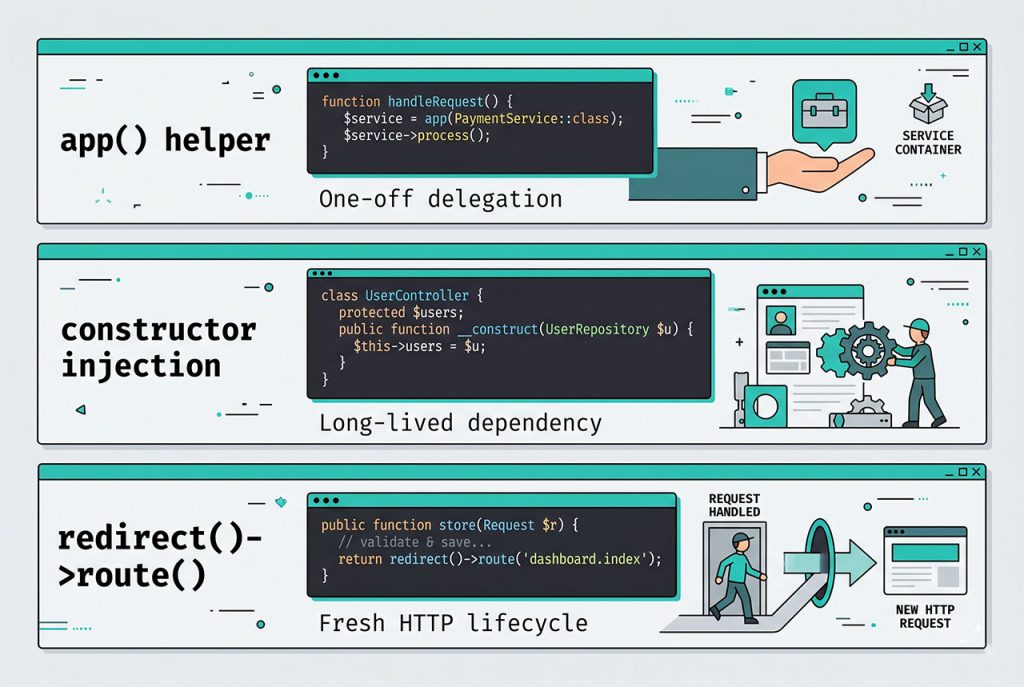
Option 1 — Resolve via app()
The shortest path. The app() helper hands back a container-resolved instance with all constructor dependencies already wired up, so calling a method on it works the same as if Laravel had routed to it directly:
use App\Http\Controllers\SaleController;

class DeliveryController extends Controller
{
    public function addDelivery(Request $request)
    {
        // Delegate to the sale flow
        app(SaleController::class)->store($request);

        // Then layer on delivery-specific logic
        // ...
    }
}
The $request in addDelivery is the same Illuminate\Http\Request instance Laravel built for the incoming call; forwarding it to store($request) costs nothing. If store type-hints a form-request class (for example StoreSaleRequest), Laravel re-resolves and re-validates it when the method is invoked — so the target’s validation rules still run.
Option 2 — Constructor inject
When the caller needs the other controller in more than one method — or you want the dependency visible in the class signature — declare it as a constructor parameter. Laravel resolves it automatically:
use App\Http\Controllers\SaleController;

class DeliveryController extends Controller
{
    public function __construct(protected SaleController $saleController)
    {
    }

    public function addDelivery(Request $request)
    {
        $this->saleController->store($request);

        // Delivery extras
    }
}
PHP 8 constructor-promotion (protected SaleController $saleController) keeps the boilerplate minimal — you skip the separate property declaration and the manual assignment.
Why new SaleController() breaks
Most Laravel controllers have constructor-injected dependencies — a repository, a service, a mailer. Instantiating with new SaleController() bypasses the container entirely and skips that injection; the first time the controller tries to use one of those dependencies you’ll hit:
TypeError: Argument #1 ($saleRepository) to App\Http\Controllers\SaleController::__construct()
  must be of type App\Repositories\SaleRepository, none given
Always reach for app(SaleController::class) or injection. Both funnel through the container so dependencies resolve cleanly.
When a redirect is the better answer
If what you actually want is “after processing, continue into the other controller’s full HTTP handling” — middleware, throttling, validation, route-model binding — return a redirect to that route instead of calling the method directly:
return redirect()
    ->route('sales.store')
    ->withInput();
The browser makes a fresh POST to the target route, and Laravel runs the full request lifecycle. Pick this when the two controllers correspond to user-visible workflows (form A finishes at B); pick the method-call patterns above when you want in-process reuse on a single request.
The cleaner long-term answer — a service or action class
If you control both controllers, the Laravel-idiomatic move is to extract the shared logic into a service class (for reusable behavior) or an action class (for a single verb). Both controllers then inject the service:
// app/Actions/StoreSale.php
class StoreSale
{
    public function execute(Request $request): Sale
    {
        // Shared logic that used to live in SaleController@store
    }
}

// Both controllers depend on StoreSale, not on each other
class SaleController extends Controller
{
    public function store(Request $request, StoreSale $action)
    {
        $sale = $action->execute($request);
        return response()->json($sale);
    }
}

class DeliveryController extends Controller
{
    public function addDelivery(Request $request, StoreSale $action)
    {
        $sale = $action->execute($request);
        // ...delivery logic using $sale
    }
}
No controller-to-controller call, no container gymnastics — just two thin HTTP boundaries sharing an action. Reach for the cross-controller patterns only when the caller can’t modify the other controller’s file.
Frequently asked questions
Usually, yes. Controllers are HTTP glue — they’re meant to receive a request, delegate to a service, and return a response. When you need to reuse logic across controllers, the Laravel-idiomatic answer is to extract that logic into a service class, action class, or trait and have both controllers call it. The cross-controller-call patterns in this post are pragmatic when you’re extending a third-party codebase you can’t refactor, not a general-purpose technique.
app(SaleController::class) and constructor injection? Both resolve the controller through Laravel’s service container, so dependencies (Request, services, repositories) are auto-wired correctly in both cases. Constructor injection is cleaner when you always need the instance — it’s declarative and shows up in the class signature. app(...) is better when the dependency is used in only one method, or when you want to resolve it lazily to avoid a hard coupling at class-load time.
new SaleController() directly? No. Controllers have constructor-injected dependencies, and new bypasses the container entirely — any type-hinted parameters in __construct won’t resolve, and you’ll hit a TypeError the moment the controller tries to use them. Always go through app() or dependency injection.
Just forward it: app(SaleController::class)->store($request). The $request in your current controller is the same Illuminate\Http\Request instance Laravel built for the incoming HTTP call; passing it across is free. If the target method uses a form request (StoreSaleRequest), Laravel resolves it when you call the method if you type-hint it — it re-validates the payload against the target’s rules.
For a full HTTP-style handoff — fresh request lifecycle, middleware, validation — use a redirect: return redirect()->route('sales.store')->withInput();. This is the right answer when the two controllers correspond to user-visible workflows (submit form A, finish at B). Cross-controller method calls are for cases where you want in-process reuse, not a new request.
Related guides
- How to Install Laravel on Ubuntu — fresh Laravel 11 setup before refactoring controllers.
- Best Way to Insert or Update Records in Laravel Eloquent — the kind of logic that usually belongs in an action class, not a controller.
- How to Retrieve Inputs with a Specific Prefix in Laravel Request — shaping the
$requestbefore you hand it off. - Laravel Nullable Exists Validation — form-request validation that stays put when controllers delegate.
References
Official Laravel container docs (app(), automatic resolution, constructor injection): laravel.com/docs/container.