To scope a wordpress pre_get_posts custom post type hook, check $query->is_post_type_archive('your_type') inside the callback — it returns true only on that archive URL and the main query. Without a scope check, pre_get_posts fires on every WP_Query in the request (widgets, related posts, REST calls) and leaks your ordering or filter into queries you didn’t mean to touch. This guide shows the three common check forms, the mandatory guards around them, and when to modify tax_query safely.
Last verified: 2026-04-23 on WordPress 6.5 and PHP 8.3. Originally published 2022-07-17, rewritten and updated 2026-04-23.
TL;DR
add_action( 'pre_get_posts', 'how7o_customize_cpt_archive' );

function how7o_customize_cpt_archive( $query ) {
    if ( is_admin() || ! $query->is_main_query() ) {
        return;
    }

    if ( $query->is_post_type_archive( 'custom_post_type' ) ) {
        $query->set( 'meta_key', 'votes' );
        $query->set( 'orderby', 'meta_value_num' );
        $query->set( 'order', 'DESC' );
    }
}
The three guards that belong on every pre_get_posts
is_admin()— skip the hook in the WordPress admin. The admin list tables are their ownWP_Querys; unless you specifically want to alter them, stay out.$query->is_main_query()— skip secondary queries. Widgets, block queries, related posts, REST API endpoints all fire throughWP_Queryand hit the hook too. The main query is the one WordPress built from the URL.- A scope check for the specific page(s) you want to affect — one of the three forms below.
Skip any of these and the customization leaks. The cost of the guards is one extra condition per request.
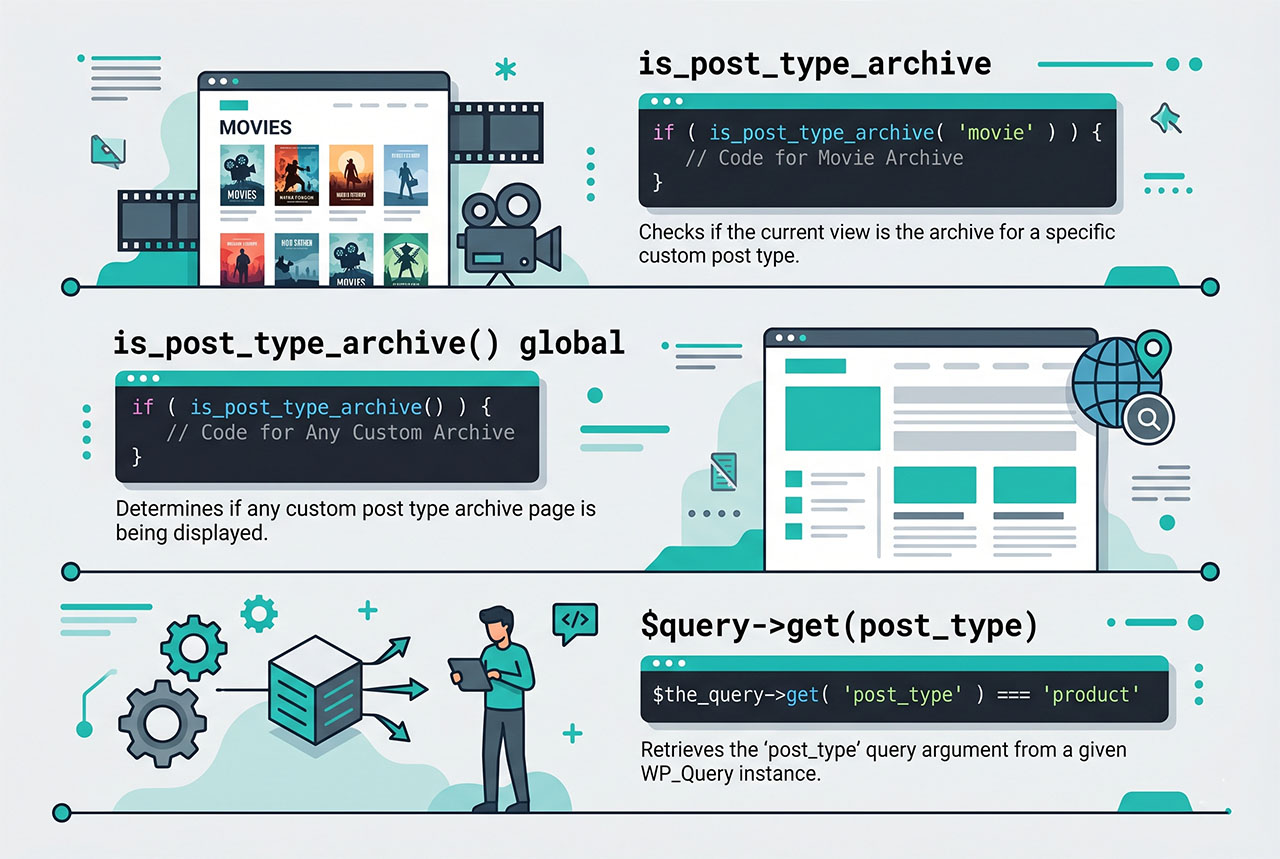
Check 1 — $query->is_post_type_archive()
if ( $query->is_post_type_archive( 'event' ) ) {
    // runs on /events/ URL, main query
}
Returns true when the request is the custom-post-type archive (typically /events/ if your CPT uses has_archive => true). Doesn’t fire for single posts of that type, taxonomy archives, or search results that happen to include that type. This is the form you want 90% of the time.
Check 2 — is_post_type_archive() conditional tag
if ( is_post_type_archive( 'event' ) ) {
    // same result as $query->is_post_type_archive('event')
}
Same semantics, global function form. $query->is_post_type_archive() is more explicit inside a pre_get_posts callback — it’s obviously asking about the query being processed, not some ambient global state — so prefer the method form. The global tag is there for compatibility with older codebases.
Check 3 — $query->get('post_type')
if ( $query->get( 'post_type' ) === 'event' ) {
    // fires any time a query targets the 'event' post type
}
Reads the post_type query var directly. Fires anywhere the query specifies that post type — archive pages, some REST endpoints, explicit new WP_Query(['post_type' => 'event']) calls. Use this when you want the customization to apply broadly, not just on the archive URL. Combine with is_main_query to still avoid affecting secondary queries.
Watch out when your CPT is accessed via multiple query shapes — post_type can be a string ('event') or an array (['event', 'post']) on queries that mix types. For the array case: in_array('event', (array) $query->get('post_type'), true).
Modifying meta_query and tax_query
$query->set('meta_query', [...]) replaces the existing value. On archive pages WordPress may have already built part of the query (for example the tax_query on a category archive), and overwriting wipes that. Merge instead:
// Merge with existing, don't replace
$meta_query = $query->get( 'meta_query' ) ?: array();

$meta_query[] = array(
    'key'     => 'featured',
    'value'   => '1',
    'compare' => '=',
);

$query->set( 'meta_query', $meta_query );
Same pattern for tax_query. The ?: [] gives you a usable starting value when nothing was there yet, and the append leaves any existing clauses alone.
Also-useful scope checks
$query->is_home()           // the blog page
$query->is_category()       // any category archive
$query->is_category( 'news' ) // specifically the 'news' category
$query->is_tag( 'featured' ) // a specific tag archive
$query->is_tax( 'genre' )    // a custom-taxonomy archive
$query->is_search()          // search results
$query->is_author()          // author archive
Combine with the three mandatory guards (is_admin / is_main_query / scope) to target exactly the archive you want to modify.
Frequently asked questions
$query->is_post_type_archive('custom_type') inside a pre_get_posts callback. It returns true only when the request is the archive for that custom post type — not for the regular blog, category pages, taxonomy pages, or individual posts. Combine it with is_main_query() and the !is_admin() guard so you only modify the intended frontend query.
is_post_type_archive vs $query->get('post_type')? is_post_type_archive is the higher-level answer — it reflects the URL context (is this the /events/ archive page?), so it naturally fits the main query on archive URLs. $query->get('post_type') === 'event' is a lower-level check that answers “is this query specifically for events?” — useful when you want the hook to also fire on secondary queries, REST endpoints, or admin-list screens where archive semantics don’t apply.
pre_get_posts fires on every WP_Query — the main query, widget queries, related-posts queries, REST API queries, dashboard widgets. Without a scope check (is_main_query, is_post_type_archive, etc.), your ordering or filter leaks into all of those and you get unexpected output everywhere. Treat scope checks as mandatory.
is_admin() or !is_admin()? Skip the hook in admin (if (is_admin()) return;) when your changes are user-facing (frontend post ordering, frontend filtering). Run the hook in admin when you’re intentionally modifying the admin list table (hiding posts from a certain role, changing the default sort in Posts → All Posts). The default is to skip — most customizations are frontend-only.
meta_query or tax_query in pre_get_posts? Yes, using $query->set('meta_query', [...]) and $query->set('tax_query', [...]). Be careful: set replaces the existing value. If you want to add a clause without wiping whatever WordPress already computed (category archive’s tax_query, for example), read the current value first, merge, then set: $tax_query = $query->get('tax_query') ?: []; $tax_query[] = [...]; $query->set('tax_query', $tax_query);.
Related guides
- How to Order Posts by Meta Value in WordPress — the most common
pre_get_postscustomization. - How to Get Posts by Date Range in WordPress — adding
date_queryviapre_get_posts. - How to Get the Current Category ID in WordPress — context for taxonomy archive checks.
- How to Disable Revisions and Autosave in WordPress — another filter-driven customization.
References
WordPress developer reference for pre_get_posts and WP_Query conditional methods: developer.wordpress.org/reference/hooks/pre_get_posts.