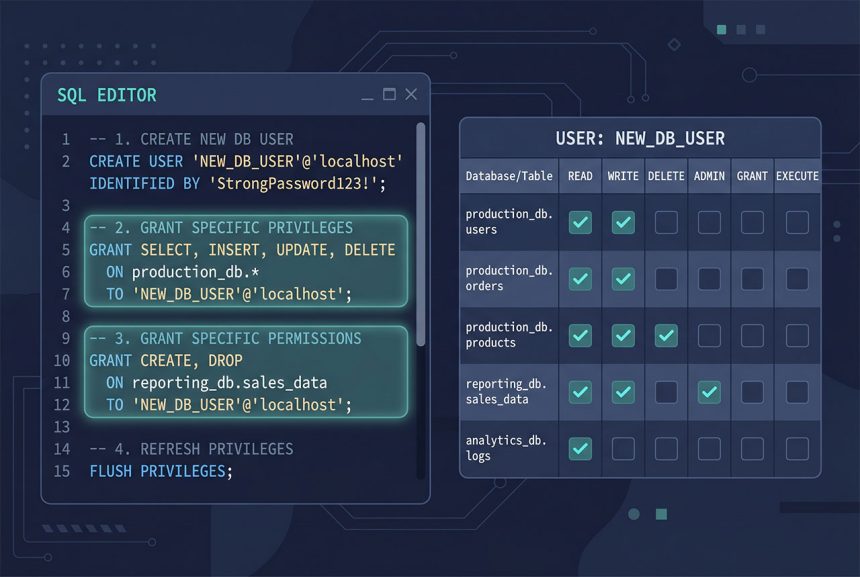
Walking through mysql create user and grant privileges on MySQL 8 / Ubuntu: connect to MySQL, run CREATE USER, GRANT the exact privileges that application needs, REVOKE or ALTER later as the scope changes. This guide covers the four authentication plugin options (auth_socket, caching_sha2_password, mysql_native_password, and the explicit default form), how to grant scoped versus blanket privileges, and the SHOW GRANTS check that confirms you got it right.
- TL;DR
- Step 1 — Connect as root
- Step 2 — Create the user
- caching_sha2_password — the MySQL 8 default
- mysql_native_password — for older clients
- auth_socket — OS-identity auth, no password
- Step 3 — Grant privileges
- Step 4 — Verify with SHOW GRANTS
- Revoking later
- Changing authentication plugin on an existing user
- Frequently asked questions
- Related guides
- References
Last verified: 2026-04-23 on MySQL 8.0 with Ubuntu 22.04. Originally published 2023-03-02, rewritten and updated 2026-04-23.
TL;DR
-- Connect as root (Ubuntu: auth_socket, no password)
sudo mysql

-- Create an app user with a password
CREATE USER 'wp_site'@'localhost' IDENTIFIED BY 'strong_unique_password';

-- Grant scoped privileges on one database
GRANT SELECT, INSERT, UPDATE, DELETE ON wordpress_db.* TO 'wp_site'@'localhost';

-- Confirm
SHOW GRANTS FOR 'wp_site'@'localhost';
Step 1 — Connect as root
# Ubuntu 18.04+ with MySQL 5.7+ — auth_socket for root, password-less via sudo
sudo mysql

# If you've enabled password auth for root explicitly:
mysql -u root -p
Ubuntu’s MySQL packages set up root with the auth_socket plugin by default: whoever can sudo becomes the MySQL root. No password flag needed. If you’ve explicitly switched root to password auth at some point, use the standard -u root -p form.
Step 2 — Create the user
-- Generic form
CREATE USER 'username'@'host' IDENTIFIED WITH authentication_plugin BY 'password';
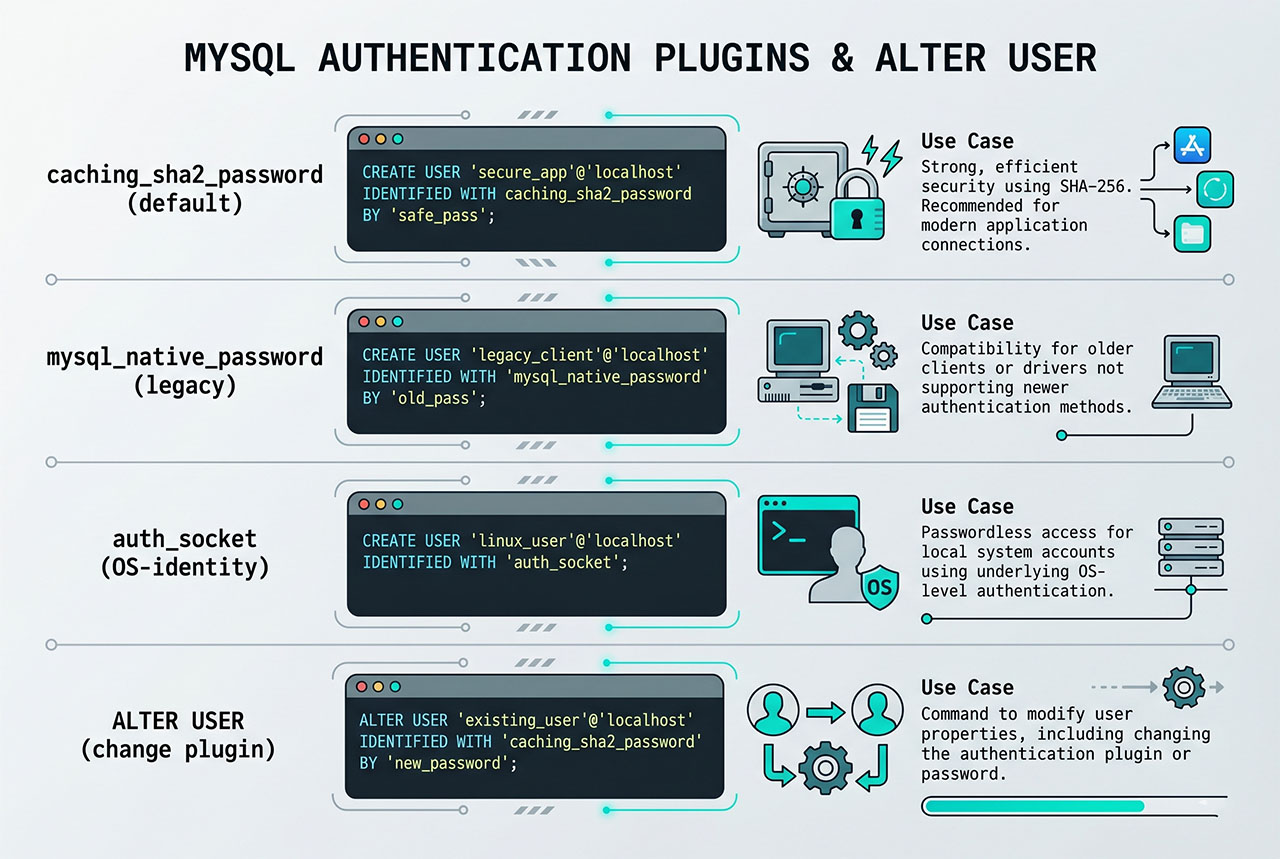
Four practical variants, each with a distinct use case:
caching_sha2_password — the MySQL 8 default
CREATE USER 'app_user'@'localhost' IDENTIFIED BY 'strong_password';Omit the IDENTIFIED WITH plugin clause and MySQL 8 uses caching_sha2_password — the more secure default. Works with any modern PHP/Laravel/WordPress.
mysql_native_password — for older clients
CREATE USER 'app_user'@'localhost'
    IDENTIFIED WITH mysql_native_password BY 'strong_password';
Use when the client complains “The server requested authentication method unknown to the client” — older PHP (pre-7.2), some legacy libraries, some DB-management GUIs. Less secure; only reach for it when the modern default genuinely doesn’t work.
auth_socket — OS-identity auth, no password
CREATE USER 'deploy'@'localhost' IDENTIFIED WITH auth_socket;Auth succeeds only if the OS user running mysql has the same name as the MySQL user. Good for deploy scripts and cron jobs where you want “whoever is deploy on the OS can run SQL” — no password management needed. Not usable for web apps (PHP-FPM runs as www-data, not as app_user).
Step 3 — Grant privileges
-- All privileges on one database (app-database-owner pattern)
GRANT ALL PRIVILEGES ON wordpress_db.* TO 'wp_site'@'localhost';

-- Scoped privileges (least-privilege for runtime app users)
GRANT SELECT, INSERT, UPDATE, DELETE
ON wordpress_db.* TO 'wp_site'@'localhost';

-- Scoped with migration support
GRANT CREATE, ALTER, DROP, INDEX, REFERENCES,
      SELECT, INSERT, UPDATE, DELETE, RELOAD
ON wordpress_db.* TO 'wp_site'@'localhost';
Pick based on how the user will be used. A runtime application user on a WordPress/Laravel site only needs SELECT, INSERT, UPDATE, DELETE. Reserve CREATE/ALTER/DROP for a separate “migration user” you only use during deployments. The middle form with ALL PRIVILEGES is fine for local dev but gives attackers more to work with if the app gets compromised.
Step 4 — Verify with SHOW GRANTS
SHOW GRANTS FOR 'wp_site'@'localhost';Lists the user’s effective grants. Should show exactly what you GRANTed — if something looks off (extra privileges, unexpected databases), another GRANT or a wildcard higher up may have expanded the scope.
Revoking later
-- Remove everything on that database
REVOKE ALL PRIVILEGES ON wordpress_db.* FROM 'wp_site'@'localhost';

-- Remove specific privileges only
REVOKE SELECT, INSERT ON wordpress_db.* FROM 'wp_site'@'localhost';

-- Remove the user entirely
DROP USER 'wp_site'@'localhost';
REVOKE mirrors GRANT; DROP USER removes the account entirely. After DROP USER, any cached credentials that depend on the user (in .env files, connection strings) need to be updated before the next deploy.
Changing authentication plugin on an existing user
ALTER USER 'app_user'@'localhost'
    IDENTIFIED WITH mysql_native_password BY 'new_password';
Useful when you created a user with caching_sha2_password, realized a client can’t connect, and need to downgrade. Also the command you use to reset any user’s password without dropping/recreating.
Frequently asked questions
CREATE USER 'name'@'localhost' IDENTIFIED BY 'password';. The @'localhost' binds the user to local connections only — adjust to @'%' for remote access, or a specific IP for tighter control. The resulting user has no privileges until you GRANT some.
auth_socket the default for root on Ubuntu? It’s password-less but secure in a specific way: authentication succeeds only if the OS user’s name matches the MySQL user’s name. So sudo mysql (running as the root OS user) authenticates as MySQL’s root automatically, but any other OS account can’t. You can’t connect from outside the server at all. Good for administrative access; bad for app users, which always need password auth.
caching_sha2_password or mysql_native_password? caching_sha2_password is MySQL 8.0’s default and is more secure. Older PHP versions (before PHP 7.2) don’t support it — they need mysql_native_password. For a modern PHP 8.x Laravel/WordPress site, stick with caching_sha2_password. If you see The server requested authentication method unknown to the client, your client is too old and mysql_native_password is the fix.
Usually SELECT, INSERT, UPDATE, DELETE on the application’s database. A WordPress or Laravel site doesn’t need CREATE/ALTER/DROP at runtime — only during migrations, which you typically run manually with a more-privileged account. Giving an app user ALL PRIVILEGES is convenient but expands the blast radius of any SQL injection: an attacker who gets any SQL through your app suddenly has DROP TABLE access.
FLUSH PRIVILEGES? Only if you INSERT/UPDATE the mysql.user table directly. CREATE USER, GRANT, REVOKE, and ALTER USER all update the internal caches automatically — the flush is a no-op there. For tutorials that tack it on at the end: harmless, but unnecessary on any modern MySQL version.
Related guides
- How to Install MySQL on Ubuntu — the install that precedes this.
- How to Connect to a Remote MySQL Database from Ubuntu — matches the
@'%'host pattern. - How to Reset the MySQL Root Password in aaPanel — root-user admin.
- How to Check Which MySQL Database or User Is Using the Most CPU — per-user CPU attribution relies on distinct users.
References
MySQL CREATE USER: dev.mysql.com/doc/refman/8.0/en/create-user. GRANT: dev.mysql.com/doc/refman/8.0/en/grant.