To add the required attribute to input fields with jQuery, use $('input').prop('required', true). The HTML5 form validation kicks in automatically — the browser blocks form submission and shows a tooltip on any empty required field. This guide covers the right method (.prop() vs .attr()), removing the attribute later, and when to use vanilla JS instead.
Last verified: 2026-05-17 with jQuery 3.7+. Originally published 2023-02-26, rewritten and updated 2026-05-17.
TL;DR
// Recommended — uses the DOM property
$('input').prop('required', true);

// Older style — uses the HTML attribute
$('input').attr('required', true);
$('input').attr('required', 'required');

// Remove it
$('input').prop('required', false);
$('input').removeAttr('required');
Use .prop() for boolean attributes
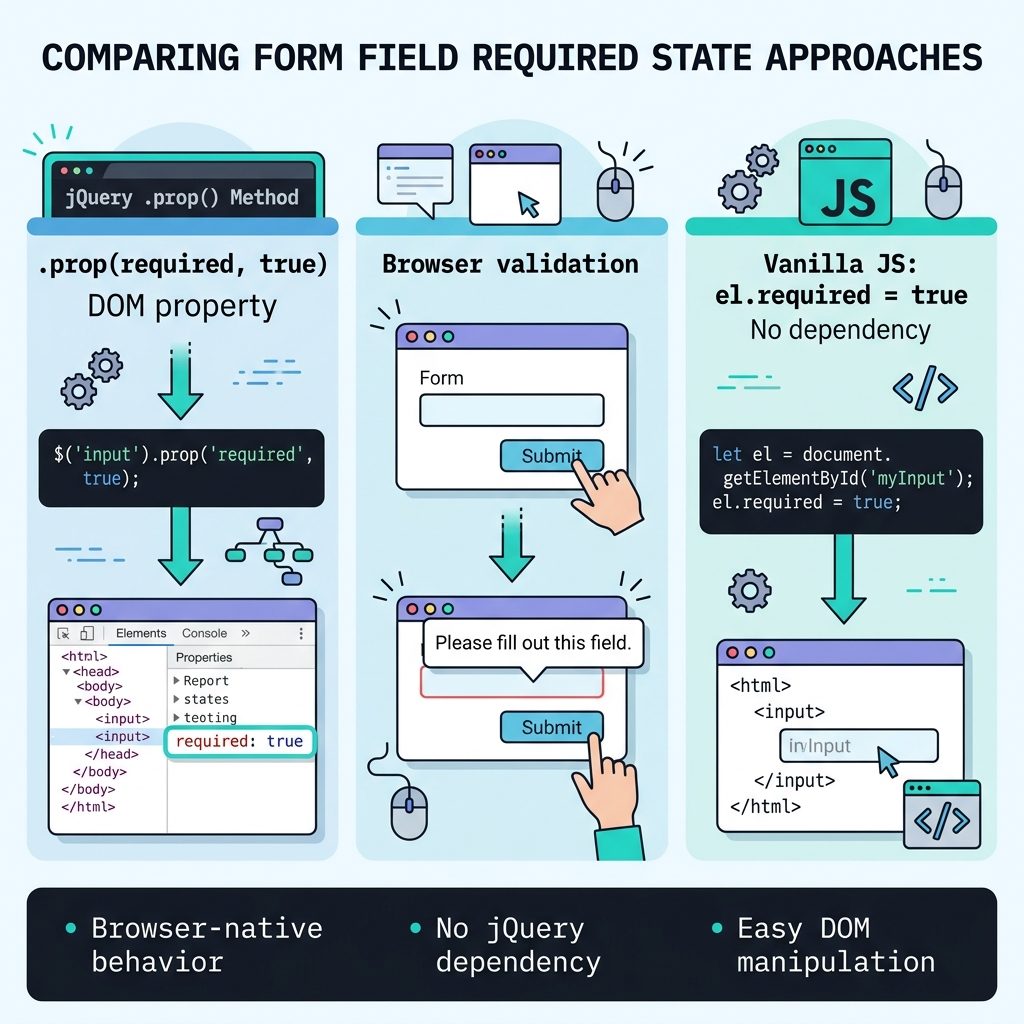
jQuery’s .prop() updates the live DOM property; .attr() updates the serialized HTML attribute. For HTML5 boolean attributes (required, checked, disabled, readonly), the browser checks the property during validation — so .prop() is the more reliable choice:
// Single input
$('#first-name').prop('required', true);

// All inputs in a form
$('#login-form input').prop('required', true);

// Just text inputs
$('input[type="text"]').prop('required', true);
The browser starts enforcing the requirement immediately — submitting the form with an empty required field shows the standard “Please fill out this field” tooltip.
When to add it dynamically
Hard-coding required in the HTML is faster and works without JavaScript. Reach for the jQuery approach when:
- The form is rendered by a CMS / shortcode you can’t easily edit.
- The form arrives via AJAX after page load.
- The requirement is conditional — e.g. “shipping address is required only if ‘ship to a different address’ is checked.”
Conditional example:
$('#ship-different').on('change', function() {
  $('.shipping-fields input').prop('required', this.checked);
});
Remove the attribute
// Toggle off — keep the property defined
$('input').prop('required', false);

// Remove entirely — drops the attribute from the HTML
$('input').removeAttr('required');
Vanilla JS equivalent
// All inputs
document.querySelectorAll('input').forEach(el => { el.required = true; });

// Single by id
document.getElementById('first-name').required = true;

// Remove
document.querySelectorAll('input').forEach(el => { el.required = false; });
Frequently asked questions
.prop() or .attr()? Use .prop(). The jQuery team recommended .prop() over .attr() for boolean HTML attributes (required, checked, disabled, readonly) starting with jQuery 1.6, because .prop() updates the live DOM property, while .attr() only updates the serialized attribute. For HTML5 validation, the browser checks the property — so .prop('required', true) always wires up correctly.
Yes — once required is set on an input, the browser includes that field in validation when the form is submitted. If you want the validation styling (e.g. the red outline) to appear before submit, you can call this.reportValidity() on the input or rely on CSS pseudo-classes like input:invalid.
required with jQuery instead of just writing it in HTML? Three common reasons: (1) the markup comes from a CMS / shortcode you can’t easily edit, (2) the input is dynamically rendered after page load (an AJAX-loaded form), or (3) the requirement is conditional — e.g. ‘this field is required only if option X is selected.’ For static forms, hardcode required in the HTML — it’s faster and works without JavaScript.
$('input').prop('required', false) or $('input').removeAttr('required'). Either works. Use prop with false if you might toggle it back on later in the same lifecycle; use removeAttr if you want the attribute gone from the serialized HTML.
Yes, in two lines of vanilla JS: document.querySelectorAll('input').forEach(el => el.required = true). Modern browsers don’t need jQuery for this. The jQuery approach is fine if your project already loads jQuery (WordPress sites, older Bootstrap projects); for new code, native JS is cleaner.
Related guides
References
jQuery .prop() reference: api.jquery.com/prop. MDN HTML5 required attribute: developer.mozilla.org/en-US/docs/Web/HTML/Attributes/required.