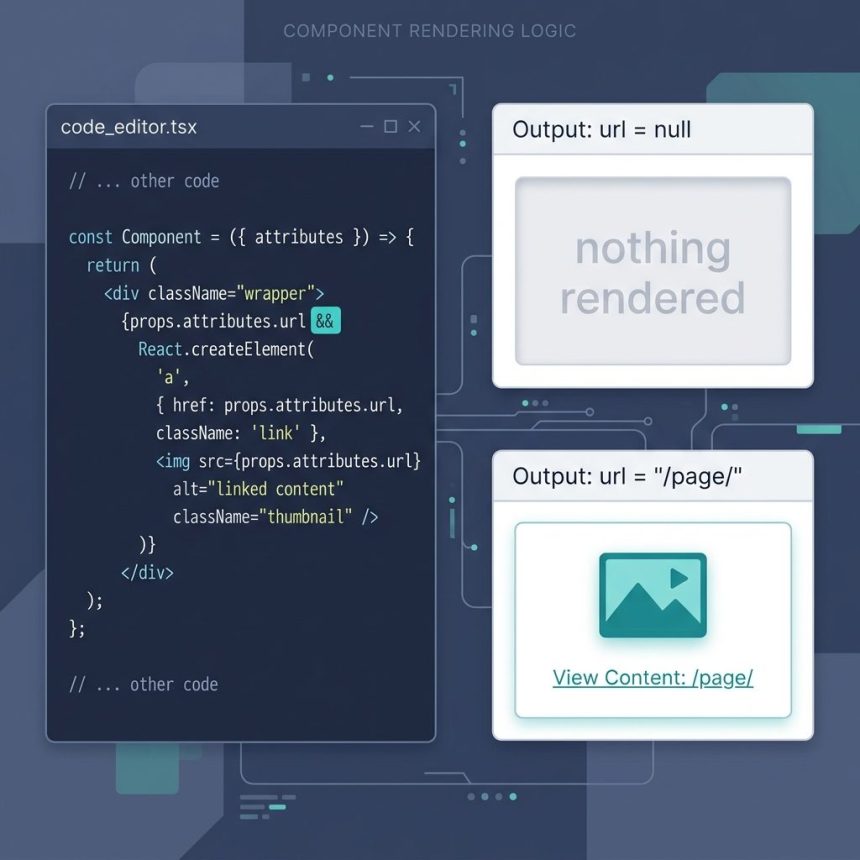
To conditionally render a React.createElement call without splitting out an if statement, use the short-circuit pattern: condition && React.createElement(...). If the condition is truthy, you get the element; if not, you get false — and React renders false as nothing. This works inline inside larger createElement trees, exactly the situation that comes up in Gutenberg block code and any other JSX-free React.
Last verified: 2026-05-17 with React 18+ and the WordPress Gutenberg block editor. Originally published 2023-03-19, rewritten and updated 2026-05-17.
TL;DR
// Conditional inline — render the  only if url is set
props.attributes.url && React.createElement(
  "a",
  { href: props.attributes.url },
  React.createElement("img", { src: "image.jpg" })
);

// Safer with !! to coerce falsy values to plain false
!!props.attributes.url && React.createElement(
  "a",
  { href: props.attributes.url },
  React.createElement("img", { src: "image.jpg" })
);
The short-circuit pattern
JavaScript’s && operator returns the first falsy operand or the last operand if all are truthy:
"hello" && "world";   // "world"
""      && "world";   // ""    (falsy short-circuits)
false   && "world";   // false (falsy short-circuits)
null    && "world";   // null  (falsy short-circuits)
React renders false, null, and undefined as nothing — so when the condition is falsy, the whole expression effectively disappears. When the condition is truthy, the element is returned and React renders it.
The falsy-value gotcha
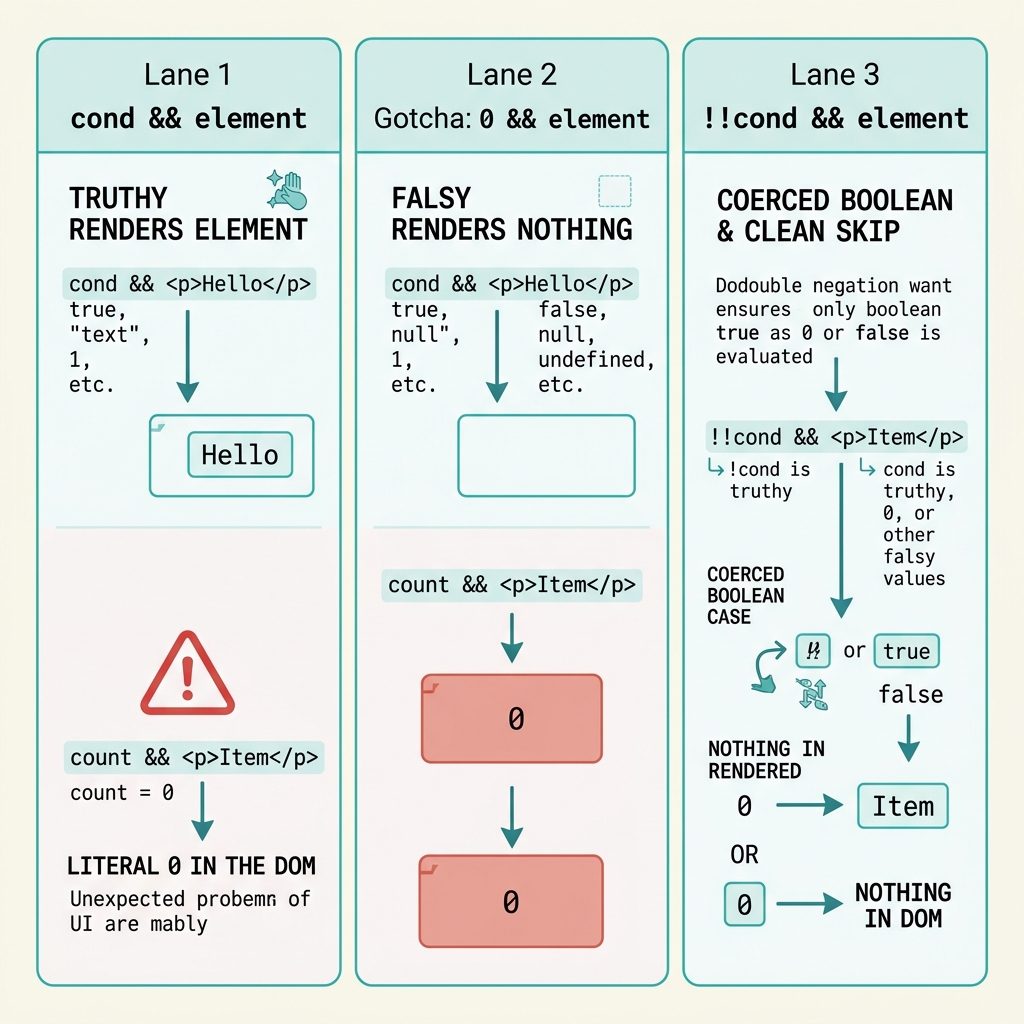
Not every falsy value is invisible. 0 && element evaluates to 0, and React renders the number 0 as a visible “0” in the DOM:
// BAD — when count is 0, renders the literal "0"
{props.count && React.createElement("span", null, "items: " + props.count)}

// GOOD — explicit Boolean()
{Boolean(props.count) && React.createElement("span", null, "items: " + props.count)}

// Also fine — !! coerce
{!!props.count && React.createElement("span", null, "items: " + props.count)}
For string conditions (like a URL), this is rarely an issue — an empty string renders as nothing. But for numeric conditions (counts, IDs), always coerce to boolean.
Inside a larger createElement tree
The pattern is most useful when the conditional element is one of several children in a parent createElement call:
React.createElement("figure", { className: "card" },
  React.createElement("img", { src: props.attributes.thumb }),
  React.createElement("h3", null, props.attributes.title),

  // Conditional caption — rendered only if present
  !!props.attributes.caption && React.createElement(
    "figcaption", null, props.attributes.caption
  ),

  // Conditional link wrapper around an icon
  !!props.attributes.url && React.createElement(
    "a",
    { href: props.attributes.url, className: "more" },
    React.createElement("span", null, "Read more")
  )
);
Each conditional sits inline among the other children — no separate if statement needed, no extra variable.
JSX equivalent
The same pattern works in JSX — just wrap in { }:
<figure className="card">
  <img src={props.attributes.thumb} />
  <h3>{props.attributes.title}</h3>

  {!!props.attributes.caption && (
    <figcaption>{props.attributes.caption}</figcaption>
  )}

  {!!props.attributes.url && (
    <a href={props.attributes.url} className="more">
      <span>Read more</span>
    </a>
  )}
</figure>
Frequently asked questions
&& instead of a ternary? condition && element evaluates to the element if the condition is truthy, or to the condition’s value (false/undefined/null/0) if not. React renders false, undefined, and null as nothing — so the element is skipped cleanly. A ternary works too (cond ? element : null) but is more verbose for the ‘render or skip’ case.
0 && element evaluates to 0, which React happily renders as the text ‘0’ on the page. '' && element evaluates to '', which renders nothing. Either way, you might get unexpected output. The fix is !!condition && element or Boolean(condition) && element — coerce to true/false first so React only ever sees a boolean or the element.
Yes — the same cond && element pattern works inside JSX: {props.attributes.url && <a href={props.attributes.url}>...</a>}. The underlying compile target is the same React.createElement call. The pattern shows up most often in raw createElement when you’re writing Gutenberg blocks or other code without a JSX build step.
Most React code uses JSX, but a few common situations leave you writing createElement directly: (1) WordPress block development outside a build pipeline (Gutenberg lets you ship inline JS without Babel), (2) very small components inlined into HTML pages, (3) some older codebases. In all of these cases, the conditional pattern from this post is what you want.
Inside a component, yes — if (!props.attributes.url) return null; at the top is the cleanest approach. The inline && pattern is for when the conditional element is one of many children in a parent call and you can’t early-return. That’s the case in the original source: this element is part of a larger children array passed into a parent React.createElement.
Related guides
- How to Check if a JavaScript String Is a Valid URL
- How to Check if a JavaScript String Contains a Unicode Character
References
React conditional rendering docs: react.dev/learn/conditional-rendering. React.createElement reference: react.dev/reference/react/createElement.