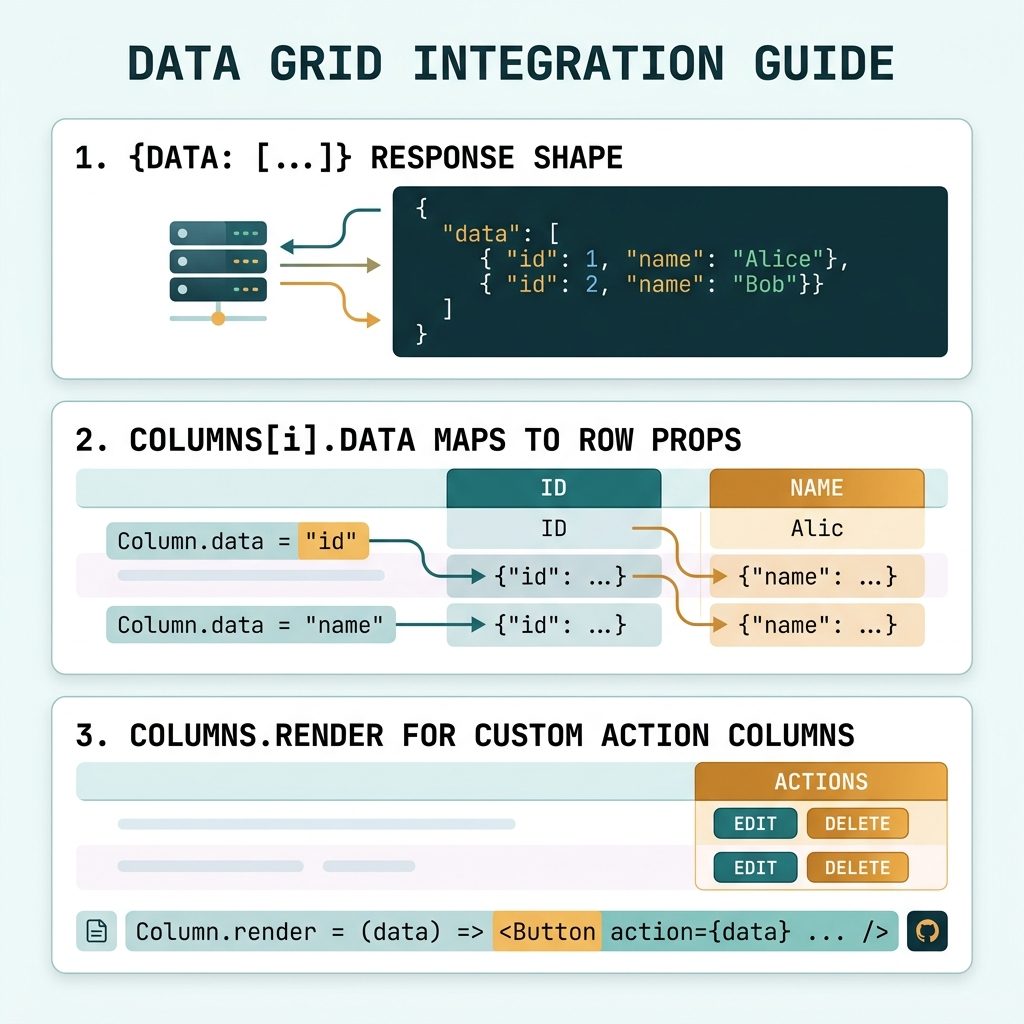
To load data into DataTables via Ajax, pass an ajax URL and a columns array to $('#table').DataTable({ ... }). The server returns JSON with a top-level data array containing one object per row, and DataTables maps each columns[i].data key to that row’s matching property.
Last verified: 2026-05-17 with DataTables 2.0. Originally published 2022-11-06, rewritten and updated 2026-05-17.
Client-side load (every row, paginate in the browser)
$(document).ready(function () {
    $('#my-table').DataTable({
        ajax: '/api/employees',
        columns: [
            { data: 'name' },
            { data: 'position' },
            { data: 'office' },
            { data: 'extn' },
            { data: 'start_date' },
            { data: 'salary' },
        ],
    });
});
DataTables fetches the full dataset once and handles paginate/sort/search client-side. Fine for hundreds of rows; switch to server-side processing past that.
The JSON shape
{
  "data": [
    {
      "id": 1,
      "name": "Tiger Nixon",
      "position": "System Architect",
      "salary": "$320,800",
      "start_date": "2011/04/25",
      "office": "Edinburgh",
      "extn": "5421"
    },
    {
      "id": 2,
      "name": "Garrett Winters",
      "position": "Accountant",
      "salary": "$170,750",
      "start_date": "2011/07/25",
      "office": "Tokyo",
      "extn": "8422"
    }
  ]
}
PHP example for the endpoint
<?php
header('Content-Type: application/json');

$rows = [
    [
        'id' => 1, 'name' => 'Tiger Nixon', 'position' => 'System Architect',
        'salary' => '$320,800', 'start_date' => '2011/04/25',
        'office' => 'Edinburgh', 'extn' => '5421',
    ],
    [
        'id' => 2, 'name' => 'Garrett Winters', 'position' => 'Accountant',
        'salary' => '$170,750', 'start_date' => '2011/07/25',
        'office' => 'Tokyo', 'extn' => '8422',
    ],
];

echo json_encode(['data' => $rows]);
The whole response is wrapped in { "data": [...] } because DataTables reads rows from data by default.
Bare array response — dataSrc: ''
$('#my-table').DataTable({
    ajax: { url: '/api/employees', dataSrc: '' },
    columns: [ /* ... */ ],
});

// Endpoint now returns a bare array:
// [ { id: 1, name: ... }, { id: 2, ... } ]
Useful when you can’t change the server to wrap the array (third-party API, fixed-shape endpoint).
Add a custom action column
columns: [
    { data: 'name' },
    { data: 'position' },
    // ...
    {
        data: null,
        orderable: false,
        searchable: false,
        render: (data, type, row) =>
            `<a href="/employees/${row.id}/edit">Edit</a>`,
    },
],
data: null means “no source field” — the cell content comes from render, which receives the entire row. Mark such columns orderable: false and searchable: false so DataTables doesn’t try to sort or search on the HTML.
For larger datasets — server-side processing
$('#my-table').DataTable({
    serverSide: true,
    processing:  true,
    ajax:        '/api/employees',
    columns:     [ /* ... */ ],
});
With serverSide: true, every interaction sends a fresh request with pagination/sort/search params, and the server returns just the slice. See DataTables server-side pagination for the request/response contract.
Frequently asked questions
data wrapper? DataTables expects the row array under a key by default (the key is configurable via ajax.dataSrc; default is 'data'). The wrapper lets you include other top-level fields too — pagination metadata, server timestamps, debug flags — without DataTables choking on them. If you can’t change the server to wrap the array, set ajax: { url: '...', dataSrc: '' } to read a bare array.
ajax and serverSide: true? With just ajax, DataTables fetches every row once and paginates/sorts/searches them in the browser — fine for hundreds of rows. With serverSide: true, every interaction (page change, sort click, search keystroke) sends a fresh Ajax request and your server returns just the slice for that view. Use server-side when the dataset is too large to ship at once.
DataTables maps each columns[i].data entry to a property on the row object. Extra fields in JSON are ignored — they don’t appear because there’s no column for them. Fields missing from JSON show up as undefined in their column; add defaultContent: '' to suppress the warning.
Use columns.render for one column: { data: null, render: (data, type, row) => `<a href="/edit/${row.id}">Edit</a>` }. data: null tells DataTables there’s no field to read; render generates the cell HTML from the whole row object.
Related guides
- How to Create Ajax-Based Pagination in DataTables
- How to Change the Default Sort Order in DataTables
- How to Add an HTML Column in Laravel DataTables
References
DataTables Ajax docs: datatables.net/manual/ajax. ajax.dataSrc: datatables.net/reference/option/ajax.dataSrc. columns.render: datatables.net/reference/option/columns.render.