How7o
  • Home
  • Tools
  • Prank Screens
  • Learn
  • Blog
  • Contact
Reading: How to Keep Only Numbers in a String with JavaScript
Share
How7oHow7o
Font ResizerAa
  • OS
Search
  • Home
  • Tools
  • Prank Screens
  • Learn
  • Blog
  • Contact
Follow US
© 2024–2026 How7o. All rights reserved.
How7o > Free Laravel, PHP, WordPress & Server Tutorials > Web Development > How to Keep Only Numbers in a String with JavaScript
Web Development

How to Keep Only Numbers in a String with JavaScript

how7o
By how7o
Last updated: May 22, 2026
4 Min Read
Keep only the digits in a JavaScript string with regex
SHARE

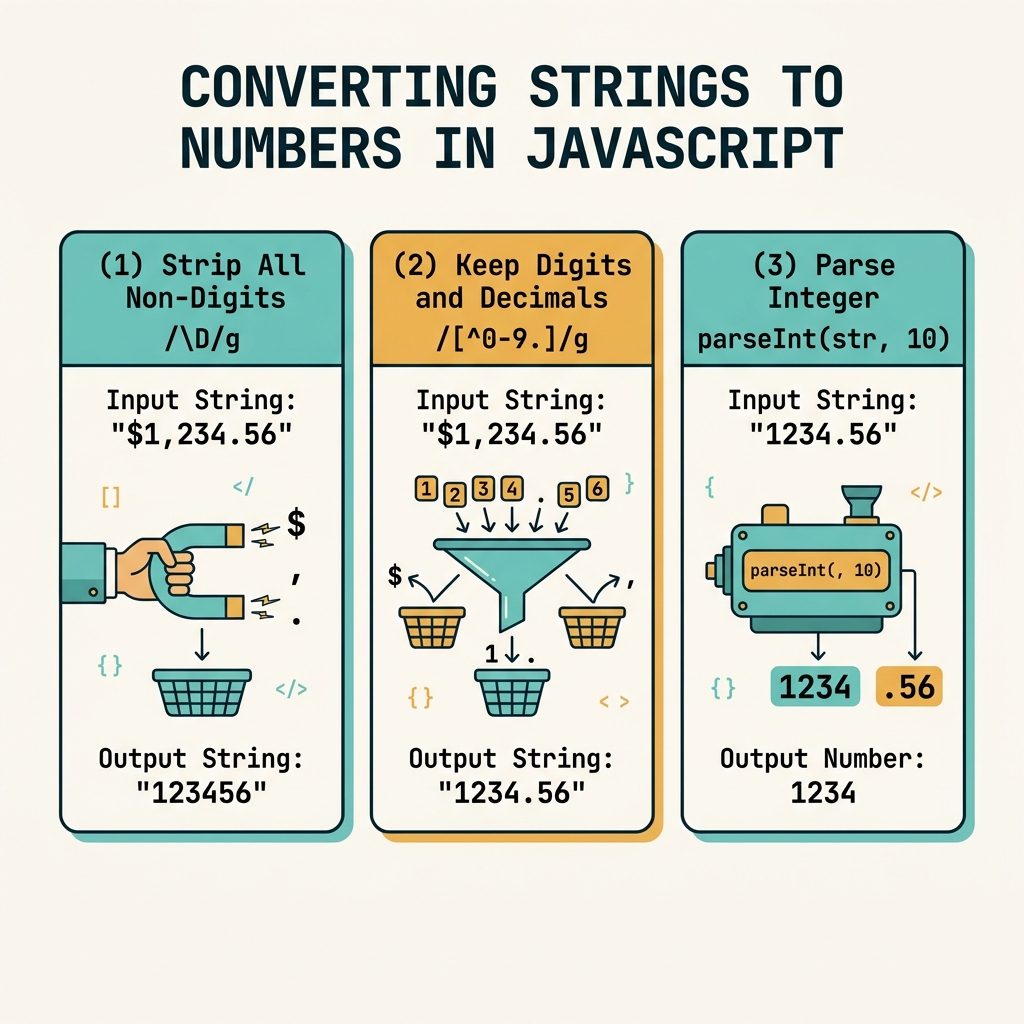
To keep only the digits in a string with JavaScript, use str.replace(/\D/g, '') — the regex \D matches every non-digit character, and replacing them with the empty string leaves only 0–9. The longhand str.replace(/[^0-9]/g, '') works identically.

Contents
  • The one-liner
  • Explicit longhand
  • Keep digits and the decimal point
  • Keep digits, sign, and decimal point
  • Convert the result to a number
  • Frequently asked questions
  • Related guides
  • References

Last verified: 2026-05-17 in Chrome 124, Firefox 125, Safari 17. Originally published 2022-06-30, rewritten and updated 2026-05-17.

The one-liner

const someID = "ID NO. 94854112";
const digits = someID.replace(/\D/g, '');
// "94854112"

\D matches any single character that isn’t a digit, and the /g flag makes the replacement apply to every match (without g, only the first non-digit would go).
JS keep only digits — \\D regex, decimal+comma variants, parseInt conversion

Explicit longhand

const digits = someID.replace(/[^0-9]/g, '');
// "94854112"

The negated character class [^0-9] means “any character that is not a digit 0–9.” Same result as \D, just more explicit.

Keep digits and the decimal point

const price   = "USD $1,299.95";
const numeric = price.replace(/[^0-9.]/g, '');
// "1299.95"

parseFloat(numeric);   // 1299.95

Keep digits, sign, and decimal point

const balance = "$-1,299.95 (overdrawn)";
const numeric = balance.replace(/[^0-9.\-]/g, '');
// "-1299.95"

parseFloat(numeric);   // -1299.95

Escape the dash inside the character class as \- or place it at the start/end of the class so it’s treated as a literal rather than a range marker.

Convert the result to a number

const digits = "ID NO. 94854112".replace(/\D/g, '');

parseInt(digits, 10);    // 94854112  — always pass the radix
Number(digits);          // 94854112  — fine for digits-only strings
+digits;                 // 94854112  — unary plus, same as Number()

Frequently asked questions

What’s the difference between \D and [^0-9]?

\D is a shorthand character class that matches any character that is not a digit. [^0-9] is the explicit equivalent — a negated character class. In ASCII contexts they’re identical and equally fast; \D is shorter and idiomatic. In some Unicode-aware regex flavors, \D can match non-ASCII non-digits differently, but JavaScript’s default regex engine treats them the same.

How do I keep digits and the decimal point?

Allow them in the character class: str.replace(/[^0-9.]/g, ''). For locale-aware numbers (commas as decimal separators in some regions), include the comma too: /[^0-9.,]/g. Note this can leave multiple dots if the input has them — for strict number parsing, also strip extras with a second pass.

Should I parse the result as a number with parseInt or Number()?

parseInt(str, 10) is the standard for integer-only inputs (always pass the radix). Number(str) works too but returns NaN for empty strings and treats "" as 0 inconsistently across operations. For a value that started as digits-only text, parseInt(str, 10) is the predictable pick.

Does \D match negative signs and decimal points?

Yes — - and . are not digits, so they’re matched by \D and stripped. If you’re parsing prices like "$-12.50" and want -12.50 back, allow the sign and dot: str.replace(/[^0-9.\-]/g, '').

Related guides

  • How to Check if a JavaScript String Is a Valid URL
  • How to Check if a Character Is Unicode in JavaScript
  • How to Format a Number with Decimals in JavaScript

References

MDN String.prototype.replace(): developer.mozilla.org/en-US/docs/Web/JavaScript/Reference/Global_Objects/String/replace. MDN regex character classes: developer.mozilla.org/en-US/docs/Web/JavaScript/Reference/Regular_expressions/Character_class.


TAGGED:JavaScriptregexstrings

Sign Up For Daily Newsletter

Be keep up! Get the latest breaking news delivered straight to your inbox.
[mc4wp_form]
By signing up, you agree to our Terms of Use and acknowledge the data practices in our Privacy Policy. You may unsubscribe at any time.
Share This Article
Facebook Copy Link Print
Previous Article Keep the first N characters of a JavaScript string with slice How to Keep Only the First N Characters of a String in JavaScript
Next Article Load DataTables data via Ajax How to Load Data in DataTables Using Ajax
Leave a Comment

Leave a Reply Cancel reply

You must be logged in to post a comment.

FacebookLike
XFollow
PinterestPin
InstagramFollow
Most Popular
Set vi as the default editor in Ubuntu — a terminal opening the vim editor
How to Set vi (Vim) as the Default Editor in Ubuntu
June 8, 2026
rsync says ALL DONE but files are missing — a terminal showing ALL DONE next to an empty folder
rsync Says “ALL DONE” but Files Are Missing: How to Verify
June 8, 2026
Migrate a website to a new server with rsync — files copying from an old server to a new one over SSH
How to Migrate a Website to a New Server With rsync
June 8, 2026
Bun runtime — faster JS toolkit replacing npm in Laravel projects
How to Install Bun Runtime on Ubuntu (And Use It in a Laravel Project)
May 24, 2026
Tailscale mesh — peer-to-peer connections between devices, coordination server
How to Install Tailscale on Ubuntu (Zero-Config Mesh VPN for Self-Hosters)
May 24, 2026

You Might Also Like

WordPress system cron — DISABLE_WP_CRON + system crontab hitting wp-cron.php
Web Development

How to Set Up a System-Based Cron Job in WordPress

7 Min Read
WordPress admin notice — four notice types shown at the top of the admin area
Web Development

How to Show Custom Notifications in the WordPress Dashboard

6 Min Read
Install Laravel on Ubuntu — terminal with composer create-project command and Laravel red-pillar icon
Web Development

How to Install Laravel on Ubuntu: Step-by-Step Guide

9 Min Read
Fix CORS policy blocked origin errors in PHP and Apache
Web Development

How to Fix “CORS Policy Blocked Origin” Errors

5 Min Read
How7o

We provide tips, tricks, and advice for improving websites and doing better search.

Tools

  • Age Calculator
  • Word Counter
  • Image Upscaler
  • Password Generator
  • QR Code Generator
  • See all tools→

Pranks

  • Fake Blue Screen Prank
  • Hacker Typer
  • Fake iMessage Generator
  • Windows XP Crash Prank
  • Windows 11 Update Prank
  • See all prank screens →

Company

  • About Us
  • Blog
  • Contact
  • Privacy Policy
  • Terms of Service
  • Sitemap
© 2024–2026 How7o. All rights reserved.
Welcome Back!

Sign in to your account

Username or Email Address
Password

Lost your password?