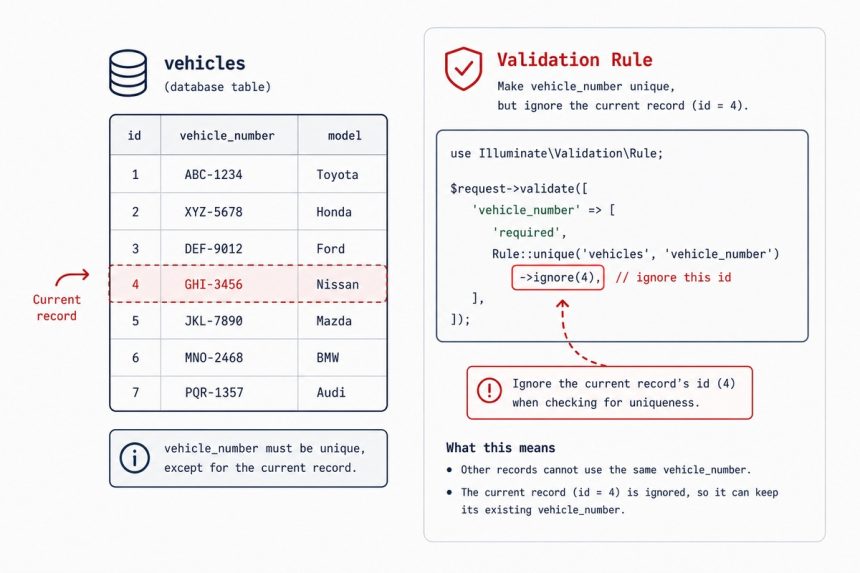
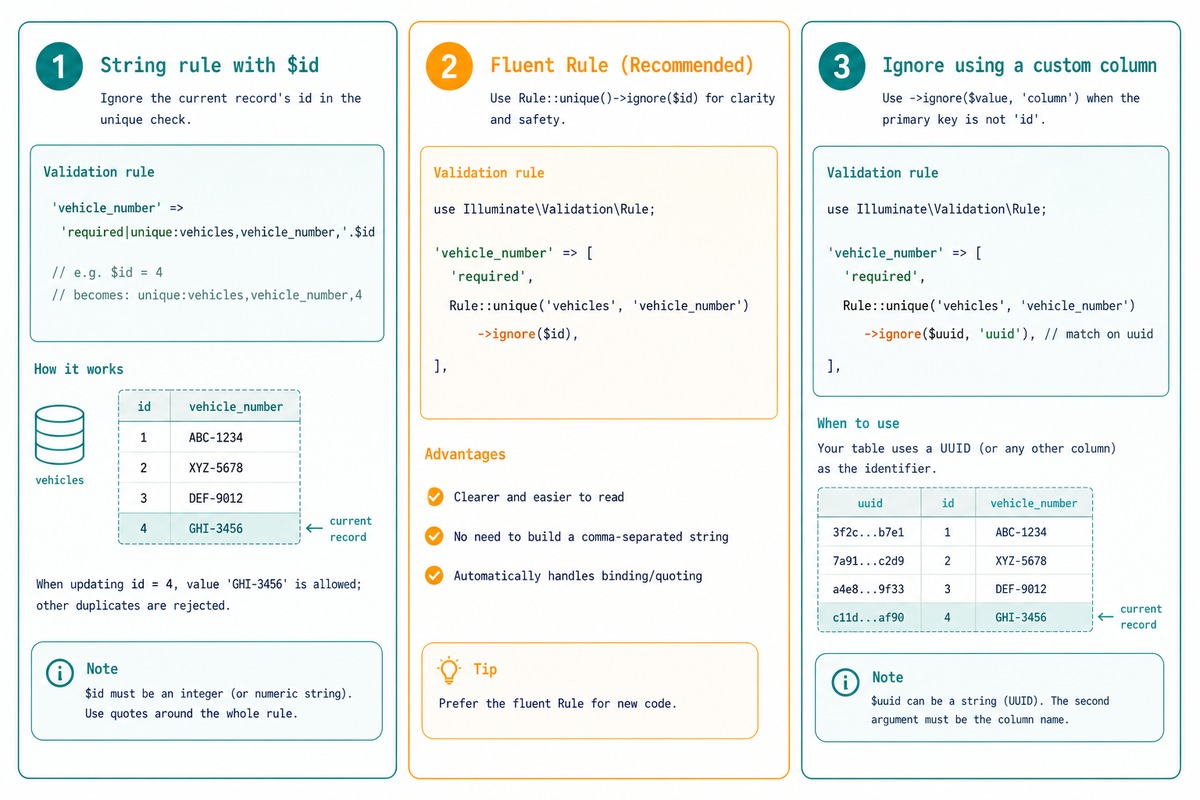
To validate a unique column on update in Laravel without rejecting the record’s own current value, add the record’s id as the third argument to the unique rule: unique:vehicles,vehicle_number,$id. The cleaner equivalent is Rule::unique('vehicles')->ignore($vehicle->id), which is the form Laravel’s docs now recommend.
Last verified: 2026-05-17 on Laravel 11. Originally published 2023-10-11, rewritten and updated 2026-05-17.
The string-rule form (from the source)
// In a controller's update method
$request->validate([
    'vehicle_number' => 'required|max:255|unique:vehicles,vehicle_number,' . $vehicle->id,
]);
The third argument is the id to ignore. The validator runs SELECT … WHERE vehicle_number = ? AND id <> $vehicle->id, so the record’s own current value doesn’t trigger the “already exists” error.
 The cleaner
 Rule::unique() form (recommended)
use Illuminate\Validation\Rule;

$request->validate([
    'vehicle_number' => [
        'required',
        'max:255',
        Rule::unique('vehicles')->ignore($vehicle->id),
    ],
]);
The Rule facade returns a builder object. ignore($id) is the same idea as the string-rule’s third argument but reads cleanly and handles edge cases (commas in values, special chars) that break string concatenation.
Ignore by a non-id column
Rule::unique('users')->ignore($user->uuid, 'uuid')For tables that use a UUID or other non-id primary key, pass the column name as the second argument to ignore.
Combine with extra where clauses
// Unique within a single tenant, ignore current record
Rule::unique('vehicles')
    ->where('tenant_id', $tenantId)
    ->ignore($vehicle->id);

// Skip soft-deleted records
Rule::unique('vehicles')
    ->whereNull('deleted_at')
    ->ignore($vehicle->id);
Chain any number of where / whereNull / whereNotNull calls. They become additional WHERE clauses in the uniqueness check.
In a Form Request
// app/Http/Requests/UpdateVehicleRequest.php
public function rules(): array
{
    return [
        'vehicle_number' => [
            'required', 'max:255',
            Rule::unique('vehicles')->ignore($this->route('vehicle')),
        ],
    ];
}
Form Request classes keep validation off the controller. $this->route('vehicle') resolves to the model bound to the route’s {vehicle} parameter (Laravel’s route-model binding), so the id is always the right one for the record being updated.
Frequently asked questions
unique rule fail on update? unique:table,column rejects values that already exist in column. On update, the record being edited still has its own value in that column — so the rule sees a match and rejects. The fourth argument $id tells the rule “ignore the row with this primary key” so the record’s own value doesn’t trigger the check.
Rule::unique()? Both produce the same SQL. The string form ('unique:vehicles,vehicle_number,'.$id) is concise but breaks subtly when the ignore value contains a comma or pipe. Rule::unique('vehicles')->ignore($id) is explicit, type-safe, and the recommended form in the Laravel docs. Prefer it for new code.
Pass both arguments to ignore: Rule::unique('users')->ignore($uuid, 'uuid'). The second argument is the column name to match against. Default is id.
By default, unique checks every row including soft-deleted ones. To skip soft-deletes: Rule::unique('vehicles')->whereNull('deleted_at')->ignore($id). To skip them only for the current record: ->ignore($id)->whereNull('deleted_at') — order of where* and ignore doesn’t matter for the resulting query.
Related guides
- How to Check if Exist in the Database with the Laravel Validator
- How to Validate Input Field to Contain Only Specific Values in Laravel
- How to Use exists Validation in Laravel Only If the Value Is Not Empty
References
Laravel validation rules — unique: laravel.com/docs/validation#rule-unique. Rule facade: laravel.com/api/master/Illuminate/Validation/Rule.html.