Forge is $19/month per server. Vapor is significantly more once you’re past the free tier. Both are excellent — but they’re not the right answer when you’ve got a $5 VPS and a single Laravel app that doesn’t need infrastructure-as-a-service. This guide shows how to deploy Laravel with GitHub Actions straight to your own VPS using a zero-downtime symlink-swap pattern. You’ll be production-ready in about 40 minutes, then deploys become a git push.
- TL;DR
- Prerequisites
- Step 1 — Create a dedicated deploy SSH key
- Step 2 — Lay out the release directory structure on the VPS
- Step 3 — The workflow file
- Step 4 — Allow the deploy user to reload PHP-FPM without a password
- Step 5 — Trigger the first deploy
- Rollback strategy
- Troubleshooting
- “Permission denied (publickey)” in the Actions log
- “php artisan migrate –force exits with errors”
- “Old assets still showing after deploy”
- Related guides
TL;DR
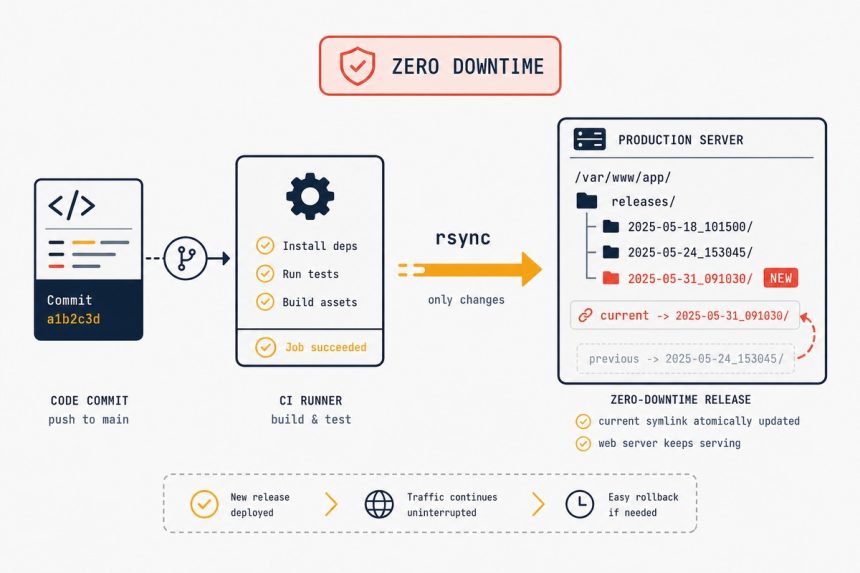
Generate a deploy SSH key, add the public key to your VPS, store the private key as a GitHub Actions secret. Lay out /var/www/myapp/{releases,shared,current} on the VPS. Write a workflow that checks out, runs composer install --no-dev and npm run build, rsyncs to releases/{timestamp}, runs php artisan migrate --force, and atomically swaps the current symlink. Reload PHP-FPM. Total downtime per deploy: zero.
Prerequisites
- An Ubuntu VPS with PHP 8.2+, nginx, MySQL/MariaDB, and Composer already installed (see related guides if you need to set those up first).
- SSH key authentication configured — passwords disabled. See our SSH key auth tutorial if you haven’t done that yet.
- A Laravel 11 or 12 project in a GitHub repo.
- nginx already configured to serve from
/var/www/myapp/current/public(we’ll use that path throughout).
Step 1 — Create a dedicated deploy SSH key
On your local machine, generate a new key just for deploys (don’t reuse your personal SSH key):
ssh-keygen -t ed25519 -f ~/.ssh/deploy_myapp -C "deploy@myapp" -N ""-N "" means no passphrase — GitHub Actions can’t enter one. The risk is contained because this key is single-purpose; it only authorises the deploy user on the deploy server.
Append the public key to the deploy user’s authorized_keys on the VPS:
cat ~/.ssh/deploy_myapp.pub | ssh [email protected] "cat >> ~/.ssh/authorized_keys"Then add the private key as a GitHub Actions secret:
- Go to your repo → Settings → Secrets and variables → Actions → New repository secret
- Name:
DEPLOY_SSH_KEY - Value: contents of
~/.ssh/deploy_myapp(the private key, including the-----BEGIN…lines)
Add two more secrets while you’re there: DEPLOY_HOST (your VPS hostname or IP) and DEPLOY_USER (e.g. deploy).
Step 2 — Lay out the release directory structure on the VPS
SSH into the VPS as the deploy user and create:
sudo mkdir -p /var/www/myapp/{releases,shared/storage,shared/bootstrap-cache}
sudo chown -R deploy:www-data /var/www/myapp

# Move existing storage/ and .env to shared/, if any
# cp -r /old/path/storage/* /var/www/myapp/shared/storage/
# cp /old/path/.env /var/www/myapp/shared/.env
The layout follows the Capistrano / Deployer convention:
/var/www/myapp/releases/{timestamp}/— each deploy lands here./var/www/myapp/shared/— persistent data (storage, .env, bootstrap cache)./var/www/myapp/current→ symlink to the latest release. nginx points here.
Step 3 — The workflow file
Create .github/workflows/deploy.yml in your repo:
name: Deploy

on:
  push:
    branches: [main]

jobs:
  deploy:
    runs-on: ubuntu-latest
    steps:
      - uses: actions/checkout@v4

      - uses: shivammathur/setup-php@v2
        with:
          php-version: '8.4'
          extensions: mbstring, intl, pdo_mysql, redis, bcmath

      - name: Install Composer dependencies
        run: composer install --no-dev --optimize-autoloader --no-progress --prefer-dist

      - uses: actions/setup-node@v4
        with:
          node-version: '22'

      - name: Build frontend
        run: |
          npm ci
          npm run build

      - name: Set up SSH
        run: |
          mkdir -p ~/.ssh
          echo "${{ secrets.DEPLOY_SSH_KEY }}" > ~/.ssh/deploy_key
          chmod 600 ~/.ssh/deploy_key
          ssh-keyscan -H ${{ secrets.DEPLOY_HOST }} >> ~/.ssh/known_hosts

      - name: Deploy
        env:
          HOST: ${{ secrets.DEPLOY_HOST }}
          USER: ${{ secrets.DEPLOY_USER }}
        run: |
          RELEASE_DIR="/var/www/myapp/releases/$(date +%Y%m%d%H%M%S)"
          ssh -i ~/.ssh/deploy_key $USER@$HOST "mkdir -p $RELEASE_DIR"
          rsync -avz --delete -e "ssh -i ~/.ssh/deploy_key" \
            --exclude='.git' --exclude='node_modules' --exclude='tests' \
            ./ $USER@$HOST:$RELEASE_DIR/
          ssh -i ~/.ssh/deploy_key $USER@$HOST "
            cd $RELEASE_DIR
            ln -sfn /var/www/myapp/shared/storage storage
            ln -sfn /var/www/myapp/shared/.env .env
            php artisan migrate --force
            php artisan config:cache
            php artisan route:cache
            php artisan view:cache
            ln -sfn $RELEASE_DIR /var/www/myapp/current
            sudo systemctl reload php8.4-fpm
            cd /var/www/myapp/releases && ls -1t | tail -n +6 | xargs -r rm -rf
          "
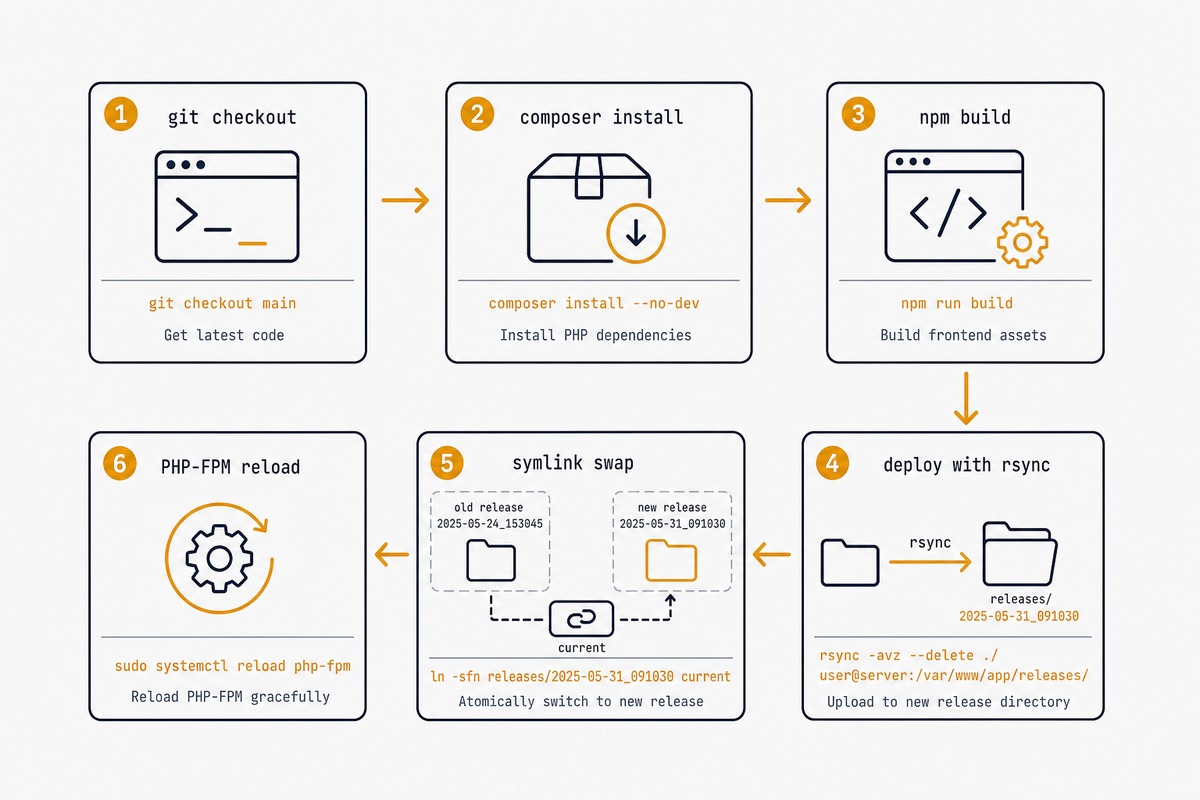
What this does, in order:
- Checks out the repo on a GitHub-hosted Ubuntu runner.
- Installs PHP 8.4 and Composer dependencies (production-only, autoloader optimised).
- Installs Node and builds frontend assets (Vite, Mix, whatever
npm run builddoes). - Sets up the SSH key from the secret.
- Creates a timestamped release directory on the VPS.
- Rsyncs the built app into it.
- Symlinks shared
storageand.envfrom/var/www/myapp/shared/. - Runs migrations + Laravel optimisation caches.
- Atomically swaps the
currentsymlink to the new release — this is the zero-downtime step. - Reloads PHP-FPM to clear OPcache.
- Cleans up old releases, keeping the last 5.
Step 4 — Allow the deploy user to reload PHP-FPM without a password
The workflow runs sudo systemctl reload php8.4-fpm. Make that work without prompting for a password by adding a sudoers entry. On the VPS:
sudo visudo -f /etc/sudoers.d/deploydeploy ALL=(root) NOPASSWD: /bin/systemctl reload php8.4-fpmLimit it to only that one command — don’t grant blanket sudo to the deploy user.
Step 5 — Trigger the first deploy
git add .github/workflows/deploy.yml
git commit -m "Add deploy workflow"
git push origin main
Watch the run under the repo’s Actions tab. The first deploy takes 2-4 minutes; subsequent ones, with cached dependencies, are usually under 90 seconds.
Rollback strategy
Rolling back is the inverse of the deploy step — point current at an earlier release directory:
cd /var/www/myapp/releases
ls -1t          # find a known-good release timestamp
ln -sfn /var/www/myapp/releases/PREVIOUS_TIMESTAMP /var/www/myapp/current
sudo systemctl reload php8.4-fpm
The release directories you didn’t clean up after step 3 are your rollback safety net. Five previous releases give you about 5 deploys of history.
Troubleshooting
“Permission denied (publickey)” in the Actions log
The DEPLOY_SSH_KEY secret doesn’t match what’s in authorized_keys on the VPS. Regenerate the key pair, update both, and re-run. Make sure you pasted the entire private key including the -----BEGIN OPENSSH PRIVATE KEY----- and -----END lines.
“php artisan migrate –force exits with errors”
Migrations failed on the release directory. The symlink swap hasn’t happened yet so the site is still pointed at the previous release — no user-facing downtime. SSH in, fix the migration, and re-run the deploy.
“Old assets still showing after deploy”
Browser cache or CDN cache. Use Vite’s content-hash filenames (the default since Laravel 9) so changed assets get new URLs automatically. If you’re behind Cloudflare, the deploy workflow can call the Cloudflare cache-purge API as a final step.
Cost and control. Forge is $19/month per server you connect; for a single-server hobby project that’s most of the VPS bill. GitHub Actions is free for public repos and generous on private (2,000 minutes/month free, deploys average 90 seconds). The trade-off: Forge’s UI is friendlier and includes server provisioning. Pick GitHub Actions when you’re comfortable with shell scripts; pick Forge when you’d rather pay to skip them.
Zero with the symlink-swap pattern shown here. The ln -sfn command is atomic at the filesystem level — nginx sees either the old current target or the new one, never an in-between state. PHP-FPM reload (not restart) gracefully cycles workers, so requests in flight finish on the old code and new requests pick up the new code.
The .env file stays in /var/www/myapp/shared/.env on the VPS, never in the repo. The deploy step symlinks it into each release. Update it manually or with a separate workflow for production secrets. For dev/staging, an .env.example in the repo is fine.
Yes, and you should. Add a test job before the deploy job, mark deploy as needs: test. PHPUnit / Pest tests run on the GitHub runner against an ephemeral MySQL service container. The Actions UI shows test results inline; a failing test blocks the deploy.
It scales further than most people think. The slow part of a deploy is composer install (60-120 seconds on a typical Laravel app) — the rsync and migrate steps are tiny. For apps over 1000 routes with many migrations, the optimisation caches at the end of the workflow start taking 30+ seconds. At that point, look at deployer.org or Vapor for parallelism.
Add a php artisan queue:restart after the symlink swap — that signals running queue workers to exit and respawn with the new code. The scheduler (php artisan schedule:run in cron) automatically picks up the new code on its next minute tick. For Laravel Reverb or Pusher-based websockets, the corresponding service needs a reload similar to PHP-FPM.
Related guides
- Install Laravel — the starting-point setup the deploy targets.
- SSH key authentication on Ubuntu — the prerequisite that makes the deploy possible.
- Run Laravel queues with Supervisor — the queue worker setup the deploy needs to restart.
- nginx reverse proxy — the nginx config that serves
current/public.
The official GitHub Actions documentation for the secrets pattern used here is at docs.github.com.