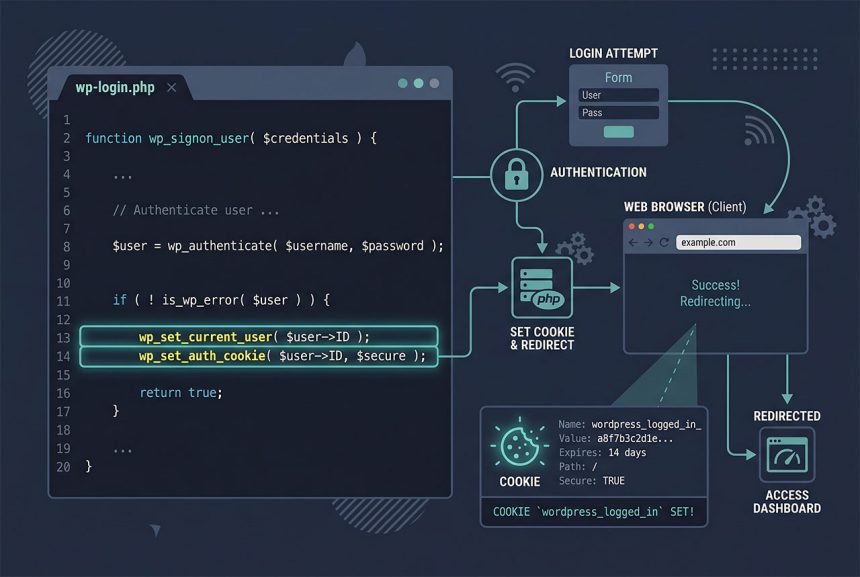
WordPress login user programmatically means authenticating someone without their password — after email verification, from an SSO callback, or in a magic-link handler. wp_signon() is out because it demands the plain-text password; the right pair is wp_set_current_user() + wp_set_auth_cookie(), which trust the caller’s prior identity check. This guide shows the four-line login routine, the safety rules, and the redirect that makes the cookie actually take effect.
Last verified: 2026-04-23 on WordPress 6.5 and PHP 8.3. Originally published 2023-01-02, rewritten and updated 2026-04-23.
TL;DR
$user_id = 1234;
$user    = get_user_by( 'id', $user_id );

if ( $user ) {
    wp_set_current_user( $user_id, $user->user_login );
    wp_set_auth_cookie( $user_id );
    do_action( 'wp_login', $user->user_login, $user );

    wp_safe_redirect( home_url( '/' ) );
    exit;
}
Why wp_signon isn’t the right tool here
wp_signon() is WordPress’s public login function, and it takes the same credentials a login form takes — user_login and user_password, plus an optional “Remember Me” flag. It runs password verification against the stored hash and returns either a WP_User or a WP_Error. That’s exactly what you want when the user typed their password. It’s unusable when:
- You’ve already verified their identity another way (email link, OAuth callback, API token).
- You’re implementing a “log in as user” admin feature for support.
- You’re running a migration that needs to synthesize logins for accounts with unknown passwords.
The alternative is the two-function pair below, which trusts the caller to have authenticated the user some other way.
The login routine
$user_id = 1234;
$user    = get_user_by( 'id', $user_id );

if ( $user ) {
    wp_set_current_user( $user_id, $user->user_login );
    wp_set_auth_cookie( $user_id );
    do_action( 'wp_login', $user->user_login, $user );
}
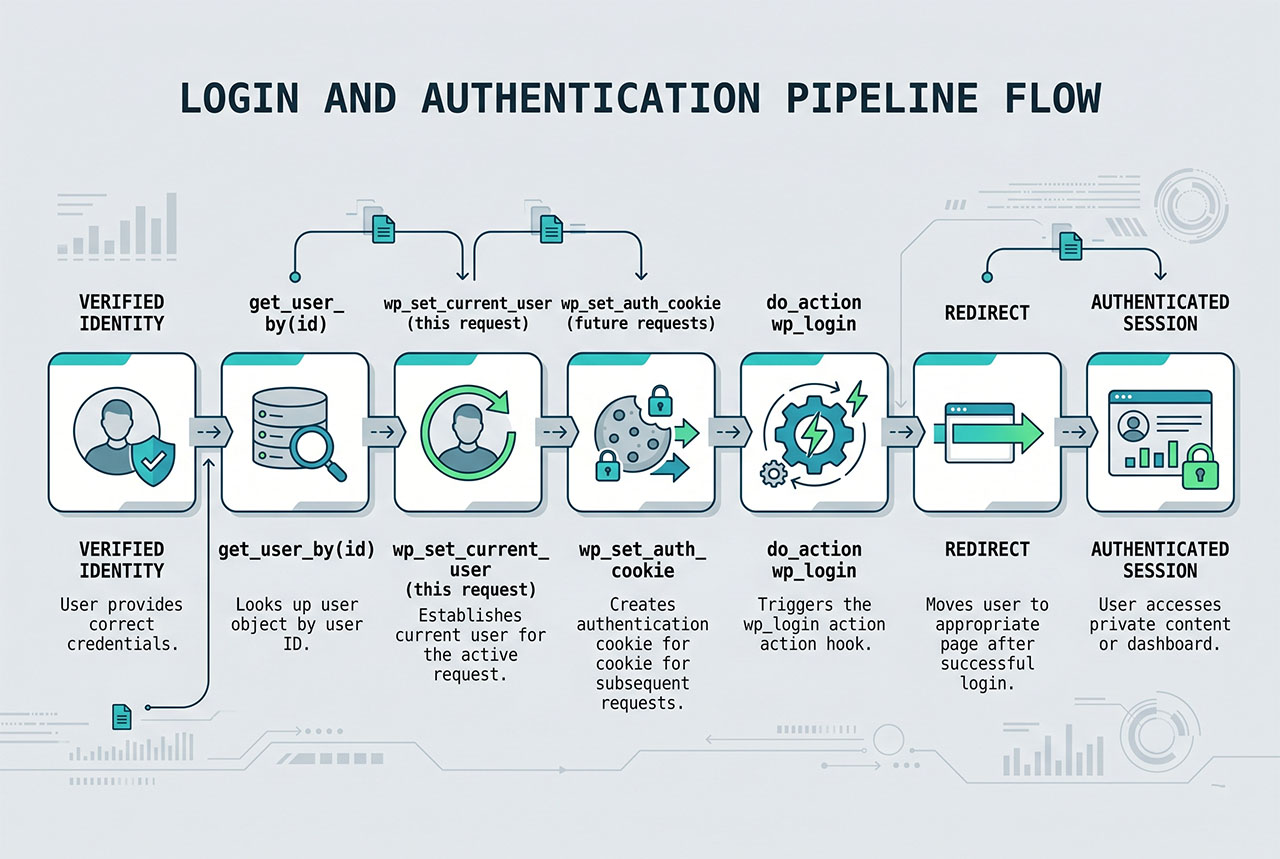
Each line has a specific job:
get_user_by('id', ...)— returns theWP_Userobject orfalse. Theif ($user)guard prevents a fatal on deleted/missing IDs.wp_set_current_user($user_id, $user->user_login)— sets the user for the current request. Anything after this line that callsis_user_logged_in(),wp_get_current_user(), orcurrent_user_can()sees the new user.wp_set_auth_cookie($user_id)— writes thewordpress_logged_in_*cookie in the response. Future requests from the same browser are authenticated.do_action('wp_login', $user->user_login, $user)— fires the standard post-login hook so plugins (WooCommerce, BuddyPress, analytics) can run their side effects.
Redirect after login
wp_safe_redirect( home_url( '/' ) );
exit;
The cookie wp_set_auth_cookie writes is only in the response. If you render the current page without redirecting, the browser hasn’t received the cookie yet and the next request still arrives unauthenticated. A redirect forces a fresh request with the cookie attached. wp_safe_redirect refuses to redirect to off-site URLs — use it whenever the destination is under your control (which, for a login, it always is).
Remember-me and cookie lifetime
// Short-lived cookie (2 days)
wp_set_auth_cookie( $user_id );

// Long-lived cookie (14 days) — the "Remember Me" behavior
wp_set_auth_cookie( $user_id, true );
The second argument toggles the remember flag. For longer / shorter absolute bounds, filter auth_cookie_expiration (three-argument filter: expiration seconds, user ID, remember flag). Pick short durations for admin-heavy sites and longer ones for customer accounts where login friction hurts retention.
Safety — where the auth actually happens
Calling wp_set_auth_cookie($user_id) is the same as handing whoever hits this code path the keys to that user’s account. The security lives in how you got the $user_id:
- Email verification links — token in the URL, hashed and compared to a stored token for that user, with an expiry. Never trust the user ID alone.
- OAuth callbacks — verify the state parameter, exchange the code for a token, confirm the email/ID from the trusted provider.
- Admin “login as” — check
current_user_can('manage_options')before the call, log the impersonation, and give the impersonation session a shorter lifetime.
An endpoint that takes a user_id in the request and logs that user in with no other proof of identity is a full-account-takeover bug. The programmatic login is a tool — the auth decision has to be made before you reach for it.
Frequently asked questions
wp_signon fit for wordpress login user programmatically? wp_signon() is WordPress’s normal login handler and requires the user’s plain-text password. That’s correct for a login form where the user just typed their password, but useless when you’re logging someone in on their behalf — after email verification, from an SSO callback, or inside a magic-link handler. For those cases reach for wp_set_current_user() + wp_set_auth_cookie(), which skip password verification entirely.
It’s safe if you’ve already authenticated the user some other way — a verified email link, an OAuth callback from a trusted provider, an API token match, a password-reset completion. The danger is calling the function without that prior check: any endpoint that accepts a user ID and logs them in unconditionally is a full-account-takeover vulnerability. Treat the ID as a capability that requires a prior, separate proof of identity.
wp_set_current_user and wp_set_auth_cookie? wp_set_current_user() sets the user for the current request only — once the PHP process ends, the login is gone. wp_set_auth_cookie() writes the authentication cookie the browser holds onto, so subsequent requests are authenticated. Call both: set-current makes the rest of this request see the user; set-auth-cookie persists the login across requests. Firing do_action('wp_login', ...) afterwards gives any listening plugins (analytics, WooCommerce, membership) a chance to run their post-login side effects.
wp_set_auth_cookie($user_id, $remember) takes a second boolean. true extends the cookie to 14 days (the “Remember Me” behavior); false / omitted defaults to 2 days. To change the absolute limits, filter auth_cookie_expiration. Keep short durations for sensitive admin flows and longer ones for customer accounts where re-login friction matters.
Always redirect after a programmatic login. wp_set_auth_cookie() sends a Set-Cookie header, and the browser only picks it up on the response it’s attached to. If you re-render the current page in-process, is_user_logged_in() returns true for this request (because wp_set_current_user ran) but the cookie isn’t set yet in the browser. A redirect to home_url('/') forces a fresh request with the new cookie attached.
Related guides
- How to Check If a User Is Logged In in WordPress — the check used right after a programmatic login.
- How to Display Different Menus to Logged-In Users in WordPress — the common UI change for authenticated sessions.
- How to Search Users by Username, Email, First / Last Name in WordPress — looking up the user before logging them in.
- How to Change a User Profile Picture in WordPress Without a Plugin — another user-admin customization.
References
WordPress developer reference for wp_set_auth_cookie and wp_set_current_user: developer.wordpress.org/reference/functions/wp_set_auth_cookie.