How7oHow7o
  • Home
  • Tools
    • All Tools
    • Image Tools
    • Text & String Tools
    • Video Tools
    • Developer Tools
    • PDF Tools
    • Calculators & More
  • Prank Screens
  • Learn
  • Blog
  • Contact
Reading: How to Check if an Element Is Hidden or Visible with jQuery
Share
Notification Show More
Font ResizerAa
How7oHow7o
Font ResizerAa
  • Tools
  • Prank Screens
  • Learn
  • Blog
Search
  • Home
  • Tools
    • All Tools
    • Image Tools
    • Text & String Tools
    • Video Tools
    • Developer Tools
    • PDF Tools
    • Calculators & More
  • Prank Screens
  • Learn
  • Blog
  • Contact
Follow US
© 2024–2026 How7o. All rights reserved.
How7o > Free Laravel, PHP, WordPress & Server Tutorials > Web Development > How to Check if an Element Is Hidden or Visible with jQuery
Web Development

How to Check if an Element Is Hidden or Visible with jQuery

how7o
By how7o
Last updated: May 22, 2026
4 Min Read
Check if an element is hidden or visible with jQuery
SHARE

To check if an element is hidden or visible with jQuery, use $(el).is(':visible') or $(el).is(':hidden'). These match jQuery’s definition of visible: the element has non-zero size and isn’t display: none (nor is any ancestor). They don’t account for visibility: hidden or opacity: 0 — you have to check those separately.

Contents
  • TL;DR
  • What :visible actually checks
  • Strict-mode check
  • Vanilla JS equivalent
  • Frequently asked questions
  • Related guides
  • References

Last verified: 2026-05-17 with jQuery 3.7+. Originally published 2023-01-04, rewritten and updated 2026-05-17.

TL;DR

// Standard jQuery check
if ($('#panel').is(':visible')) {
  // visible to the user (display ≠ none, ancestors visible, non-zero size)
}

if ($('#panel').is(':hidden')) {
  // hidden (display: none somewhere up the chain, or zero size)
}

// Strict check — also catches visibility:hidden and opacity:0
function isReallyVisible($el) {
  return $el.is(':visible')
      && $el.css('visibility') !== 'hidden'
      && $el.css('opacity')    !== '0';
}

What :visible actually checks

  • The element has non-zero width or height.
  • No display: none on the element or any ancestor.
  • Elements with visibility: hidden are still considered visible.
  • Elements with opacity: 0 are still considered visible.

So :visible is really “occupies space and isn’t display:none-d.” For the everyday case (“is this panel shown right now?”) that’s the right semantics.
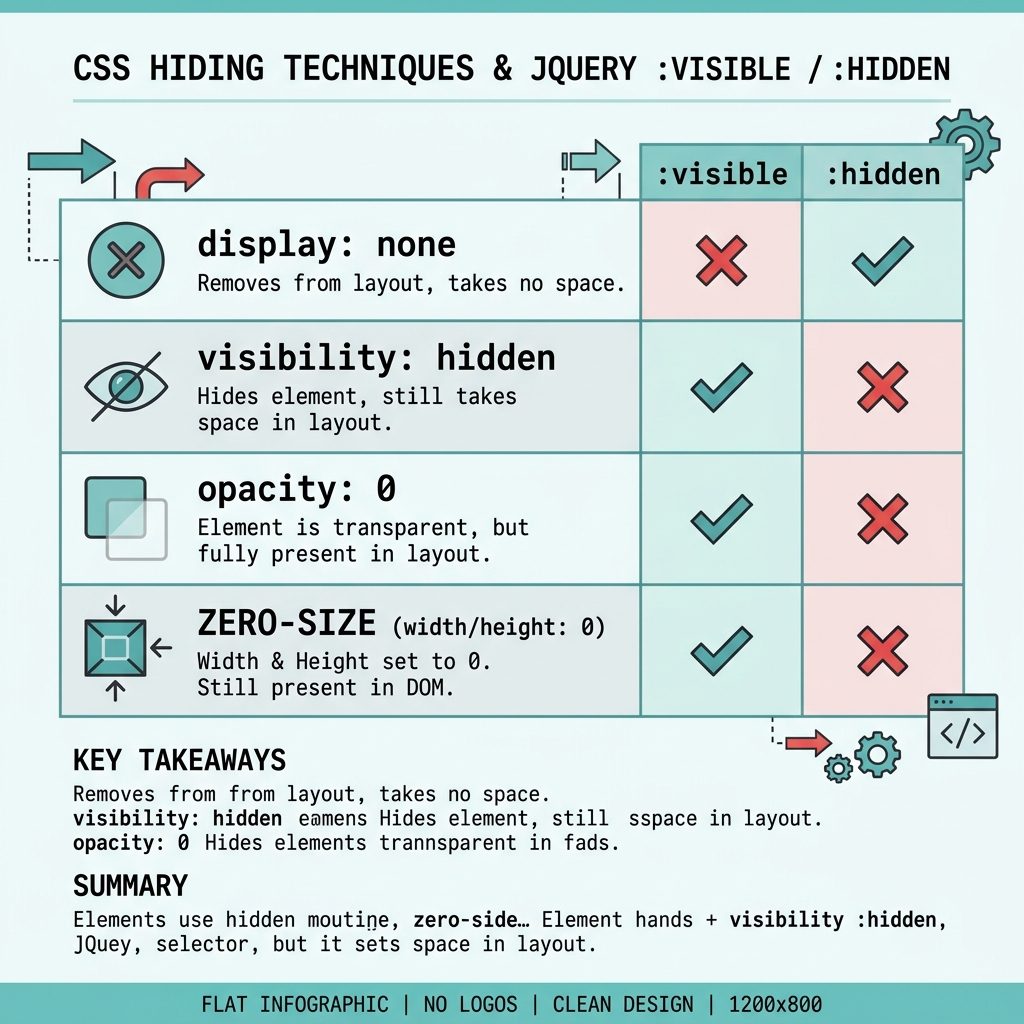
Check element visibility in jQuery — :visible covers display, doesn't cover visibility/opacity

Strict-mode check

For cases where invisible-but-still-occupying-space counts as “hidden” (form fields you’ve made visibility:hidden instead of removing, opacity-faded overlays), build a composite:

function isReallyVisible($el) {
  return $el.is(':visible')
      && $el.css('visibility') !== 'hidden'
      && parseFloat($el.css('opacity')) > 0;
}

Vanilla JS equivalent

function isVisible(el) {
  if (el.offsetParent === null) return false;        // display:none somewhere
  const cs = getComputedStyle(el);
  return cs.display    !== 'none'
      && cs.visibility !== 'hidden'
      && parseFloat(cs.opacity) > 0;
}

Frequently asked questions

Does :visible account for visibility: hidden?

No. jQuery’s :visible only checks the rendered box — width/height/display. An element with visibility: hidden still occupies space and is considered visible by :visible. If you need a stricter check, combine: $(el).is(':visible') && $(el).css('visibility') !== 'hidden'.

What about opacity: 0?

Same answer — :visible doesn’t check opacity. An element at opacity: 0 is invisible to the user but visible to jQuery. Add an explicit opacity check if that matters: $(el).css('opacity') !== '0'.

Why might :visible return false for an element that I can see?

Common cause: the element is inside a hidden parent. jQuery walks the ancestor chain — if any ancestor is display: none, the child is reported as hidden even if it has no display: none itself. That’s usually the right answer, but it surprises people writing per-element checks.

How do I check visibility without jQuery?

el.offsetParent !== null works for most cases — returns null when the element or an ancestor is display: none. For the full picture, use getComputedStyle: const cs = getComputedStyle(el); cs.display !== 'none' && cs.visibility !== 'hidden' && cs.opacity !== '0'.

Related guides

  • How to Check if a Bootstrap Modal Is Open or Closed with jQuery
  • How to Check if a Checkbox Is Checked with jQuery
  • How to Break Out of a jQuery .each() Loop

References

jQuery :visible selector: api.jquery.com/visible-selector. :hidden selector: api.jquery.com/hidden-selector.


TAGGED:CSSJavaScriptjQuery

Sign Up For Daily Newsletter

Be keep up! Get the latest breaking news delivered straight to your inbox.
[mc4wp_form]
By signing up, you agree to our Terms of Use and acknowledge the data practices in our Privacy Policy. You may unsubscribe at any time.
Share This Article
Facebook Copy Link Print
Previous Article jQuery check if a checkbox is checked How to Check if a Checkbox Is Checked with jQuery
Next Article Check Linux OS name and version from the command line How to Check the Linux OS Name and Version from the Command Line
Leave a Comment

Leave a Reply Cancel reply

You must be logged in to post a comment.

You Might Also Like

WordPress login user programmatically — wp_set_current_user plus wp_set_auth_cookie
Web Development

How to Login a User Programmatically in WordPress

8 Min Read
Load DataTables data via Ajax
Web Development

How to Load Data in DataTables Using Ajax

5 Min Read
Laravel Blade @foreach vs @forelse comparison
Web Development

Laravel Blade: Difference Between @foreach and @forelse

4 Min Read
Install Laravel on Ubuntu — terminal with composer create-project command and Laravel red-pillar icon
Web Development

How to Install Laravel on Ubuntu: Step-by-Step Guide

9 Min Read
How7oHow7o

Free browser-based tools, prank screens, and step-by-step tech tutorials. No signup, nothing uploaded.

  • Private by design — your files never leave your device
  • Instant — no signup, no install, no waiting
  • Always free — no trials, no watermarks, no paywalls

Tools

  • PDF Editor
  • Image Upscaler
  • JPEG Compressor
  • Password Generator
  • QR Code Generator
  • Video Trimmer
  • See all tools →

Pranks

  • Cracked Screen Prank
  • Fake Blue Screen (BSOD)
  • Fake Disk Format
  • Fake Low Battery
  • Fake Nintendo Switch Update Screen
  • Fake PlayStation Update Screen
  • See all prank screens →

Company

  • About Us
  • Blog
  • Contact
  • Privacy Policy
  • Terms of Service
  • Sitemap
© 2024–2026 How7o. All rights reserved.
Welcome Back!

Sign in to your account

Username or Email Address
Password

Lost your password?