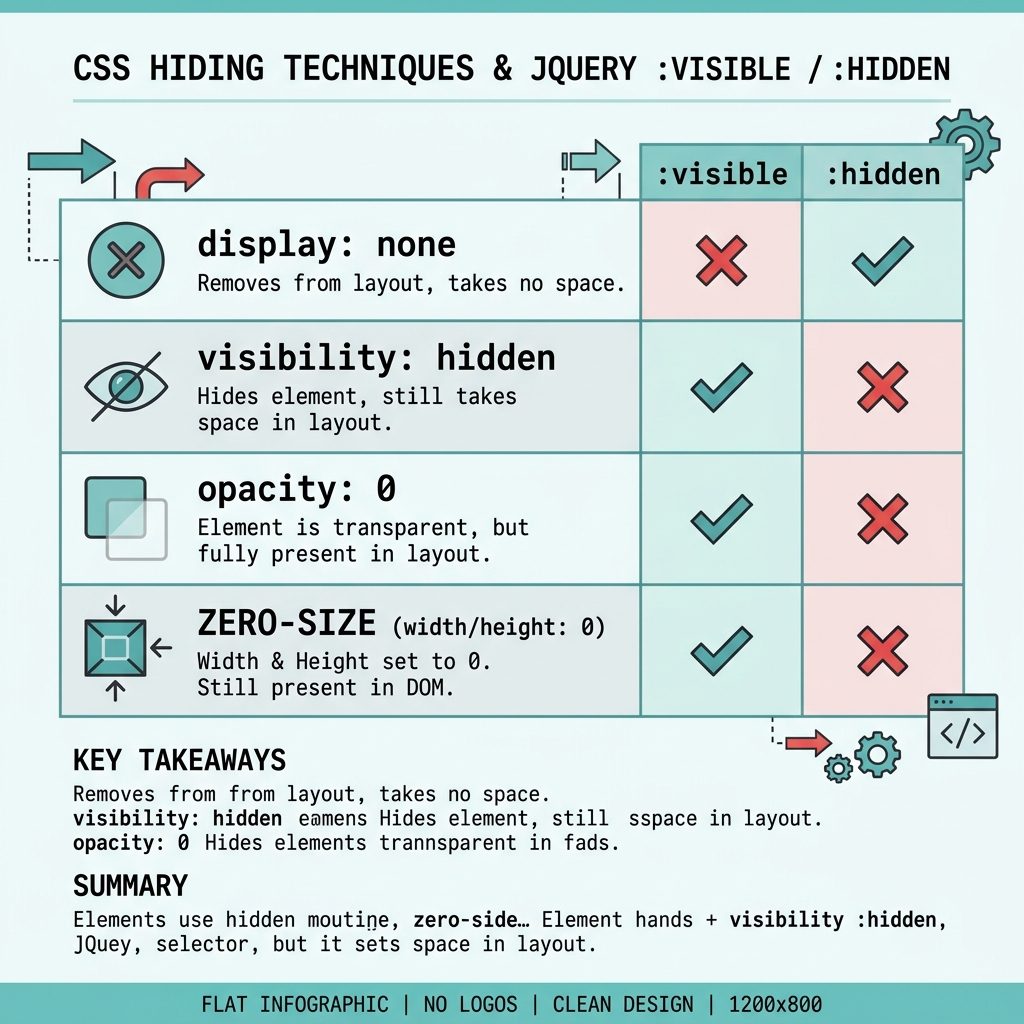
To check if an element is hidden or visible with jQuery, use $(el).is(':visible') or $(el).is(':hidden'). These match jQuery’s definition of visible: the element has non-zero size and isn’t display: none (nor is any ancestor). They don’t account for visibility: hidden or opacity: 0 — you have to check those separately.
Last verified: 2026-05-17 with jQuery 3.7+. Originally published 2023-01-04, rewritten and updated 2026-05-17.
TL;DR
// Standard jQuery check
if ($('#panel').is(':visible')) {
  // visible to the user (display ≠ none, ancestors visible, non-zero size)
}

if ($('#panel').is(':hidden')) {
  // hidden (display: none somewhere up the chain, or zero size)
}

// Strict check — also catches visibility:hidden and opacity:0
function isReallyVisible($el) {
  return $el.is(':visible')
      && $el.css('visibility') !== 'hidden'
      && $el.css('opacity')    !== '0';
}
What :visible actually checks
- The element has non-zero width or height.
- No
display: noneon the element or any ancestor. - Elements with
visibility: hiddenare still considered visible. - Elements with
opacity: 0are still considered visible.
So :visible is really “occupies space and isn’t display:none-d.” For the everyday case (“is this panel shown right now?”) that’s the right semantics.
Strict-mode check
For cases where invisible-but-still-occupying-space counts as “hidden” (form fields you’ve made visibility:hidden instead of removing, opacity-faded overlays), build a composite:
function isReallyVisible($el) {
  return $el.is(':visible')
      && $el.css('visibility') !== 'hidden'
      && parseFloat($el.css('opacity')) > 0;
}
Vanilla JS equivalent
function isVisible(el) {
  if (el.offsetParent === null) return false;        // display:none somewhere
  const cs = getComputedStyle(el);
  return cs.display    !== 'none'
      && cs.visibility !== 'hidden'
      && parseFloat(cs.opacity) > 0;
}
Frequently asked questions
:visible account for visibility: hidden? No. jQuery’s :visible only checks the rendered box — width/height/display. An element with visibility: hidden still occupies space and is considered visible by :visible. If you need a stricter check, combine: $(el).is(':visible') && $(el).css('visibility') !== 'hidden'.
opacity: 0? Same answer — :visible doesn’t check opacity. An element at opacity: 0 is invisible to the user but visible to jQuery. Add an explicit opacity check if that matters: $(el).css('opacity') !== '0'.
:visible return false for an element that I can see? Common cause: the element is inside a hidden parent. jQuery walks the ancestor chain — if any ancestor is display: none, the child is reported as hidden even if it has no display: none itself. That’s usually the right answer, but it surprises people writing per-element checks.
el.offsetParent !== null works for most cases — returns null when the element or an ancestor is display: none. For the full picture, use getComputedStyle: const cs = getComputedStyle(el); cs.display !== 'none' && cs.visibility !== 'hidden' && cs.opacity !== '0'.
Related guides
- How to Check if a Bootstrap Modal Is Open or Closed with jQuery
- How to Check if a Checkbox Is Checked with jQuery
- How to Break Out of a jQuery .each() Loop
References
jQuery :visible selector: api.jquery.com/visible-selector. :hidden selector: api.jquery.com/hidden-selector.