How7oHow7o
  • Home
  • Tools
    • All Tools
    • Image Tools
    • Text & String Tools
    • Video Tools
    • Developer Tools
    • PDF Tools
    • Calculators & More
  • Prank Screens
  • Learn
  • Blog
  • Contact
Reading: How to Check if a Checkbox Is Checked with jQuery
Share
Notification Show More
Font ResizerAa
How7oHow7o
Font ResizerAa
  • Tools
  • Prank Screens
  • Learn
  • Blog
Search
  • Home
  • Tools
    • All Tools
    • Image Tools
    • Text & String Tools
    • Video Tools
    • Developer Tools
    • PDF Tools
    • Calculators & More
  • Prank Screens
  • Learn
  • Blog
  • Contact
Follow US
© 2024–2026 How7o. All rights reserved.
How7o > Free Laravel, PHP, WordPress & Server Tutorials > Web Development > How to Check if a Checkbox Is Checked with jQuery
Web Development

How to Check if a Checkbox Is Checked with jQuery

how7o
By how7o
Last updated: May 22, 2026
4 Min Read
jQuery check if a checkbox is checked
SHARE

To check if a checkbox is checked with jQuery, the cleanest one-liner is $('#myCheckbox').prop('checked') — returns true or false based on the live DOM state. Alternative forms (.is(':checked'), :checked selector + .length) all work and have their place. Don’t use .attr('checked') — it reads the original HTML attribute, not the live state.

Contents
  • TL;DR
  • Pick the method that reads cleanly
  • Don’t use .attr('checked')
  • React to state changes
  • Frequently asked questions
  • Related guides
  • References

Last verified: 2026-05-17 with jQuery 3.7+. Originally published 2023-01-05, rewritten and updated 2026-05-17.

TL;DR

// Single checkbox — get the live boolean state
if ($('#agree').prop('checked')) {
  // ...
}

// Reads English-style
if ($('#agree').is(':checked')) {
  // ...
}

// "Are any of these checked?"
if ($('input[type="checkbox"]:checked').length) {
  // at least one is checked
}

// Vanilla JS
if (document.getElementById('agree').checked) {
  // ...
}

Pick the method that reads cleanly

All three jQuery forms work; choose based on what you’re expressing:

  • .prop('checked') — best for boolean math (assigning to a variable, passing to a function). Returns the literal boolean.
  • .is(':checked') — best inside an if for readability. Reads “if the element is checked…”
  • $('selector:checked').length — best for “is any of these checked?” without writing a loop.
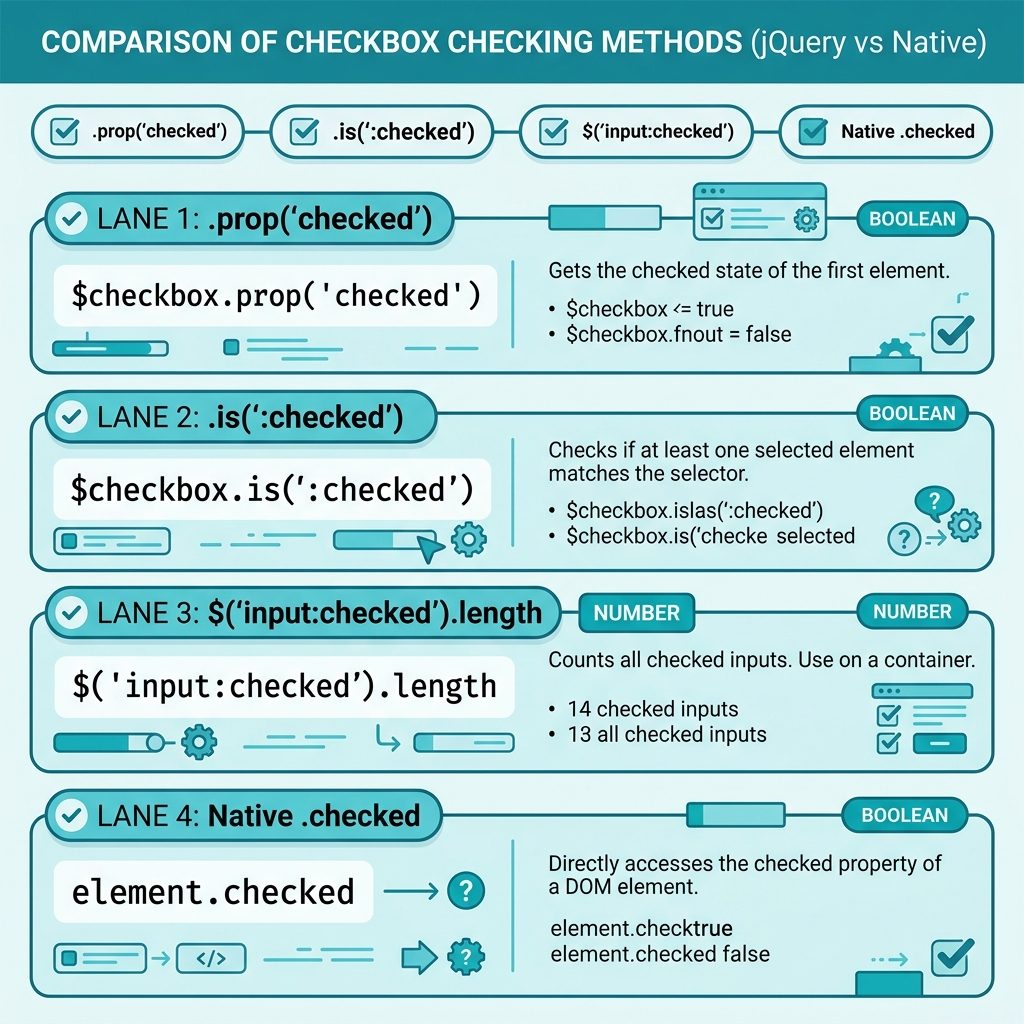
jQuery check if checkbox is checked — .prop, .is(':checked'), :checked selector, vanilla JS

Don’t use .attr('checked')

// MISLEADING — returns the original HTML attribute, not the live state
$('#agree').attr('checked');     // "checked" or undefined, no matter what the user did

The HTML checked attribute reflects only the default state from the markup. After the user clicks, the live state lives on the DOM property — which is what .prop() reads. This trap has been the subject of “jQuery checkbox not working” Stack Overflow questions for over a decade.

React to state changes

$('#agree').on('change', function () {
  console.log('Checked:', this.checked);
});

this inside the handler is the raw DOM checkbox, so this.checked gives you the live boolean without wrapping in jQuery.

Frequently asked questions

Which method is the cleanest — :checked, .prop(), or .is()?

For a single checkbox: $('#agree').prop('checked') returns a boolean directly. For a selector that might match many checkboxes (“is any of these checked?”): $('input:checked').length > 0. For a one-off readability win inside a conditional: $('#agree').is(':checked') reads almost like English. All three are equivalent; pick the one that reads cleanest in context.

Why does $('#cb').attr('checked') sometimes give wrong results?

Because .attr('checked') reads the original HTML attribute (the default state from the markup), not the live state after the user clicks. .prop('checked') reads the live DOM property. For ‘is it checked right now?’ always use .prop() — this was the jQuery 1.6+ recommendation and still holds.

Can I do this without jQuery?

Yes: document.getElementById('agree').checked for a single element, or document.querySelectorAll('input:checked').length for a count. Native JS has been comfortable for this since forever — jQuery’s only advantage is the terse selector syntax.

How do I run code when the checkbox state changes?

Wire up the change event: $('#agree').on('change', function () { console.log(this.checked); });. The this inside the handler is the raw DOM element, so this.checked is the boolean state at the moment of the event.

Related guides

  • How to Add the Required Attribute to Input Fields with jQuery
  • How to Check if an Element Is Hidden in jQuery
  • How to Change a Checkbox Background Color with CSS

References

jQuery .prop(): api.jquery.com/prop. :checked selector: api.jquery.com/checked-selector.

TAGGED:JavaScriptjQuery

Sign Up For Daily Newsletter

Be keep up! Get the latest breaking news delivered straight to your inbox.
[mc4wp_form]
By signing up, you agree to our Terms of Use and acknowledge the data practices in our Privacy Policy. You may unsubscribe at any time.
Share This Article
Facebook Copy Link Print
Previous Article Check Bootstrap modal open or closed with jQuery How to Check if a Bootstrap Modal Is Open or Closed with jQuery
Next Article Check if an element is hidden or visible with jQuery How to Check if an Element Is Hidden or Visible with jQuery
Leave a Comment

Leave a Reply Cancel reply

You must be logged in to post a comment.

You Might Also Like

PHP Bangladeshi number format — 1,00,23,456.79 grouping
Web Development

Format Numbers in Bangladeshi / Indian Style with PHP

6 Min Read
Laravel validator exists rule checking a post_id against the posts table
Web Development

How to Use the Laravel Validator Exists Rule

6 Min Read
Keep the first N characters of a JavaScript string with slice
Web Development

How to Keep Only the First N Characters of a String in JavaScript

4 Min Read
Install PHP on Ubuntu — terminal with apt install php command and stylized elephant icon
Web Development

How to Install PHP on Ubuntu (22.04 & 24.04): Step-by-Step Guide

9 Min Read
How7oHow7o

Free browser-based tools, prank screens, and step-by-step tech tutorials. No signup, nothing uploaded.

  • Private by design — your files never leave your device
  • Instant — no signup, no install, no waiting
  • Always free — no trials, no watermarks, no paywalls

Tools

  • PDF Editor
  • Image Upscaler
  • JPEG Compressor
  • Password Generator
  • QR Code Generator
  • Video Trimmer
  • See all tools →

Pranks

  • Cracked Screen Prank
  • Fake Blue Screen (BSOD)
  • Fake Disk Format
  • Fake Low Battery
  • Fake Nintendo Switch Update Screen
  • Fake PlayStation Update Screen
  • See all prank screens →

Company

  • About Us
  • Blog
  • Contact
  • Privacy Policy
  • Terms of Service
  • Sitemap
© 2024–2026 How7o. All rights reserved.
Welcome Back!

Sign in to your account

Username or Email Address
Password

Lost your password?