To fix the “Origin has been blocked by CORS policy” error, the server has to send an Access-Control-Allow-Origin response header. The simplest fix is one line in PHP (header("Access-Control-Allow-Origin: *");) or one block in .htaccess. For authenticated APIs or anything beyond a simple GET, you also need to handle the preflight OPTIONS request — covered below.
Last verified: 2026-05-17 on Chrome 124, Firefox 125, Safari 17. Originally published 2024-01-03, rewritten and updated 2026-05-17.
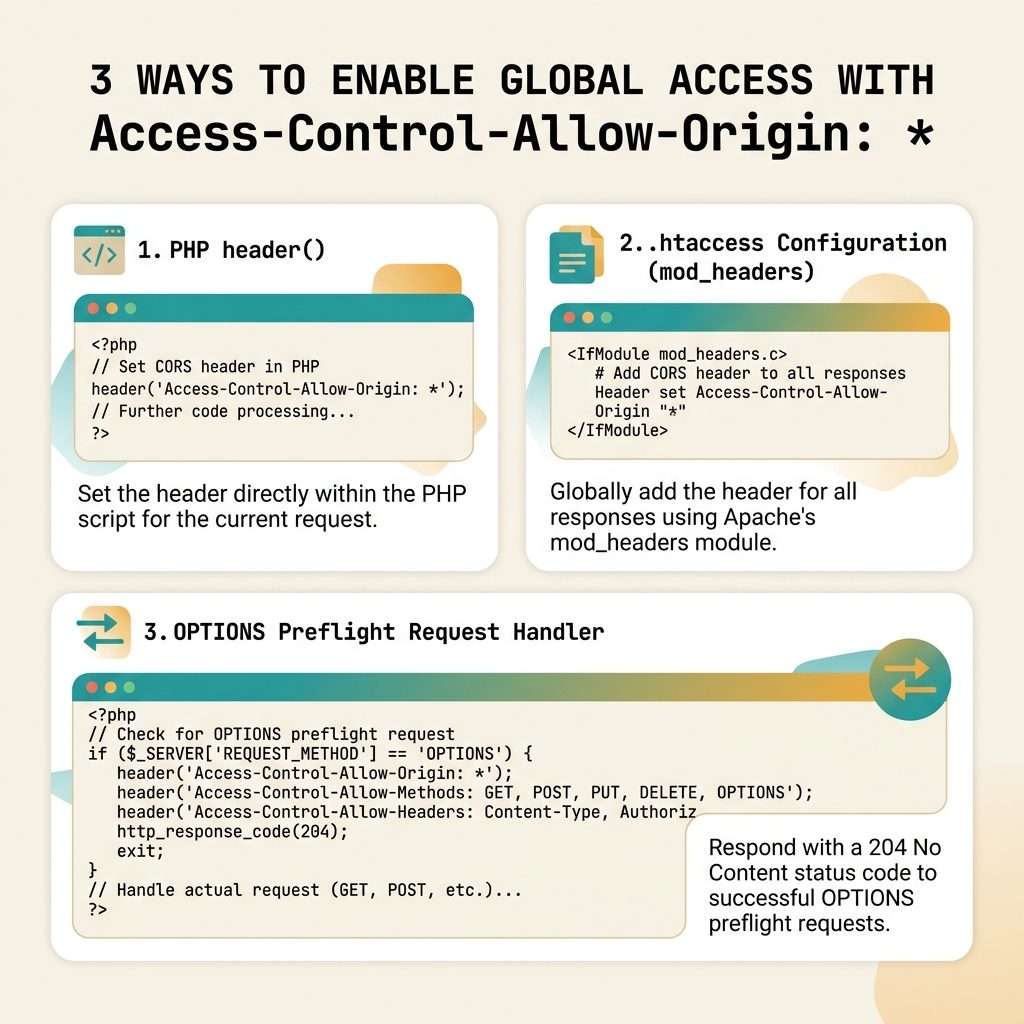
Quick fix — PHP header()
<?php
header("Access-Control-Allow-Origin: *");

// ... your API response below
This must run before any output. If anything has already been echoed (or even a stray newline before <?php), header() warns and the header isn’t sent.
Quick fix — Apache .htaccess
<IfModule mod_headers.c>
    Header set Access-Control-Allow-Origin "*"
</IfModule>
The <IfModule> guard prevents a 500 error if mod_headers isn’t loaded. On most shared hosts it is — but on a minimal server, enable it with sudo a2enmod headers on Debian/Ubuntu and restart Apache.
When POST or custom headers still fail — preflight
If you’re sending JSON, custom headers, or anything other than a “simple” GET/POST-form-encoded request, the browser sends a preflight OPTIONS request first. The server must answer it with the allowed methods and headers, and a 2xx status. A 404 on OPTIONS fails the preflight.
<?php
header("Access-Control-Allow-Origin: *");
header("Access-Control-Allow-Methods: GET, POST, PUT, DELETE, OPTIONS");
header("Access-Control-Allow-Headers: Content-Type, Authorization");
header("Access-Control-Max-Age: 86400");

if ($_SERVER['REQUEST_METHOD'] === 'OPTIONS') {
    http_response_code(204);
    exit;
}

// ... your normal handler below
Access-Control-Max-Age tells the browser to cache the preflight result, so subsequent requests from the same origin skip the OPTIONS round-trip. 86400 = 24 hours.
Authenticated endpoints — drop the wildcard
<?php
$allowed = ['https://app.example.com', 'https://admin.example.com'];
$origin  = $_SERVER['HTTP_ORIGIN'] ?? '';

if (in_array($origin, $allowed, true)) {
    header("Access-Control-Allow-Origin: $origin");
    header("Vary: Origin");
    header("Access-Control-Allow-Credentials: true");
}
When you set Access-Control-Allow-Credentials: true (needed for cookies to be sent on cross-origin requests), the Allow-Origin header cannot be * — the browser ignores the response. Echo the specific origin back instead, and use Vary: Origin so caches store a separate copy per origin.
Frequently asked questions
Access-Control-Allow-Origin: * safe to use? It depends. The wildcard works for endpoints that serve public data (no auth, no session). For anything that uses cookies, sessions, or returns user-specific data, * is not allowed when Access-Control-Allow-Credentials: true is set, and you should echo back a specific origin from a whitelist instead. * on an authenticated endpoint can also enable attackers to read responses from your API when a victim’s browser visits a malicious site.
Browsers send a preflight OPTIONS request before any “non-simple” request (POST with JSON content type, custom headers, etc.). Your server must answer that OPTIONS request with the right CORS headers and a 2xx status — many backends 404 it because no route handles OPTIONS. Add an explicit handler that returns 204 with the CORS headers for the OPTIONS method.
CORS is enforced by the browser based on response headers the server sends — there is no client-side fix that doesn’t involve proxying or disabling browser security. If you can’t change the server, route requests through your own backend (which calls the third-party server-to-server, where CORS doesn’t apply) and serve the response from your own domain. Disabling CORS in the browser is only ever a dev-time hack.
Either works. PHP’s header() calls are honoured by any SAPI (Apache, Nginx+FPM, Caddy). The Apache .htaccess approach is useful when the same response needs CORS regardless of which PHP path serves it (e.g. static assets in the same directory). For an API endpoint, sending headers from PHP keeps the policy next to the code.
Related guides
- How to Fix Missing Authorization Header in PHP Requests
- How to Display PHP Errors
- How to Convert an Image to a Base64 String in JavaScript
References
MDN CORS guide: developer.mozilla.org/en-US/docs/Web/HTTP/CORS. Access-Control-Allow-Origin: developer.mozilla.org/en-US/docs/Web/HTTP/Headers/Access-Control-Allow-Origin. Apache mod_headers: httpd.apache.org/docs/2.4/mod/mod_headers.html.