How7oHow7o
  • Home
  • Tools
    • All Tools
    • Image Tools
    • Text & String Tools
    • Video Tools
    • Developer Tools
    • PDF Tools
    • Calculators & More
  • Prank Screens
  • Learn
  • Blog
  • Contact
Reading: How to Run Code on URL Hash Change in JavaScript
Share
Notification Show More
Font ResizerAa
How7oHow7o
Font ResizerAa
  • Tools
  • Prank Screens
  • Learn
  • Blog
Search
  • Home
  • Tools
    • All Tools
    • Image Tools
    • Text & String Tools
    • Video Tools
    • Developer Tools
    • PDF Tools
    • Calculators & More
  • Prank Screens
  • Learn
  • Blog
  • Contact
Follow US
© 2024–2026 How7o. All rights reserved.
How7o > Free Laravel, PHP, WordPress & Server Tutorials > Web Development > How to Run Code on URL Hash Change in JavaScript
Web Development

How to Run Code on URL Hash Change in JavaScript

how7o
By how7o
Last updated: May 22, 2026
4 Min Read
Run JS code on URL hash change with the hashchange event
SHARE

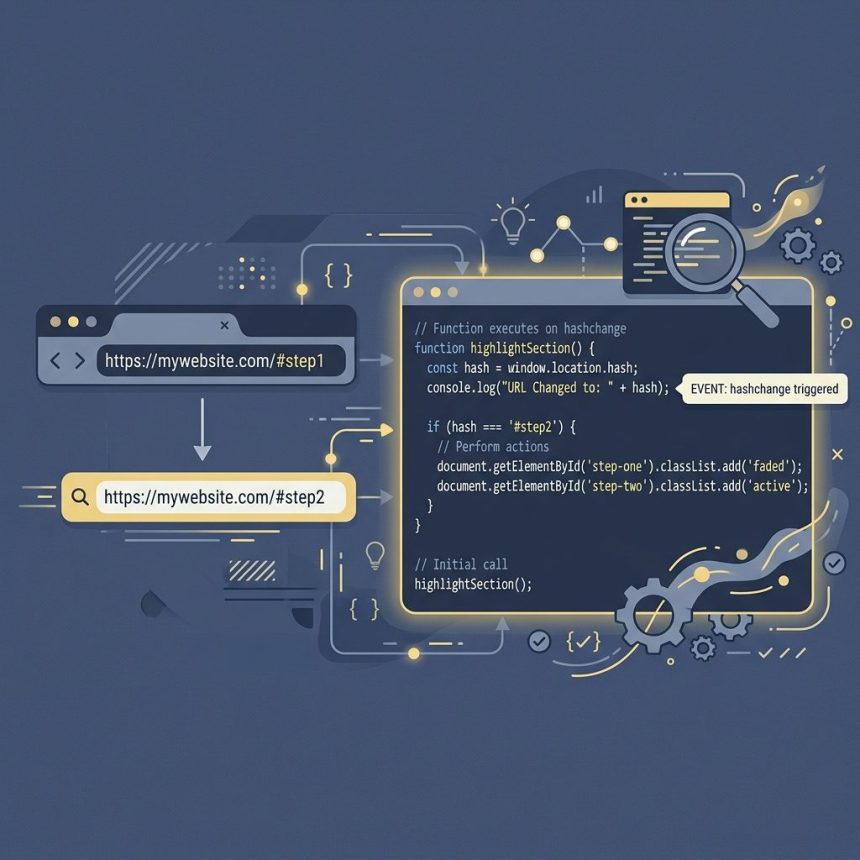
To run code when the URL hash changes in JavaScript, listen for the hashchange event on window. The browser doesn’t reload when only the hash changes — your handler runs each time it does, so you can branch on location.hash without forcing a page refresh.

Contents
  • The hashchange event
  • Force a reload on hash change (if you really need it)
  • React to the initial hash on page load too
  • Read old and new hash from the event
  • Frequently asked questions
  • Related guides
  • References

Last verified: 2026-05-17 in Chrome 124, Firefox 125, Safari 17. Originally published 2022-08-28, rewritten and updated 2026-05-17.

The hashchange event

window.addEventListener('hashchange', () => {
    if (location.hash === '#step2') {
        // show tutorial step 2
    }
});

Every time the hash part of the URL changes — programmatically or via a click on a same-page anchor — the listener fires. No reload, no loss of in-memory state.
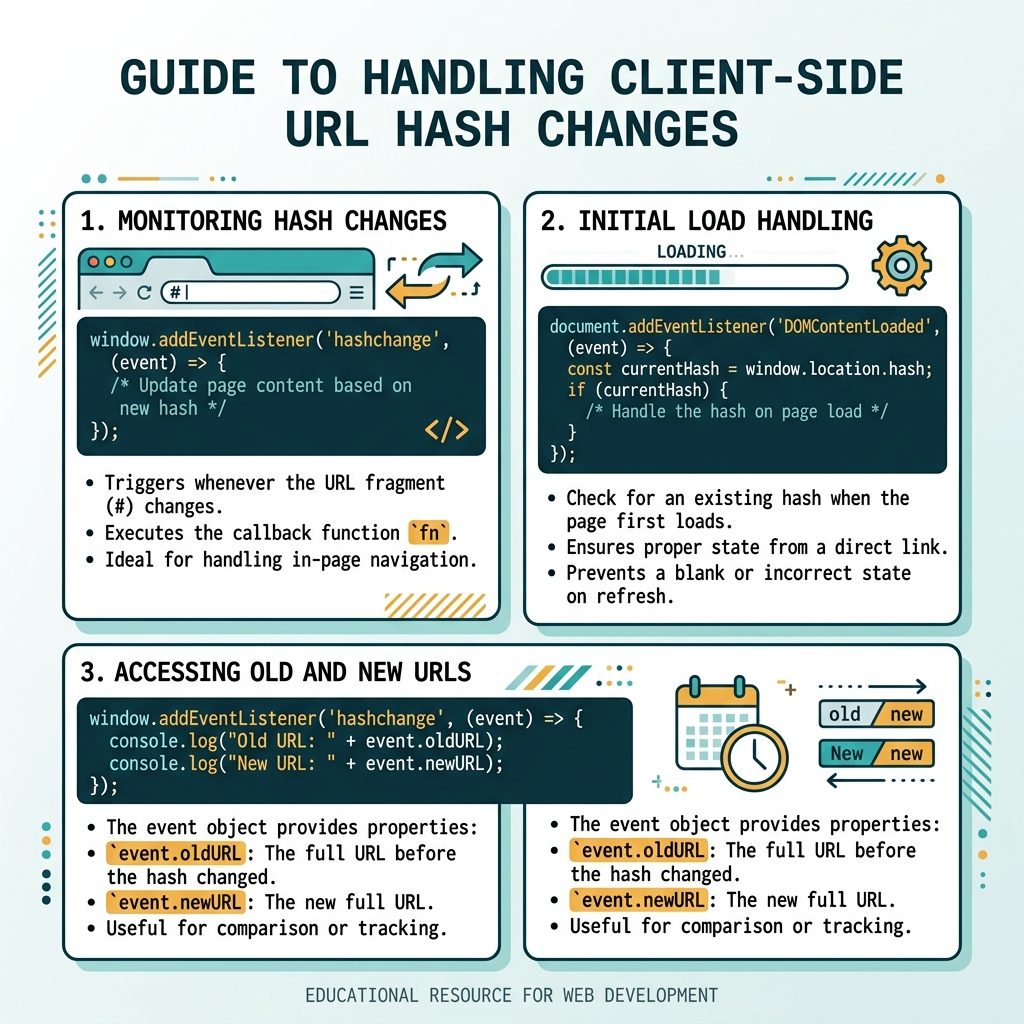
URL hash change in JS — hashchange event, addEventListener, location.reload fallback

Force a reload on hash change (if you really need it)

window.addEventListener('hashchange', () => {
    location.reload();
});

Almost never the right call — the whole point of a hash change is that it’s cheap and in-memory. But if your initial render only handles the hash at page load, a reload is the quickest fix.

React to the initial hash on page load too

function handleHash() {
    const step = location.hash.slice(1);   // 'step2' without the #
    if (step === 'step2') {
        // ...
    }
}

window.addEventListener('hashchange', handleHash);
window.addEventListener('DOMContentLoaded', handleHash);

hashchange doesn’t fire on the very first page load — only on subsequent changes. Run the same handler on DOMContentLoaded (or just inline at the bottom of the script) so the initial hash is also handled.

Read old and new hash from the event

window.addEventListener('hashchange', (event) => {
    console.log('Old:', event.oldURL);
    console.log('New:', event.newURL);
});

The event object exposes oldURL and newURL — full URLs, not just the hash. Useful for tracking transitions like “user went from #step1 to #step3” for analytics or transition animations.

Frequently asked questions

Why doesn’t the page reload when only the hash changes?

Hash-only navigations are explicitly designed to not reload — they’re meant for in-page jumps (anchor links) and SPA routing. The browser treats example.com/page#step1 and example.com/page#step2 as the same document, just with a different fragment. The hashchange event exists precisely so you can react to that change without a reload.

Should I prefer window.onhashchange = ... or addEventListener?

addEventListener('hashchange', ...) is the modern recommendation. Multiple listeners can coexist on the same event, and there’s no risk of accidentally overwriting another script’s handler — which can happen with window.onhashchange = .... Same browser support.

How do I read the hash without the leading #?

location.hash includes the # (e.g. '#step2'). Strip it with .slice(1) or use the URL constructor: new URL(location.href).hash.slice(1). The History API’s pushState equivalent (history.state) doesn’t include hash semantics.

Do I need hashchange if I’m using the History API?

If you push real URLs (history.pushState({}, '', '/step2')), use popstate instead. hashchange only fires for the #fragment part. Most SPA routers use pushState/popstate now; hashchange is best for lightweight in-page state without true route changes.

Related guides

  • How to Check if a JavaScript String Is a Valid URL
  • How to Check the HTTP Referrer with JavaScript
  • How to Disable or Enable an Input with JavaScript or jQuery

References

MDN hashchange event: developer.mozilla.org/en-US/docs/Web/API/Window/hashchange_event. MDN Location.hash: developer.mozilla.org/en-US/docs/Web/API/Location/hash.


TAGGED:browserdomJavaScript

Sign Up For Daily Newsletter

Be keep up! Get the latest breaking news delivered straight to your inbox.
[mc4wp_form]
By signing up, you agree to our Terms of Use and acknowledge the data practices in our Privacy Policy. You may unsubscribe at any time.
Share This Article
Facebook Copy Link Print
Previous Article Nginx redirect www to non-www or vice versa How to Redirect www to non-www (or vice versa) in Nginx
Next Article Reload DataTables with a new Ajax URL How to Reload DataTables with a New Ajax URL
Leave a Comment

Leave a Reply Cancel reply

You must be logged in to post a comment.

You Might Also Like

Replace jQuery .each with vanilla JavaScript loops
Web Development

How to Replace jQuery’s .each() with Vanilla JavaScript

4 Min Read
Laravel migration adding two new columns to an existing transactions table
Web Development

How to Add New Columns to an Existing Table in Laravel Migration

5 Min Read
Set A4 paper size in CSS for printing
Web Development

How to Set A4 Paper Size in CSS for Print

5 Min Read
WooCommerce add custom fee — woocommerce_cart_calculate_fees + WC()->cart->add_fee
Web Development

How to Add a Custom Fee (or Transaction Fee) in WooCommerce

8 Min Read
How7oHow7o

Free browser-based tools, prank screens, and step-by-step tech tutorials. No signup, nothing uploaded.

  • Private by design — your files never leave your device
  • Instant — no signup, no install, no waiting
  • Always free — no trials, no watermarks, no paywalls

Tools

  • PDF Editor
  • Image Upscaler
  • JPEG Compressor
  • Password Generator
  • QR Code Generator
  • Video Trimmer
  • See all tools →

Pranks

  • Cracked Screen Prank
  • Fake Blue Screen (BSOD)
  • Fake Disk Format
  • Fake Low Battery
  • Fake Nintendo Switch Update Screen
  • Fake PlayStation Update Screen
  • See all prank screens →

Company

  • About Us
  • Blog
  • Contact
  • Privacy Policy
  • Terms of Service
  • Sitemap
© 2024–2026 How7o. All rights reserved.
Welcome Back!

Sign in to your account

Username or Email Address
Password

Lost your password?