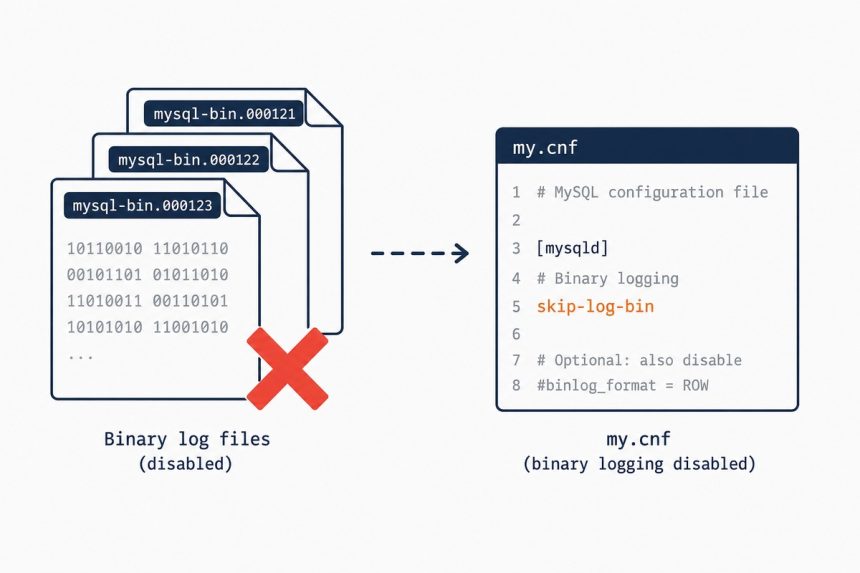
To permanently disable binary logging in MySQL or MariaDB, stop the service, add skip-log-bin under [mysqld] in my.cnf, and start it again. Verify with SHOW VARIABLES LIKE 'log_bin'; the value should be OFF. Only do this on standalone servers — replication and point-in-time recovery require binary logs.
Last verified: 2026-05-17 on MySQL 8.0 and MariaDB 10.11. Originally published 2023-01-25, rewritten and updated 2026-05-17.
Step 1 — stop the service
# MariaDB
sudo systemctl stop mariadb

# MySQL
sudo systemctl stop mysql        # Debian/Ubuntu
sudo systemctl stop mysqld       # RHEL-family
Step 2 — edit my.cnf
# Common locations
sudo vi /etc/my.cnf                                   # RHEL-family
sudo vi /etc/mysql/mariadb.conf.d/50-server.cnf       # Debian/Ubuntu MariaDB
sudo vi /etc/mysql/mysql.conf.d/mysqld.cnf            # Debian/Ubuntu MySQL
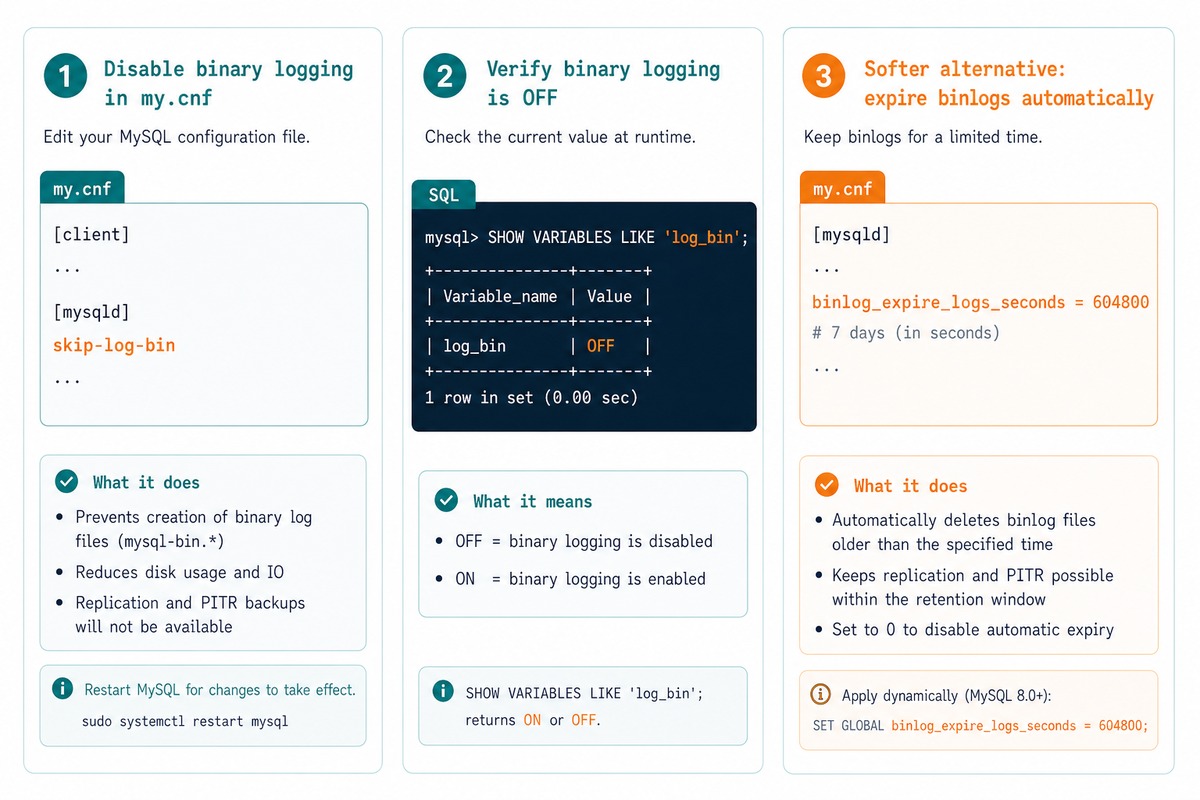
Under the [mysqld] section, add:
[mysqld]
skip-log-bin
If you already have a log-bin = ... directive, put skip-log-bin after it (or comment out the log-bin line entirely). MariaDB reads top-to-bottom — a later log-bin re-enables binary logging and overrides the skip.
Step 3 — start the service and verify
sudo systemctl start mariadb    # or mysql / mysqld

mysql -u root -p
SHOW VARIABLES LIKE 'log_bin';

+---------------+-------+
| Variable_name | Value |
+---------------+-------+
| log_bin       | OFF   |
+---------------+-------+
If the value is OFF, binary logging is fully off. The server will not produce any more mysql-bin.* files.
Step 4 — clean up existing log files
-- See what's there
SHOW BINARY LOGS;

-- Wipe them (replication-safe — if there are no replicas)
RESET MASTER;        -- MySQL 5.7 / MariaDB
RESET BINARY LOGS AND GTIDS;   -- MySQL 8.4+ replacement
RESET MASTER (or RESET BINARY LOGS AND GTIDS on MySQL 8.4+) drops every binary log file and resets the GTID set. Don’t run this on a server that has replicas — they’ll desync immediately.
Alternative — keep binary logs but expire them quickly
[mysqld]
# MySQL 8.0+ — seconds (default 30 days)
binlog_expire_logs_seconds = 86400    # 1 day

# MySQL 5.7 / MariaDB — days
expire_logs_days = 1
If you want point-in-time recovery for the last day or two but not unbounded growth, expire logs aggressively rather than disabling them. Best of both worlds.
Frequently asked questions
Three cases. (1) You run replication — binary logs are how primary→replica delta-sync works; disable them and replication stops cold. (2) You rely on point-in-time recovery — binary logs are what let you replay changes since the last backup; without them, recovery is limited to whatever your full backup contained. (3) You use Group Replication or InnoDB Cluster — both require binary logs. For a single-instance server with full nightly backups and no replication, disabling is reasonable.
No — set binlog_expire_logs_seconds = 86400 (one day) or whatever retention you can afford in my.cnf. MySQL rotates old binary logs out automatically. This keeps the ability to recover recent state without unbounded disk use. Disable only if you don’t need them at all.
skip-log-bin ordering with log-bin? MariaDB processes my.cnf top-to-bottom. If log-bin = mysql-bin appears after skip-log-bin, the log-bin directive re-enables binary logging and your skip-log-bin does nothing. Either put skip-log-bin after log-bin, or comment out log-bin entirely. Same rule applies to log_bin with an underscore.
Both honor skip-log-bin in [mysqld]. MySQL 8.0 also accepts disable-log-bin as an alias. The cleanup commands (PURGE BINARY LOGS, SHOW BINARY LOGS) are identical. The config-file paths differ on some distros — MySQL on Debian/Ubuntu uses /etc/mysql/mysql.conf.d/mysqld.cnf, MariaDB uses /etc/mysql/mariadb.conf.d/. On RHEL-family, both default to /etc/my.cnf + /etc/my.cnf.d/.
Related guides
- How to Safely Clean Up MySQL Binary Log Files
- How to Find What’s Pinning MySQL at 100% CPU
- How to Troubleshoot MariaDB Not Starting
References
MySQL --skip-log-bin: dev.mysql.com/doc/refman/8.0/en/replication-options-binary-log.html. MariaDB binary logs: mariadb.com/kb/en/activating-the-binary-log. RESET MASTER: dev.mysql.com/doc/refman/8.0/en/reset-master.html.