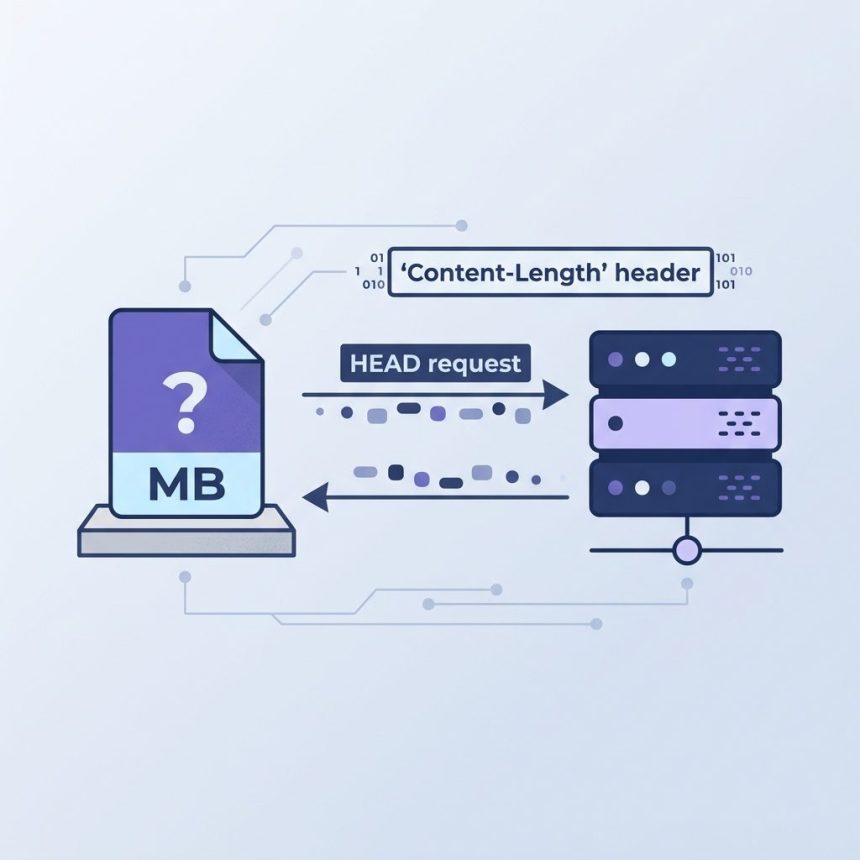
To get a remote file’s size from a URL in PHP without downloading the file, send a HEAD request and read the Content-Length response header. The simplest way is get_headers($url, true); the more robust way is cURL with CURLOPT_NOBODY.
Last verified: 2026-05-17 on PHP 8.3. Originally published 2023-02-22, rewritten and updated 2026-05-17.
Why filesize() doesn’t work
$url = 'https://example.com/file.mp4';
$filesize = filesize($url);
// Warning: filesize(): stat failed
filesize() calls stat(), which the PHP HTTP stream wrapper doesn’t implement. Use HTTP directly.
Quick — get_headers()
$url      = 'https://example.com/file.mp4';
$headers  = get_headers($url, true);
$filesize = isset($headers['Content-Length']) ? (int) $headers['Content-Length'] : 0;

echo "$filesize bytes";
Passing true as the second argument groups headers by name (case-insensitive). Content-Length is a string of digits — cast to int for arithmetic. If the server doesn’t send the header (chunked responses, dynamic endpoints), the lookup returns null and we fall back to 0.

Robust — cURL with explicit HEAD
function remoteFileSize(string $url): ?int {
    $ch = curl_init($url);
    curl_setopt($ch, CURLOPT_NOBODY,         true);   // HEAD only
    curl_setopt($ch, CURLOPT_RETURNTRANSFER, true);
    curl_setopt($ch, CURLOPT_FOLLOWLOCATION, true);   // follow 301/302
    curl_setopt($ch, CURLOPT_TIMEOUT,        10);

    if (curl_exec($ch) === false) {
        curl_close($ch);
        return null;
    }

    $size = curl_getinfo($ch, CURLINFO_CONTENT_LENGTH_DOWNLOAD);
    curl_close($ch);

    return $size >= 0 ? (int) $size : null;
}

$bytes = remoteFileSize('https://example.com/file.mp4');
echo $bytes === null ? 'unknown' : "$bytes bytes";
The cURL version handles redirects, has an explicit timeout, and uses CURLINFO_CONTENT_LENGTH_DOWNLOAD which is already parsed from the header. Returns null when the server didn’t supply Content-Length — that’s the truthful answer, not 0.
Formatting the size for display
function humanBytes(int $bytes, int $decimals = 1): string {
    $units = ['B', 'KB', 'MB', 'GB', 'TB'];
    $i = 0;
    while ($bytes >= 1024 && $i < count($units) - 1) {
        $bytes /= 1024;
        $i++;
    }
    return number_format($bytes, $decimals) . ' ' . $units[$i];
}

echo humanBytes(15728640); // "15.0 MB"
Frequently asked questions
filesize() work on a URL? filesize() calls stat() on the path, which only works for local filesystems (and stream wrappers that implement url_stat). The HTTP stream wrapper in PHP doesn’t implement it. get_headers() works because it issues an actual HTTP request (HEAD by default when $associative is true) and reads the Content-Length header from the response.
Content-Length? No. Static files almost always do, but dynamic responses (PHP, Node, Python) often omit it because the size isn’t known until the body is generated — they use Transfer-Encoding: chunked instead. If Content-Length is missing, you cannot know the size without downloading the whole body. Handle that case explicitly in your code.
get_headers()? cURL gives you finer control — explicit HEAD via CURLOPT_NOBODY, custom timeouts, header collection, and curl_getinfo($ch, CURLINFO_CONTENT_LENGTH_DOWNLOAD) as a parsed shortcut. get_headers() is simpler and works in two lines. Pick cURL for production code that needs robust timeouts and error handling; get_headers() for scripts and one-off tools.
filesize() in terms of performance? get_headers() still costs a network round-trip — typically 50–200 ms to a remote server, versus a microsecond for local filesize(). For a hot loop that needs many remote sizes, batch them: keep the cURL handle, reuse the TCP connection, or use curl_multi_* for parallel HEADs. Don’t call get_headers() in a tight loop without caching.
Related guides
- How to Create a Folder If It Does Not Exist in PHP
- How to Extract a .tar.gz Archive in PHP
- How to Display PHP Errors
References
PHP get_headers(): php.net/manual/en/function.get-headers.php. PHP cURL CURLOPT_NOBODY: php.net/manual/en/function.curl-setopt.php. HTTP Content-Length: developer.mozilla.org/en-US/docs/Web/HTTP/Headers/Content-Length.