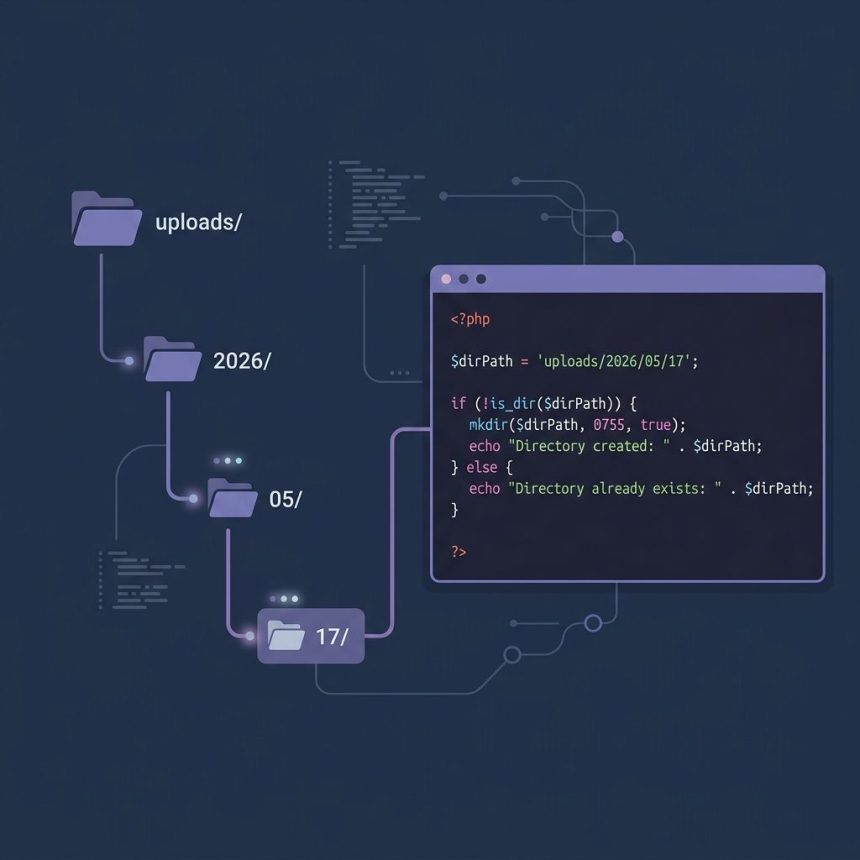
To create a folder if it does not already exist in PHP, check with is_dir() and create with mkdir($path, 0755, true). The third argument creates parent directories along the path — handy for date-based folders like uploads/2026/05/17 where multiple levels may be missing.
Last verified: 2026-05-17 on PHP 8.3. Originally published 2023-01-03, rewritten and updated 2026-05-17.
The one-liner
$upload_dir = 'uploads/' . date('Y/m/d');

if (!is_dir($upload_dir)) {
    mkdir($upload_dir, 0755, true);
}
On the first request of the day, uploads/2026/05/17 is created (along with any missing parent like 2026 or 2026/05). On every subsequent request, is_dir() short-circuits and mkdir() isn’t called.

mkdir()‘s three arguments
$pathname— relative or absolute path. Relative paths resolve from the current working directory, which is usually the script’s own location but can change if your code callschdir(). Use absolute paths when in doubt.$mode— Unix permissions in octal.0755(owner write, others read+execute) is a sane default.0777is world-write and almost never necessary. Ignored on Windows.$recursive— whentrue, missing parent directories are created too. Defaults tofalse, which means a deep path with any missing parent fails.
is_dir() vs file_exists()
The source recipe used file_exists(), which works in the common case but has a subtle edge: if a regular file at uploads/2026 already exists (created in error somewhere), file_exists() returns true and you skip the directory creation — then any attempt to write a file inside uploads/2026/05/17/ fails because uploads/2026 isn’t a directory. is_dir() is more precise:
// Better
if (!is_dir($upload_dir)) {
    mkdir($upload_dir, 0755, true);
}
Race-safe variant for concurrent requests
Two requests can both pass the is_dir() check before either calls mkdir(); the second mkdir() then raises a warning (“File exists”). Under low traffic this is harmless, but for an API or upload handler that runs concurrently, the resilient pattern is:
if (!is_dir($upload_dir) && !@mkdir($upload_dir, 0755, true) && !is_dir($upload_dir)) {
    throw new RuntimeException("Failed to create directory: $upload_dir");
}
The second is_dir() after a suppressed mkdir() covers the race: if another request just created the folder, we’re fine; if mkdir() failed for a real reason (permissions, missing parent we can’t create), we throw.
Frequently asked questions
file_exists() or is_dir() to check? is_dir() is more specific — it returns true only if the path exists and is a directory. file_exists() returns true for files, directories, and symlinks. If a file with the same name as your target folder already exists, file_exists() will report true and you’ll skip the mkdir, then your file write into the “directory” fails. Prefer is_dir().
0755 instead of 0777? 0777 grants write permission to everyone on the server — including any other site or user on a shared host. 0755 gives owner write, group/other read-and-execute, which is enough for the web server to read files and for upload scripts (running as the same user) to write. Use 0777 only when you genuinely need world-write, which is rare.
true in mkdir() do? It’s the $recursive flag — it tells mkdir() to create any missing parent directories along the path. Without it, mkdir('uploads/2026/05/17') fails if uploads/2026 doesn’t already exist. With true, every intermediate folder is created in one call, like mkdir -p on the command line.
if (!is_dir()) check race-safe under heavy traffic? Not strictly. Between the is_dir() check and the mkdir() call, another request can create the directory — then your mkdir() raises a warning. To handle this cleanly, suppress the warning and check the result: if (!is_dir($d) && !@mkdir($d, 0755, true) && !is_dir($d)) throw new Exception('mkdir failed');. The second is_dir() covers the race where another request just created it.
Related guides
References
PHP mkdir(): php.net/manual/en/function.mkdir.php. PHP is_dir(): php.net/manual/en/function.is-dir.php.