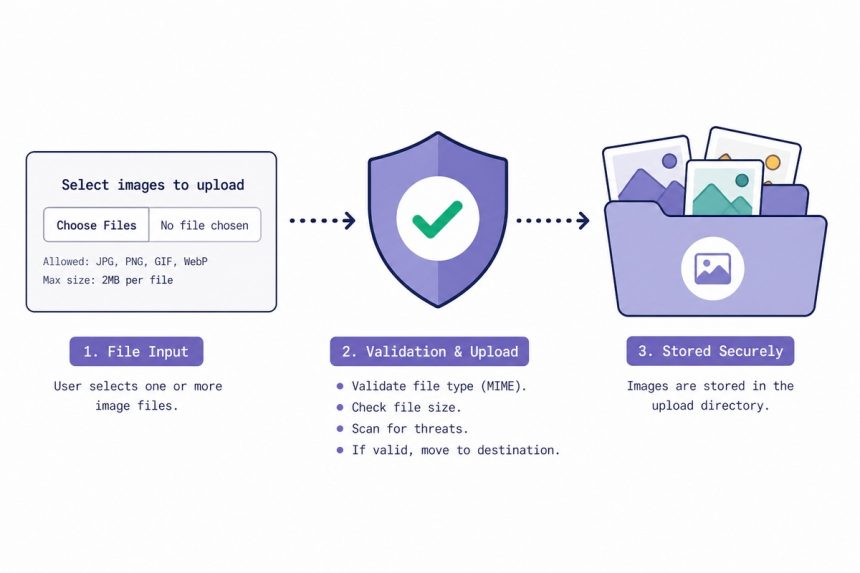
To upload only image files using PHP, don’t trust $_FILES['x']['type'] alone — that’s user-controlled. Verify the bytes with getimagesize() (or finfo_file()), check the extension, and configure the upload directory so it can’t execute scripts. Defence in depth is the rule for any user-supplied file.
Last verified: 2026-05-17 on PHP 8.3. Originally published 2022-11-30, rewritten and updated 2026-05-17.
The minimal version (from the source)
<?php
if ( isset( $_FILES['image_file'] ) && $_FILES['image_file']['error'] === UPLOAD_ERR_OK ) {
    $allowed  = [ 'image/jpeg', 'image/gif', 'image/png', 'image/webp' ];
    $filename = $_FILES['image_file']['name'];

    if ( in_array( $_FILES['image_file']['type'], $allowed, true ) ) {
        $dest = 'upload/' . $filename;
        if ( file_exists( $dest ) ) {
            echo $filename . ' already exists.';
        } else {
            move_uploaded_file( $_FILES['image_file']['tmp_name'], $dest );
            echo 'Your image uploaded successfully.';
        }
    } else {
        echo 'Error: only image files are allowed!';
    }
}
Works — but the MIME-type check ($_FILES['x']['type']) is browser-supplied and trivially spoofed. For anything user-facing, also verify the actual file contents (next section).
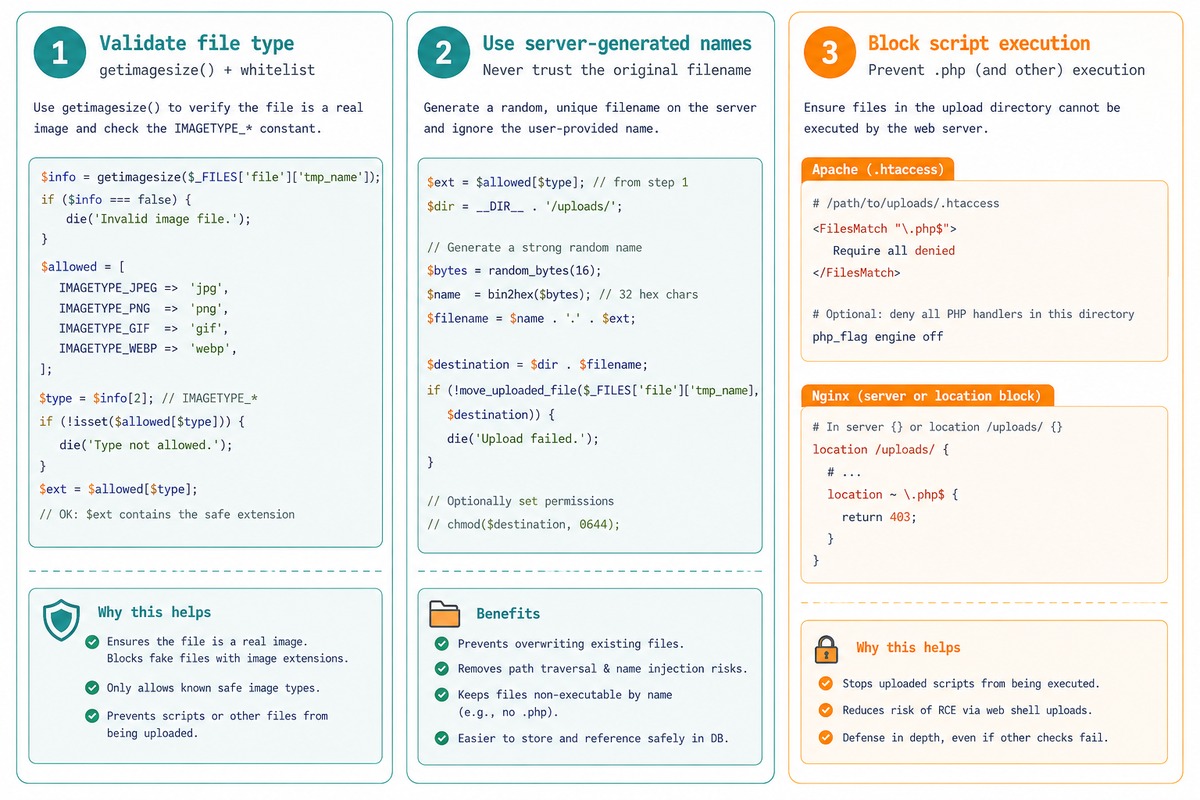
Robust version — inspect the bytes
<?php
if ( isset( $_FILES['image_file'] ) && $_FILES['image_file']['error'] === UPLOAD_ERR_OK ) {
    $tmp_path = $_FILES['image_file']['tmp_name'];

    // 1. Verify the file is actually an image by reading its header
    $info = getimagesize( $tmp_path );
    if ( $info === false ) {
        die( 'Not a valid image.' );
    }

    // 2. Whitelist allowed image types by IMAGETYPE_*
    $allowed_types = [ IMAGETYPE_JPEG, IMAGETYPE_PNG, IMAGETYPE_GIF, IMAGETYPE_WEBP ];
    if ( ! in_array( $info[2], $allowed_types, true ) ) {
        die( 'This image format is not allowed.' );
    }

    // 3. Generate a safe, server-controlled filename
    $ext       = image_type_to_extension( $info[2] );    // .jpg / .png / .gif / .webp
    $safe_name = bin2hex( random_bytes( 16 ) ) . $ext;
    $dest      = __DIR__ . '/upload/' . $safe_name;

    // 4. Move into place
    if ( move_uploaded_file( $tmp_path, $dest ) ) {
        echo "Uploaded as $safe_name";
    } else {
        die( 'Failed to save the file.' );
    }
}getimagesize()opens the file and returns dimensions + anIMAGETYPE_*constant. Returnsfalsefor non-image bytes — the simplest “is this really an image?” check.- Whitelist on
IMAGETYPE_*instead of MIME or extension. These come from PHP after inspecting the bytes, so the user can’t lie about them. - Server-generated filename via
random_bytes(16). Drops directory-traversal and overwrite attempts in one step. image_type_to_extension()maps the type constant back to.jpg/.png/etc., so the stored file has the right extension for its actual content.
Block script execution in the uploads directory
# upload/.htaccess (Apache)
<FilesMatch "\.(ph(p[3-7]?|tml))$">
    Require all denied
</FilesMatch>
# /etc/nginx/sites-available/example.com (Nginx)
location /upload/ {
location ~ \.(ph(p[3-7]?|tml))$ {
deny all;
}
}Even with perfect validation, an attacker who manages to write a .php file to the uploads dir cannot have it executed. This is the “if validation fails, contain the damage” layer.
Frequently asked questions
Extensions are trivially renameable. A malicious user can rename shell.php to shell.jpg, upload it, and have it served as PHP if the server is misconfigured. The MIME type from $_FILES['x']['type'] is also user-controlled (the browser sends it). The only reliable check is opening the file and inspecting its bytes — getimagesize() or finfo_file() does this.
$_FILES['x']['type']? It’s whatever the user’s browser claims, not what the file actually is. A request can set Content-Type: image/jpeg on any payload. Better path: pass the file to finfo_file (libmagic-backed inspection) or call getimagesize(), which returns false if the bytes aren’t a recognised image format.
.php, .phtml, etc. from being executed even if uploaded? Configure the web server. In Apache, place an .htaccess in the uploads directory: <FilesMatch "\.(ph(p[3-7]?|tml))$"> Require all denied </FilesMatch>. In Nginx, add a location ~ \.(ph(p[3-7]?|tml))$ { deny all; } block inside the uploads location. Defence in depth: even if validation fails, execution is blocked.
Yes — generate a server-controlled name (uniqid(), UUID, or hash of the contents) and don’t keep the user’s name. Stops directory-traversal attempts (../../etc/passwd), collision-based overwrites, and information leaks (the user’s filename can contain their real name or PII). Keep the original name in your database if you need it for display.
Related guides
- How to Upload Files via Ajax with jQuery
- How to Open a File Dialog When Clicking a Button
- How to Create a Folder If It Does Not Exist in PHP
References
PHP getimagesize(): php.net/manual/en/function.getimagesize.php. PHP move_uploaded_file(): php.net/manual/en/function.move-uploaded-file.php. PHP finfo_file(): php.net/manual/en/function.finfo-file.php.