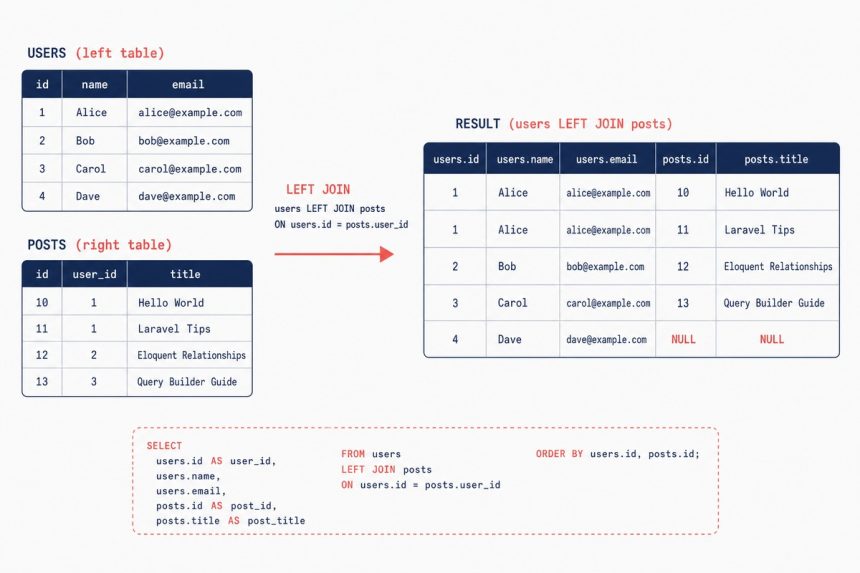
To get all records from the main table in Laravel even when there’s no match in the joined table, swap join() for leftJoin(). The default join() is an inner join — it drops rows without a match. leftJoin() keeps every row from the left table and fills the right-side columns with NULL when there’s no match.
Last verified: 2026-05-17 on Laravel 11. Originally published 2023-01-31, rewritten and updated 2026-05-17.
The fix
$funds = DB::table('funds')
    ->select(
        'funds.id',
        'funds.package_code',
        'funds.amount',
        'funds.method',
        'funding_sources.name',
        'funding_sources.estimated_cost',
        'funding_sources.contract_value',
        'funding_sources.party_name'
    )
    ->leftJoin('funding_sources', 'funding_sources.id', '=', 'funds.funding_source_id')
    ->get();
Every row in funds comes back. Funds without a corresponding funding_sources record get NULL for name, estimated_cost, contract_value, and party_name.
The four join types Laravel supports
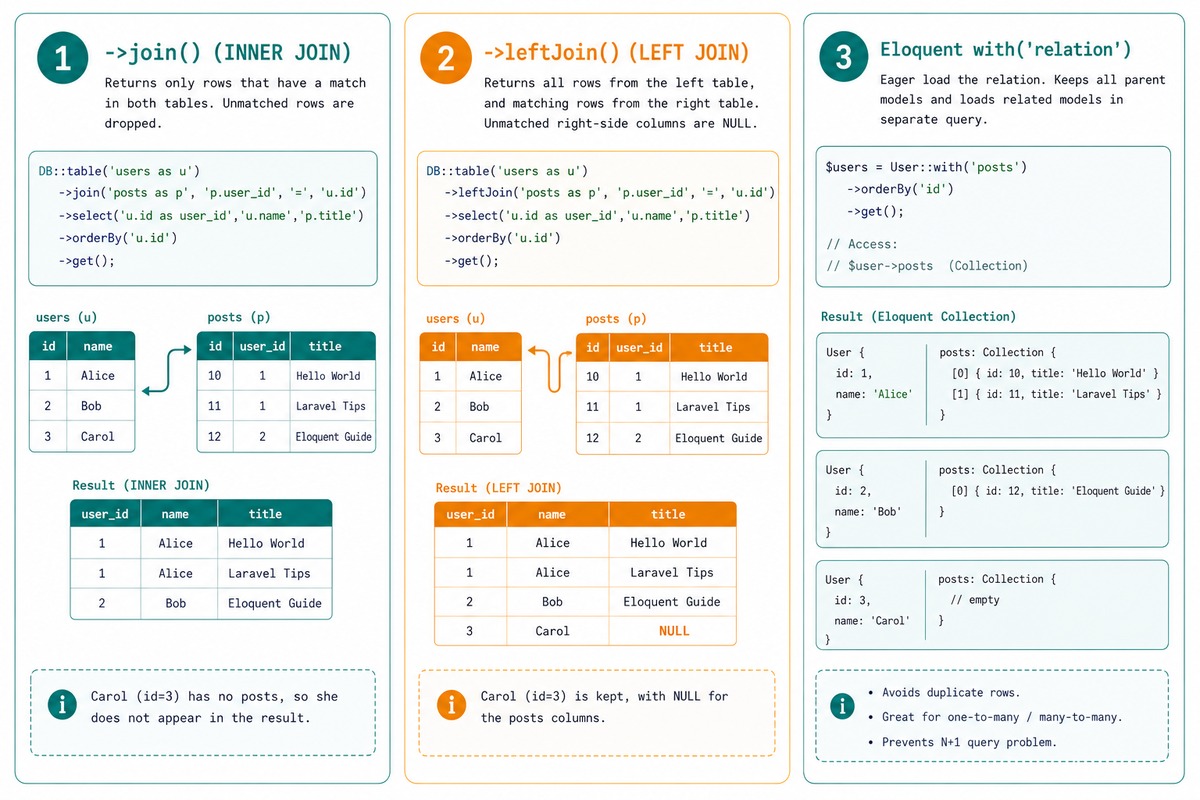
join()— inner join. Default. Drops unmatched rows.leftJoin()— left outer join. Keeps every row from the main table; NULLs on the right when no match.rightJoin()— right outer join. Keeps every row from the joined table; NULLs on the left when no match. Rarely used; usually it’s clearer to swap which table is the main one and use aleftJoin.crossJoin()— Cartesian product. Every row from each table paired with every row from the other. Useful for generating combinations; almost never what you want by accident.
Alternative — the four-arg join
// Same result as leftJoin
->join('funding_sources', 'funding_sources.id', '=', 'funds.funding_source_id', 'left')
The four-argument join takes the join type as the fifth element. Both 'left' and 'left outer' work and produce identical SQL. leftJoin() is the dedicated shortcut.
Eloquent equivalent
// app/Models/Fund.php
public function fundingSource()
{
    return $this->belongsTo(FundingSource::class);
}

// Controller
$funds = Fund::with('fundingSource')->get();

// In Blade / view
@foreach ($funds as $fund)
    {{ $fund->package_code }} —
    {{ $fund->fundingSource?->name ?? 'No source assigned' }}
@endforeach
For relationship navigation, Eloquent’s with() eager-loads the related record. Funds without a source get $fund->fundingSource as null — the nullsafe operator ?-> handles it cleanly. Use this when you don’t need the joined columns flattened into the same row.
Frequently asked questions
join() default to in Laravel? Inner join. join('table', 'a.id', '=', 'b.id') only returns rows where the join condition matches on both sides. Use leftJoin (or rightJoin) when you want unmatched rows from one side to still appear, with the other side as NULL.
leftJoin and join(..., 'left outer')? None — they produce the same SQL. leftJoin is a thin wrapper around join() with the fourth argument set to 'left'. Use leftJoin for readability; the four-arg form is mostly there for code that builds queries dynamically and needs to switch join types based on a variable.
After a leftJoin, rows without a match have NULL in every column from the right-hand table. In Blade or PHP: $fund->name ?? 'No funding source'. In a query filter: ->whereNotNull('funding_sources.id') to keep only matched rows, or ->whereNull('funding_sources.id') to find unmatched ones (the “anti-join” pattern).
leftJoin? Eloquent relationships (hasOne, belongsTo) generate cleaner code for the common case — Fund::with('fundingSource')->get() handles the missing-match case naturally (the relationship is just null). Reach for leftJoin when you need the joined columns inside the same row (for filtering, sorting, or selecting specific fields) instead of as a nested relation.
Related guides
- How to Do a Left Outer Join with Laravel
- How to Use Multiple where and orWhere in Laravel Eloquent
- How to Use orderBy in Laravel Eloquent
References
Laravel query builder joins: laravel.com/docs/queries#joins. Eloquent relationships: laravel.com/docs/eloquent-relationships.