How7o
  • Home
  • Tools
  • Prank Screens
  • Learn
  • Blog
  • Contact
Reading: How to Use Select2 Inside a Bootstrap Modal
Share
How7oHow7o
Font ResizerAa
  • OS
Search
  • Home
  • Tools
  • Prank Screens
  • Learn
  • Blog
  • Contact
Follow US
© 2024–2026 How7o. All rights reserved.
How7o > Free Laravel, PHP, WordPress & Server Tutorials > Web Development > How to Use Select2 Inside a Bootstrap Modal
Web Development

How to Use Select2 Inside a Bootstrap Modal

how7o
By how7o
Last updated: May 23, 2026
4 Min Read
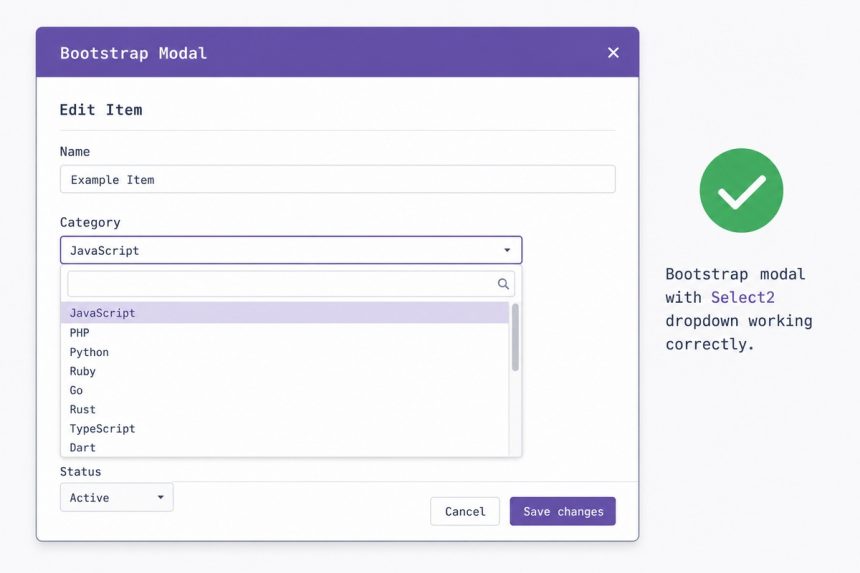
Make Select2 work inside a Bootstrap modal
SHARE

To make Select2 work inside a Bootstrap modal, pass the modal as the dropdownParent option when initialising Select2. Without it, the modal’s focus trap blocks every interaction with the dropdown, which renders outside the modal.

Contents
  • The fix
  • Initialise on modal open (recommended)
  • Why this is necessary — focus traps
  • Multiple selects in the same modal
  • Frequently asked questions
  • Related guides
  • References

Last verified: 2026-05-17 with Select2 4.0.13 and Bootstrap 5.3. Originally published 2023-10-10, rewritten and updated 2026-05-17.

The fix

$('#products').select2({
    dropdownParent: $('#products-modal')
});

dropdownParent tells Select2 to append its dropdown inside the modal’s DOM instead of <body>. Once inside the modal, the dropdown is part of the focus-trapped region and clicks/keystrokes reach it normally.
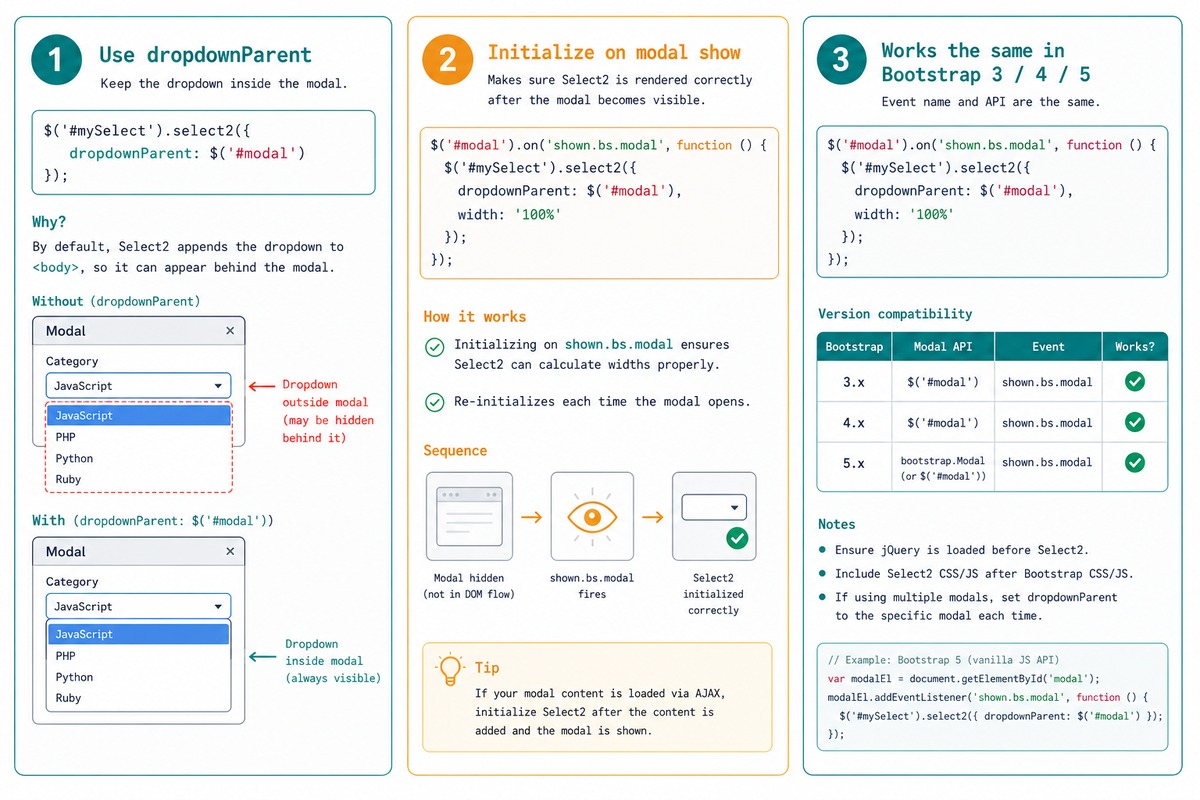
Select2 in Bootstrap modal — dropdownParent fix, init on shown.bs.modal, same for BS 3/4/5

Initialise on modal open (recommended)

// Bootstrap 5
$('#products-modal').on('shown.bs.modal', function () {
    $('#products').select2({
        dropdownParent: $('#products-modal')
    });
});

Waiting for shown.bs.modal means the modal is fully visible and any responsive sizing has settled before Select2 measures the dropdown’s width. Prevents the zero-width-dropdown bug.

Why this is necessary — focus traps

Bootstrap modals add tabindex="-1" and trap focus inside the modal, both for accessibility and to prevent background-page interactions while the modal is open. Select2 appends its dropdown to <body> by default — outside the modal. The focus trap intercepts the dropdown’s clicks and keystrokes because they happen “outside” the modal even though the user sees them inside.

Moving Select2’s dropdown into the modal (via dropdownParent) puts it back inside the focused region.

Multiple selects in the same modal

$('#products-modal').on('shown.bs.modal', function () {
    $(this).find('select.select2').each(function () {
        $(this).select2({
            dropdownParent: $('#products-modal')
        });
    });
});

Loop every select.select2 inside the modal and pass the same dropdownParent to each. Works for as many selects as the form needs.

Frequently asked questions

Why doesn’t Select2 work in Bootstrap modals by default?

Modals use tabindex="-1" on the modal container, which traps focus inside the modal for accessibility. Select2’s dropdown is appended to <body> by default — outside the modal — so the focus trap intercepts every click and keystroke meant for the dropdown. Pointing Select2’s dropdownParent at the modal puts the dropdown inside the focus-trapped region, where it can receive input normally.

Which element should I pass to dropdownParent?

The element representing the modal — the one with class modal or modal-content. Either works; modal-content can give slightly cleaner positioning. Don’t pass a child of the modal that doesn’t fill its width, or the dropdown will be clipped.

Does this same fix apply to Bootstrap 5 / 4 / 3?

Yes — the modal focus-trap behavior is the same across versions. The Select2 fix (dropdownParent: $('#myModal')) is identical. The only thing that changes between Bootstrap versions is the modal markup and JS API for opening/closing, not the focus model.

Should I initialise Select2 before or after the modal opens?

Either works as long as dropdownParent is set. The cleanest pattern is to initialise inside the shown.bs.modal event (Bootstrap 4/5) so the modal is fully visible and any responsive sizing has settled. Initialising too early — while the modal is hidden — can produce zero-width dropdowns the same way ApexCharts does.

Related guides

  • How to Auto-Focus a Select2 Dropdown on Page Load
  • How to Check if a Bootstrap Modal Is Open with jQuery
  • How to Make the First Option Selected in a select with jQuery

References

Select2 dropdownParent option: select2.org/configuration/options-api. Bootstrap modals: getbootstrap.com/docs/5.3/components/modal. Select2 issue #1645 (the original bug report): github.com/select2/select2/issues/1645.
TAGGED:bootstrapJavaScriptjQueryselect2

Sign Up For Daily Newsletter

Be keep up! Get the latest breaking news delivered straight to your inbox.
[mc4wp_form]
By signing up, you agree to our Terms of Use and acknowledge the data practices in our Privacy Policy. You may unsubscribe at any time.
Share This Article
Facebook Copy Link Print
Previous Article Laravel leftJoin to keep all records even without matches How to Use LEFT JOIN in Laravel to Keep All Records
Next Article Validate an email address in PHP with filter_var How to Validate an Email Address in PHP
Leave a Comment

Leave a Reply Cancel reply

You must be logged in to post a comment.

FacebookLike
XFollow
PinterestPin
InstagramFollow
Most Popular
Run Laravel queue workers with Supervisor
How to Run Laravel Queue Workers in Production with Supervisor
May 23, 2026
Nginx as a reverse proxy for a Node.js app on Ubuntu
How to Set Up Nginx as a Reverse Proxy for Node.js on Ubuntu
May 23, 2026
Install and configure Redis on Ubuntu for Laravel and WordPress
How to Install and Configure Redis on Ubuntu (for Laravel & WordPress)
May 23, 2026
Harden a fresh Ubuntu VPS with UFW, Fail2Ban, and SSH key auth
How to Harden a Fresh Ubuntu VPS: UFW + Fail2Ban + SSH Key Auth
May 23, 2026
Set up Let's Encrypt SSL with Certbot on Ubuntu
How to Set Up Let’s Encrypt SSL with Certbot on Ubuntu (Apache & Nginx)
May 23, 2026

You Might Also Like

Install Composer on Ubuntu — terminal with composer-setup.php and PHP elephant icon
Web Development

How to Install Composer on Ubuntu: Step-by-Step Guide

8 Min Read
WordPress check if user is logged in with is_user_logged_in()
Web Development

How to Check If a User Is Logged In in WordPress

7 Min Read
Get the index in a jQuery each loop
Web Development

How to Get the Index in a jQuery .each() Loop

4 Min Read
Laravel get config variable — config() helper and Config facade resolving dotted keys
Web Development

How to Get Config Variables in Laravel

7 Min Read
How7o

We provide tips, tricks, and advice for improving websites and doing better search.

Tools

  • Age Calculator
  • Word Counter
  • Image Upscaler
  • Password Generator
  • QR Code Generator
  • See all tools→

Pranks

  • Fake Blue Screen Prank
  • Hacker Typer
  • Fake iMessage Generator
  • Windows XP Crash Prank
  • Windows 11 Update Prank
  • See all prank screens →

Company

  • About Us
  • Blog
  • Contact
  • Privacy Policy
  • Terms of Service
  • Sitemap
© 2024–2026 How7o. All rights reserved.
Welcome Back!

Sign in to your account

Username or Email Address
Password

Lost your password?